
How to Do a GEO Audit of Your Shopify Store with StoreSEO
Search is going through its weirdest, most interesting decade. The shopper who used to type a query, scroll ten blue links, and pick the third one is slowly being replaced by someone asking ChatGPT, Perplexity, or Google AI Overviews to just tell them what to buy.
And here is the part most Shopify merchants are still missing: those AI engines do not rank pages the same way Google does. They cite sources, they pick favorites, and they recommend products based on how well your data is structured for machines to understand. If your store is not optimized for that, you are basically whispering in a room full of louder shops.
That is exactly why we built the StoreSEO GEO optimization and why doing a proper GEO audit of your Shopify store is no longer optional in 2026. In this guide, we will walk you through what a GEO audit actually is, why your Shopify store needs one this quarter (not next year), and how to run a complete GEO audit from inside StoreSEO in about an hour, even if you are not a technical SEO. Grab a coffee. We will keep this practical.
What Is a GEO Audit and Why Does Your Shopify Store Need One in 2026?
A GEO audit is a structured review of how well your Shopify store and its individual product pages are prepared to be discovered, understood, and recommended by generative AI engines.
Think ChatGPT shopping searches, Google AI Overviews, Perplexity product panels, Gemini, Claude, and voice assistants like Alexa and Siri. A traditional SEO audit asks, ‘Will Google rank this page?’
A GEO audit asks, ‘Will an AI agent confidently name your brand, describe your product accurately, and link a shopper to buy it?’ Those are two very different questions, and they need different checks.
Google AI Overviews already appear on a significant share of queries, and that share is climbing every quarter. The stores that get cited inside those AI answers are rarely the ones with the strongest backlink profiles.
They are the ones with the cleanest, most complete, most semantically clear product data. We see this pattern over and over again in our analysis work. If you want the deeper data on this, our team unpacked it in the post on why Shopify stores fail to rank in Google and AI search.
GEO vs Traditional SEO vs AEO: The Quick Difference
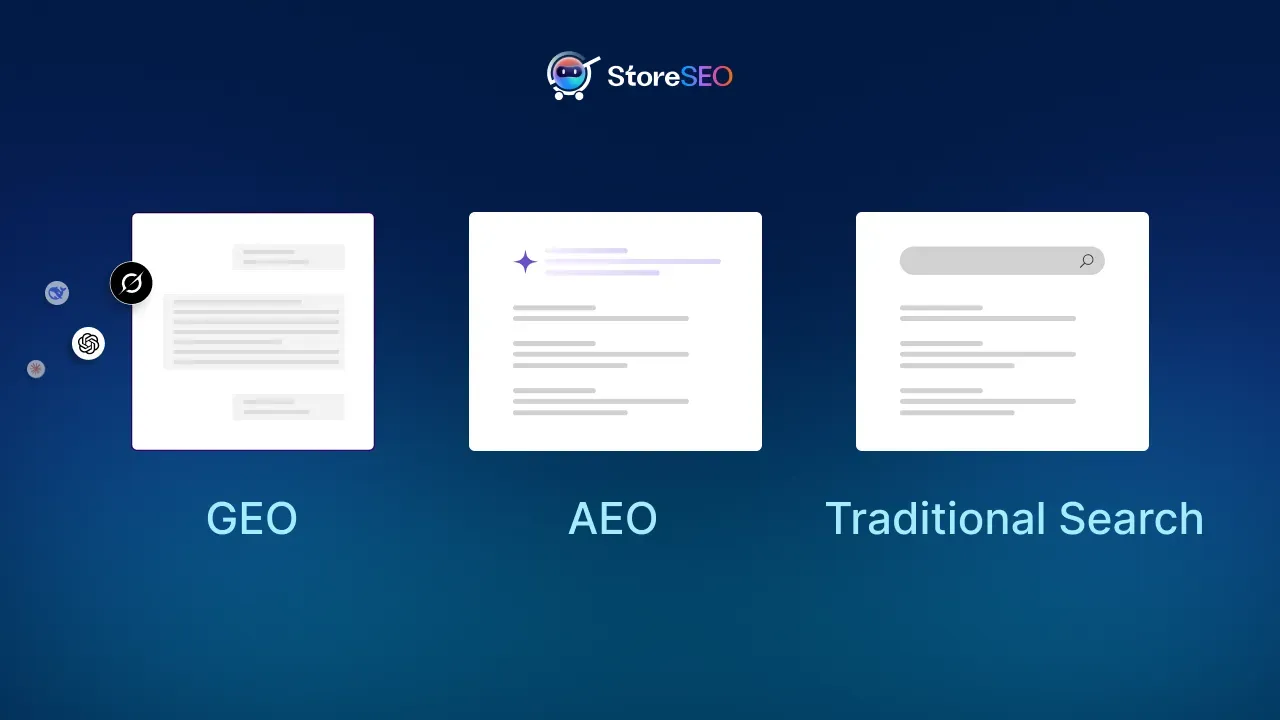
Traditional SEO focuses on getting your page to rank on a search engine results page. Answer Engine Optimization (AEO) focuses on becoming the trusted answer that AI systems pick when a user asks a direct question.
Generative Engine Optimization (GEO) is the broader practice of structuring your brand and product information so generative AI engines can use it accurately when they summarize, compare, or recommend products.
A GEO audit is how you check if your store is doing that job. If you want a full breakdown of the differences, our deep dive on GEO vs AEO vs traditional SEO for Shopify stores is worth bookmarking.
Why Most Shopify Stores Fail in AI-Driven Discovery
Here is the uncomfortable truth we keep running into. Most Shopify stores have decent product photos and okay descriptions, but their structured data is incomplete, their taxonomy is sloppy, their FAQs are missing, and their titles are written for humans, not machines. AI agents read titles, descriptions, schema, and taxonomy signals to decide which products to surface. If any of those signals are weak, your products are invisible at the generative search layer. Our research piece on how ChatGPT, Gemini, and Perplexity recommend Shopify products goes deep on the patterns we found, and the gaps that are easiest to fix.
The StoreSEO GEO Score Is Your GEO Audit Score
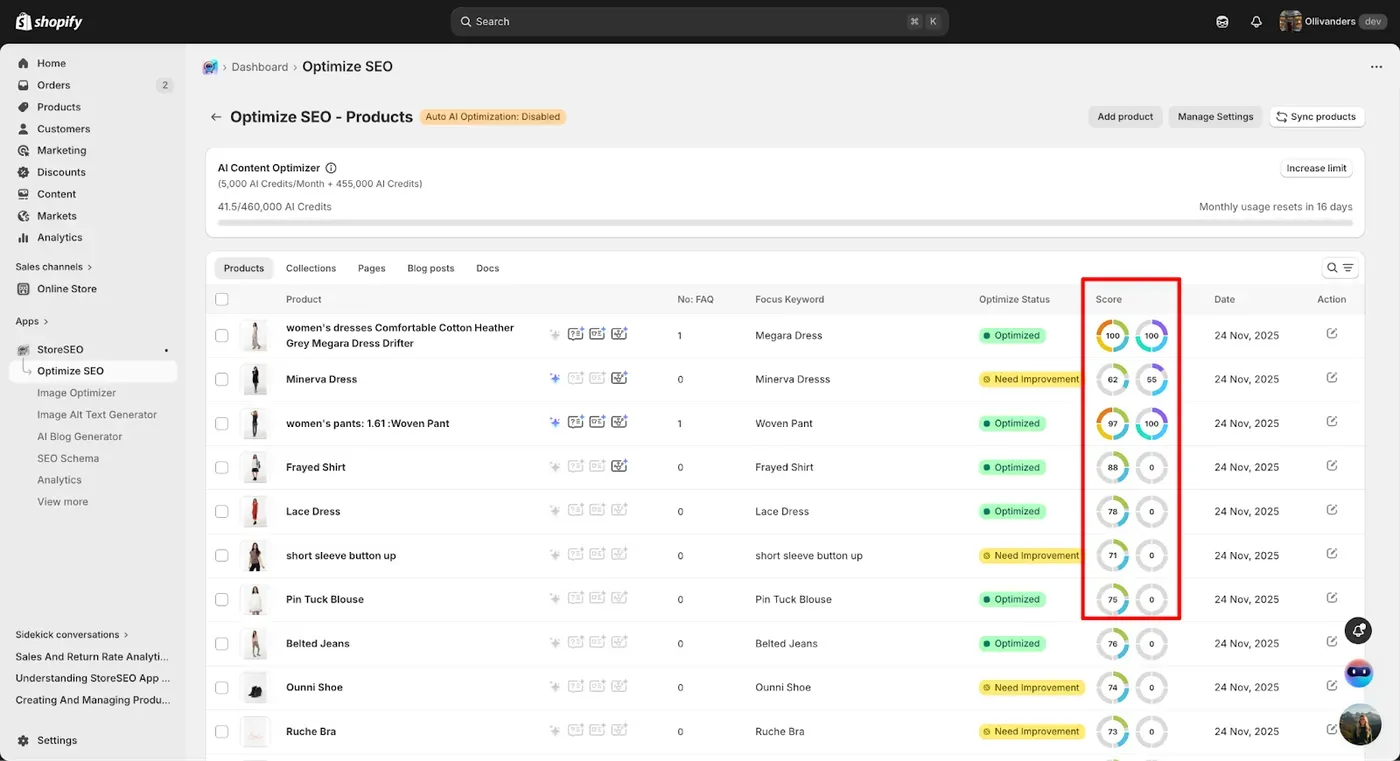
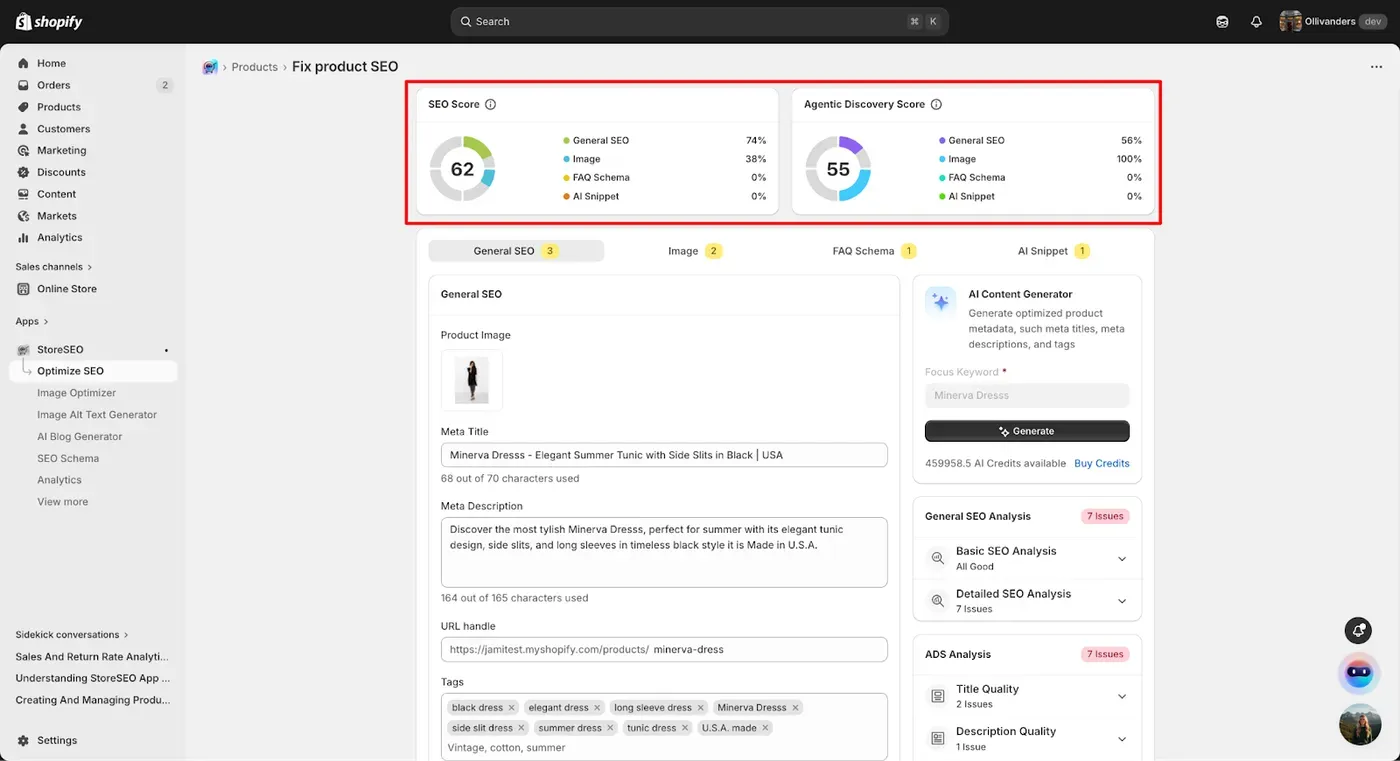
Inside StoreSEO, every product page gets two scores at the top of the optimization screen. Your traditional SEO Score and your GEO Score. The ADS is your GEO audit score. It tells you, at a glance, how AI-ready that product page is. Click into any product and you will see a checklist of seven optimization categories. Green means a check passes. Red means there is something to fix. That checklist is your audit. No fluffy reports, no thirty-page PDFs, no consultant invoices. Just clear signals about what to fix today.
The 7 Pillars Your GEO Audit Measures
Every product gets scored across seven categories. Each one maps to a specific signal that AI systems and large language models care about. Here is the quick map.
| GEO Audit Pillar | What StoreSEO Checks | Why It Matters for AI Discovery |
|---|---|---|
| Title Quality | Length, brand name, product type | AI agents classify products by parsing title tokens |
| Description Quality | Completeness, clarity, length | LLMs extract intent and meaning from descriptions |
| Taxonomy & Classification | Category, product type, tags | Proper taxonomy lets AI place products in the right cluster |
| Media & Visuals | Image presence and optimization | Multimodal AI links visual data with product listings |
| Availability & Status | Published, in stock, inventory tracked | AI agents only recommend products you can actually buy |
| Structured Data | Product schema, FAQ schema | Machine-readable markup is the cleanest input for AI parsing |
| AI Content Readiness | FAQ entries, AI snippet present | Conversational Q&A directly feeds answer engine logic |
How ADS Differs From Your Traditional SEO Score
Your SEO Score evaluates the classic stuff: title tag length, meta description, focus keyword usage, image alt text, and so on. Those signals still matter, and we are not abandoning them. The ADS sits beside that score and looks at a different layer entirely. It checks for things like JSON-LD product schema, FAQ schema, AI snippet readiness, and whether your taxonomy is complete enough for an AI to confidently say, ‘Yes, this product fits the query.’ The two scores work together. You want both green. For a complementary view, our framework, called Shopify AI Readiness Score (SAIRS), gives you a store-wide read on AI discoverability across all product pages at once.
How to Run a GEO Audit of Your Shopify Store With StoreSEO, Step by Step
Let us get into the actual workflow. This is the exact process we recommend for a complete GEO audit of any Shopify catalog. If you already have StoreSEO installed, skip to Step 2. If you do not, the install takes a couple of minutes. The full technical reference also lives in our official ADS optimization documentation.
Step 1: Open StoreSEO in Your Shopify Admin
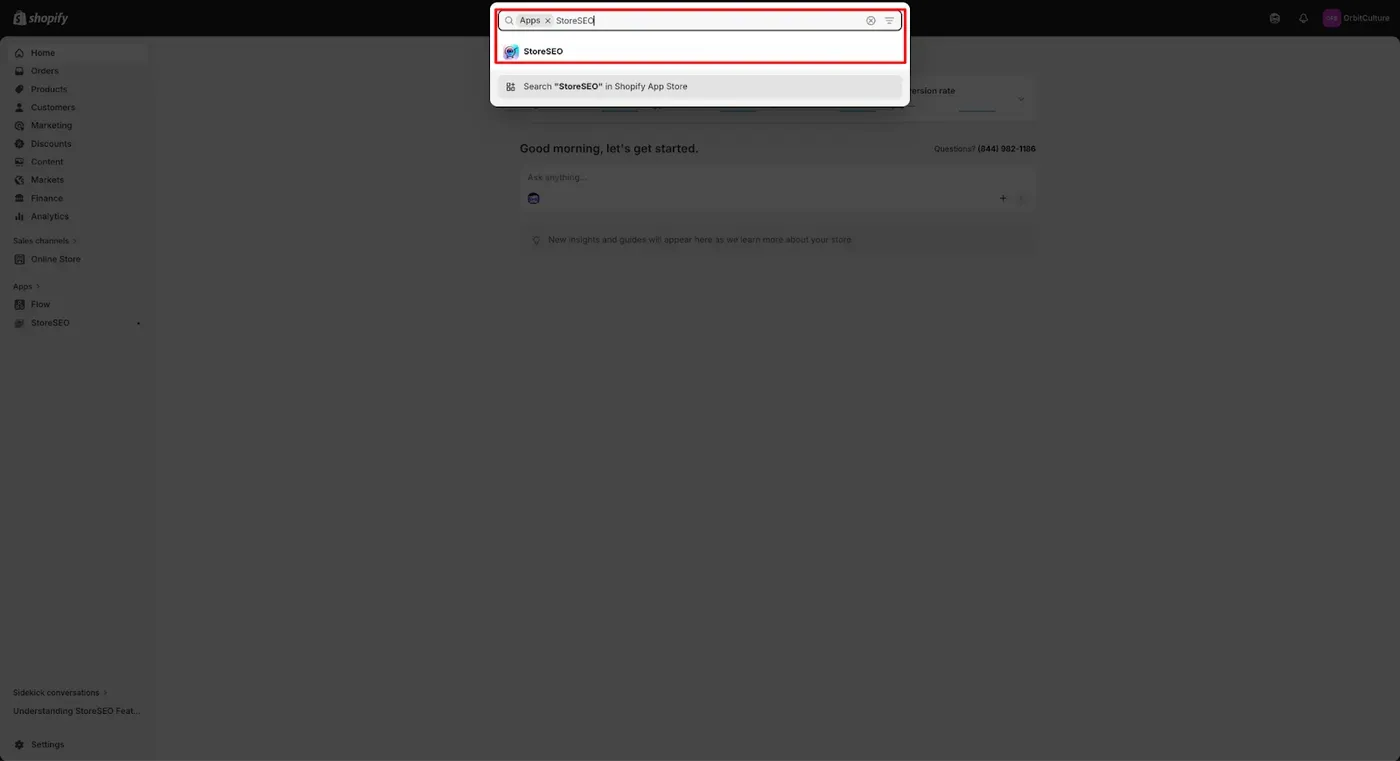
Log in to your Shopify admin. From the left-hand navigation, click ‘Apps’, find StoreSEO, and open the dashboard. Everything you need for your GEO audit lives inside one interface, so you will not be hopping between five tools and three browser tabs.
Step 2: Pull Up Your Product List and Sort by ADS
Click ‘Optimize SEO’ in the main navigation. You will see every product in your store with its current SEO Score and GEO Score side by side. Sort by ADS, lowest first. Now you have a prioritized audit list. Our advice: start with your highest-revenue and best-selling products, even if their ADS is not the lowest. Fixing AI readiness on your top sellers has the biggest immediate payoff.
Step 3: Review the ADS Analysis Checklist for the First Product
Click into any product to open its optimization screen. At the top, you will see two score cards: the SEO Score and the GEO Score. On the right is the ADS Analysis panel. That panel is your audit checklist. Every check is grouped under one of the seven pillars we covered earlier, and each line item shows pass or fail. Spend a minute eyeballing the red items. That is your work for this product.
Step 4: Audit Your Title Quality
StoreSEO checks three things on your product title: it should be under fifty characters, it should include your brand name, and it should include the product type. A title like ‘BrandName Wireless Headphones’ passes all three. A title like ‘Our amazing best-selling wireless over-ear noise-cancelling headphones with 30hr battery’ does not, because it is too long and the structure is harder for AI to parse cleanly. Update the title in the product editor and watch the corresponding checks turn green in real time.
Step 5: Audit Your Product Description
Product descriptions carry the most semantic weight on the page. AI systems use them to figure out what the product is, who it is for, and what problem it solves. Thin, vague, or missing descriptions are one of the most common reasons products do not get cited in AI answers. If you do not feel like writing from scratch, StoreSEO has a built-in AI Content Generator that creates a description from your focus keyword, and you can edit it for voice afterward. We also recommend layering in semantically related phrases. Our piece on keyword clusters for product descriptions walks through the technique.
| Pro tip: When you write or edit a product description for AI readiness, answer three questions in the copy. What is this product? Who is it for? What does it solve or deliver? AI systems are literally built to extract those three signals. Make them obvious. |
Step 6: Audit Taxonomy, Tags, and Categories
Taxonomy is the most under-loved SEO signal in eCommerce. AI engines use category data to decide whether a product belongs in a recommendation cluster. StoreSEO checks three conditions here: that you have assigned a Shopify product category, that you have set a product type, and that you have at least one tag. If your store has been running with empty category fields, that is your biggest fast win. Use the StoreSEO Keyword Cluster Generator to find semantically related tag candidates if you are stuck.
Step 7: Audit Availability and Publication Status
This one sounds boring, but it has real consequences. AI shopping agents only recommend products that shoppers can actually buy. Three checks here: the product must be active and published, inventory tracking must be on, and the product must be in stock. If any of these fail, fix them in the Shopify product editor and refresh StoreSEO. Out-of-stock products often still appear in indexes, but AI shopping agents quietly deprioritize them in favor of purchasable alternatives.
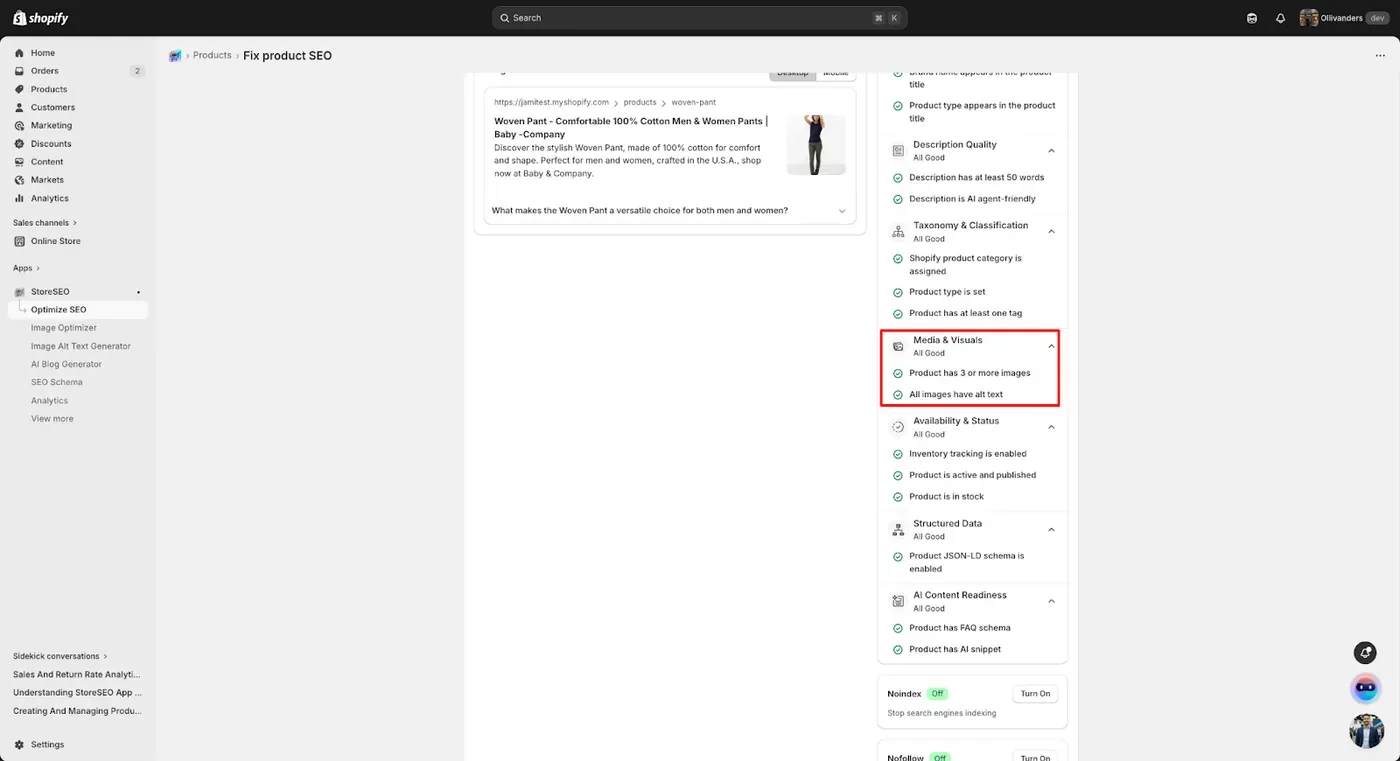
Step 8: Audit Media and Product Images
Multimodal AI now reads images, not just text. A product page without a clear image is essentially missing a whole sensory dimension. StoreSEO checks whether your product has an image attached. Upload a high-resolution photo if it does not. While you are there, make sure each image has descriptive alt text. StoreSEO can also auto-generate alt text in bulk if your catalog is large, which is a serious sanity-saver.
Step 9: Audit Structured Data and Schema
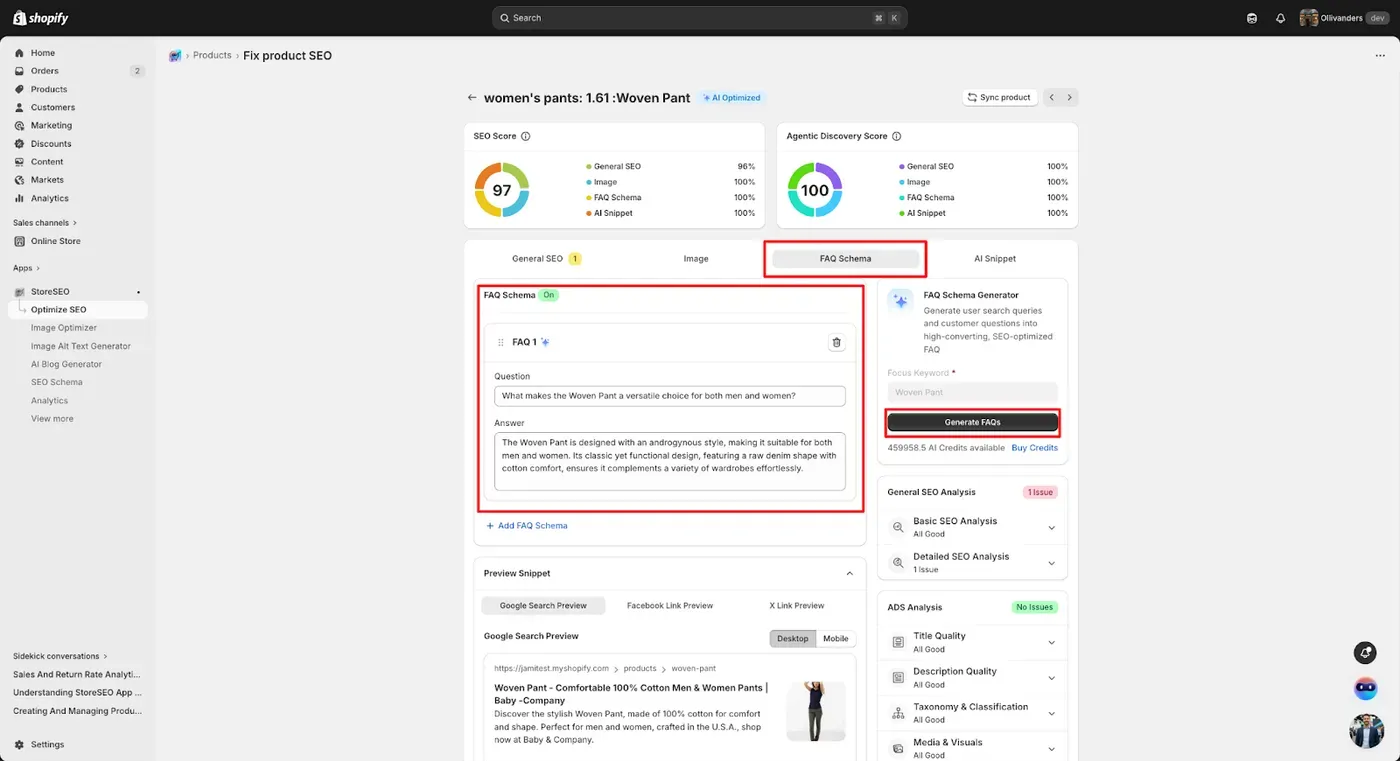
Structured data is how you speak directly to AI in a language it cannot misinterpret. StoreSEO checks for two schema types under this pillar: Product JSON-LD schema and FAQ schema. Both can be enabled with a toggle inside the StoreSEO SEO Schema settings. If you are wondering whether schema actually moves the needle, the answer comes from our schema analysis of 300 Shopify product pages, which found that stores with complete product schema were dramatically more likely to be cited in AI answers.
Step 10: Audit AI Content Readiness (FAQ + AI Snippets)
The seventh pillar checks whether your page has the kind of conversational Q&A content AI engines love. This is the AEO layer inside your GEO audit. StoreSEO checks whether FAQ entries are added and whether an AI snippet is present on the product page. FAQ entries should mirror the way real shoppers ask questions out loud. If you want to nail the format, our note on the wording formats AI Overviews prefer for FAQ is short and very practical. You can also display the FAQs on the storefront so they help conversion at the same time. We covered the full setup in the guide on showing FAQs on your Shopify storefront.
Step 11: Sync, Re-Score, and Track the Wins
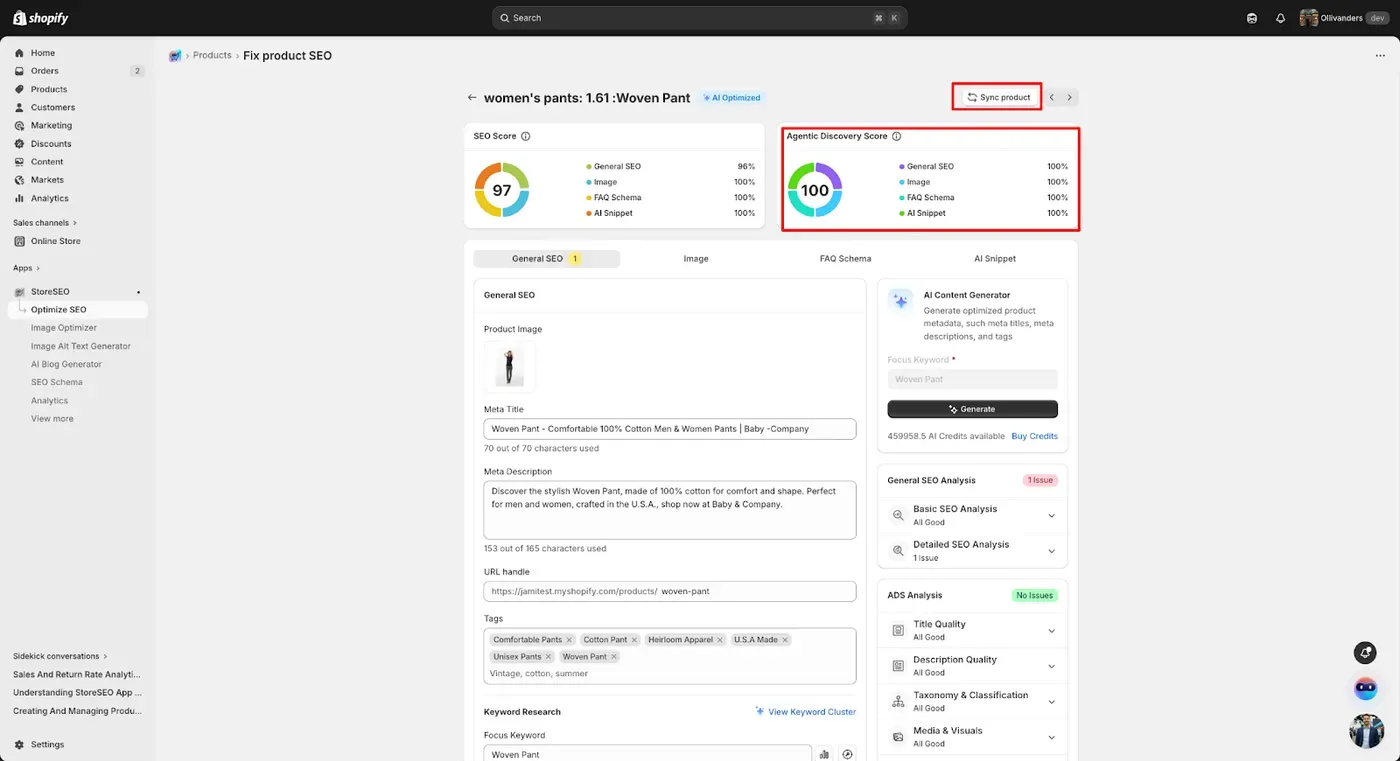
After fixing the red checks, hit the Sync Product button. Your ADS card refreshes, the checklist updates, and your overall score rises. Aim for every checklist item to pass, across all seven pillars. Now repeat the process for the next product on your prioritized list. With StoreSEO open in one tab and Shopify in another, our team typically audits and optimizes ten to fifteen products per hour at full speed. Not bad for a process that used to take a full afternoon per page.
Beyond the Audit: What to Do After You Score Every Product
A GEO audit gives you a baseline. The real wins come from the things you stack on top of that baseline. Here are three moves we recommend pairing with your audit workflow.
Generate an LLMs.txt File for Your Store
An LLMs.txt file works a bit like robots.txt, except it gives large language models explicit directives about what content they are allowed to summarize, access, and recommend. StoreSEO has a built-in generator. If you want the strategic case for why this matters in 2026, our guide on how to implement LLMs.txt on your Shopify store has the playbook, and the roundup of best AI Shopify apps for LLMs.txt and schema markup shows how StoreSEO compares to alternatives.
Build Keyword Clusters Around High-Intent Topics
AI engines reward topical authority more than individual keywords. Use the StoreSEO Keyword Cluster Generator to map semantically related keywords into clusters, then organize your product copy, collection pages, and blog content around those clusters. This is how stores go from showing up in AI answers occasionally to showing up consistently.
Track Keyword Rank Changes Over Time
Audits without measurement are just busywork. Use the StoreSEO Keyword Rank Tracker to watch how your changes move positions on tracked keywords. Pair this with our research on the 12 on-page SEO factors that actually move Shopify rankings and you have a feedback loop that tells you exactly which optimizations are paying off.
Frequently Asked Questions About GEO Audits for Shopify
What is a GEO audit for a Shopify store?
A GEO audit is a structured review of how prepared your Shopify store is to be discovered, understood, and recommended by generative AI engines like ChatGPT, Google AI Overviews, Perplexity, and Gemini. It evaluates signals beyond traditional SEO, including structured data, taxonomy, product completeness, and AI-ready FAQ content. Inside StoreSEO, your GEO audit is run automatically through the GEO optimization on each product page.
Is a GEO audit different from a regular SEO audit?
Yes, and the difference matters. A traditional SEO audit checks whether your page is likely to rank on Google for a target keyword. A GEO audit checks whether AI engines have enough structured, semantically clear information to confidently surface, describe, and recommend your products. Both audits should run in parallel. StoreSEO shows both scores side by side so you do not have to pick one over the other.
How often should I run a GEO audit on my Shopify store?
We recommend a monthly check for high-revenue products and a quarterly audit across your full catalog. Re-audit whenever you launch new products, run seasonal campaigns, or restructure categories. Because StoreSEO scores update in real time as you edit, you can also just open a product and audit on demand whenever something feels off.
Can I do a GEO audit without technical SEO knowledge?
Absolutely. The entire reason we built the GEO Score as a checklist was to remove the technical guesswork. You do not need to know what JSON-LD looks like under the hood, you just need to toggle the right schema options on and follow the green and red signals. If you ever get stuck, the StoreSEO support team is one click away.
Does a higher GEO Score also help my Google rankings?
Yes, indirectly but reliably. The signals that improve your ADS, like complete schema, clear taxonomy, strong FAQ content, and AI-ready descriptions, are the same signals that earn rich snippet eligibility, AI Overview citations, and higher trust on traditional Google search. We have seen plenty of stores improve both their AI visibility and their organic positions after a focused round of ADS optimization.
Where can I learn more about the broader shift to AI search?
We wrote a longer take on the bigger picture in our piece on the AI shopping revolution and how merchants can survive it, and the post on agentic commerce and getting your store AI-agent ready covers the strategy layer that sits above any single audit.
Final Thoughts: Make GEO Audits a Quarterly Habit
AI-driven product discovery is not coming. It is already here, and it is reshaping how shoppers find Shopify stores every single day. The merchants who win in 2026 and beyond will be the ones who treat GEO audits the same way they treat traditional SEO checkups: as a regular, non-negotiable part of running the store. The good news is, with StoreSEO, you do not need a separate consultant, a separate tool, or a separate spreadsheet. The GEO Score gives you a clean, actionable checklist on every product page, and every fix maps directly to a real improvement in how AI engines find and recommend your store.
If this is your first GEO audit, take it one product at a time. Start with your top sellers, work through the seven pillars, and watch your score climb. If you are already familiar with the basics, layer on LLMs.txt, keyword clusters, and rank tracking to compound the wins. And if you want the full foundation in one place, our Shopify SEO Guide is a great companion read. Open your StoreSEO dashboard today, run a GEO audit on your top ten products, and start fixing the red checks. The shoppers asking AI engines for recommendations right now are not waiting. We will not pretend it is glamorous work, but we promise it pays back faster than almost anything else you could do for your store this quarter.

Written by
Mahmudul Hasan