
Bij StoreSEO zijn we het team achter een van de meest geliefde AI-gestuurde SEO-apps in de Shopify App Store. We hebben jarenlang gezien hoe verkopers fantastisch werk verrichtten aan hun producten en merk, maar vervolgens wekelijks uren verloren aan de minder aantrekkelijke aspecten.
Metatitels. Schema-opmaak. Alt-tekst. FAQ-blokken. De zeventien andere kleine details die stilletjes bepalen of jouw webwinkel wel of niet gevonden wordt door AI-zoekmachines.
Vandaag willen we u kennis laten maken met onze nieuwste release, de StoreSEO AI-toolkit, wat, voor zover wij weten, de eerste AI-agentvriendelijke SEO-oplossing is die specifiek voor Shopify is ontwikkeld.

Het verbindt je webwinkel rechtstreeks met AI-codeertools zoals Claude Code, Cursor en VS Code via een Model Context Protocol server, zodat je echte SEO-optimalisaties kunt uitvoeren met eenvoudige Engelse commando's vanuit je terminal. Geen klikken. Geen gejongleer met tabbladen. Geen frustraties over meta-beschrijvingen tot diep in de nacht.
We laten u graag zien hoe het werkt, waarom we het op deze manier hebben gebouwd en hoe u het in ongeveer vijf minuten kunt instellen.
Wat is de StoreSEO AI Toolkit?
De StoreSEO AI Toolkit is een functie binnen de StoreSEO Shopify-app waarmee je je webwinkel via een Model Context Protocol (MCP)-server kunt verbinden met AI-codeerassistenten.
Simpel gezegd is het een beveiligde brug waarmee AI-agenten zoals Claude Code, Cursor en VS Code rechtstreeks met je StoreSEO-account kunnen communiceren en daadwerkelijke SEO-acties op je Shopify-winkel kunnen uitvoeren.
Dat omvat onder andere het optimaliseren van producten, het corrigeren van meta-beschrijvingen, het genereren van alt-tekst voor afbeeldingen, het toevoegen van een FAQ-schema, het opschonen van URL-handles en een lange lijst met gerelateerde taken.
In plaats van het StoreSEO-dashboard te openen en door menu's te klikken, typt u een commando in natuurlijke taal in uw terminal. De AI-agent ontvangt het commando, communiceert met StoreSEO via de MCP-verbinding en voert de taak uit. U kunt het proces volgen en vervolgens de samenvatting aan het einde lezen.
Als dat futuristisch klinkt, dan is dat ook zo. Het staat bovendien al klaar in je StoreSEO-instellingenpaneel, voor gebruik.
Waarom we een toolkit hebben ontwikkeld die geschikt is voor AI-agenten
Dit is het eerlijke achtergrondverhaal.
Het afgelopen jaar is het SEO-landschap sneller veranderd dan ooit tevoren. AI-assistenten zijn niet langer alleen chatbots, maar worden ook agenten. Dit betekent dat ze namens u taken kunnen plannen, uitvoeren en beheren in verschillende tools. De vragen die Shopify-klanten ons stellen, zijn door deze verschuiving veranderd. Vroeger was het... “Hoe voeg ik een meta-omschrijving toe?” Nu wel. Kan mijn AI-agent dit gewoon voor me doen?
We namen die vraag serieus.
Iedereen die in 2026 een Shopify-winkel runt, heeft nu al te maken met een heleboel nieuwe realiteiten, van... agentische handel naar GEO en AEO vervangen traditionele SEO. naar ChatGPT, Gemini en Perplexity bevelen actief Shopify-producten aan. Voordat een shopper ooit Google ziet, is handmatig optimaliseren voor die wereld niet meer realistisch. Je hebt een systeem nodig dat door AI namens jou kan worden aangestuurd.
Dus hebben we er een gebouwd. De StoreSEO AI Toolkit is het resultaat.
Hoe de StoreSEO AI Toolkit intern werkt
Heb je je ooit afgevraagd hoe het verband tussen StoreSEO en je favoriete AI-assistent er precies uitziet? Het antwoord is het Model Context Protocol.
Wat is het Model Context Protocol (MCP)?
MCP is een open standaard voor het bieden van veilige, gestructureerde toegang tot externe tools en data voor AI-agenten. Zie het als een universele poort voor AI. Elke agent die MCP ondersteunt, kan verbinding maken met elke service die een MCP-server beschikbaar stelt.
We stellen StoreSEO beschikbaar als een MCP-server. Uw AI-assistent wordt de MCP-client. Wanneer u een commando geeft, vertaalt de AI de intentie, roept de juiste StoreSEO-functie aan via de MCP-verbinding en rapporteert de resultaten terug.
Goed om te weten: authenticatie verloopt via een API-token dat je genereert in de StoreSEO-app. Dit betekent dat je AI-agent alleen doet wat je hebt geautoriseerd, specifiek voor jouw winkel. Het token kan op elk moment opnieuw worden gegenereerd, zodat je de controle over de toegang behoudt.
Welke AI-codeerassistenten worden ondersteund?
We hebben de toolkit grondig getest met drie populaire klanten:
- Claude Code
- Cursor
- VS Code (via MCP-compatibele extensies)
In de praktijk zou elke MCP-compatibele client moeten werken. We raden Claude Code als eerste aan, omdat de installatie het meest soepel verloopt en de client zelf gratis te installeren is via claude.ai.
Wat je kunt automatiseren met de StoreSEO AI Toolkit
Dit is het onderdeel waar onze bètatesters de meeste tijd aan hebben besteed, dus laten we delen wat op dit moment echt nuttig is. Je kunt commando's in natuurlijke taal versturen zoals deze:
- SEO-optimaliseer al mijn producten met de laagste scores.
- SEO-optimaliseer al mijn collecties met de laagste scores.
- Genereer alternatieve tekst voor alle productafbeeldingen.
- Corrigeer de meta-beschrijvingen voor alle producten.
- Voeg het FAQ-schema toe aan alle producten in de zomeruitverkoopcollectie.
- Genereer AI-codefragmenten voor mijn 50 meest verkochte producten.
- Verwijder overbodige URL-handles uit de gehele catalogus.
Achter elke opdracht communiceert de AI-agent met StoreSEO, identificeert de getroffen artikelen, voert de juiste correctie uit en genereert een samenvattend rapport. Taken die voorheen een hele middag in beslag namen, zijn nu in een koffiepauze geklaard.
Een bericht van ons team: De toolkit blinkt uit bij bulkwerk. Als je één product wilt optimaliseren, is het StoreSEO-dashboard sneller. Maar als je 280 producten wilt opschonen vóór een lancering, is de toolkit altijd de juiste oplossing.
Voordat je begint: Vereisten
Zorg ervoor dat je het volgende klaar hebt liggen voordat je begint:
- Een actieve Shopify-winkel met de StoreSEO-app geïnstalleerd.
- Je Shopify-winkel is gekoppeld aan StoreSEO.
- Claude Code is op uw computer geïnstalleerd (gratis te downloaden via claude.ai).
- Basiskennis van de terminal of commandoregel is vereist.
Dat is de volledige lijst. Je hebt geen programmeerkennis nodig, je hoeft alleen maar één commando te plakken en op Enter te drukken.
Stap voor stap: De StoreSEO AI-toolkit instellen
Laten we de installatie stap voor stap doornemen, zoals we dat aan een vriend zouden doen.
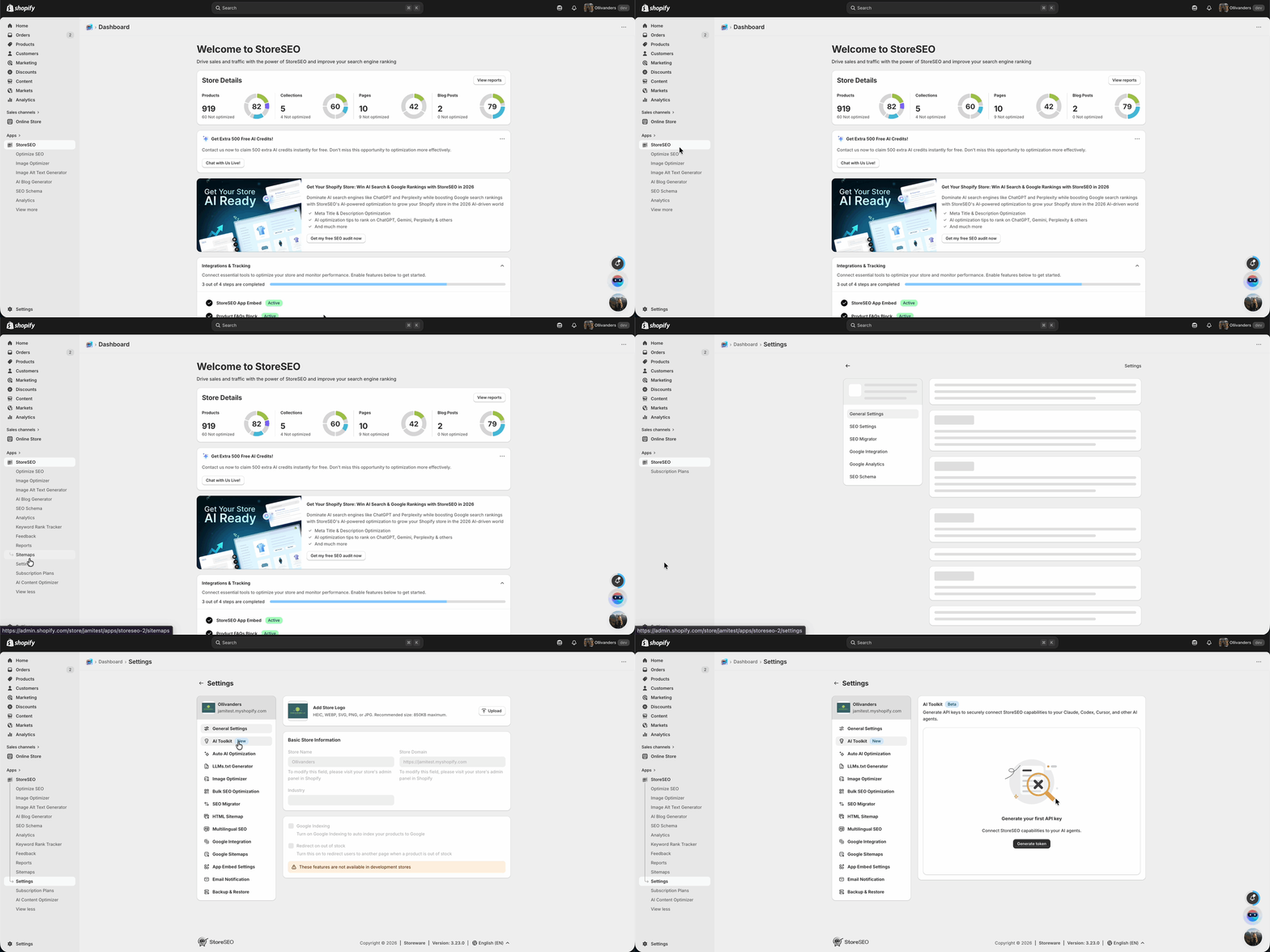
Stap 1: Ga naar de AI-toolkit
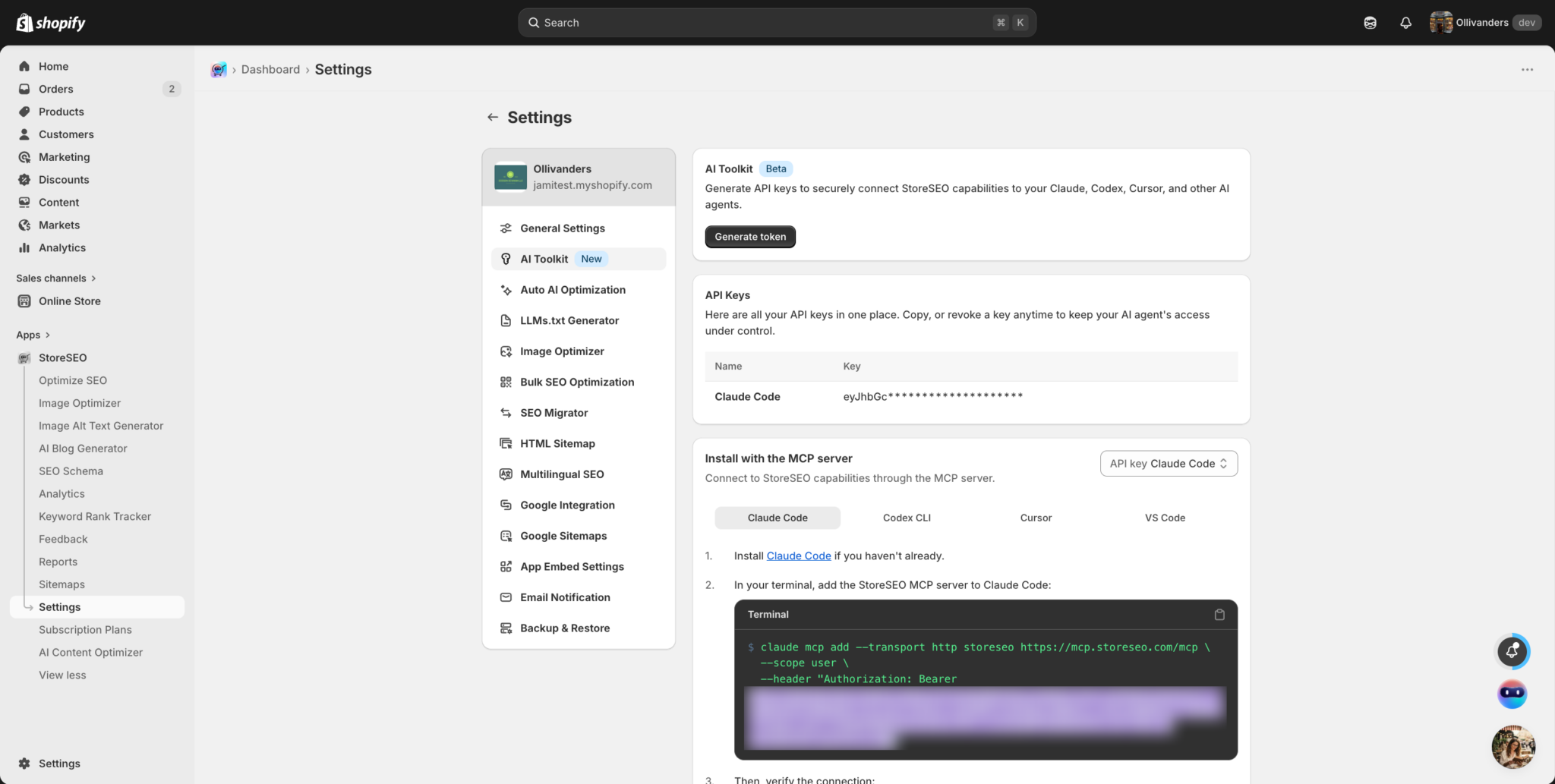
Open eerst de StoreSEO-app. Klik in de linkerzijbalk op Instellingen. Zoek in het menu Instellingen naar de optie AI Toolkit en klik erop. Je ziet nu een gedeelte waar je API-sleutels kunt genereren om StoreSEO te verbinden met AI-agents zoals Claude Code, Cursor en VS Code.
Stap 2: Genereer uw API-token
Zodra u op de pagina van de AI Toolkit bent, ziet u een opvallende knop met het opschrift "“Token genereren.Klik op deze knop. Er verschijnt een pop-upvenster waarin u wordt gevraagd uw token een naam te geven. Geef het een betekenisvolle naam, zodat u het later kunt herkennen.
Als u bijvoorbeeld Claude Code gebruikt, noem het dan Claude Code. Deze naam is slechts een label ter referentie en heeft geen invloed op de functionaliteit. Klik op de knop Genereren nadat u het een naam hebt gegeven.
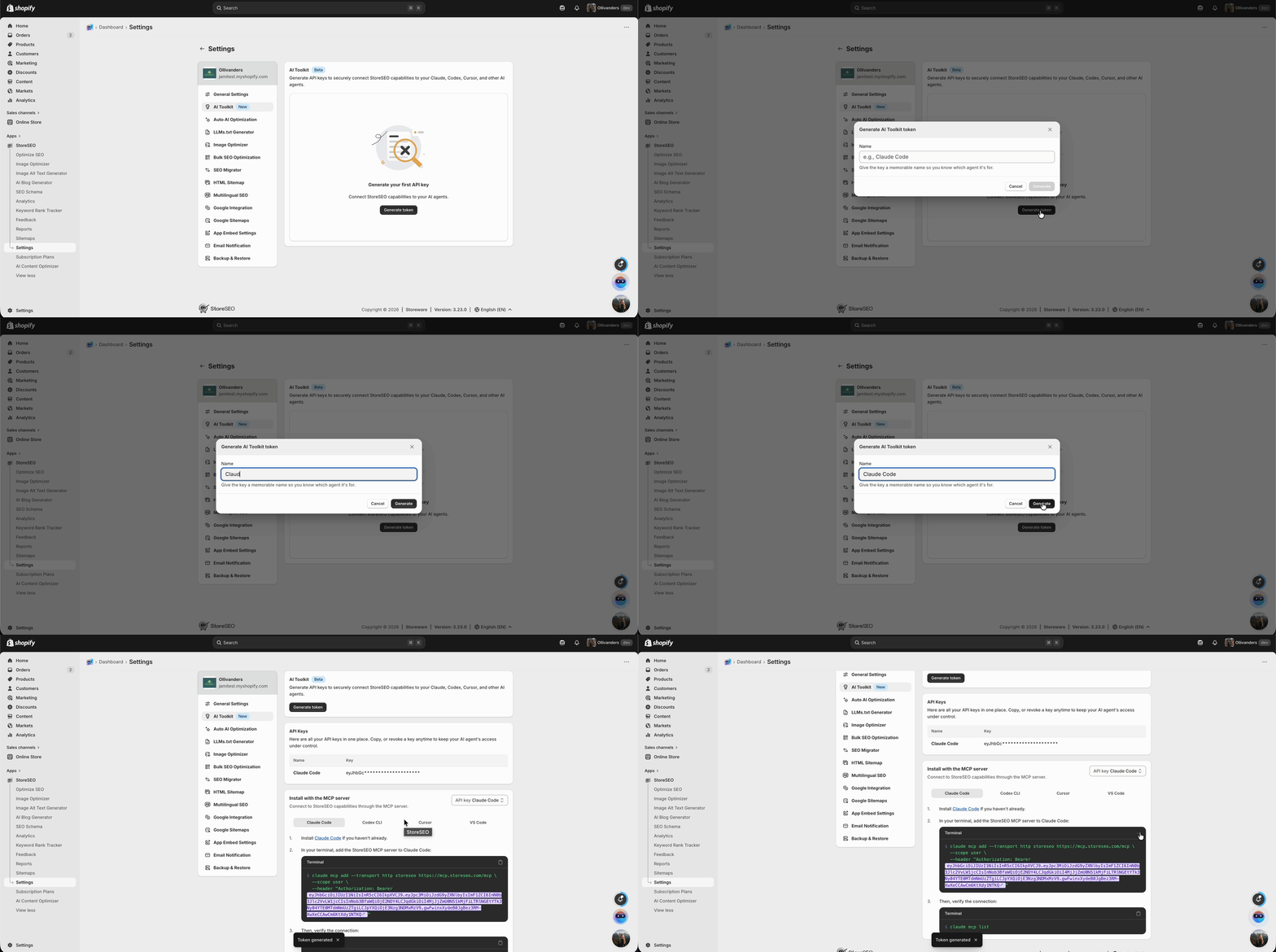
Stap 3: Voeg de StoreSEO MCP-server toe aan Claude Code.
Open de terminal op je computer. Plak de opdracht die je in stap 3 hebt gekopieerd en druk op Enter. Met deze opdracht wordt StoreSEO als MCP-server toegevoegd aan je Claude Code-configuratie. Je ziet een bevestigingsbericht dat de HTTP MCP-server succesvol is toegevoegd, samen met de URL van StoreSEO.
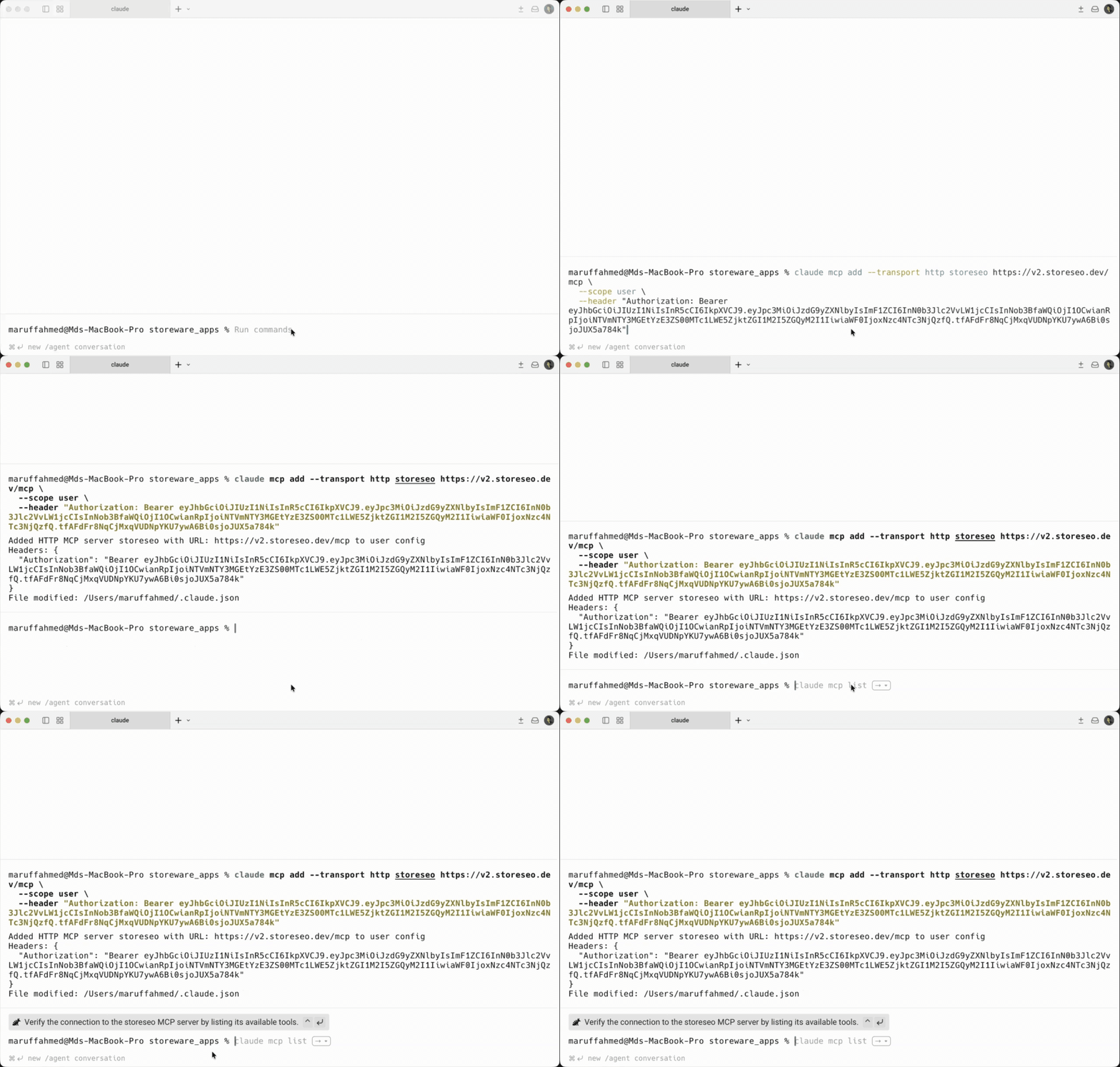
Stap 4: Controleer de verbinding
Voer in je terminal de volgende opdracht uit:
Claude MCP-lijst
Hier worden alle verbonden MCP-servers weergegeven. Zoek naar “WinkelSEO”Als er 'Verbonden' met een vinkje in de lijst staat, werkt je verbinding naar behoren.
Je zou ook de bevestiging van je StoreSEO-URL-verbinding ernaast moeten zien. Als je een foutmelding ziet of de verbinding verbroken is, controleer dan of je token correct is gekopieerd en probeer het opnieuw te genereren via de AI Toolkit-pagina.
Stap 5: Begin met het gebruiken van de toolkit
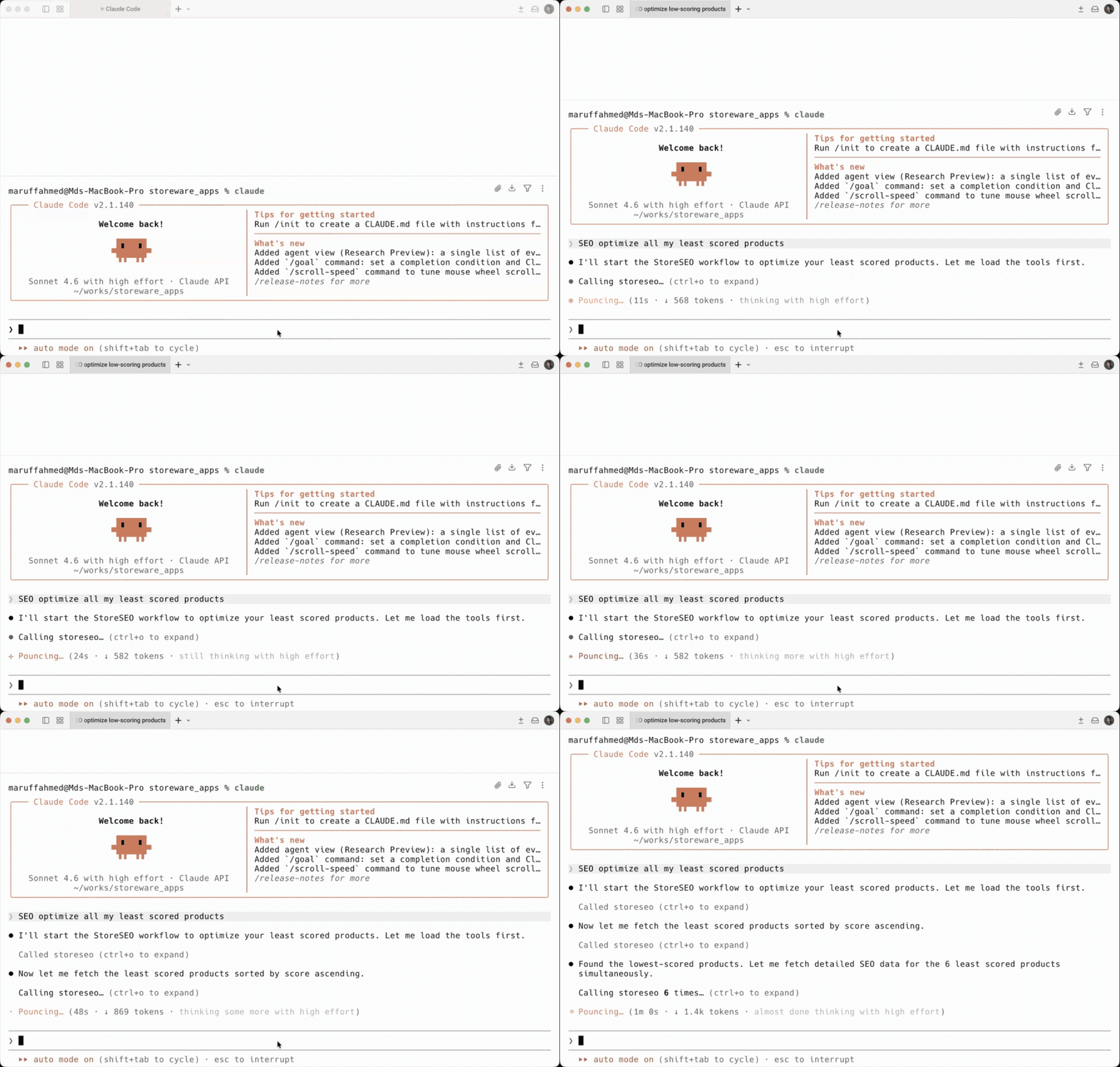
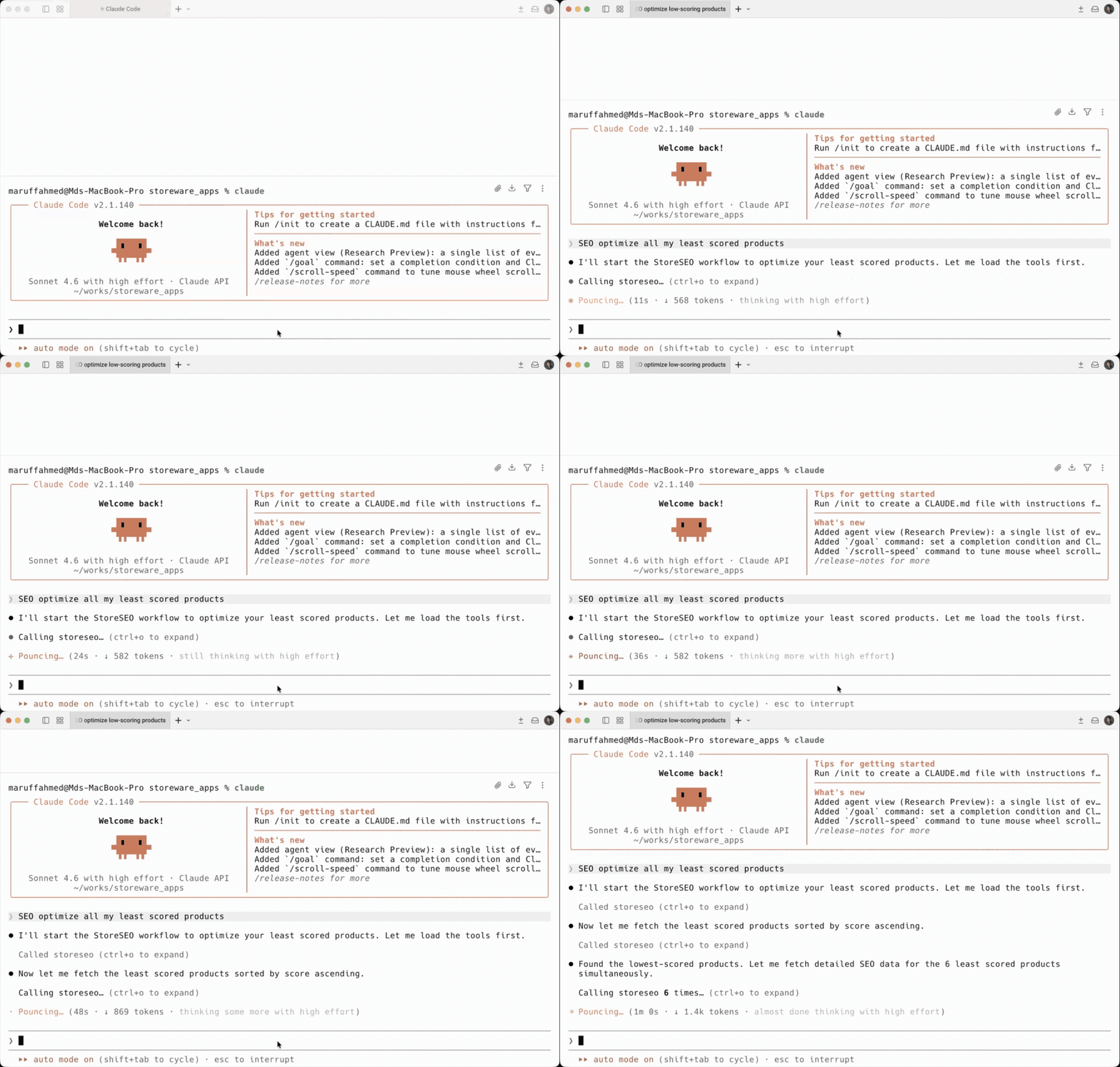
Nu bent u klaar om de StoreSEO AI Toolkit te gebruiken. Typ in uw terminal 'claude' en druk op Enter om Claude Code te starten. U kunt nu in gewoon Engels commando's geven om SEO-taken uit te voeren. U kunt bijvoorbeeld typen: "SEO-optimaliseer al mijn producten met de laagste score." Claude maakt verbinding met StoreSEO, identificeert uw producten met lage prestaties en optimaliseert deze automatisch. De AI doorloopt het optimalisatieproces en toont u een samenvatting van wat er is verbeterd en wat nog aandacht nodig heeft.
Voorbeelden van opdrachten die u kunt gebruiken:
- Optimaliseer al mijn producten met de laagste scores voor SEO.
- SEO-optimaliseer al mijn collecties met de laagste scores.
- Genereer alternatieve tekst voor alle productafbeeldingen.
- Corrigeer de meta-beschrijvingen voor alle producten.
Lees de volledige gedetailleerde documentatie De functie is snel in te stellen en direct te gebruiken.
Praktische voorbeelden die we van winkeliers horen.
Sinds de lancering heeft ons supportteam een aantal mooie verhalen verzameld. Een paar patronen komen steeds terug.
Opruimwerkzaamheden vóór de lancering
Webwinkeliers die zich voorbereiden op de lancering van een nieuwe collectie gebruiken de toolkit om ervoor te zorgen dat elk product schone metatitels, beschrijvingen en alt-teksten heeft voordat de lancering plaatsvindt. De volledige SEO-controle voorafgaand aan de lancering past nu in één enkel commando.
Optimalisaties na import
Als je net duizenden producten naar Shopify hebt gemigreerd, kan de toolkit de SEO-optimalisatie in één keer afhandelen, in plaats van dat je dit wekenlang handmatig moet doen. Dit is de toepassing waar onze klanten met grote migratieprocessen als eerste enthousiast over waren.
Seizoensgebonden vernieuwingen
Black Friday, de feestdagen en de zomeruitverkoop. Verkopers richten de toolkit op de betreffende collectie en vernieuwen metatitels, beschrijvingen en alt-tekst in enkele minuten. Combineer dit met ons werk aan
Shopify-collectiepagina SEO En je hebt een serieuze seizoensvoorstelling die uren duurt, geen weken.
Waarom dit nu, in 2026, belangrijk is.
We willen eerlijk tegen u zijn over het grotere geheel.
De SEO-strategie voor Shopify verschuift van traditionele zoekmachineoptimalisatie naar een breder concept: vindbaar zijn via AI-agenten, antwoordsystemen en traditionele zoekmachines tegelijkertijd. We hebben hier al uitgebreid over geschreven. GEO en AEO vervangen traditionele SEO., over Waarom uw winkel een AI-strategie nodig heeft, en over Hoe de AI-winkelrevolutie de behoeften van winkeliers verandert..
De korte versie: AI-agenten doen nu echt winkelonderzoek namens kopers. Als uw productpagina's geen schone metadata, gestructureerde data en antwoordklare content bevatten, bent u onzichtbaar in ChatGPT, Gemini en Perplexity, ongeacht hoe goed uw Google-ranking eruitziet. Zelfs uw Shopify AI-gereedheidsscore Het hangt ervan af of deze basisprincipes op grote schaal goed worden toegepast.
De StoreSEO AI Toolkit is ons praktische antwoord op die verschuiving. Hiermee kunt u uw store agent-klaar houden, terwijl u AI-agents het werk laat doen. Het is, met andere woorden, agent-SEO voor agent-commerce, een term waar we aanvankelijk niet zo enthousiast over waren, maar waar we inmiddels aan gewend zijn geraakt.
Hoe de AI-toolkit past in het grotere StoreSEO-ecosysteem
De toolkit is op zichzelf al krachtig, maar werkt het beste in combinatie met de rest van het aanbod van StoreSEO. We willen graag een paar functies onder de aandacht brengen nu we uw aandacht hebben:
- StoreSEO GEO-optimalisatie Dit geeft aan hoe zichtbaar uw winkel is voor AI-agenten en waar u verder kunt verbeteren.
- AI-fragmentgenerator Creëert kant-en-klare contentblokken die AI-systemen graag citeren.
- LLMs.txt ondersteuning Geeft AI-crawlers een duidelijke handleiding voor de inhoud van uw winkel.
- AI-beschrijvinggenerator Schrijft hoogwaardige productbeschrijvingen in de stijl van uw merk.
- Trefwoordenclustergenerator En Trefwoordrangschikkingstracker Helpt je de juiste zoektermen te vinden en te meten wat daadwerkelijk werkt.
- FAQ-schema gecombineerd met productschema Hierdoor komen uw productpagina's in aanmerking voor rijkere zoekresultaten.
- Veelgestelde vragen over de winkel En Beste AI Shopify-apps voor LLMs.txt en schema-opmaak Maak de ervaring compleet.
Combineer de AI Toolkit met een van deze opties, en het cumulatieve effect is echt merkbaar.
Tips van ons team om het meeste uit de toolkit te halen
Een paar dingen die we hebben geleerd door te kijken hoe bètatesters en ons eigen team de toolkit dagelijks gebruiken.
- Begin smal en ga dan breed. Probeer eerst één collectie uit, bekijk de resultaten en breid daarna vol vertrouwen uit naar de volledige catalogus.
- Geef specifieke instructies. Optimaliseer mijn producten met de laagste scores. Het optimaliseren van de 30 producten met de laagste scores in mijn huidverzorgingscollectie werkt veel beter.
- Houd je AI-credits in de gaten. Sommige commando's activeren op de achtergrond de AI Content Optimizer of de AI Description Generator, wat credits verbruikt. Controleer uw gebruik regelmatig.
- Gebruik benoemde tokens. Als u meerdere AI-clients gebruikt, genereer dan een token per client. Dat maakt het beheer eenvoudiger, de intrekking gemakkelijker en het is een kleine gunst aan uzelf in de toekomst.
- Houd het dashboard open voor steekproeven. De AI-agent doet het zware werk, maar een snelle visuele controle van een paar producten geeft je gemoedsrust, vooral tijdens de eerste paar runs.
Veelgestelde vragen over de StoreSEO AI-toolkit
Is de StoreSEO AI Toolkit veilig in gebruik?
Ja. De toolkit gebruikt API-tokens die u binnen StoreSEO genereert en maakt verbinding via het Model Context Protocol over een beveiligd HTTPS-eindpunt. U bepaalt welke AI-agenten toegang hebben en u kunt een token op elk moment intrekken of opnieuw genereren via de AI Toolkit-pagina.
Moet ik kunnen programmeren om de AI Toolkit te gebruiken?
Nee. De installatie bestaat uit het plakken van één commando in je terminal. Daarna verloopt alle interactie in begrijpelijke taal. Als je Claude Code kunt installeren, kun je de toolkit probleemloos gebruiken.
Met welke Shopify-abonnementen is de AI Toolkit compatibel?
Elk Shopify-abonnement dat de StoreSEO-app ondersteunt, ondersteunt ook de AI Toolkit. Er zijn geen abonnementsspecifieke vereisten aan de Shopify-kant. Je hoeft er alleen maar voor te zorgen dat je StoreSEO-abonnement de AI-functies dekt die je wilt gebruiken.
Vervangt de AI Toolkit het StoreSEO-dashboard?
Helemaal niet. Het dashboard blijft de beste plek voor het verfijnen van individuele producten, het bekijken van visuele voorbeelden en het beoordelen van scores. De toolkit is bedoeld voor bulkbewerkingen en AI-gestuurde workflows. De meeste verkopers met wie we spreken, gebruiken beide, afhankelijk van de taak die ze moeten uitvoeren.
Kan ik Cursor of VS Code gebruiken in plaats van Claude Code?
Ja. Elke MCP-compatibele client werkt. De installatiestappen lijken op elkaar; je gebruikt de MCP-configuratie van die client in plaats van de Claude Code-opdracht, en vanaf daar is de ervaring in principe hetzelfde.
Wat gebeurt er als de verbinding midden in een taak wegvalt?
De toolkit voert taken transactioneel per item uit, zodat een onderbroken run geen half geoptimaliseerd product achterlaat. U kunt dezelfde opdracht opnieuw uitvoeren en de AI-agent zal verdergaan met de items die niet zijn afgerond.
Helpt de AI Toolkit mijn winkel hoger te scoren in ChatGPT en Gemini?
Indirect wel. De toolkit past de fundamentele SEO- en gestructureerde data-optimalisaties toe waarop AI-systemen vertrouwen bij het bepalen welke winkels ze weergeven. Combineer dit met ons werk aan... EEAT voor ranking in AI-zoekmachines en onze Implementatiehandleiding LLMs.txt voor een completere strategie voor agentische ontdekking.
Hoe lang duurt een typische optimalisatierun?
Het hangt af van de omvang van de taak. Een enkel product duurt slechts enkele seconden. Een volledige catalogus met een paar honderd producten kan een paar minuten in beslag nemen. In beide gevallen kunt u de terminal laten draaien en later terugkeren naar het overzicht.
Tot slot nog een paar opmerkingen van het StoreSEO-team.
We zijn oprecht enthousiast over de StoreSEO AI Toolkit. Het is het soort functie waarvan we verwachten dat over zes maanden elke serieuze Shopify-verkoper deze in een of andere vorm zal gebruiken. Het runnen van een webwinkel is te gevarieerd, de productcatalogi te groot en het SEO-gebied te breed om alles handmatig te blijven doen.
Ons aanbod is dus simpel. Installeer StoreSEO als je dat nog niet hebt gedaan; open de AI Toolkit-pagina, genereer een token, wijs je AI-agent ernaar en laat hem zijn werk doen. Mocht je ergens vastlopen, dan helpen we je graag verder. toegewijd ondersteuningsteam Het is slechts één berichtje verwijderd.
Wij blijven bouwen. Jullie blijven verkopen. Hopelijk zorgen we er samen voor dat jullie winkel onmisbaar wordt voor de volgende klant, of die nu mens is of AI.