
StoreSEO AI Toolkit: The AI-Agent-Friendly Solution Built for Shopify Stores
At StoreSEO, we are the team behind one of the most loved AI-powered SEO apps on the Shopify App Store, and we have spent years watching merchants do brilliant work on their products and brand, only to lose hours every week to the unglamorous bits.
Meta titles. Schema markup. Alt text. FAQ blocks. The seventeen other tiny details that quietly decide whether your store gets discovered by AI search engines or not.
Today, we want to walk you through our newest release, the StoreSEO AI Toolkit, which is, as far as we can tell, the first AI agent-friendly SEO solution built specifically for Shopify.
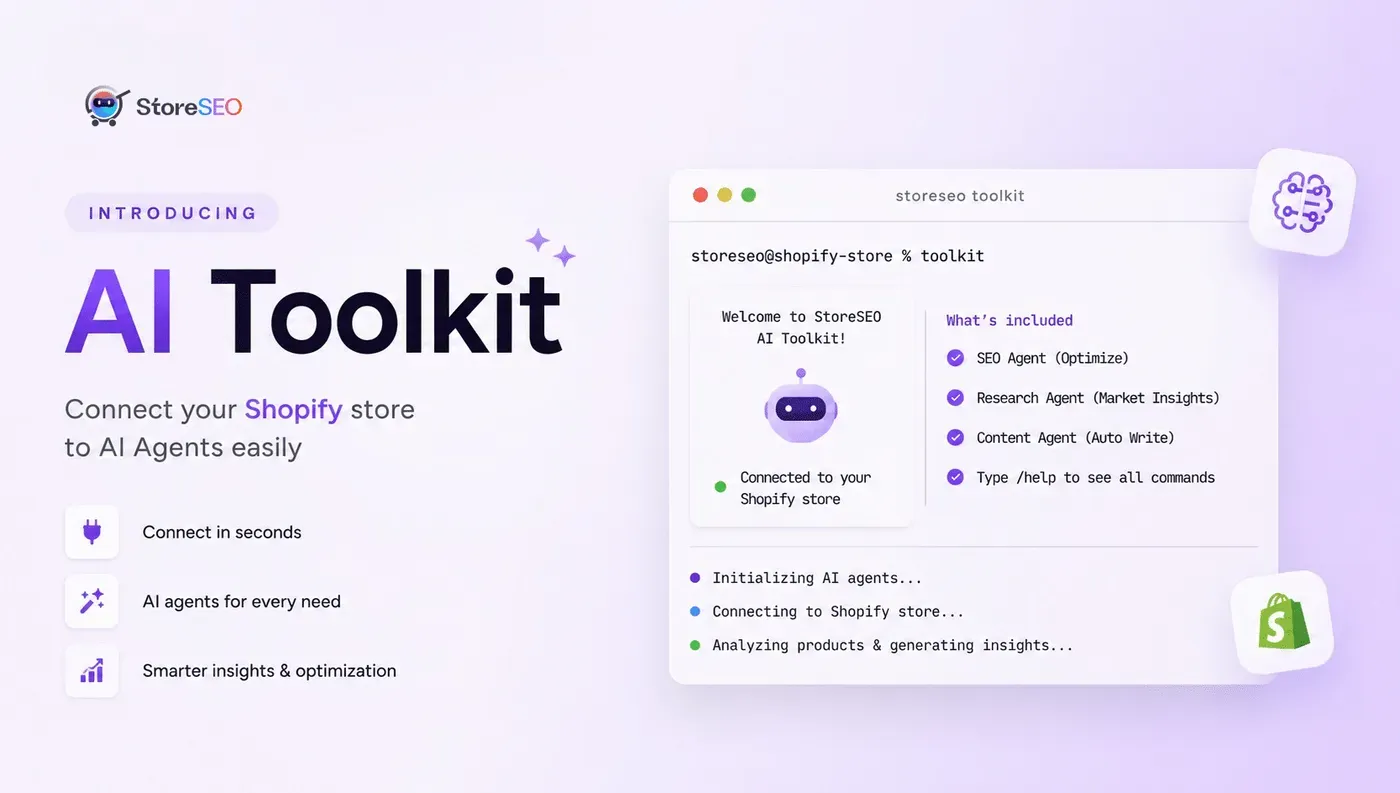
It plugs your store directly into AI coding assistants like Claude Code, Cursor, and VS Code through a Model Context Protocol server, so you can run real SEO optimizations using plain English commands from your terminal. No clicking. No tab juggling. No late-night meta description rage.
Let us show you how it works, why we built it this way, and how to set it up in about five minutes.
What Is the StoreSEO AI Toolkit?
The StoreSEO AI Toolkit is a feature inside the StoreSEO Shopify app that connects your store to AI coding assistants through a Model Context Protocol (MCP) server.
In simpler terms, it is a secure bridge that lets AI agents such as Claude Code, Cursor, and VS Code talk directly to your StoreSEO account and perform real SEO actions on your Shopify store.
That includes optimizing products, fixing meta descriptions, generating image alt text, adding FAQ schema, cleaning up URL handles, and a long list of related tasks.
Instead of opening the StoreSEO dashboard and clicking through menus, you type a natural language command into your terminal. The AI agent receives the command, talks to StoreSEO over the MCP connection, and gets the work done. You watch it happen, then read the summary at the end.
If that sounds futuristic, it is. It is also already sitting inside your StoreSEO settings panel, ready to use.
Why We Built an AI Agent Friendly Toolkit
Here is the honest backstory.
Over the last year, the SEO landscape has shifted faster than at any point we can remember. AI assistants stopped being chatbots and started becoming agents, which means they can plan, act, and execute tasks across tools on your behalf. The questions Shopify merchants ask us changed with that shift. It used to be “How do I add a meta description?” Now it is. Can my AI agent just do this for me?
We took that question seriously.
Anyone running a Shopify store in 2026 is already navigating a stack of new realities, from agentic commerce to GEO and AEO replacing traditional SEO to ChatGPT, Gemini, and Perplexity actively recommending Shopify products before a shopper ever sees Google. Optimizing for that world by hand is not realistic anymore. You need a system that an AI can actually drive on your behalf.
So we built one. The StoreSEO AI Toolkit is the result.
How the StoreSEO AI Toolkit Works Under the Hood
If you have ever wondered what the connection between StoreSEO and your favorite AI assistant actually looks like, the answer is the Model Context Protocol.
What Is the Model Context Protocol (MCP)?
MCP is an open standard for giving AI agents secure, structured access to external tools and data. Think of it like a universal port for AI. Any agent that speaks MCP can plug into any service that exposes an MCP server.
We expose StoreSEO as an MCP server. Your AI assistant becomes the MCP client. When you issue a command, the AI translates the intent, calls the right StoreSEO function through the MCP connection, and reports back with results.
One thing worth knowing: authentication is handled by an API token you generate inside the StoreSEO app, which means your AI agent only does what you have authorized, scoped to your store. The token can be regenerated at any time, and you stay in control of access.
Which AI Coding Assistants Are Supported?
We have tested the toolkit thoroughly with three popular clients:
- Claude Code
- Cursor
- VS Code (through MCP-compatible extensions)
In practice, any MCP-compatible client should work. We recommend Claude Code first because the setup experience is the cleanest and the client itself is free to install from claude.ai.
What You Can Automate With the StoreSEO AI Toolkit
This is the part our beta testers spent most of their time exploring, so let us share what is genuinely useful right now. You can send natural language commands like these:
- SEO optimize all my lowest-scoring products
- SEO optimize all my lowest-scored collections
- Generate alt text for all product images
- Fix meta descriptions for all products
- Add the FAQ schema to all products in the Summer Sale collection
- Generate AI snippets for my top 50 products
- Clean up URL handles across the entire catalog
Behind each command, the AI agent talks to StoreSEO, identifies the affected items, runs the appropriate fix, and produces a summary report. Tasks that used to take an afternoon now take a coffee break.
A note from our team: the toolkit shines with bulk work. If you want to polish a single product, the StoreSEO dashboard is faster. If you want to clean up 280 products before a launch, the toolkit is the right tool every time.
Before You Begin: Prerequisites
Make sure you have these ready before you start:
- An active Shopify store with the StoreSEO app installed
- Your Shopify store is connected to StoreSEO
- Claude Code installed on your computer (free download from claude.ai)
- Basic familiarity with the terminal or command line
That is the entire list. No coding experience needed beyond pasting one command and pressing Enter.
Step by Step: Setting Up the StoreSEO AI Toolkit
Let us walk through the setup the way we would walk a friend through it.
Step 1: Navigate to the AI Toolkit
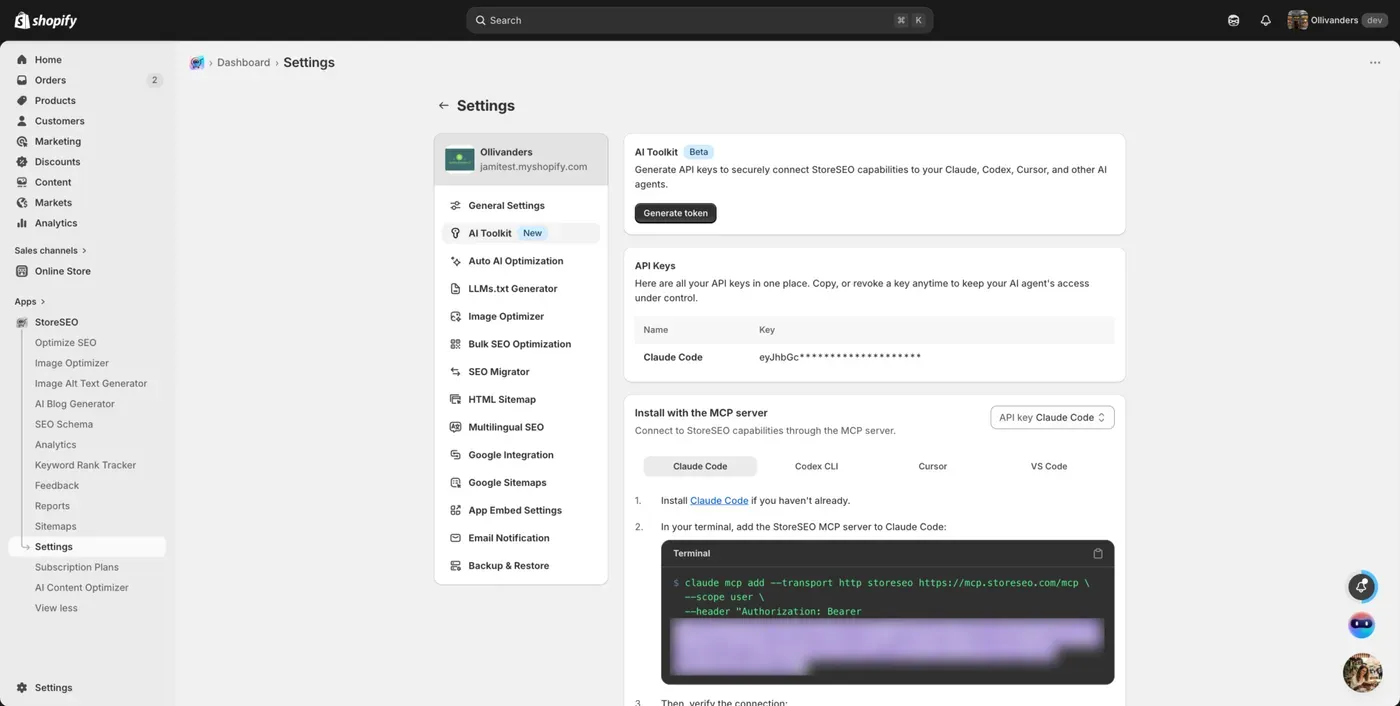
First, open your StoreSEO app. From the left sidebar, click on Settings. In the Settings menu, look for the AI Toolkit option and click on it. You will see a section that lets you generate API keys to connect StoreSEO with AI agents like Claude Code, Cursor, and VS Code.
Step 2: Generate Your API Token
Once you are on the AI Toolkit page, you will see a prominent button labeled “Generate Token.” Click this button. A popup window will appear asking you to name your token. Give it a meaningful name so you can identify it later.
For example, if you are using Claude Code, name it Claude Code. This name is just a label for your reference and does not affect functionality. Click the Generate button after naming it.
Step 3: Add the StoreSEO MCP Server to Claude Code
Open your terminal on your computer. Paste the command you copied in Step 3 and press Enter. The command will add StoreSEO as an MCP server to your Claude Code configuration. You will see a confirmation message showing that the HTTP MCP server was added successfully, along with your StoreSEO URL.
Step 4: Verify the Connection
In your terminal, run the following command:
Claude MCP list
This will show all connected MCP servers. Look for “StoreSEO” in the list. If it shows Connected with a checkmark, your connection is working properly.
You should also see your StoreSEO URL connection confirmation next to it. If you see an error or the connection says disconnected, double-check that your token was copied correctly and try regenerating it from the AI Toolkit page.
Step 5: Start Using the Toolkit
Now you are ready to use the StoreSEO AI Toolkit. In your terminal, type claude and press Enter to start Claude Code. You can now give commands in plain English to perform SEO tasks. For example, you can type: “SEO optimize all my least scoring products.” Claude will connect to StoreSEO, identify your low-performing products, and automatically optimize them. The AI will work through the optimization process and show you a summary of what was fixed and what still needs attention.
Sample Commands You Can Use:
- SEO optimize all my least scoring products
- SEO optimize all my least scored collections
- Generate alt text for all product images
- Fix meta descriptions for all products
Read the full detailed documentation of the feature to set up quickly and start using it right away.
Real World Use Cases We Hear From Merchants
Since launch, our support team has collected some lovely stories. A few patterns keep coming up.
Pre Launch Cleanups
Merchants preparing for a new collection drop use the toolkit to make sure every product has clean meta titles, descriptions, and alt text before the launch goes live. The whole pre-launch SEO sanity check now fits inside a single command.
Post Import Optimizations
If you have just migrated thousands of products into Shopify, the toolkit can handle the SEO clean up in one batch instead of stretching it across weeks of manual edits. This is the use case our migration-heavy customers fell in love with first.
Seasonal Refreshes
Black Friday, the holiday season, and the summer sale. Merchants point the toolkit at the affected collection and refresh meta titles, descriptions, and alt text in minutes. Combine it with our work on
Shopify collection page SEO and you have a serious seasonal play that takes hours, not weeks.
Why This Matters Right Now in 2026
We want to be straight with you about the bigger picture.
The Shopify SEO game is shifting from traditional search engine optimization toward a broader idea of being discoverable across AI agents, answer engines, and traditional search at the same time. We have written extensively about GEO and AEO replacing traditional SEO, about why your store needs an agentic AI strategy, and about how the AI shopping revolution is changing what merchants need to do.
The short version: AI agents are now doing real shopping research on behalf of buyers. If your product pages do not have clean metadata, structured data, and answer-ready content, you become invisible inside ChatGPT, Gemini, and Perplexity, no matter how good your Google rankings look. Even your Shopify AI readiness score depends on getting these basics right at scale.
The StoreSEO AI Toolkit is our practical answer to that shift. It lets you keep your store agent ready while using AI agents to do the work. It is, in other words, agentic SEO for agentic commerce, a phrase we did not love at first but have grown into.
How the AI Toolkit Fits Into the Bigger StoreSEO Ecosystem
The toolkit is powerful on its own, but it works best alongside the rest of what StoreSEO offers. A few features we want to highlight while we have your attention:
- StoreSEO GEO Optimization tells you how visible your store is to AI agents and where to improve next.
- AI Snippets Generator creates answer ready content blocks that AI engines love to cite.
- LLMs.txt support gives AI crawlers an explicit guide to your store’s content.
- AI Description Generator writes high quality product descriptions in your brand voice.
- Keyword Cluster Generator and Keyword Rank Tracker help you target the right terms and measure what is actually working.
- FAQ schema combined with product schema makes your product pages eligible for richer search results.
- Storefront FAQ blocks and best AI Shopify apps for LLMs.txt and schema markup round out the experience.
Pair the AI Toolkit with any of these, and the compound effect is real.
Tips From Our Team for Getting the Most Out of the Toolkit
A few things we have learned from watching beta testers and our own team use the toolkit every day.
- Start narrow, then go wide. Try one collection first, see the results, and then scale to the full catalog with confidence.
- Be specific in your commands. Optimize my least scoring products. Optimizing my 30 lowest-scoring products in the Skincare collection works far better.
- Watch your AI credits. Some commands trigger the AI Content Optimizer or AI Description. Generator behind the scenes, which consumes credits. Check your usage occasionally.
- Use named tokens. If you use multiple AI clients, generate a token per client. Easier to manage, easier to revoke, and a small kindness to your future self.
- Keep the dashboard open for spot checks. The AI agent does the heavy lifting, but a quick visual scan of a few products gives you peace of mind, especially during the first few runs.
Frequently Asked Questions About the StoreSEO AI Toolkit
Is the StoreSEO AI Toolkit safe to use?
Yes. The toolkit uses API tokens you generate inside StoreSEO and connects through the Model Context Protocol over a secure HTTPS endpoint. You control which AI agents have access, and you can revoke or regenerate a token at any moment from the AI Toolkit page.
Do I need to know how to code to use the AI Toolkit?
No. The setup involves pasting one command into your terminal. After that, every interaction is in plain English. If you can install Claude Code, you can run the toolkit comfortably.
Which Shopify plans does the AI Toolkit work with?
Any Shopify plan that supports the StoreSEO app also supports the AI Toolkit. There is nothing plan-specific about it on the Shopify side. You will only want to make sure your StoreSEO plan covers the AI features you intend to trigger.
Does the AI Toolkit replace the StoreSEO dashboard?
Not at all. The dashboard remains the best place for single-product fine-tuning, visual previews, and reviewing scores. The toolkit is for bulk operations and AI-driven workflows. Most merchants we talk to use both, depending on the task in front of them.
Can I use Cursor or VS Code instead of Claude Code?
Yes. Any MCP-compatible client works. The setup steps look similar; you will use that client’s MCP configuration instead of the Claude Code command, and from there, the experience is essentially the same.
What happens if the connection drops in the middle of a task?
The toolkit completes work transactionally per item, so an interrupted run will not leave a product half optimized. You can re-run the same command, and the AI agent will pick up from the items it did not finish.
Does the AI Toolkit help my store rank in ChatGPT and Gemini?
Indirectly, yes. The toolkit applies the foundational SEO and structured data optimizations that AI engines rely on when they decide which stores to surface. Combine it with our work on E-E-A-T for ranking in AI search engines and our LLMs.txt implementation guide for a fuller agentic discovery strategy.
How long does a typical optimization run take?
It depends on the size of the job. A single product takes seconds. A full catalog of a few hundred products might take a few minutes. Either way, you can leave the terminal running and come back to the summary.
Final Thoughts From the StoreSEO Team
We are genuinely excited about the StoreSEO AI Toolkit. It is the kind of feature that, six months from now, we expect every serious Shopify merchant to be using in some form. The work of running a store is too varied, the catalogs are too big, and the SEO surface area is too wide to keep doing all of it by hand. For a tour of specific prompts you can run today, see our recipe pack of SEO jobs for ChatGPT and Claude through StoreSEO MCP.
So our pitch is simple. Install StoreSEO if you have not already; open the AI Toolkit page, generate a token, point your AI agent at it, and let it earn its keep. If you get stuck anywhere along the way, our dedicated support team is one message away.
We will keep building. You keep selling. Together, hopefully, we make your store impossible for the next shopper to miss, human or AI.

Written by
Mahmudul Hasan