
[BIG NEWS] StoreSEO for Shopify Sidekick Is Now Available: A Smarter, Faster Way to Optimize Your Store
StoreSEO is now available in Shopify Sidekick, which means you can ask Sidekick questions about your store’s SEO in plain language and get instant, data-backed answers without leaving your Shopify admin.
So, let’s see exactly what StoreSEO for Shopify Sidekick can do together, and how to start using this integration to find and fix SEO issues faster than ever before.
What is Shopify Sidekick?
Shopify Sidekick is an AI-powered assistant built directly into the Shopify admin. It was first introduced on July 26, 2023, during Shopify Editions Summer 2023. What started as a simple chat tool for answering admin questions has grown into something far more capable. Now, in 2026, it is a much more powerful and proactive tool that can do everything from building a custom app to generating an email campaign. All you have to do is ask.
For merchants today, Sidekick is remarkably convenient to use. It is included free with every Shopify plan, works in all 20 Shopify admin languages by text or voice, and is accessible on desktop and mobile. You do not need to configure anything or install a separate tool. It works through a chat interface in your Shopify admin, available 24/7, and since it is a native part of Shopify, it integrates seamlessly with your store’s data, including your products, orders, and settings.
The most recent milestone came with the Shopify Spring 2026 Edition. Shopify moved Sidekick onto every screen and opened it to third-party apps through App Extensions. When an app connects to Sidekick as an App Extension, Sidekick can pull data directly from that app and bring it into the conversation.
It lets merchants ask questions, get store insights, and take action using plain conversational language, without navigating through multiple menus or dashboards. Shopify Sidekick was designed to bring intelligent, conversational assistance directly into the admin experience.
The Faster Way to Manage Shopify SEO Is Already in Your Admin
Sidekick is designed to understand the context of your store and respond with relevant, actionable information. You can ask it about your sales, your customers, your inventory, and now, your SEO.
Managing SEO on a Shopify store takes time. You check product pages, review meta fields, audit image alt text, compare scores, and try to figure out where to start. By the time you have a clear picture, hours have passed, and the fixes are still pending. When a Shopify SEO app connects to Sidekick as an App Extension, Sidekick can pull SEO data directly from that app and surface it inside the conversation.
StoreSEO Is Now Available Inside Shopify Sidekick
StoreSEO is built specifically for Shopify SEO. It tracks SEO scores, audits meta fields and image alt text, and generates optimization recommendations. With StoreSEO connected to Sidekick, all of that data becomes instantly accessible through a simple chat interface. The result is a faster, smarter SEO workflow that lives exactly where you are already working.
StoreSEO connects as an App Extension, which means when you ask Sidekick an SEO-related question, it fetches the answer from StoreSEO and delivers it instantly in the chat. No separate dashboard, no manual report, no extra steps.
What You Can Do with StoreSEO Inside Shopify Sidekick
Say goodbye to switching SEO tabs as StoreSEO is just inside Shopify Sidekick. StoreSEO in Sidekick is not limited to checking a single product score. You can audit your entire store, identify patterns across hundreds of products, and get targeted recommendations, all from one conversation. Here is what the integration makes possible:
- Check SEO scores for individual products, collections, or pages
- Find products with missing meta titles or meta descriptions across your catalog
- Identify images with missing or weak alt text so you can improve accessibility and search visibility
- Get instant recommendations to fix specific SEO issues tied to your actual store data
The practical impact here is significant. You can ask a targeted question and get a specific answer within seconds.
Step-by-Step Guide to Use StoreSEO with Shopify Sidekick
Let’s walk you through opening Sidekick, asking your SEO question, and getting recommendations for the fixes. Before you start, make sure you have StoreSEO installed on your Shopify store. Follow this documentation to learn how to install StoreSEO.
Open Sidekick Panel in Your Shopify Admin
After you log in to your Shopify store, go to your admin dashboard. Find the purple glasses icon in the top bar of your admin. Click on it to open the Sidekick panel.
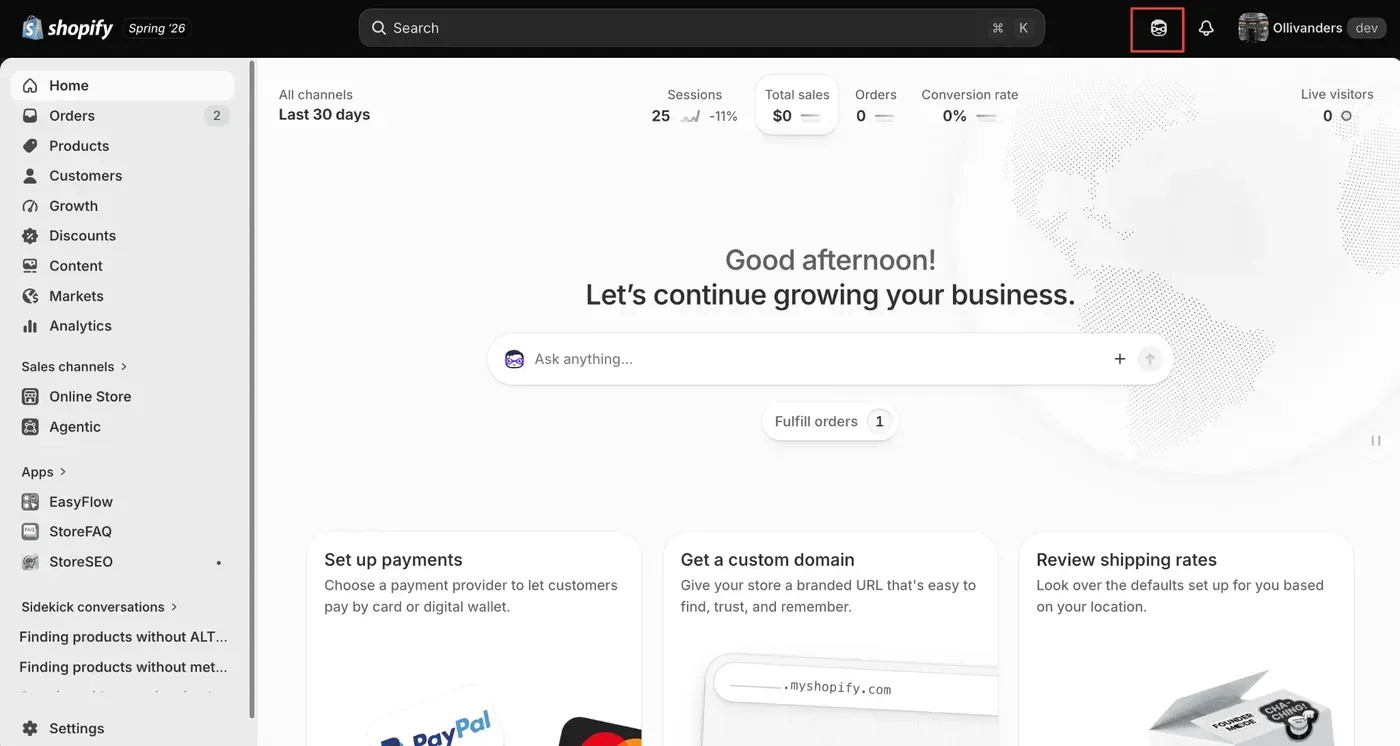
Sidekick is accessible from the left side panel labeled as ‘Sidekick Conversations’. Simply, open a new conversation from there. Both paths take you to the same chat interface.
Ask Your SEO Queries
Now, you will see a chat interface once the Sidekick panel opens. Type your question or use voice mode to ask. No extra configuration required.
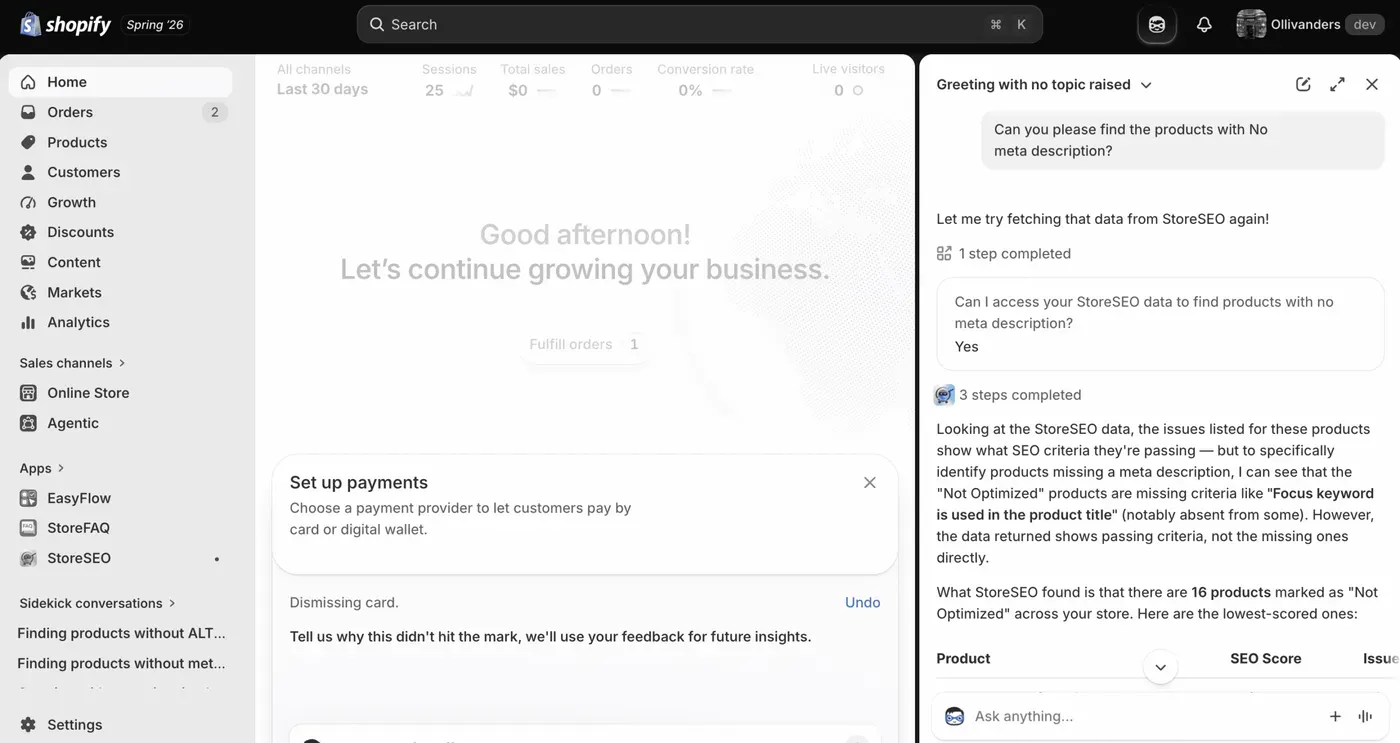
Simply describe what you want to know about your store’s SEO. Here are some examples:
- “Which of my products have missing meta descriptions?”
- “How can I improve SEO for my best-selling products?”
- “What is the SEO score for my summer collection page?”
- “Which products have the lowest SEO scores right now?”
The phrasing is completely flexible. Sidekick will interpret your question and use StoreSEO to find the relevant data.
After you ask your question, Sidekick will pull the relevant SEO data from StoreSEO and display it directly in the chat. It will show you things like missing fields, SEO scores, and specific recommendations tied to your actual store data.
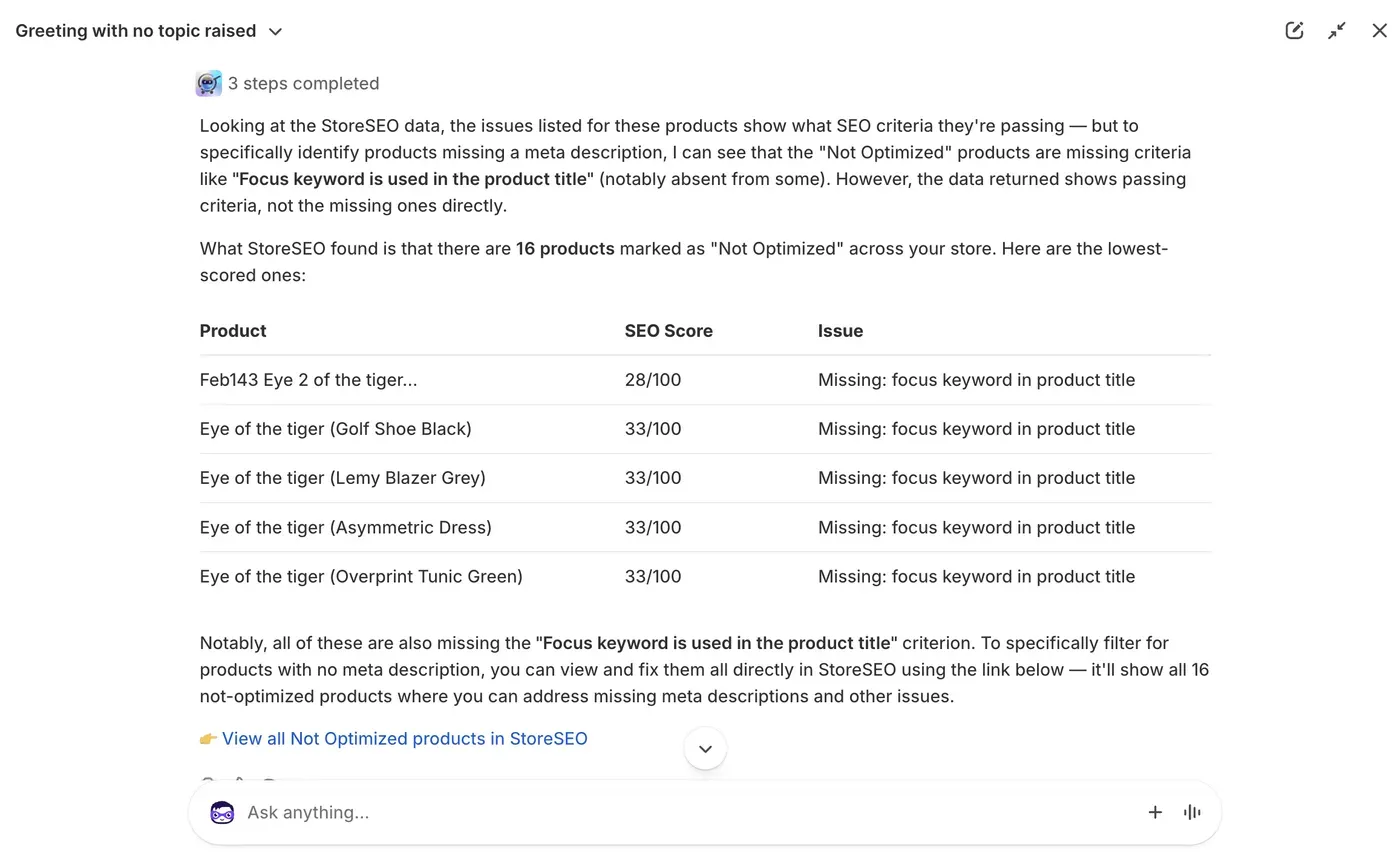
The insights are not generic. They reflect the actual state of your products, collections, and pages at that moment, so you are always looking at current information.
Review the results to understand where your store needs attention. You can then narrow the conversation further. For example, if Sidekick surfaces five products with missing meta descriptions, you can ask about any one of them specifically or ask Sidekick to prioritize by SEO score.
Just Ask Sidekick & See How StoreSEO Fixes Your SEO Issues
SEO on Shopify stores has always involved a lot of switching between tabs, tools, and dashboards. StoreSEO solved this hassle and Shopify Sidekick takes that a step further by bringing the audit, the recommendations, and the fix suggestions into a single conversation, right inside your Shopify admin.
You can check SEO scores, find missing fields, identify weak alt text, and get suggestion for fixes, all in plain language. For merchants who want to stay on top of SEO without making it a separate workstream, this integration is a practical step forward.
If you want to see it in action on your own store, open Sidekick from your Shopify admin and ask your first SEO question. Need help getting started? Reach out to the StoreSEO support team and they will get you sorted.
Frequently Asked Questions
What is the StoreSEO Shopify Sidekick integration?
StoreSEO is available as a Shopify Sidekick App Extension. This means Shopify’s AI assistant, Sidekick, can pull SEO data directly from StoreSEO and surface it inside a Sidekick conversation in your Shopify admin. You can check SEO scores, find missing meta fields, audit image alt text, and apply fixes without leaving the admin.
Do I need to configure anything before using StoreSEO with Sidekick?
No configuration is required. Once StoreSEO is installed on your Shopify store, the Sidekick integration is available automatically. Open the Sidekick panel and start asking questions about your store’s SEO in plain language.
What kinds of SEO questions can I ask Shopify Sidekick?
You can ask about SEO scores for specific products, collections, or pages, request a list of products with missing meta titles or descriptions, identify images with missing alt text, and ask for recommendations on how to improve SEO for specific pages or your best-performing products.
Can Sidekick actually apply SEO fixes to my store?
No. It can not directly apply fixes to your store. It can help you identify the issues and recommend fixes. The fix needs to be applied to your store through StoreSEO.
Is the StoreSEO Sidekick integration available to all StoreSEO users?
The Sidekick App Extension is part of StoreSEO on Shopify. If you have StoreSEO installed, you can access this feature through the Sidekick panel in your Shopify admin. Check the StoreSEO support page if you have questions about access or plan eligibility.
How is this different from using StoreSEO on its own?
StoreSEO on its own provides a full SEO management dashboard with detailed audit reports and optimization tools. The Sidekick integration brings that data into a conversational interface within the Shopify admin. The core data is the same, but the workflow is faster and requires fewer steps to go from identifying an issue to applying a fix.

Written by
Jemima