
Shopifyの販売者はこれまで以上に多くの商品やコンテンツを公開しているが、Googleが実際に自分のストアをどのように認識しているかについては、依然としてほとんど把握できていない販売者が多い。.
そして2026年には、それは深刻な問題となるだろう。.
現代のSEOは、単にいくつかのキーワードで上位表示を目指すだけではありません。Google検索、AIによる概要表示、ショッピング結果、対話型検索など、あらゆる検索結果に表示されるためには、検索エンジンがあなたのストアを適切にクロール、インデックス登録、理解する必要があります。.
それは Google 検索コンソール 入ってくる。.
Google Search Consoleは、Shopifyストアオーナーがインデックス登録状況を監視し、検索パフォーマンスを追跡し、サイトマップを送信し、SEOの技術的な問題を視認性に悪影響を与える前に発見するのに役立ちます。しかし、手動で設定するのは、多くの販売者にとって依然として不必要に技術的に感じられるかもしれません。.
StoreSEOを使えば、テーマファイル、HTMLタグ、DNS設定などを一切変更することなく、ガイドに従って数回クリックするだけで、ShopifyストアをGoogle Search Consoleに接続できます。.
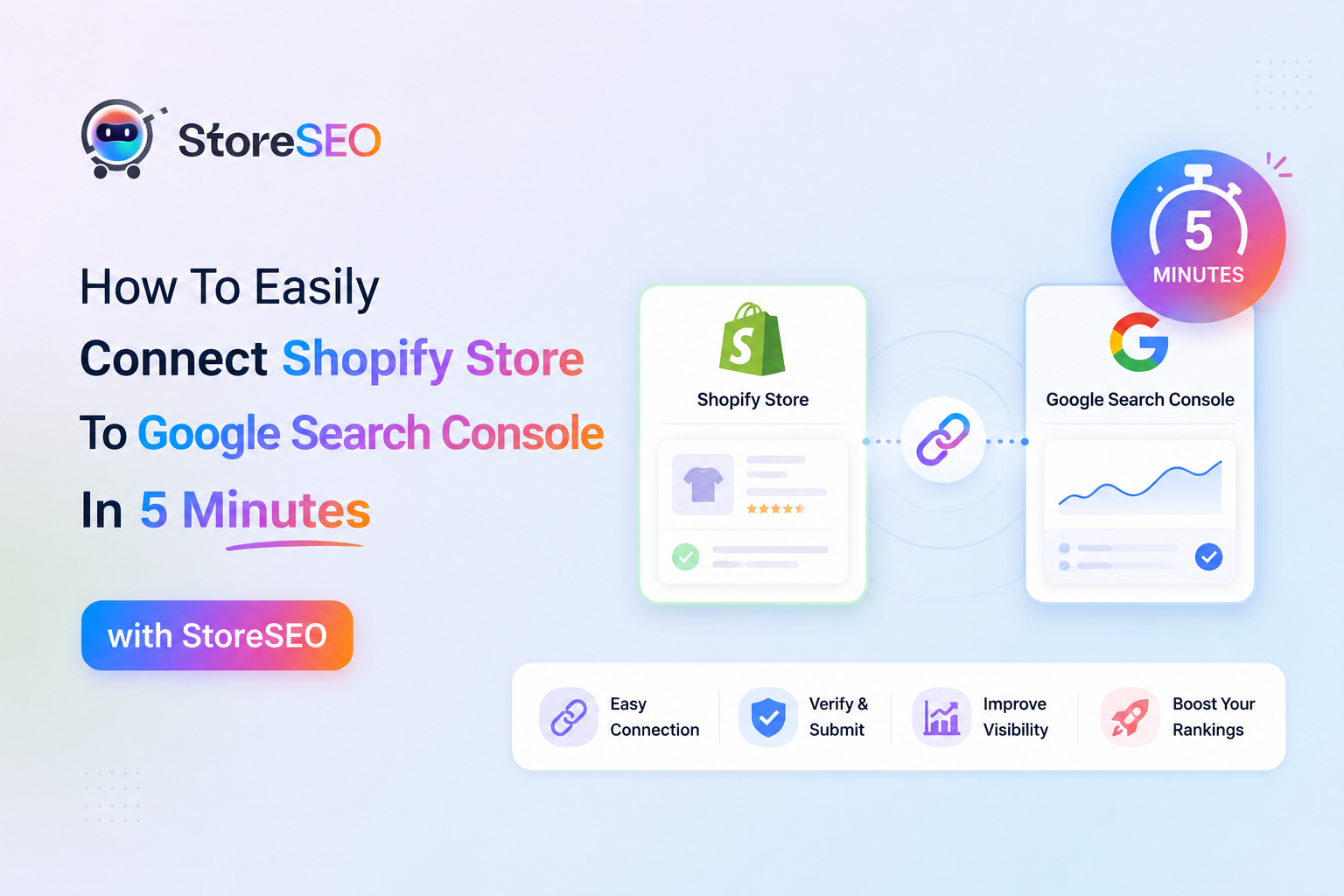
このガイドでは、 ShopifyをGoogle Search Consoleに接続する StoreSEOを利用することで、即時インデックス登録が可能になり、長期的なオーガニック成長のためのより強固な基盤を構築できます。.
Google Search Consoleとは何か?そして、ShopifyストアオーナーはなぜGoogle Search Consoleに関心を持つべきなのか?
Google Search Console(GSC)は、Googleが提供する無料ツールで、Google検索結果におけるストアの表示状況を監視、維持、トラブルシューティングすることができます。これは、Shopifyストアと世界最大の検索エンジンとの間の公式なコミュニケーションチャネルと考えてください。GSCがなければ、まるで正面玄関を閉め切ったまま、顧客が何とかして店内に入ってくるのを待っているようなものです。.
Google Search ConsoleはShopifyストアにとって実際どのようなメリットがあるのでしょうか?
簡単に言うと、Google Search Consoleは、Googleがあなたのストアをどのように認識しているかを理解するのに役立ちます。どの検索クエリが訪問者を呼び込んでいるか、どの商品ページがインプレッションを獲得しているか、どのURLがインデックスされているか(そしてどのURLが密かに無視されているか)、そして技術的な問題がランキングに悪影響を与えている可能性がある箇所などが表示されます。Shopifyストアのオーナーにとって、これは非常に貴重な情報です。推測に頼る必要がなくなり、実際のデータに基づいて最適化を開始できるのです。.
2026年にShopifyとGoogle Search Consoleの連携が不可欠となる理由
ここで、透明性を確保しておきたい点があります。Shopifyは、自動的にあなたのストアをGoogleに登録しません。ストアは確かに存在しますが、サイトマップを積極的に送信して所有権を確認しない限り、オーガニック検索では必要以上に長い間表示されません。Google Search Consoleを接続すると、次の3つの重要なことが同時に行われます。
- XMLサイトマップを送信することで、Googleが商品、コレクション、ブログ、ページなどのカタログ全体をクロールできるようになります。.
- これにより即時インデックス作成が可能になり、新製品の発売が検索結果に迅速に表示されるようになります。.
- 検索分析機能が解放され、どのキーワードがクリック数、インプレッション数、コンバージョン数を増加させているかを正確に把握できるようになります。.
もしあなたが、自社製品でGoogle検索結果の1ページ目に店舗をランクインさせることを真剣に考えているなら、これは最初のステップです。これを飛ばすのは、美しい実店舗を何ヶ月もかけて建てたのに、店の前に看板を立てるのを忘れてしまうようなものです。このアイデアをさらに詳しく知りたい場合は、次のガイドをご覧ください。 ShopifyストアをGoogle検索結果の1ページ目にランクインさせる方法.
ShopifyストアをGoogle Search Consoleに接続する前に必要なもの
具体的な手順に入る前に、まずは共通認識を持っておきましょう。手順を進めるには、以下のものが必要です。
- 少なくとも数点の商品を掲載している、アクティブなShopifyストア。.
- 有効なGoogleアカウント(理想的には、長期的にストアの分析データに紐付けたいアカウント)。.
- StoreSEOアプリは、お客様のShopifyストアにインストールされています。.
StoreSEOをまだインストールしていない場合でもご安心ください。30秒で完了する簡単なインストールガイドに従ってください。 ShopifyストアにStoreSEOをインストールする方法, そしたら、すぐにここに戻ってきてください。お待ちしています。.
その3つのことは解決しましたか?素晴らしい。それでは、本題に入りましょう。.
StoreSEOを使ってShopifyストアをGoogle Search Consoleに5分で接続する方法
ShopifyストアをGoogle Search Consoleに接続する最も速い方法は、 ストアSEO, AI搭載のShopify SEOアプリを使えば、たった5回の簡単なクリックで統合が完了します。メタタグをtheme.liquidにコピーする必要も、DNSレコードを作成する必要も、サポートチケットを発行する必要もありません。その仕組みを詳しくご説明します。.
ステップ1:StoreSEOからGoogleアカウントにログインします
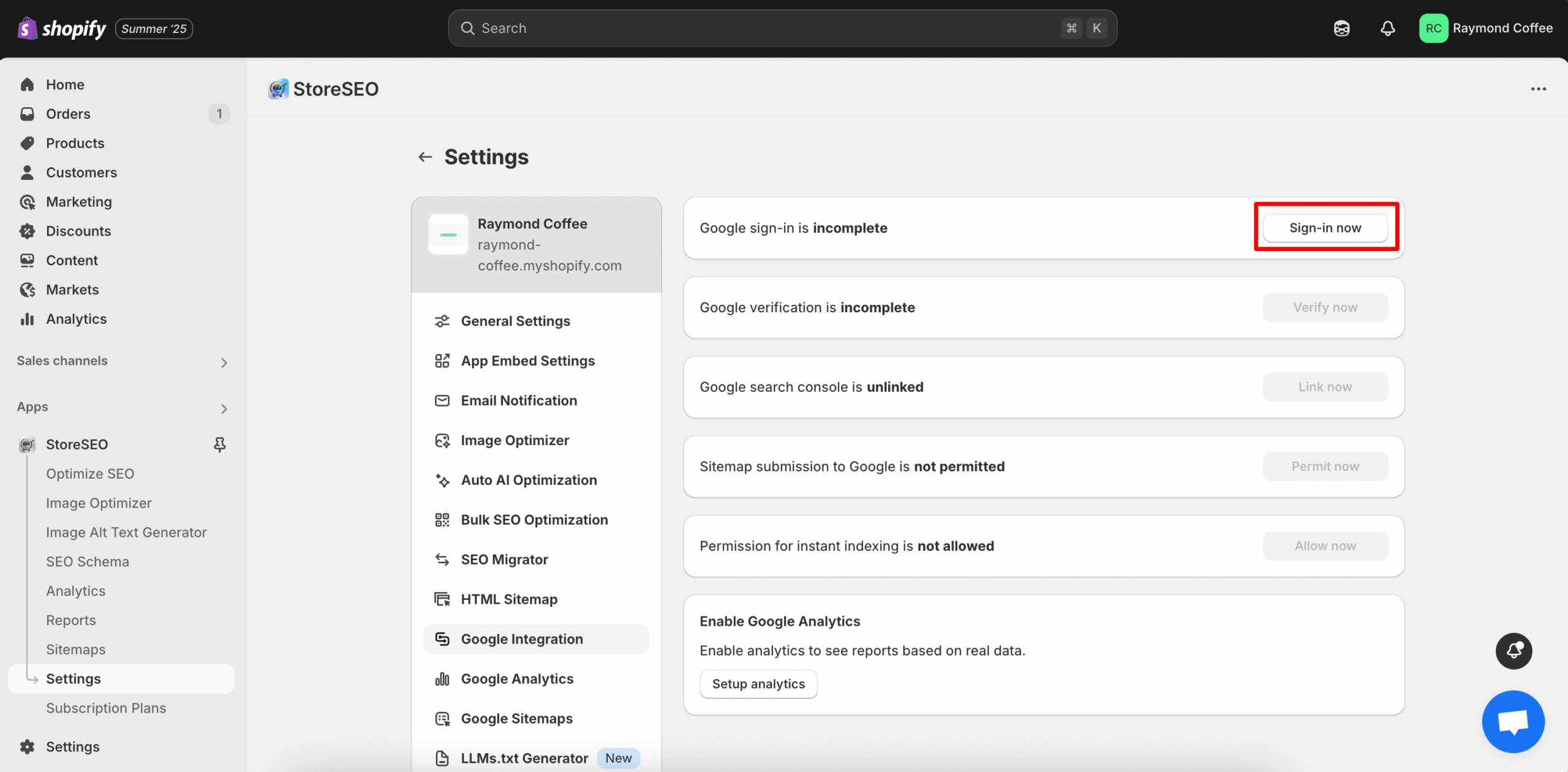
Shopifyの管理ダッシュボードからStoreSEOアプリを開き、 設定 > Google連携. きれいなパネルが表示されます “「今すぐログイン」” 一番上のボタンをクリックしてください。.
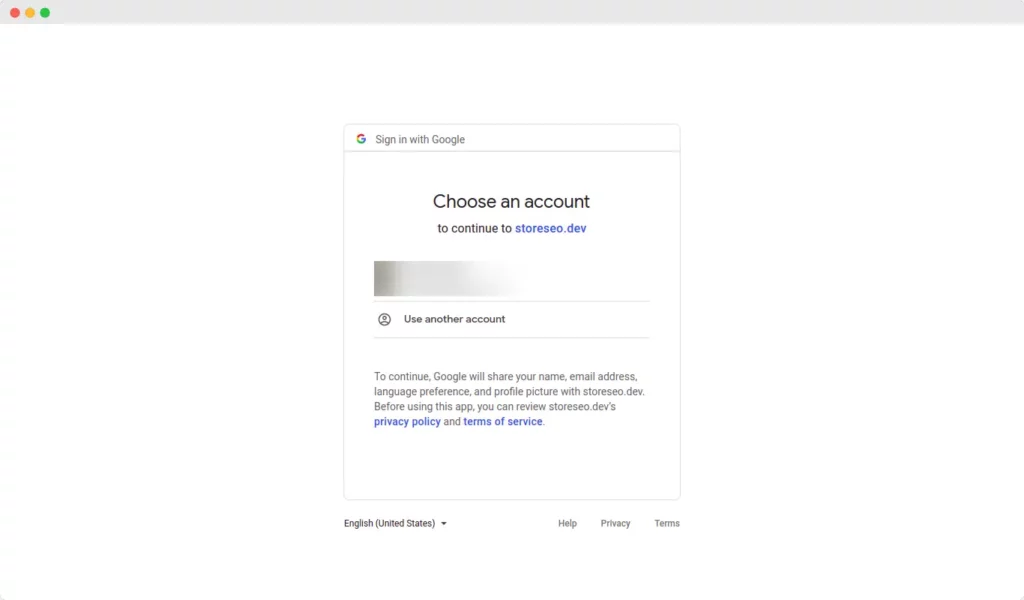
ポップアップが表示され、ストアに接続するGoogleアカウントを選択するよう求められます。ストアのアナリティクスを所有している(または今後所有する予定の)アカウントを選択してください。接続を承認すると、認証が即座に完了し、次のステップに進みます。.
ステップ2:GoogleでShopifyサイトを認証する
認証が完了すると、StoreSEO は Shopify サイトの所有権を確認するよう求めます。 “「今すぐ確認」” ボタン。
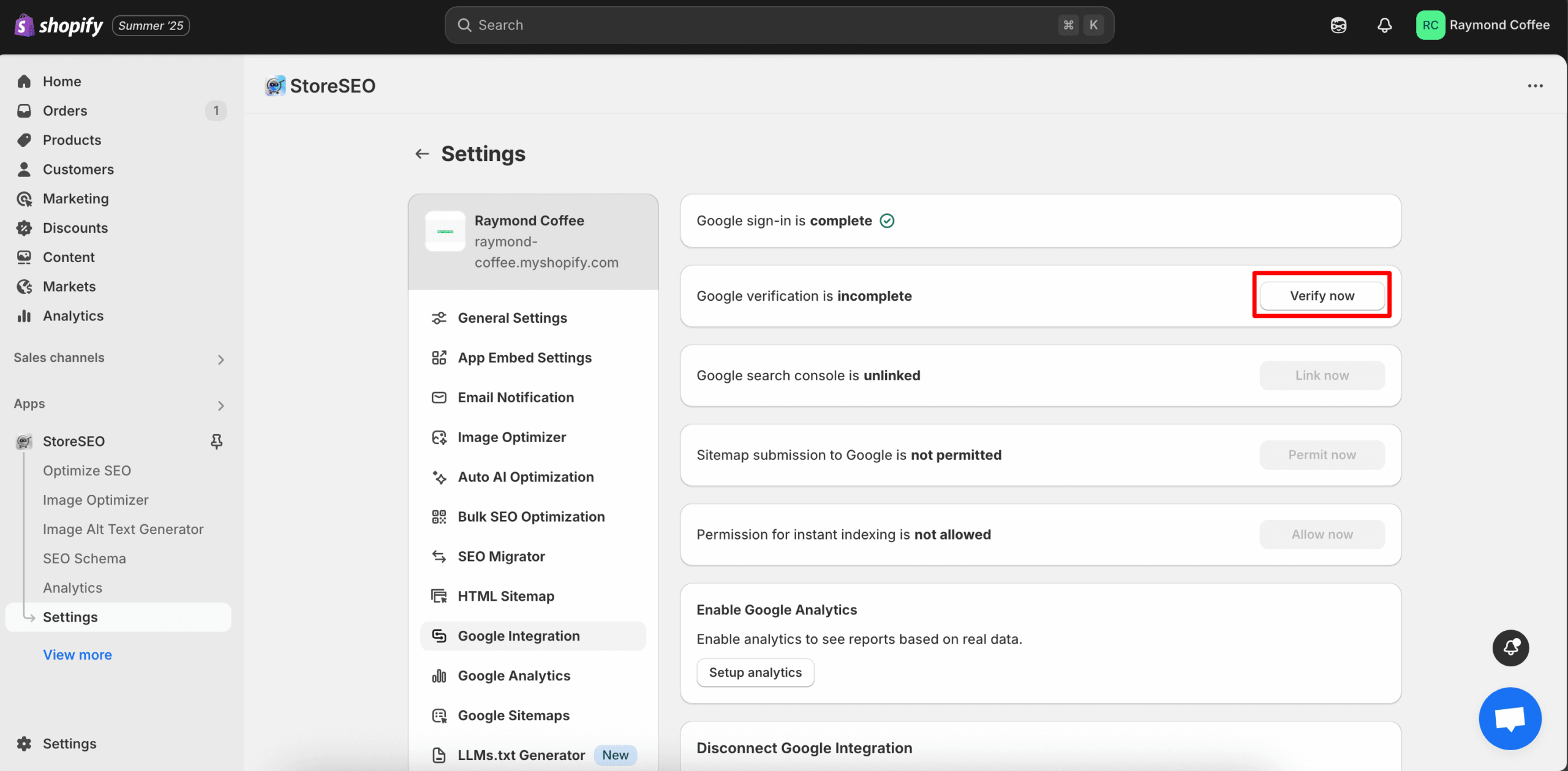
Google の認証ウィンドウが開きます。同じ Gmail アカウントでログインして「“続く。.”これが検証手順のすべてです。テーマにHTMLタグを挿入する必要も、ドメイン登録業者にログインする必要もありません。StoreSEOがGoogleの公式検証APIを使用して、バックグラウンドで面倒な処理をすべて行います。.
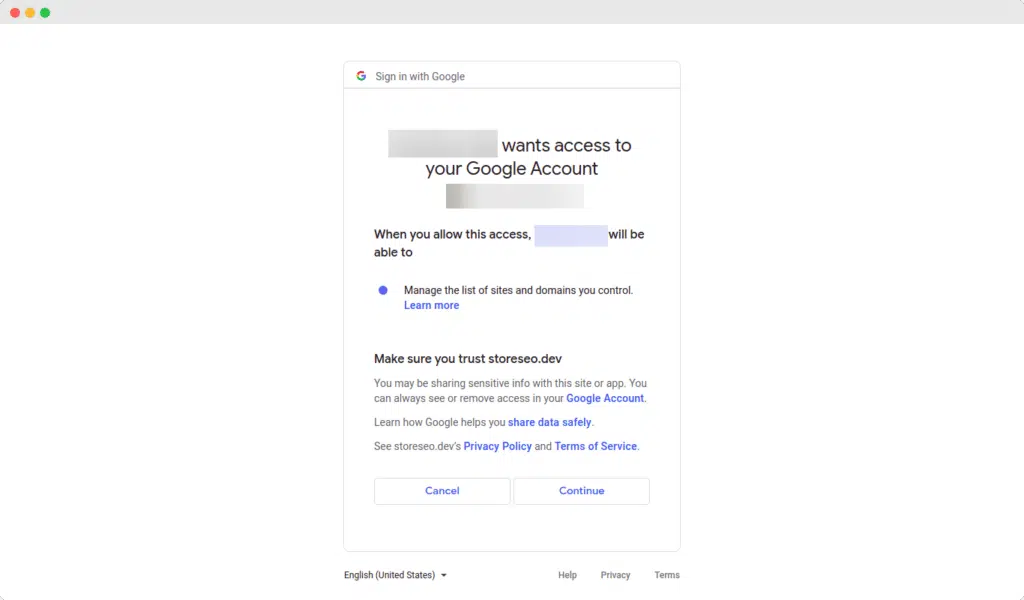
わずか数秒で、あなたのShopifyストアはGoogleによってあなたのものとして認証されます。これは通常、多くの販売者が手動で行う際につまずく点なので、この手間を省けることは、目立たないながらも大きなメリットです。.
ステップ3:StoreSEOをGoogle Search Consoleにリンクする
サイトが認証されたので、StoreSEO を Google Search Console プロパティに直接接続できるようになりました。 “「今すぐリンク」” ボタンを押して、ポップアップウィンドウで接続を確認してください。.
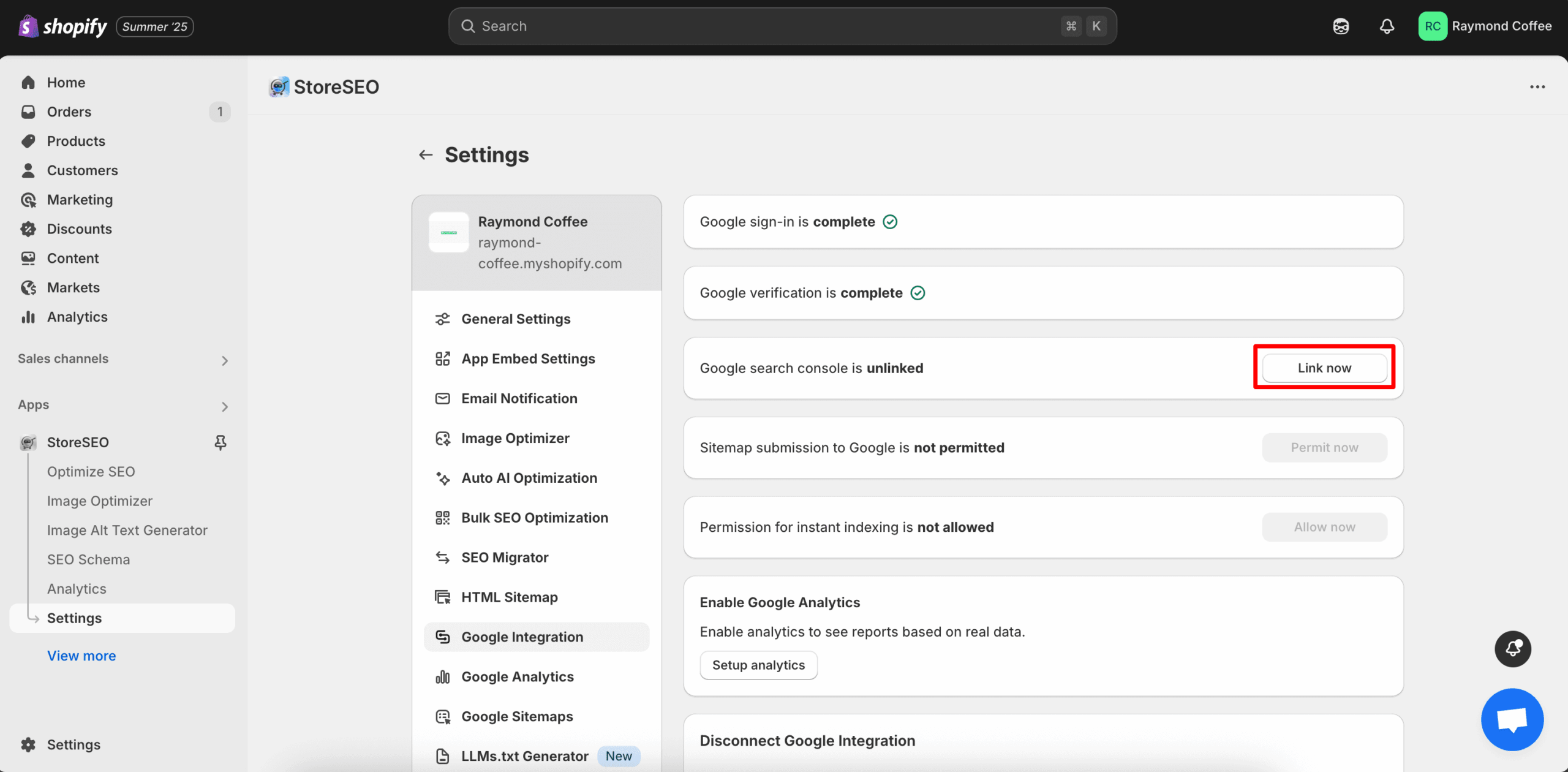
この権限は、StoreSEOがGoogle Search Consoleのデータを読み取り、サイトマップやインデックス登録のリクエストを代行することをGoogleに指示するものです。このリンクがないと、手探りで作業することになります。このリンクがあれば、すべての検索分析データがStoreSEOダッシュボードに集約されるため、タブを開く回数が減り、コンテキストの切り替えも少なくなり、実際に成果につながる要素に集中できるようになります。.
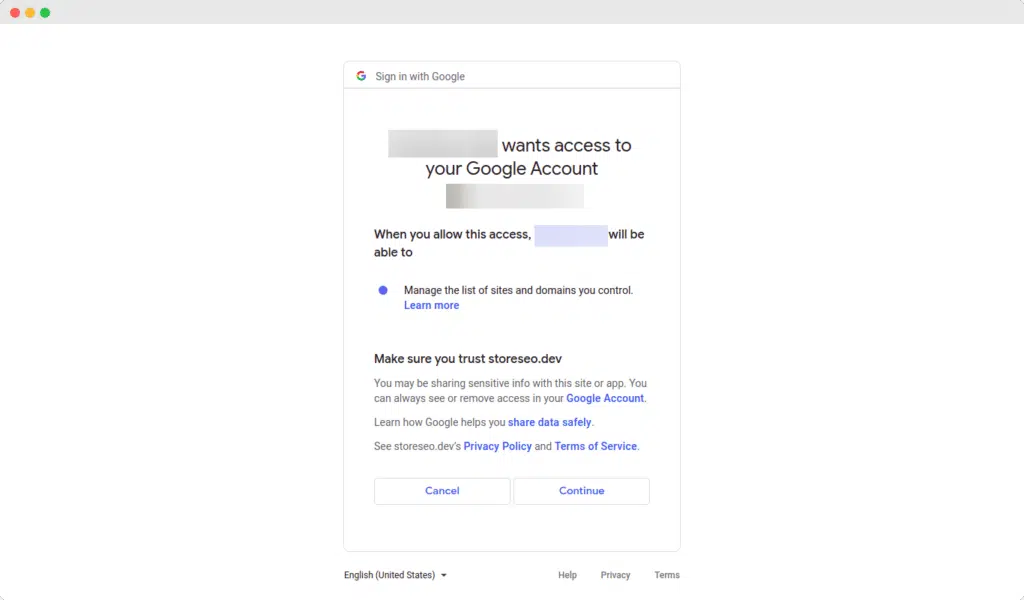
ステップ4:Googleへのサイトマップの自動送信を許可する
サイトマップは、あなたのストアのGPS座標のようなものです。サイトマップがないと、Googleのクローラーは目的もなくさまよいます。サイトマップがあれば、すべての商品、コレクション、ページ、ブログ記事が、発見されインデックスされるための明確な経路を得ることができます。.
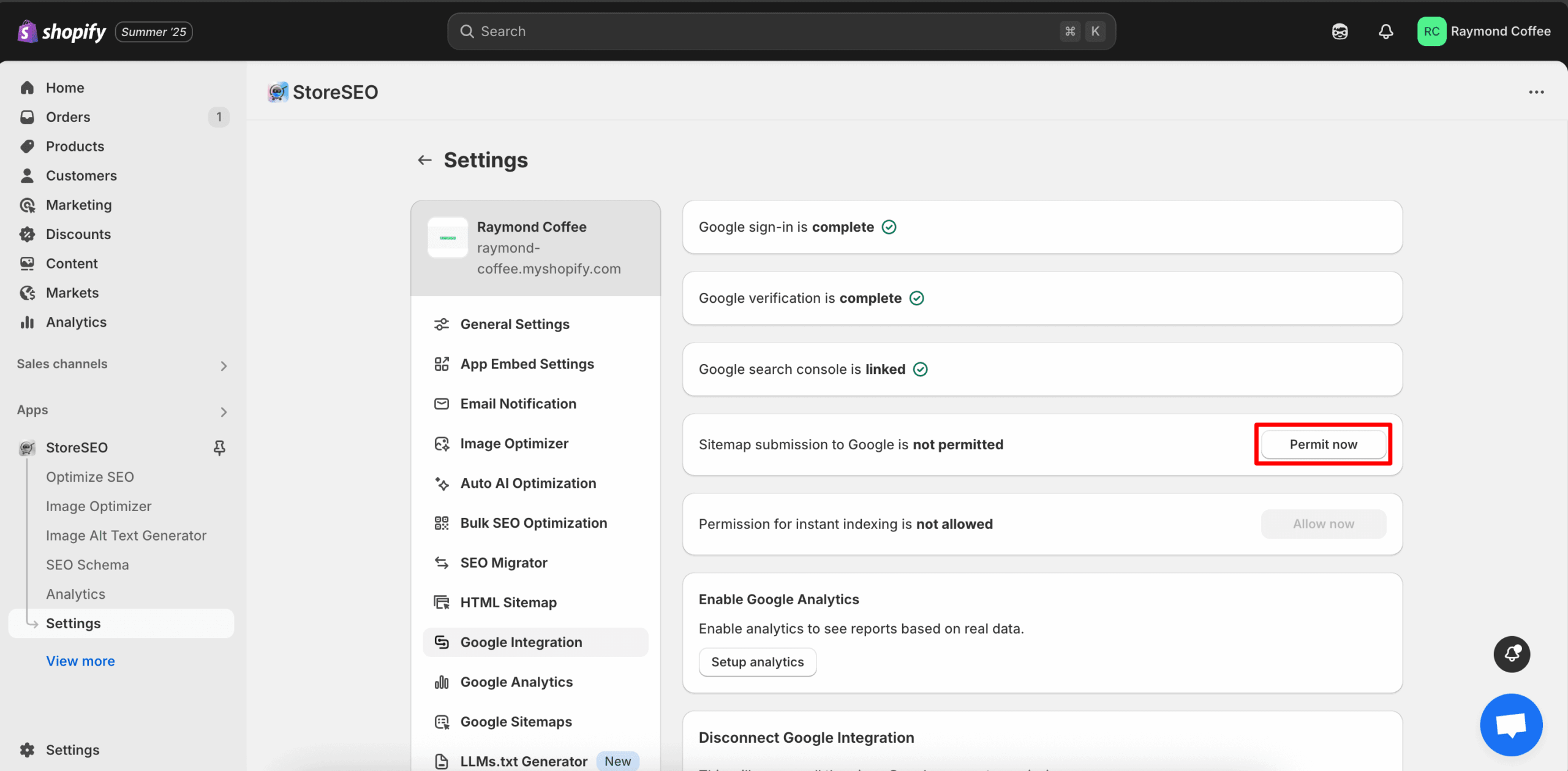
このステップでは、 “「今すぐ許可を」” ボタンをクリックすると、StoreSEOが自動的にShopifyのXMLサイトマップを取得し、Google Search Consoleに送信します。サイトマップのURLを探したり、コピーしたり、GSCに貼り付けたり、プロセスを監視したりする必要はありません。完全に自動化されています。.
サイトマップについてもう少し詳しく知りたい場合は、 Shopifyのサイトマップについて知っておくべきことすべて, また、より詳細な読み物もご用意しています。 eコマースサイトマップとは何か、そしてそれがShopifyのSEOにどのように役立つか. どちらもブックマークする価値があります。.
ステップ5:Shopifyストアのインスタントインデックス機能を有効にする
これが、StoreSEOを手動のGSC設定と真に区別するステップです。クリック “「今すぐ許可」” Shopifyストアの即時インデックス作成を有効にするため。.
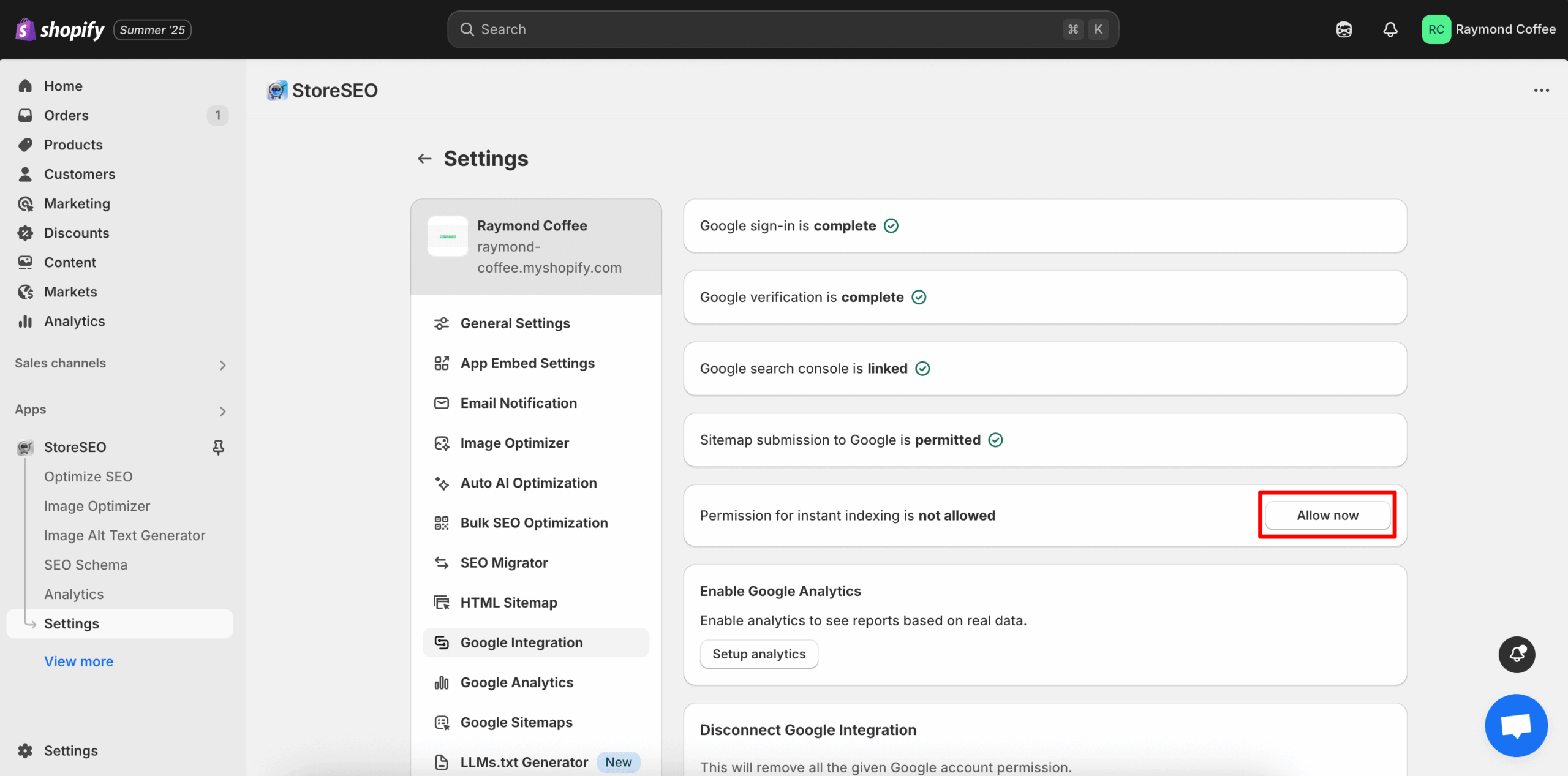
インスタントインデックス機能は、GoogleのインデックスAPIを利用して、新規または更新されたURLを公開と同時にGoogleに送信します。そのため、Googleが新製品の発売を認識するまで数日(場合によっては数週間)待つ必要がなく、数分以内にURLがGoogleのクローラーの目に留まります。在庫を頻繁に追加する店舗にとって、これは今週売上を上げるか、来月まで待つかの違いになります。.
打つ "“今すぐ許可”これで完了です。ShopifyストアがGoogle Search Consoleに完全に接続されました。.
StoreSEOにおけるGoogle Search Console連携のリセットまたは切断方法
計画は変わるものです。Googleアカウントを切り替えるかもしれませんし、さまざまな設定を試しているかもしれません。あるいは、単にまっさらな状態から始めたいだけかもしれません。.
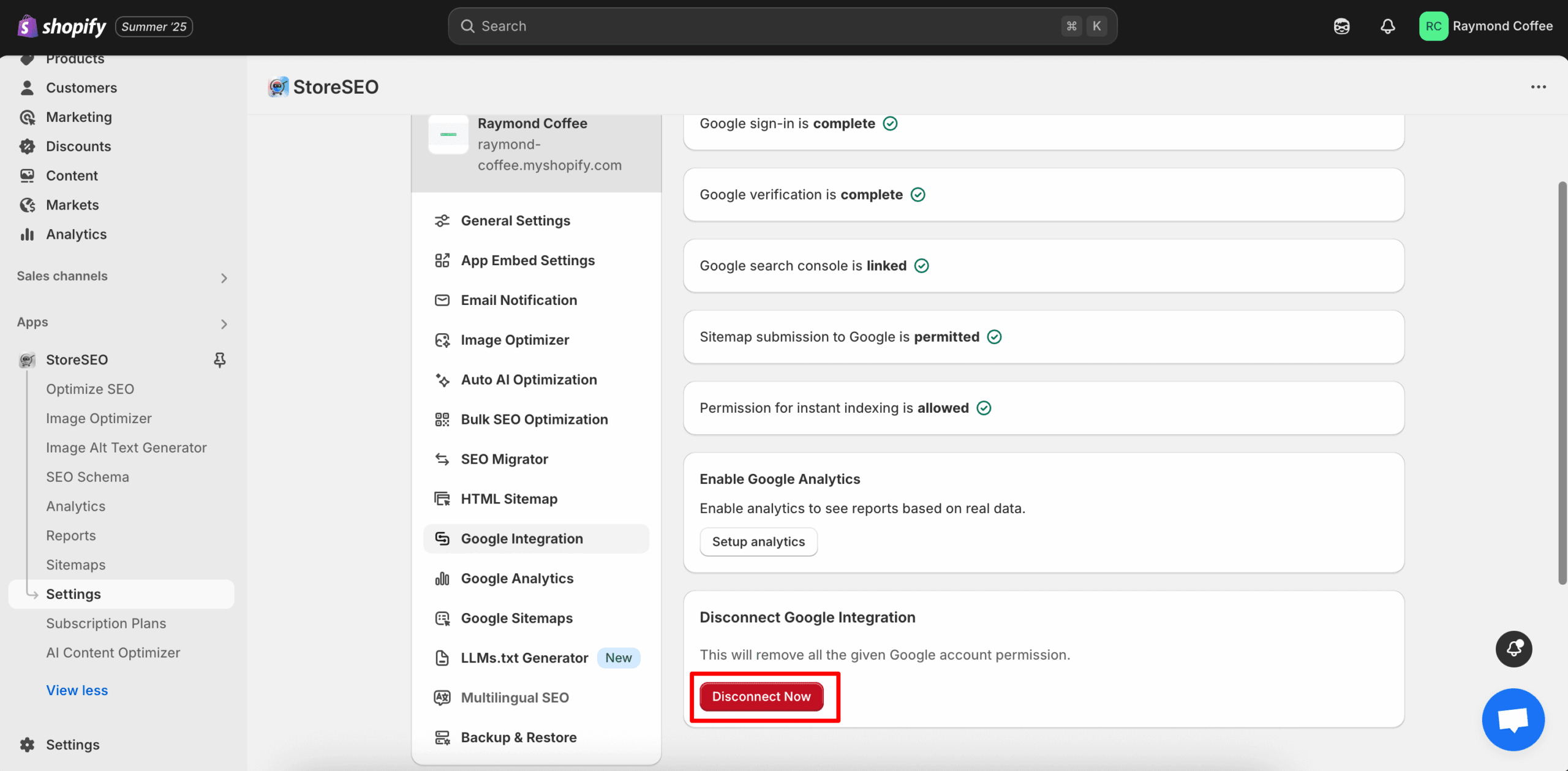
統合をリセットする必要がある場合は、次のページに戻ってください。 設定 > Google連携 StoreSEO の中に入り、 “「今すぐ接続を解除」” ボタンをクリックするだけで、Google連携設定がすべてリセットされます。準備ができたらいつでも別のアカウントで再接続でき、サポートチケットは一切不要です。.
ShopifyをGoogle Search Consoleに接続した後、何が起こるのか
ここからが面白いところです。接続が確立されると、バックグラウンドで次の3つのことが静かに始まります。
- Googleがあなたのストアを適切にクロールし始めます。新しい商品、ページ、ブログ記事が以前よりもはるかに速く発見されるようになります。.
- 検索分析データはStoreSEOダッシュボードに反映されます。各URLのクリック数、インプレッション数、平均掲載順位、クリック率を確認できます。.
- インデックス作成上の問題が明確になります。ページがブロックされたり、表示が遅かったり、何らかの問題が発生している場合、推測するのではなく、実際にその状況を把握できます。.
この新しいデータを最大限に活用するには、 StoreSEO 内の Google Search Console Insights, これは、GSCの生データを分かりやすい言葉で次のステップに翻訳します。指標の羅列を前にして、どこを修正すれば良いのか悩む代わりに、どのキーワードを狙うべきか、どのページを最適化すべきか、どの商品がブレイク寸前なのかといった明確な推奨事項が得られます。.
StoreSEOがGoogle Search Consoleとの連携を超える方法
Google Search Consoleを接続するだけでストアに必要なものが全てだとは言いません。それはあくまでも基盤です。真のオーガニック成長は、その上にSEO対策を重ねていくことで実現します。だからこそ、StoreSEOは単なる統合ツールではなく、包括的なSEOスイートとして構築されているのです。.
ShopifyストアがStoreSEOを通じてGSCに接続されると、以下の機能も利用できるようになります。
- AIコンテンツオプティマイザー 商品説明、メタタイトル、メタディスクリプションを数秒で書き換えます。 StoreSEO AIコンテンツオプティマイザーの使い方 完全攻略ガイドはこちら。.
- 画像最適化 画像を圧縮し、代替テキストを一括生成することで、ページ表示速度の向上とアクセシビリティの改善を図ります。.
- JSON-LDとFAQスキーマ Googleでリッチスニペットを有効にするには、次のガイドを参照してください。 Shopifyでスキーママークアップを有効にする方法 このエンドツーエンドのすべてを網羅しています。.
- キーワードランクトラッカー ターゲットとするキーワードごとに、Google検索結果における自社製品の掲載順位を正確に監視します。.
- AEOおよびGEO向けAIツールキット つまり、あなたのストアはChatGPT、Gemini、Claude、Perplexityなど、あらゆるプラットフォームに表示されるということです。 StoreSEO AIツールキットガイド 詳細な内訳については、こちらをご覧ください。.
- Google アナリティクスの統合 トラフィックとコンバージョンデータを同期するために Google Analytics接続設定.
これが完全なサイクルです。接続、最適化、追跡、そして成長。すべてShopify内の1つのダッシュボードから行えます。.
ShopifyとGoogle Search Consoleの接続に関するよくある質問
これらの質問は繰り返し寄せられるので、ここで直接お答えしましょう。.
Shopifyストアの場合、Google Search Consoleは無料ですか?
はい、Google Search ConsoleはすべてのShopifyストアで完全に無料でご利用いただけます。料金プランやプレミアムアップグレード、利用制限は一切ありません。ご利用にはGoogleアカウントのみが必要で、StoreSEOは追加料金なしでGoogle Search Consoleに接続します。.
ShopifyをGoogle Search Consoleに接続するには、プログラミングスキルが必要ですか?
いいえ、コーディングスキルは一切必要ありません。StoreSEOを使えば、Shopifyダッシュボード内でわずか5クリックで全ての統合が完了します。テーマファイルも、theme.liquidに貼り付けるHTMLメタタグも、DNSレコードも不要です。.
ShopifyとGoogle Search Consoleを接続するにはどれくらい時間がかかりますか?
StoreSEOを使用すれば、完全な統合は約5分で完了します。Googleの認証フローを手動で行う場合は、ドメインの設定やテーマによっては20分から30分かかる場合があります。.
Google Search Consoleは、接続後すぐに店舗データを表示しますか?
Google Search Consoleは通常、接続後24~48時間以内にデータの表示を開始します。StoreSEOの即時インデックス機能を有効にすると、個々のURLが数日ではなく数分でGoogleに認識されるようになります。.
複数のShopifyストアをGoogle Search Consoleに接続できますか?
はい、複数のShopifyストアを1つのGoogleアカウントに接続できます。各ストアはGoogle Search Console内で個別のプロパティとして表示され、StoreSEOはこの複数ストアの設定を標準でサポートしています。.
StoreSEOをアンインストールすると、Google Search Consoleへの接続はどうなりますか?
StoreSEOをアンインストールしても、Google Search Consoleのプロパティは引き続き有効です。ただし、StoreSEOが自動で行っていたサイトマップの送信機能や、即時インデックス登録機能は失われます。.
StoreSEOは、まだアクセスがない新規のShopifyストアにも効果がありますか?
もちろんです。実際、Google Search ConsoleとStoreSEOを連携させることは、新しいShopifyストアにとって最も重要な最初のステップの一つです。GoogleにURLを登録するタイミングが早ければ早いほど、ストアの検索履歴、権威性、信頼性のシグナルがより早く構築されます。.
StoreSEOは、Google Search Consoleに手動で接続する場合とどう違うのですか?
Google Search Console を手動で接続するには、HTML 検証の処理、メタタグの theme.liquid へのコピー、サイトマップの手動送信、および URL を 1 つずつインデックス登録リクエストする必要があります。StoreSEO は、これらすべてを 5 クリックで自動化し、さらに AI 最適化、画像 SEO、スキーマ マークアップ、ランキング分析を重ね合わせます。詳細については、まとめ記事をご覧ください。 Shopifyストアのランキングを上げるための最適なSEOアプリ 並べて比較したい場合。.
最後に:たった5分でShopifyストアをGoogle検索結果の上位に表示させる方法
正直に申し上げます。SEOは、特に新製品の発売、カスタマーサポート、マーケティングキャンペーン、そしてShopifyストア運営に伴うその他多くの要素を同時にこなさなければならない状況では、圧倒されるほど大変な作業に感じられるかもしれません。しかし、ストアをGoogle Search Consoleに接続するのは、決して難しい作業ではありません。StoreSEOを使えば、今月最も簡単に達成できる成果の一つとなるでしょう。.
5分。5クリック。数ヶ月にわたるオーガニック成長を支える基盤が1つ。推測をやめてGoogle検索結果に表示されるようになりたいなら、, ShopifyストアにStoreSEOをインストールする 今すぐご連絡いただければ、貴社の製品をより多くの方に知っていただけるようお手伝いいたします。また、途中で何かお困りのことがございましたら、弊社までお気軽にご連絡ください。 専任サポートチーム メッセージを送るだけで、あなたのお店が応援されます。.
最終更新日: 2026年5月21日 マフムドゥル・ハサン