
40 ChatGPT Prompts for Shopify SEO, Tested
 Written by M Asif Rahman
The most useful ChatGPT prompts for Shopify SEO are narrow, not clever: one job, one expected output, and one way to check it before it goes live. This library holds 40 of them across six jobs, each with a real output and the mistake ChatGPT makes most often.
TL;DR: what each prompt job is good for, and the one thing to check before you publish the output.
| Job | What ChatGPT Drafts Well | What to Do Before You Publish It |
|---|---|---|
| Meta descriptions | A near-length first draft | Count the characters and name one real product detail |
| Image alt text | A literal description of the photo | Confirm it names the product, not a generic phrase |
| Collection page copy | An intro explaining what unites the products | Check it is true of every item in the collection |
| FAQ content | Plausible, Shopify-shaped questions | Confirm the answer matches your actual policy |
| Schema / structured data | A JSON-LD skeleton to start from | Check every field against Google’s own documentation |
| Running prompts across a catalog | A reusable template per category | Test it on five products by hand before automating it |
How Do You Write Meta Descriptions With ChatGPT?
A meta description prompt only works if you force it to use real product details instead of filler. These seven cover the cases that come up on most Shopify catalogs, and they lean on the same keyword clustering logic covered in Turn Keyword Clusters Into Better Product Descriptions:
- Write a meta description under 155 characters for this product, naming its material or size and one shipping detail.
- Rewrite this meta description so it does not start with “Shop” or “Discover”.
- Turn this product’s top review quote into a meta description under 155 characters.
- Write five meta description variants for this product and rank them from most to least specific.
- Check this meta description for phrases a competitor’s product could also claim, and flag them.
- Shorten this 180-character meta description to under 155 characters without losing the size detail.
- Write a meta description for this out-of-stock product that invites a shopper to check back, without promising a restock date.
A first pass on a generic prompt reads like marketing filler: “Shop our premium ceramic mugs today. Great quality, fast shipping, and amazing customer service. Order now and enjoy!” at 117 characters, it fits literally any product on the store. Naming the real attributes fixes it: “12oz stoneware mug, dishwasher and microwave safe, hand-glazed in small batches. Ships in 2 to 4 days from our US warehouse.” The second prompt adds one instruction, “name the product’s actual attributes,” and the output stops being interchangeable with every other listing.
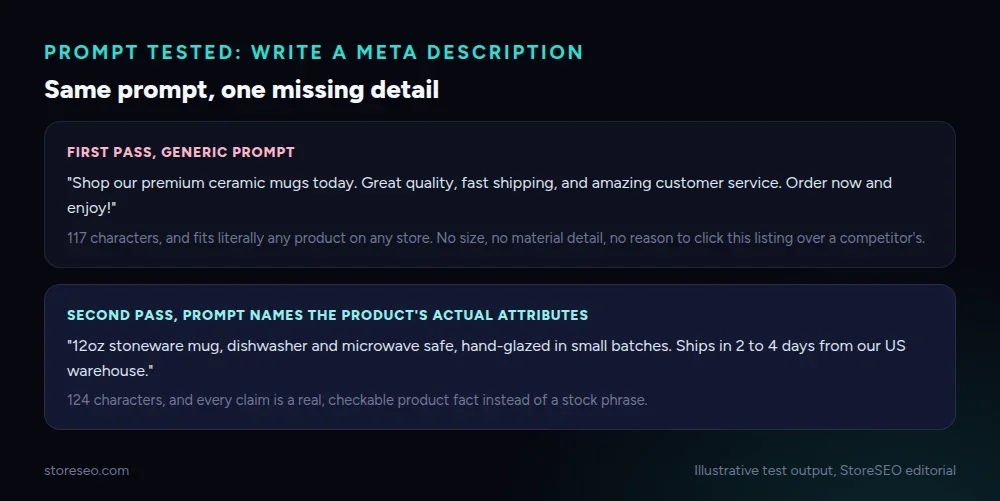 Illustrative test output, StoreSEO editorial.
How Do You Generate Shopify Alt Text With ChatGPT?
Alt text prompts fail in a specific way: ChatGPT defaults to “image of a product” unless you ask for the visible details instead.
- Write alt text for this product photo, describing the visible color, material and camera angle.
- Write alt text for a lifestyle photo showing the product in use, not just its name.
- Check this alt text for keyword stuffing and rewrite it as a plain description.
- Write alt text for a product with no visible branding, describing shape and material only.
- Write alt text for 10 variants of the same product that differ only by color.
- Write alt text for a size chart image, describing what the chart shows rather than just calling it “size chart”.
Before you trust any of the forty prompts in this library, it helps to know the general shape of where ChatGPT gets confident and where it gets it wrong.
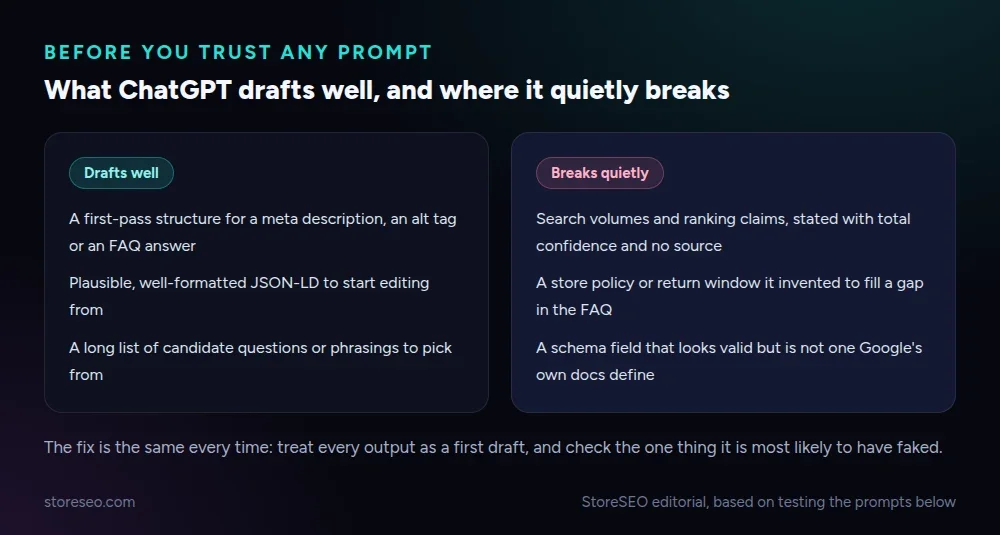 StoreSEO editorial, based on testing the prompts below.
How Do You Draft Collection Page Copy With ChatGPT?
Collection copy has one job a generic prompt keeps missing: explaining what actually unites the products on the page, not restating a product description that already exists elsewhere on the store.
- Write a 60-word intro for this collection, explaining what unites the products in it.
- Write collection copy that does not repeat phrases already used in the individual product descriptions.
- Write a one-sentence answer to “what is in this collection” suitable for an AI shopping answer to quote.
- Rewrite this collection intro to mention the actual price range and material options available.
- Write three short collection intros for a seasonal collection that will be reused again next year.
- Check this collection description for a claim that is not true of every product inside it.
For the underlying description itself, StoreSEO’s Product Description Writer runs the same kind of prompt inside the app rather than a separate chat window: see how to write descriptions with the AI description generator for the exact steps. Once you have a description you trust, Writing Product Descriptions for AI Answer Engines covers the separate question of whether ChatGPT and Perplexity will actually quote it back to a shopper.
How Do You Build FAQ Content With ChatGPT?
FAQ prompts are the easiest to get usefully wrong, because ChatGPT will happily invent a policy to fill a gap if you let it.
- Write five FAQ questions a shopper would actually ask about this product, based on its description.
- Turn these three real customer support questions into FAQ entries with two to four sentence answers.
- Write an FAQ answer about our return window, using only the policy text I paste in, nothing else.
- Check this FAQ answer for a promise of “rich results” or “snippets” and remove it.
- Write an FAQ answer explaining the size difference between two product variants.
- Write an FAQ entry about shipping times that names a real timeframe, not “fast shipping”.
- Flag any FAQ answer below that states a policy the store page does not actually confirm.
Prompt 23 exists for a real reason. Google removed FAQ rich results from search on 7 May 2026, so a rich snippet is no longer a realistic outcome of adding FAQ schema, even though ChatGPT still drafts FAQ copy as if it were. An FAQ section is still worth having for the questions it answers, never for a result it can no longer produce.
Can ChatGPT Check Your Schema Markup?
Schema prompts are where ChatGPT’s confidence is the most dangerous, because an invented field does not throw an error. It just gets ignored.
- Check this Product JSON-LD block for fields that are not real schema.org properties.
- Explain what this block of JSON-LD is telling Google about the product, in plain language.
- Compare this schema block against Google’s required Product properties and list what is missing.
- Check this FAQ schema for a question that the visible page content does not actually answer.
- Write a plain-language summary of what changes if I add aggregateRating to this schema.
- Flag any schema property below that is written in the wrong data type, such as a price stored as a string.
Pasting a real Product block into prompt 27 is the fastest way to see the failure mode: ChatGPT invented a trustScore field that looks plausible beside brand and sku, but Google’s structured data documentation defines aggregateRating, never trustScore. The block still validates as JSON. It just tells Google nothing useful through that field.
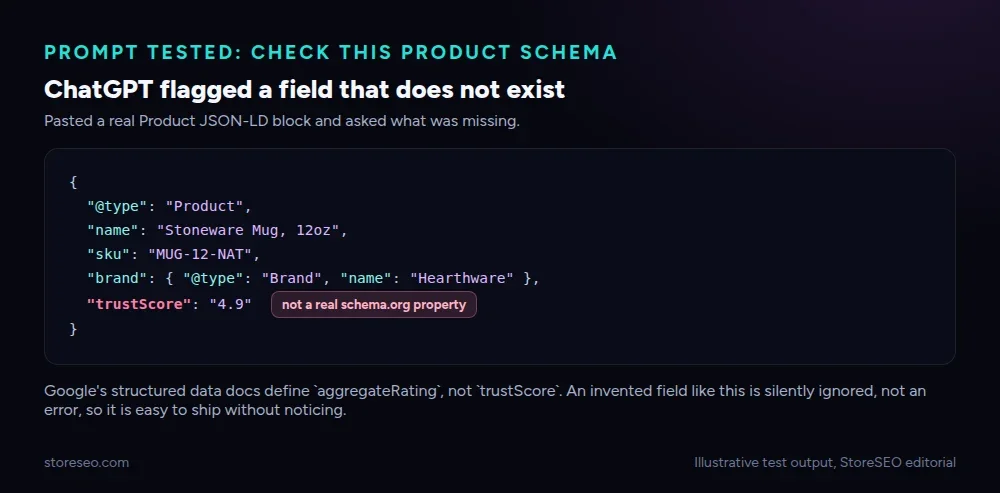 Illustrative test output, StoreSEO editorial.
StoreSEO’s own schema settings, the same panel used to customize JSON-LD, are a faster way to check a field is real than asking ChatGPT to guess at Google’s specification from memory.
Where Does AI Get Shopify SEO Wrong?
Three patterns repeat across all forty prompts above, and none of them are reasons to stop using ChatGPT, only reasons to check its output in a specific place.
It states search volumes and ranking positions with total confidence and no source, because the model is pattern-matching plausible numbers, not querying a keyword tool. It invents a store policy, a return window or a shipping timeframe, to fill a gap in whatever you pasted in, rather than telling you the information is missing. It drafts schema fields and rich-result claims that stopped being true, like the FAQ snippet removal above, because its training data includes years in which they were. The Risks of Relying Solely on AI for SEO goes through the rest of this list in more depth than one section here can.
How Do You Run These Prompts at Catalog Scale?
A prompt that works once on one product is not the same as a prompt you can trust across 400 SKUs without reading every output.
- Write a single meta description template with blanks, from 10 example products in one category.
- Write a rule I can repeat for every product in this category to avoid duplicate meta descriptions.
- Rewrite these five generic AI-written product descriptions as a checklist of what to fix in each.
- Write a 5-point QA checklist to run before publishing any AI-drafted product description at scale.
- Summarize the pattern in these 20 meta descriptions and flag any that are too similar to each other.
- Write one prompt I can reuse for every new product in this category without editing it each time.
- List the three checks to never skip when applying a prompt to a whole catalog instead of one product.
- Write a short brief a teammate could follow to apply this prompt consistently without reviewing every output.
Copying one output at a time into Shopify works for a handful of listings, but nobody repeats that by hand for a few hundred SKUs. StoreSEO’s AI SEO Agent runs the same kind of prompt product by product inside the app instead of a chat window, through the same MCP connection you can wire up for your own AI assistant.
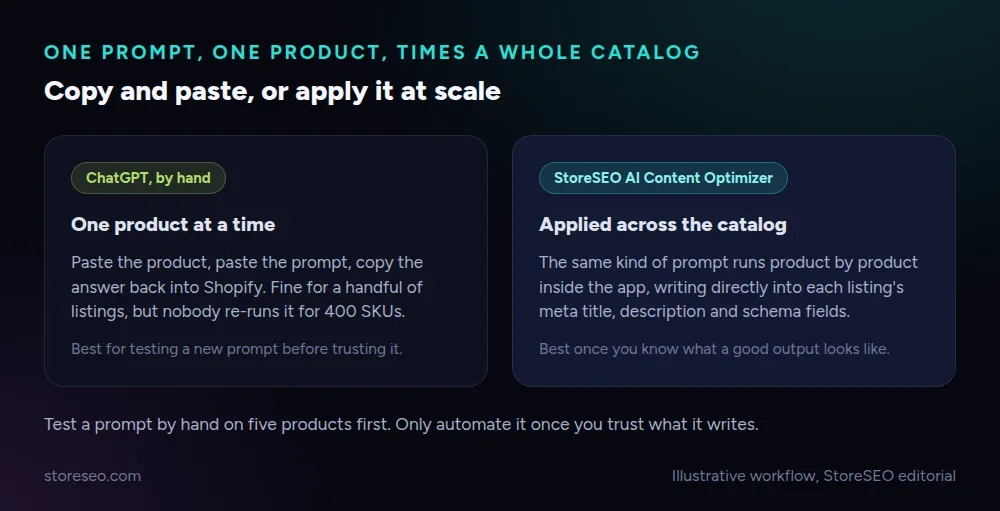 Illustrative workflow, StoreSEO editorial.
This library is one piece of a larger approach to writing for both search engines and AI answers; Building an AI-First Content Strategy for Shopify Stores covers where prompts like these fit alongside the rest of a store’s content plan.
Frequently Asked Questions (FAQs)
1. Can I trust ChatGPT’s search volume or ranking claims in a prompt output?
No, not without checking them against a real keyword tool first. ChatGPT states a volume or a ranking position with the same confidence whether it is accurate or invented, because it is pattern-matching a plausible number rather than querying live search data.
2. Will ChatGPT give me a working meta description every time?
It gives you a usable first draft most of the time, not a finished one. Always count the characters yourself and confirm the draft names a real detail about that specific product, since a generic version that fits any listing is the most common failure.
3. Can I use ChatGPT to write FAQ schema for my Shopify store?
Yes, for the questions and answers themselves, but do not expect it to earn a rich result. Google removed FAQ rich results from search on 7 May 2026, so an FAQ section is worth having for the content, never for a snippet it can no longer produce.
4. Does checking JSON-LD with ChatGPT replace testing it in Google’s tools?
No. ChatGPT can catch an invented field or an obvious mismatch, but it cannot confirm how Google will actually parse the markup. Treat its check as a first pass, then verify the result the way you would any schema change.
5. Can I run all 40 prompts automatically without reviewing the output?
Not safely, especially the FAQ and schema prompts, where an invented policy or property will not throw an error. Test any prompt by hand on five products first, and only automate the ones whose output you have already checked.
6. Why does the same prompt give a different quality answer on different products?
The output quality depends heavily on how much real detail you paste into the prompt. A prompt fed only a product title produces a generic answer, while the same prompt fed the title, material, size and a review quote produces something specific enough to publish with minor edits.
Forty prompts are a starting point, not a substitute for checking what they produce against your own store. If you would rather have the drafting and the schema checks run inside the app against your real catalog, try StoreSEO on the Shopify App Store.
Keep reading

Why Search Engines Are Becoming Recommendation Engines
Search engines are becoming recommendation engines. See how AI picks products and how Shopify stores can get recommended with StoreSEO.
Read article
We Checked 148 Shopify Stores for AI Crawler Blocks
We crawled robots.txt on 148 live Shopify stores and found only one blocking any AI crawler by name, and zero blocking GPTBot, ClaudeBot or PerplexityBot.
Read article
Track ChatGPT & Perplexity Traffic in GA4 (Shopify)
GA4 already tags some ChatGPT and Gemini visits as AI Assistant traffic, and one custom channel group adds Perplexity and Claude to the same report.
Read article