
Shopify Core Web Vitals Audit Guide (2026): LCP, CLS & INP Benchmarks

Shopify store owners spend months perfecting product photos, collection layouts, and checkout flows, yet many still lose customers in the first three seconds of a page load. The culprit is often invisible until you audit for it. Google evaluates every storefront against three specific performance metrics, known as Core Web Vitals, and a store that fails even one of them can slide down the search results while shoppers quietly abandon the page.
This Shopify Core Web Vitals audit guide covers exactly what to measure, what the current 2026 benchmarks look like for real Shopify stores, and where to start fixing issues across all three metrics. Whether you are running your first performance audit or investigating why your scores regressed after a recent app install, the goal is the same: walk away knowing what your LCP, CLS, and INP scores mean and what to do about them.
TL;DR: Shopify Core Web Vitals at a Glance
| Metric | What It Measures | Good Threshold | Common Shopify Cause | Fastest Fix |
| LCP (Largest Contentful Paint) | Loading speed of the main visible content | Under 2.5 seconds | Unoptimized hero or product images, render-blocking apps | Compress images, use fetchpriority=”high”, remove lazy loading on above-the-fold images |
| CLS (Cumulative Layout Shift) | Visual stability while the page loads | Under 0.1 | Apps injecting banners or pop-ups, missing image dimensions | Reserve space with width and height attributes, load apps after first paint |
| INP (Interaction to Next Paint) | Responsiveness to clicks, taps, and keystrokes | Under 200 milliseconds | Too many third-party apps running JavaScript on the main thread | Audit and remove unused apps, defer non-critical scripts |
| Evaluation method | How Google scores your store | 75th percentile of real visitors over 28 days | N/A | Monitor with Google Search Console and PageSpeed Insights |
| 2026 update | What changed this year | Thresholds unchanged, INP measurement tightened | N/A | Re-test INP with the latest web-vitals library |
What Are Core Web Vitals And Why Should You Audit Your Shopify Store
Before running any audit, it helps to understand exactly what these metrics measure and why Google built them around real visitor behavior rather than lab conditions. This section lays the groundwork so every number you pull from Search Console or PageSpeed Insights actually means something.
Core Web Vitals are three metrics Google created to measure real user experience on the web. They cover loading speed, visual stability, and interactivity, which together capture how a page actually feels to use rather than how fast it appears in a synthetic test.
- Largest Contentful Paint (LCP) measures loading performance and should occur within 2.5 seconds of when the page starts loading.
- Interaction to Next Paint measures interactivity, and pages should keep it at 200 milliseconds or less.
- Cumulative Layout Shift (CLS) measures visual stability and should stay at 0.1 or less.
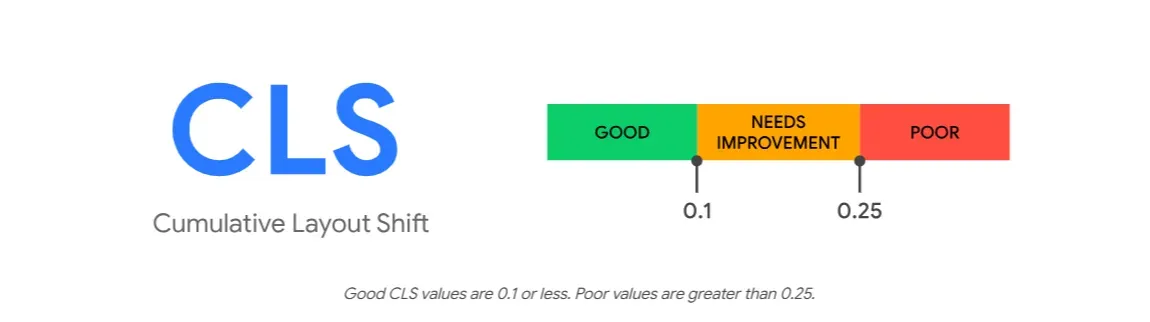
Google does not look at a single page load to score a site. Instead, it evaluates these thresholds using the 75th percentile of real visitor data, meaning that at least 75 percent of page views to a URL need to meet the good threshold for that URL to pass. This is an important detail for Shopify merchants because it means your store cannot pass based on how fast it loads on your office laptop with fiber internet. It needs to perform well even for a shopper browsing on a mid-range phone over a patchy mobile network.
For eCommerce specifically, the stakes are commercial, not just technical. eCommerce sites that pass all three thresholds show a 24 percent higher conversion rate than sites that do not, and sector leaders such as Amazon, Zalando, and ASOS maintain a median LCP below 1.8 seconds, CLS below 0.04, and INP below 150 milliseconds. A Shopify store does not need to match Amazon’s infrastructure, but the gap between “passing” and “failing” Core Web Vitals often determines whether a paid ad click turns into a sale or a bounce.
Why Core Web Vitals Matter for SEO & Conversions?
Core Web Vitals affect more than a developer’s dashboard. They sit at the intersection of search visibility and revenue, which is why marketing teams and developers both need to track them.
Core Web Vitals are a confirmed Google ranking factor, incorporated into page experience signals since June 2021. Content relevance remains the most important ranking factor, but Core Web Vitals can act as a tiebreaker when two pages have similar content quality, and in competitive niches, passing them can provide a measurable ranking advantage. For Shopify stores competing in crowded categories like fashion, beauty, or home goods, this tiebreaker effect can decide which product page shows up first. The conversion impact is documented beyond theory as well.
In an A/B test run by Vodafone Italy comparing two visually and functionally identical pages, a 31 percent improvement in LCP drove an 8 percent increase in sales, according to web.dev’s own case study. Other documented examples include Tokopedia seeing a 23 percent increase in average session duration after reducing LCP by 55 percent, and Nykaa achieving 28 percent more organic traffic after improving LCP by 40 percent. These are not agency estimates. They come directly from Google’s published case studies, and they show that performance work pays back in measurable business terms, not just cleaner audit scores.
Core Web Vitals 2026 Benchmarks for Shopify
Knowing the thresholds is one thing. Knowing where your store actually stands against the rest of the web is another. This section breaks down the current pass rates and what realistic targets look like for a Shopify store.
The three official thresholds have stayed consistent for several years. What has changed is the distribution of pass rates across the web and the relative difficulty of each metric for teams starting optimization work today.
| Metric | Good | Needs Improvement | Poor | Recommended Shopify Target |
| LCP | Under 2.5s | 2.5s – 4.0s | Above 4.0s | Under 2.2s |
| INP | Under 200ms | 200ms – 500ms | Above 500ms | Under 180ms |
| CLS | Under 0.1 | 0.1 – 0.25 | Above 0.25 | Under 0.08 |
The recommended Shopify targets sit comfortably inside Google’s “good” range while leaving a buffer, since Google measures at the 75th percentile and you want margin for slower devices and connections.
Looking at industry-wide pass rates gives useful context.
- Forty-three percent of sites still fail the 200 millisecond INP threshold, making INP the most commonly failed Core Web Vital across the web in 2026.
- Meanwhile, LCP pass rates sit around 78 percent, reflecting two years of ecosystem improvement from framework-level image optimization defaults, widespread CDN edge delivery, and the maturation of streaming server-side rendering patterns, while CLS is the most mature metric in the suite.
For a typical Shopify store, these numbers translate into realistic, achievable targets. A mid-sized eCommerce site should aim for LCP under 2.2 seconds, CLS under 0.08, and INP under 180 milliseconds, which requires product image optimization, third-party script management, and server-side rendering or pre-rendering for category pages.
What Page Types Struggle Most on Shopify
Not every page on a Shopify store fails Core Web Vitals for the same reason. Knowing which page type tends to fail which metric helps you prioritize your audit instead of guessing where to start.
Blog posts and homepages most commonly fail LCP because of image issues, while product and category pages tend to struggle most with CLS from dynamic content loading. INP failures concentrate on pages with heavy JavaScript interactions, checkouts, landing pages with forms, and filter-heavy listing pages. On Shopify specifically, this maps closely onto collection pages with filtering apps, product pages with size selectors and review widgets, and checkout-adjacent pages where upsell apps inject extra scripts.
How to Measure Core Web Vitals on Your Shopify Store
Fixing these metrics is only useful if you can verify the improvement with reliable data. This section covers the tools that matter and how to read them correctly.
Google Search Console’s Core Web Vitals report shows field data pulled from real visitors over a rolling 28-day window, grouped by URL. This is the data Google actually uses for ranking, so treat it as the source of truth rather than a single Lighthouse run. PageSpeed Insights combines this field data with a lab test, which is useful for diagnosing specific issues even though the lab score itself does not directly affect rankings.
For ongoing monitoring beyond Search Console’s monthly view, many development teams install the open-source web-vitals JavaScript library directly on the storefront to capture every visitor’s LCP, CLS and INP values in real time. A single aggregate INP number hides everything that matters, since the same average can come from a consistently mediocre site or one that is excellent except during a single laggy interaction, so slicing the data by route, device type, and country reveals where the real problems live.
A useful practice is setting internal alert thresholds tighter than Google’s official ones. Setting alerts at 80 percent of Google’s thresholds, such as INP above 160 milliseconds, LCP above 2.0 seconds, and CLS above 0.08, gives a team early warning before a metric crosses into “needs improvement” territory after a new app installation or theme update.
How to Audit LCP Issues on Shopify: Largest Contentful Paint
LCP measures how quickly the largest visible element, usually your hero image or main product photo, renders on screen. On Shopify, image handling and app scripts are almost always the root cause. Key areas to audit:
- Compress and serve modern image formats: Convert hero and product images to WebP or AVIF and check whether third-party app banners are bypassing Shopify’s CDN compression
- Prioritize the LCP image instead of lazy loading it: Remove any
loading="lazy"attribute from your hero image and add fetchpriority=”high” instead - Reduce render-blocking apps and scripts: Audit scripts loading in without async or defer and enable delayed loading settings where available
- Diagnose the actual LCP element first: Use Lighthouse’s “Largest Contentful Paint element” callout to confirm which exact element you are optimizing before making changes
For a deeper walkthrough of each fix with code examples, read this blog on Shopify Core Web Vitals 2026: The Complete Guide to Fixing INP
How to Identify CLS Issues on Shopify: Cumulative Layout Shift
CLS on Shopify almost always comes from apps and dynamic content rather than the core theme. The fixes are straightforward once you know where to look:
- Reserve space for every image, video, and embed: Add explicit width and height attributes or a CSS aspect-ratio box so the browser holds the correct space before assets load
- Reserve space for third-party widgets: Set a minimum height on containers for chat widgets, review badges and announcement bars so late-loading content does not push the page around
- Use font-display: swap carefully: Pair it with a preload tag for your primary font file to keep the fallback-to-final-font swap early and predictable
- Watch for promotional banners and pop-ups: Test flash sale bars and cookie consent banners in real browsing sessions since some shifts only appear seconds after page load
How to Audit INP Performance on Shopify: Interaction to Next Paint
INP measures the full responsiveness of every interaction across the session, not just the first click. On Shopify, the cause is almost always cumulative app JavaScript rather than theme code:
- Audit and trim your app stack: Remove any app not actively driving revenue; stores running ten or more front-end apps simultaneously almost always fail INP on mobile
- Break up long JavaScript tasks: Split heavy functions into smaller chunks and yield control back to the browser between them using scheduler.yield()
- Prioritize user-visible updates over background work: Defer analytics pixels and heatmap trackers to a lower priority so they never compete with an add-to-cart tap
- Treat checkout and filter pages as priority zones: Test INP directly on collection pages with live filtering and product pages with variant selectors, since automated audits rarely catch these
What Changed in the 2026 Core Web Vitals Update
Shopify merchants who passed Core Web Vitals comfortably in past years should not assume their store still does, since Google has refined how it measures responsiveness. This section covers what actually changed and what to re-check.
Google’s 2026 update tightened the INP good threshold’s measurement methodology to better capture sustained interaction latency on input-heavy pages, expanded soft-navigation support in CrUX for single-page applications and made Time to First Byte a more prominent diagnostic in PageSpeed Insights without elevating it to a ranking signal. The three core thresholds themselves did not change.
The practical implication for Shopify stores is straightforward. Sites already passing Core Web Vitals at the 75th percentile see no change, while sites that were borderline on INP may need to re-measure under the updated methodology, since a store that passed last year could now show as failing without any code changes on its end. If your last INP audit predates 2026, treat it as outdated and re-run it with a current version of the web-vitals library.
Time to First Byte also deserves more attention going forward even though it remains a diagnostic rather than a ranking factor. TTFB functions as an LCP floor, since a slow server response means LCP cannot be fast no matter how well the rest of the page is optimized, and current guidance treats TTFB below 200 milliseconds as good and above 500 milliseconds as poor. For Shopify stores, TTFB is largely controlled by Shopify’s own infrastructure, but heavy server-side app integrations and custom checkout extensions can still add meaningful delay.
When to Run a Core Web Vitals Audit?
Passing Core Web Vitals once is not the same as keeping them passed. Every new app, design change or promotional banner is a potential regression. The stores that maintain good scores long-term are the ones that treat performance monitoring as an ongoing process, not a one-time project.
A practical way to do this is to define clear triggers for when a fresh audit is due. Here is when you should run a Core Web Vitals audit on your Shopify store:
- After changing themes: A new theme resets your entire front-end baseline. Always audit LCP, CLS and INP before going live.
- Before major sales events: Run an audit before BFCM, seasonal sales, or any campaign driving high traffic, since a slow store during peak days directly costs revenue.
- After installing apps: Every new app adds front-end JavaScript. Audit immediately after installation to catch any LCP or INP regression before it affects real visitors.
- After redesigning pages: New hero images, layout changes, or added sections can break CLS. Check before publishing.
- Quarterly: Even without deliberate changes, third-party scripts update themselves and scores drift. A quarterly audit catches silent regressions.
- When Search Console reports failures: If a URL group moves from Good to Needs Improvement or Poor in the Core Web Vitals report, treat it as urgent and investigate immediately.
Shopify Core Web Vitals Audit Checklist
Before making any changes, verify the following across your store:
Pages to audit:
☐ Homepage
☐ Product pages
☐ Collection pages
☐ Blog posts
☐ Search page
Performance environments:
☐ Mobile performance
☐ Desktop performance
Measurement tools:
☐ Core Web Vitals report in Search Console
☐ PageSpeed Insights
Audit areas:
☐ Third-party apps
☐ Largest LCP element
☐ Layout shifts
☐ JavaScript-heavy interactions
The Stores Passing Core Web Vitals in 2026 Are Already Winning the Customers
Running a Shopify Core Web Vitals audit is not a one-off task, it is the starting point for a faster, more competitive store. LCP under 2.5 seconds, CLS under 0.1, and INP under 200 milliseconds remain the official thresholds in 2026, but a well-audited Shopify store should aim tighter, closer to 2.2 seconds, 0.08 and 180 milliseconds, to build in a safety margin for slower devices and unpredictable app behavior.
The fixes this audit guide covers are achievable without a full rebuild. Prioritize the right images, reserve space for dynamic content, trim the JavaScript weight of your app stack, and then monitor the results using Search Console and PageSpeed Insights on a regular schedule rather than waiting for scores to quietly fail. Use the checklist above as your recurring audit template before every major change and before every big sales campaign.
Was this guide helpful? If you want to get more blogs like this on Shopify store optimization, subscribe to our blogs.
Frequently Asked Questions
What are good Core Web Vitals scores for a Shopify store in 2026?
A Shopify store should aim for LCP under 2.5 seconds, CLS under 0.1, and INP under 200 milliseconds to meet Google’s official “good” thresholds. For a comfortable safety margin, mid-sized e-commerce sites should target LCP under 2.2 seconds, CLS under 0.08, and INP under 180 milliseconds.
Why does my Shopify store fail INP even though it loads quickly?
INP measures responsiveness to clicks, taps, and keystrokes throughout an entire visit, not just loading speed. A fast-loading Shopify page can still fail INP if installed apps run heavy JavaScript on the main thread when a shopper interacts with filters, size selectors, or add-to-cart buttons.
Do Shopify apps affect Core Web Vitals?
Yes, apps are one of the most common causes of Core Web Vitals failures on Shopify. Each app adds its own script, and apps that inject pop-ups, banners, or sliders without reserving layout space or deferring their JavaScript frequently cause CLS and INP problems.
How often should I check Core Web Vitals on my Shopify store?
Check Core Web Vitals before and after any significant change, including new app installations, theme updates, or promotional banners, rather than relying solely on an annual audit. Google Search Console updates its field data on a rolling 28-day basis, so allow time after a fix before expecting the report to reflect improvement.
Is Lighthouse the same as Core Web Vitals in Google Search Console?
No. Lighthouse produces a lab score from a single simulated page load, while Google Search Console’s Core Web Vitals report uses real visitor field data collected over 28 days. Use Lighthouse to diagnose specific issues, but treat Search Console as the authoritative score for ranking purposes.
Did Core Web Vitals thresholds change in 2026?
The three official thresholds did not change. LCP remains 2.5 seconds, INP remains 200 milliseconds, and CLS remains 0.1. What changed is the measurement methodology behind INP, which now better captures sustained interaction latency, so stores that were borderline on INP in past years should re-test their scores.
Keep reading
Shopify SEO Checklist for Launch Day: The Last 48 Hours
A Shopify store's SEO gets set in the 48 hours before launch: titles, sitemap submission, and the password screen all need fixing before the first crawl.
Read article
Do Shopify Stores Need Breadcrumbs for SEO?
Shopify's Dawn theme ships no breadcrumb trail or schema, so you need StoreSEO's one click Breadcrumb Schema to help Google read your site structure.
Read article
Shopify FAQ Answer Template: 6 Fill-In Formats
Six copy-paste FAQ answer templates for shipping, returns, sizing, warranty, subscriptions, and general support, ready to fill in and publish today.
Read article