
Shopify SEO Checklist for Launch Day: The Last 48 Hours
 Written by M Asif Rahman
Most SEO mistakes on a brand-new Shopify store are not the slow kind. They happen in the 48 hours before launch, when titles are still placeholders, the sitemap has not been submitted, and the password screen still blocks every crawler. Fix those three in order and the rest of launch week is mostly watching Search Console.
TL;DR: six tasks, in deadline order, from two weeks before launch to the first week after.
| Deadline | What to do | Why it matters | Time needed |
|---|---|---|---|
| 2 weeks before | Lock URL handles and collection structure | Shopify’s own setup guidance warns that changing a handle later can affect rankings it has already earned | 1 to 2 hours |
| 1 week before | Write real titles and meta descriptions, not placeholders | The version a crawler indexes first is the one every later edit gets compared against | Half a day |
| 3 days before | Connect Search Console and prepare the sitemap submission | Indexing already runs 48 to 72 hours behind on a brand-new domain, so earlier submission buys back time | 15 minutes |
| Launch day | Preview the store, then remove the storefront password | A page cannot be indexed while the password screen is still blocking it | 10 minutes |
| First 48 hours after | Check the Search Console coverage report daily | A crawl error caught on day one is a quick fix; caught on day ten it is a reindex | 5 minutes a day |
| First week after | Confirm the sitemap status once the first pages show as indexed | Confirms the submission actually worked rather than stalling silently | 5 minutes |
What Should You Do Two Weeks Before Launch?
Two weeks out is when to make the decisions that get expensive to reverse once Google has crawled the store even once. Shopify’s own setup guidance is specific about one of them: avoid frequently changing a product’s URL handle, because it can affect search rankings the page has already built. A store with zero rankings yet has nothing to lose from a handle change this week; the same change three months after launch is a different, costlier decision.
The same window is the time to fix collection structure and navigation, not after the first hundred visitors have bookmarked a link. Decide now which collections exist, how products are tagged, and what the main menu looks like, because every one of those choices becomes a URL a crawler will eventually index. This checklist is for a brand-new store; a store moving platforms instead has a different set of risks, covered in our Shopify SEO migration guide. The same deadline-ordered approach carries a store through its first seasonal sale too, covered in our Black Friday SEO checklist.
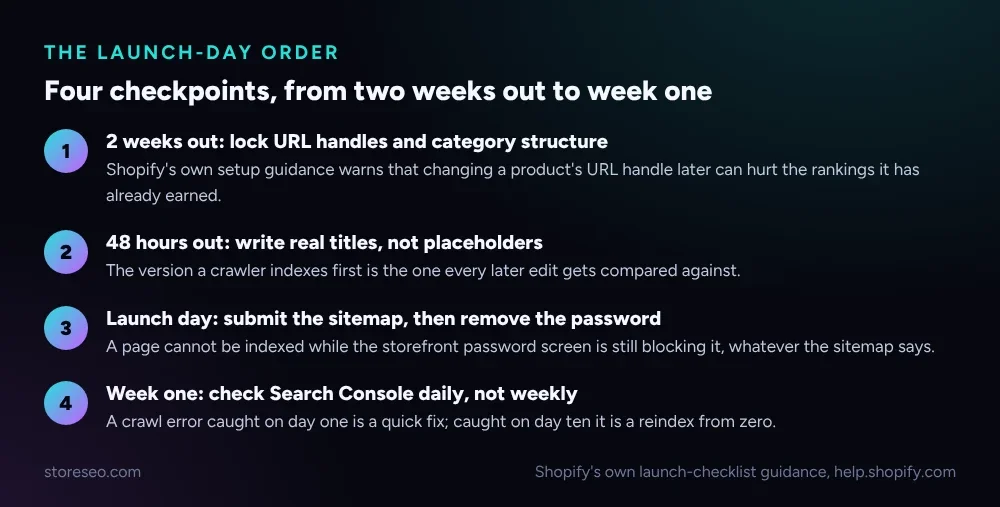 The same four checkpoints run through the rest of this checklist, in order.
What Should You Do In The Last 48 Hours Before Launch?
This is the window that actually decides what Google sees first. Every page Shopify ships with a theme carries a generic default title and description until a merchant overwrites them, and that default is exactly what gets indexed if launch day arrives before anyone touches it.
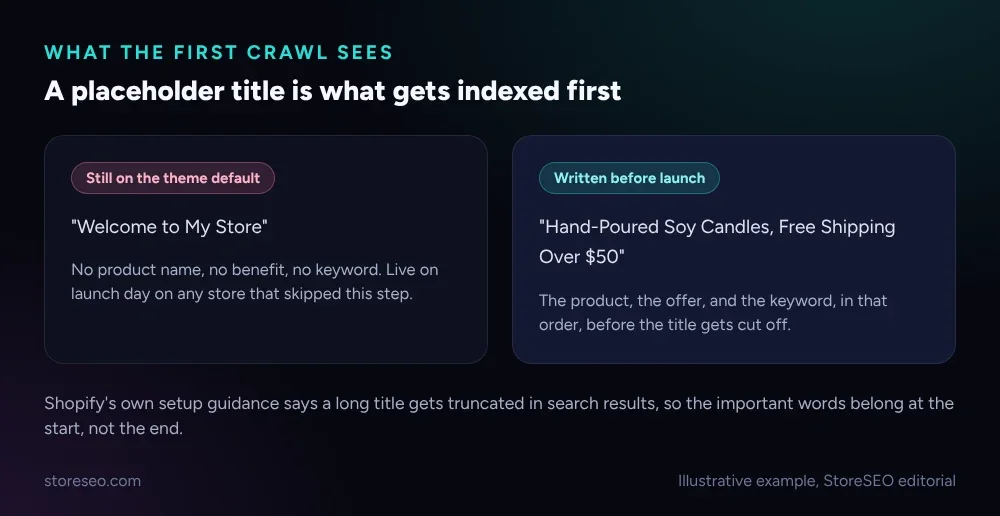 The difference between a skipped step and a 10-minute fix.
Shopify’s own guidance adds a second reason to get this right the first time: a long title gets truncated in search results, so the important words belong at the start, not buried after the brand name. Write the homepage title and meta description, the top product titles, and the main collection titles before launch day, not after. This is also the moment to turn on StoreSEO’s SEO Schema for products and collections, so the structured data a crawler reads matches the page a shopper sees from the first visit, instead of catching up weeks later.
How Do You Get The New Store Indexed As Fast As Possible?
Google’s own crawling guidance is clear about when a sitemap actually helps: a new site with few external links pointing to it, which describes nearly every store on launch day. A sitemap does not change ranking, but it gives Google a direct list of every page to crawl instead of waiting for links to be discovered one at a time, the same discovery process our diagram of how Google crawls a Shopify store walks through end to end. That difference matters most in the exact week a store has the fewest inbound links it will ever have.
Our full guide to indexing a Shopify store in Google Search covers the complete submission and troubleshooting process; what follows here is the version scoped to the first 48 hours.
Shopify’s own setup guidance states plainly that search engine indexing is not instant: it can take 48 to 72 hours for Google and other search engines to index new pages, and not every page is guaranteed to be indexed at all. That window is the reason the sitemap submission belongs in the 3-days-before step, not the morning-of step. StoreSEO’s Google Search Console integration handles the sitemap submission and instant indexing requests from the same screen used to manage products, so a store does not need a separate login or a developer to get the sitemap in front of Google before launch.
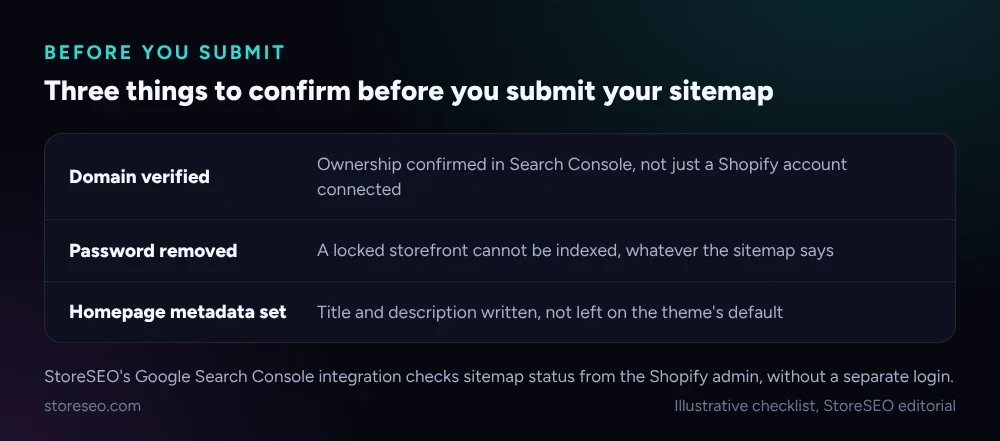 Submitting a sitemap behind a password screen wastes the submission entirely.
A sitemap submitted while the storefront password is still on is effectively ignored: the crawler hits the password page on every URL and has nothing to index. Remove the password only once the store is actually ready for customers, then submit, in that order.
What Should You Check In The First Week After Launch?
The first week is where a quiet mistake either gets caught cheap or gets expensive. Search Console’s coverage report is the one screen worth a daily look rather than a weekly one: a crawl error on day one is a two-minute fix, the same error on day ten means the page has already been dropped from the index and needs to be rediscovered from nothing.
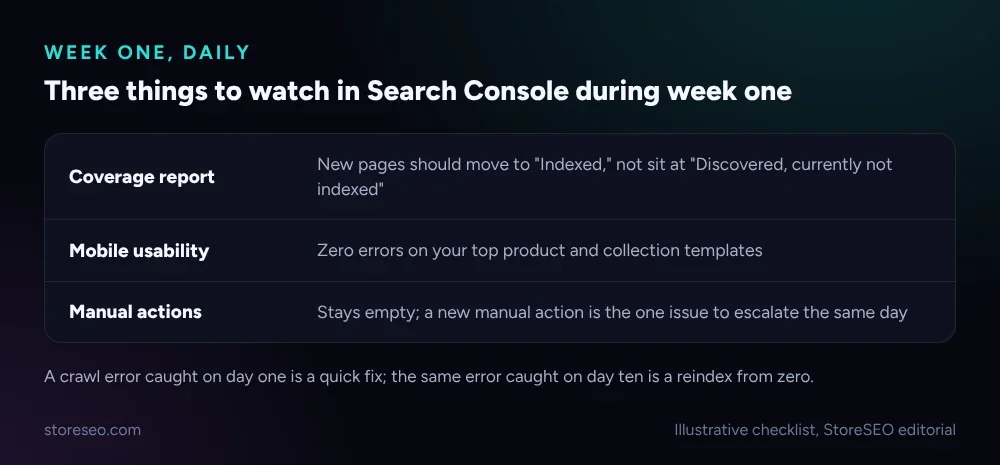 Catch a problem in week one and it is a fix, not a recovery.
Watch mobile usability on the top product and collection templates specifically, since a theme change made in the rush before launch is the most common cause of a new mobile error. Manual actions should stay empty through week one and beyond; a new one appearing is the single issue worth escalating the same day it shows up, ahead of everything else on this list.
Frequently Asked Questions (FAQs)
1. How soon after launch does a Shopify store get indexed?
Shopify’s own guidance says indexing typically takes 48 to 72 hours once a page is submitted and crawlable, and not every page is guaranteed to be indexed at all. A sitemap submitted early and a password removed on schedule are what keep a store inside that window rather than outside it.
2. Does submitting a sitemap before launch actually help?
It helps most on a brand-new site with very few external links pointing to it, which is every store on launch day, because the sitemap gives a crawler a direct list of pages instead of waiting for links to surface them. It does not improve ranking by itself; it only speeds up discovery.
3. What happens if the storefront password is still on when I submit the sitemap?
The crawler reaches the password page on every URL in the sitemap and finds nothing to index, so the submission is effectively wasted. Remove the password first, then submit the sitemap, never the other way around.
4. Should I change a product’s URL handle after launch if the first version was wrong?
Fix it in the first week if you must, since there is little ranking history yet to lose. Shopify’s own guidance is to avoid frequent handle changes specifically because a change later, once a page has earned some ranking, can affect it.
5. How often should I check Search Console in week one?
Daily, not weekly. A crawl error or a coverage issue caught the day it appears is usually a small fix; the same issue left for a week can mean the page has already dropped out of the index.
6. Do I need a developer to submit a Shopify sitemap to Google?
No. Shopify generates the sitemap automatically, and connecting it to Search Console is an admin-level task, not a code change. StoreSEO’s Google Search Console integration handles the submission and ongoing indexing requests from the same admin screen.
A launch-day checklist only works if it is followed in order, so lock the structure, write real titles, submit the sitemap, remove the password, then watch, and when the store is ready, try StoreSEO on the Shopify App Store.
Keep reading
Do Shopify Stores Need Breadcrumbs for SEO?
Shopify's Dawn theme ships no breadcrumb trail or schema, so you need StoreSEO's one click Breadcrumb Schema to help Google read your site structure.
Read article
Shopify FAQ Answer Template: 6 Fill-In Formats
Six copy-paste FAQ answer templates for shipping, returns, sizing, warranty, subscriptions, and general support, ready to fill in and publish today.
Read article
Does Changing Your Shopify Theme Hurt SEO?
Switching your Shopify theme keeps your URLs and settings intact, but it can quietly change the schema markup and headings your pages output.
Read article