
How Google Crawls a Shopify Store (One Diagram)
 Written by M Asif Rahman
Googlebot finds a Shopify page from your sitemap or a link, requests it, renders the JavaScript your theme loads, then decides whether to keep it. Four stages, four places a page can quietly disappear: a blocked rule, a missing sitemap entry, a slow render, or a noindex tag nobody meant to leave on.
TL;DR
| Stage | What happens | Who controls it | Action if it breaks |
|---|---|---|---|
| Discovery | Googlebot learns the URL exists from your sitemap, an internal link, or a prior crawl | Your sitemap and internal linking | Add an internal link and confirm the sitemap entry |
| Fetch | Googlebot requests the page the way a browser does | Shopify’s servers, your robots.txt | Check robots.txt for a Disallow rule, then check for server errors |
| Render | Googlebot runs the page’s JavaScript to see the finished HTML | Your theme’s scripts | Move critical content out of slow, late-loading scripts |
| Index | Google decides whether to store the page in its index at all | Canonical tags, noindex, duplicate content | Remove a stray noindex tag or fix the canonical target |
| AI crawl | A named AI bot requests the page on its own schedule, separately from Googlebot | Your robots.txt’s named bot groups | Check the bot by name instead of assuming it is blocked |
How Does Googlebot Find a Shopify Product Page?
Discovery comes first, and it has exactly three sources: your sitemap, a link from a page Google already knows, or a leftover memory of a page it crawled before. Shopify generates /sitemap.xml automatically and keeps it current as products publish, which is why most new products surface within days without any manual step. A page with zero internal links pointing to it, often a seasonal landing page nobody linked from the homepage or a collection, has to rely on the sitemap alone, and a sitemap entry that never got added (a common gap on hand-built landing pages outside the theme’s normal templates) means Google has no path in at all.
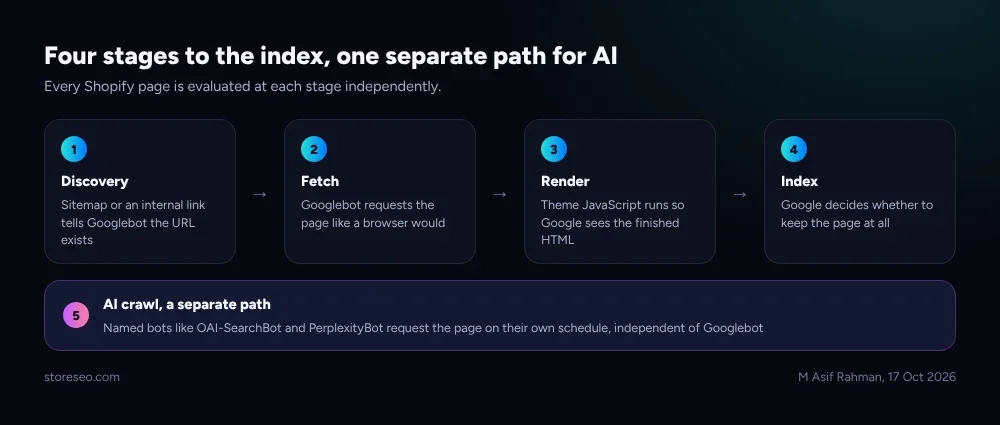 Each numbered stage is a separate decision point; a page can fail at any one of them without the others ever being reached.
The legend above maps to the TL;DR table one step at a time: 1 discovery (sitemap or link), 2 fetch (the request itself), 3 render (running the theme’s scripts), 4 index (the keep-or-drop decision), and a fifth, separate path for AI crawl, since an AI bot’s own request does not wait for Googlebot to go first.
What Can Stop Googlebot Before It Ever Renders the Page?
Two kinds of block exist, and they happen at different stages. The first is explicit: a Disallow rule in robots.txt, a noindex meta tag, or a server returning anything other than a clean 200 (a soft 404 that still serves a 200 status is a frequent Shopify trap on an out-of-stock product that nobody redirected). The second is accidental: a slow-loading script that injects the product description after Googlebot’s render budget runs out, or a canonical tag pointing at the wrong URL because a template was copied from a different page type. Shopify’s own canonical_url behavior and crawl guidance are documented directly on shopify.dev, which is the first place to check before assuming a block is intentional.
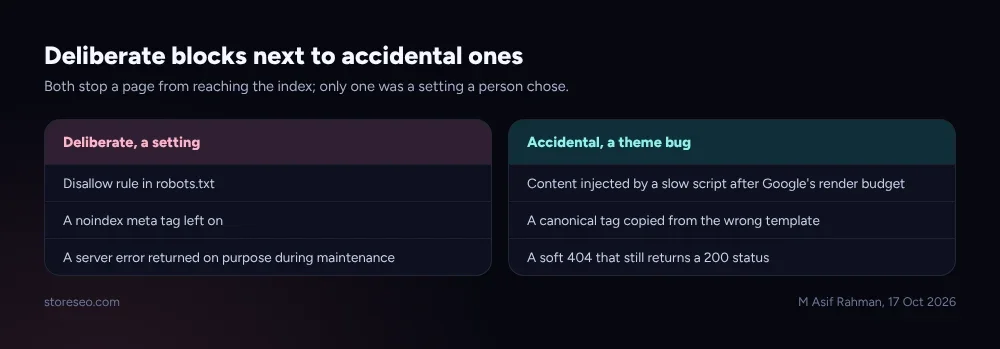 The left column is a deliberate setting; the right column is usually a theme bug nobody noticed until traffic dropped.
A page that passes discovery and fetch but still never appears in search is almost always stuck in render or index, not in the first two stages, which is why a crawl problem and an indexing problem need different fixes even though both look the same from the outside: “it’s just not showing up.”
What Does a Real Shopify robots.txt Actually Allow?
Shopify’s own Dawn theme ships a robots.txt with one wildcard group (User-agent: *, Allow: /) plus a separate adsbot-google group, and it blocks the predictable crawl traps: admin, cart, checkout, orders, account pages, and the filter and sort parameters that could otherwise generate near-infinite duplicate URLs. It also declares a Sitemap: line, which is how Googlebot and every other well-behaved crawler finds the file without being told twice.
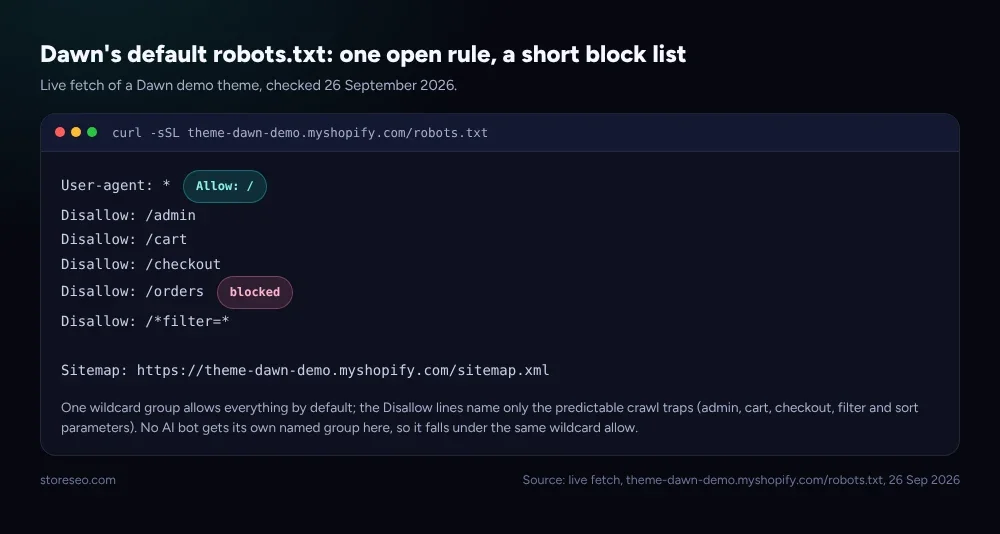 Live fetch of a Dawn demo theme’s robots.txt, 26 September 2026: one open rule, a short, deliberate block list, and a sitemap pointer at the bottom.
Most stores never touch this file and do not need to. The place it actually matters is sitemap health and resubmission after a structural change, which is the half of discovery a theme file cannot fix for itself. StoreSEO’s own sitemap submission and instant indexing tooling resubmits your sitemap to Search Console and pings Google directly when products change, so the discovery stage above does not sit waiting on Google’s own crawl schedule. If a page you expect to be indexed still is not, our why isn’t my page indexed walkthrough covers the index-stage causes in the TL;DR table one at a time.
How Do AI Crawlers Differ From Googlebot?
An AI assistant does not see your store through Googlebot at all. ChatGPT, Claude and Perplexity each run their own named bots, and OpenAI’s own bot documentation draws a line most store owners never hear about: GPTBot is a training-data crawl (a Disallow opts your content out of being used to train a future model), OAI-SearchBot is the separate crawl that lets ChatGPT cite your page as a live search answer, and ChatGPT-User is neither, it is a one-off fetch triggered by an actual person asking a question in the chat window. Blocking GPTBot does not remove you from ChatGPT’s answers; blocking OAI-SearchBot does.
| Bot | What it actually does | Independent of Googlebot? | Blocking it removes you from |
|---|---|---|---|
| Googlebot | Standard search crawl and index | n/a, this is the baseline | Google Search results |
| GPTBot | Crawls content to train future models | Yes | Nothing visible today, only future training use |
| OAI-SearchBot | Crawls for ChatGPT’s live search answers | Yes | ChatGPT’s cited search answers |
| ChatGPT-User | Fetches one page when a person asks about it in chat | Yes | That single live lookup, not a background crawl |
| PerplexityBot | Crawls for Perplexity’s answers | Yes | Perplexity’s cited answers |
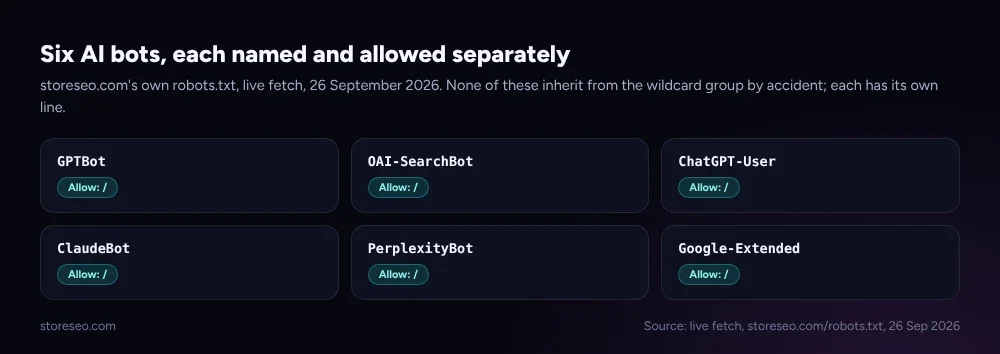 storeseo.com’s own robots.txt, live fetch, 26 September 2026: six AI bots are each named and allowed separately, none of them inherited from the wildcard group by accident.
A theme’s default robots.txt almost never names these bots at all, which means they fall under the wildcard User-agent: * group and are allowed unless a store deliberately blocks them. StoreSEO’s sitemap tooling above handles the Google half of this automatically; checking the AI-crawler half is a separate, manual step, and “usually allowed” is worth confirming rather than assuming: running your own store through AIScan, a free agent-readiness checker, shows exactly which named AI bots a page currently allows or blocks, the same way the table above does for this one.
Crawl and AI-crawl problems both start in the same place our robots.txt guide covers in depth, and the 148-store pattern behind that guide is detailed in our AI crawler study. If the page in question is a collection filtered by tags rather than a single product, our guide to tags, collections and filters covers the duplicate-URL risk this diagram’s fetch stage glosses over. Start from the fundamentals checklist if crawling is only one of several things you suspect is wrong.
Frequently Asked Questions (FAQs)
1. Why does Google say a page is “Discovered, currently not indexed”?
That status means Googlebot found the URL (discovery worked) but has not yet fetched or decided to index it, usually because of crawl budget, not a block. A thin page, a slow server response, or simple queue depth on a large site are the common causes; a direct block would show a different status entirely.
2. Does submitting a sitemap guarantee Google will crawl every URL?
No. A sitemap is a hint, not an instruction, and Google still prioritizes by its own crawl budget and judgment of a page’s value. Submitting one removes the discovery barrier; it does not remove queuing, rendering or indexing decisions further down the path.
3. Can a fast page still fail at the render stage?
Yes, if the content that matters loads after Googlebot’s render budget runs out, regardless of how fast the page feels to a person clicking through it. Content injected by a slow third-party script, or hidden behind a user interaction Googlebot never performs, is the usual cause.
4. Do I need to edit robots.txt myself to allow AI crawlers?
Usually not. Most themes’ default robots.txt does not name AI bots at all, so they fall under the open wildcard rule and are already allowed. Edit the file only if you want to deliberately block one, most often a training-only bot like GPTBot, which is a brand decision rather than an SEO one.
5. Why does a page look fine in the browser but still show as blocked?
Because a browser does not read robots.txt the way a crawler does; it only renders what the server sends it. The block happens before the request reaches the page at all, so visually inspecting the rendered page tells you nothing about whether a crawler was ever let in.
6. Is a slow server response the same problem as a render-stage block?
No, they sit at different stages. A fetch problem means Googlebot never got a page to render at all, while a render problem means the server answered fine but the page’s own scripts were too slow to finish.
Four stages, five bots, one file worth checking occasionally rather than ignoring entirely: that is most of what determines whether a Shopify page ever reaches a search result or an AI answer. For the sitemap resubmission and instant-indexing half of this that nobody wants to do by hand every time a product changes, try StoreSEO on the Shopify App Store.
Keep reading
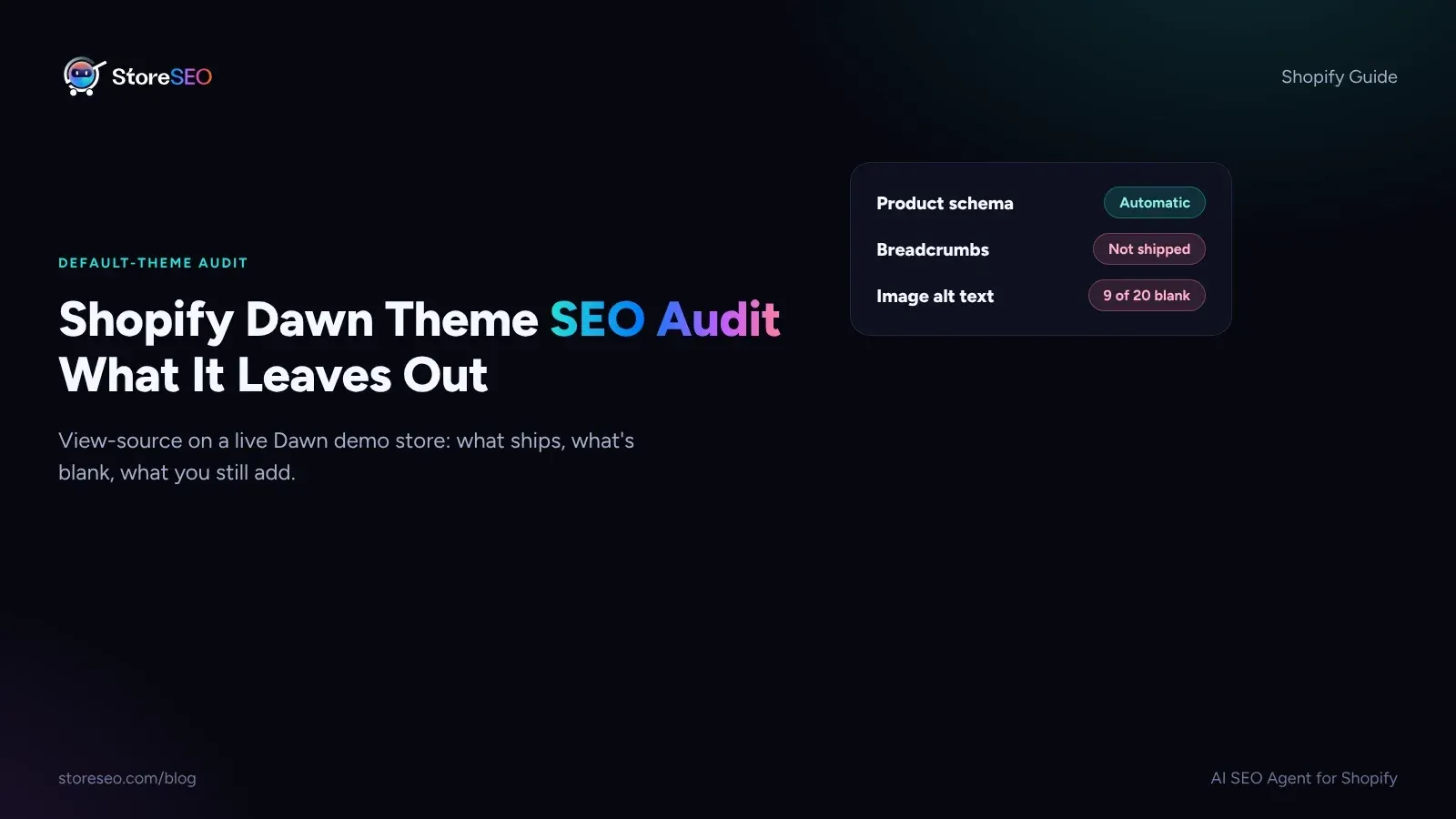
Shopify Dawn Theme SEO Audit: What It Leaves Out
Shopify Dawn writes Product and Organization schema on its own, but it ships no breadcrumbs, no image alt text and no review markup out of the box.
Read article
Shopify SEO Brief Template for Your Theme Developer
A one-page brief gives your theme developer the SEO fields to leave alone, the checks that must pass, and exactly who signs off before launch day.
Read article
Shopify SEO: The Complete Guide
Shopify SEO means six things done right: technical setup, product pages, structured data, content, fixes and AI visibility, each with a next step.
Read article