
Why Is Only Part of Your Shopify Catalog Indexed?
 Written by M Asif Rahman
When Google Search Console shows some products indexed and others sitting gray, the cause is almost always one of four things: the missing pages are new, something is blocking or deindexing them on purpose, Google sees them as duplicates of another URL, or your catalog is too large for how often Google is willing to crawl it.
TL;DR: start with these four checks, in this order.
| Symptom in Search Console | Likely cause | What to do first |
|---|---|---|
| “Discovered, currently not indexed” on a brand new product | The page is simply new | Wait about a week, then submit it directly |
| “Excluded by noindex tag” or “Blocked by robots.txt” | Something is deliberately keeping it out | Check that page’s own meta tag and robots.txt, not Search Console alone |
| “Duplicate, Google chose different canonical than user” | Google sees this URL as a copy of another one | Inspect the URL to see which page Google picked as canonical |
| “Crawled, currently not indexed” across a large share of the catalog | Google is not spending enough crawl budget on your store | Consolidate duplicate URLs and block the ones that add no value |
What Does “Partially Indexed” Actually Mean?
Search Console’s Page Indexing report does not have a single “not indexed” bucket. It sorts every unindexed URL into one of several named statuses, and each one means something different. Google’s own documentation on the report is specific about two of the most common: “Discovered, currently not indexed” means “the page was found by Google, but not crawled yet,” usually because crawling it right away “was expected to overload the site,” so Google rescheduled the crawl. “Crawled, currently not indexed” means Google did fetch the page but chose not to index it, and Google is explicit that this status alone “doesn’t necessarily indicate an issue that needs attention,” since it does not index every page on the web.
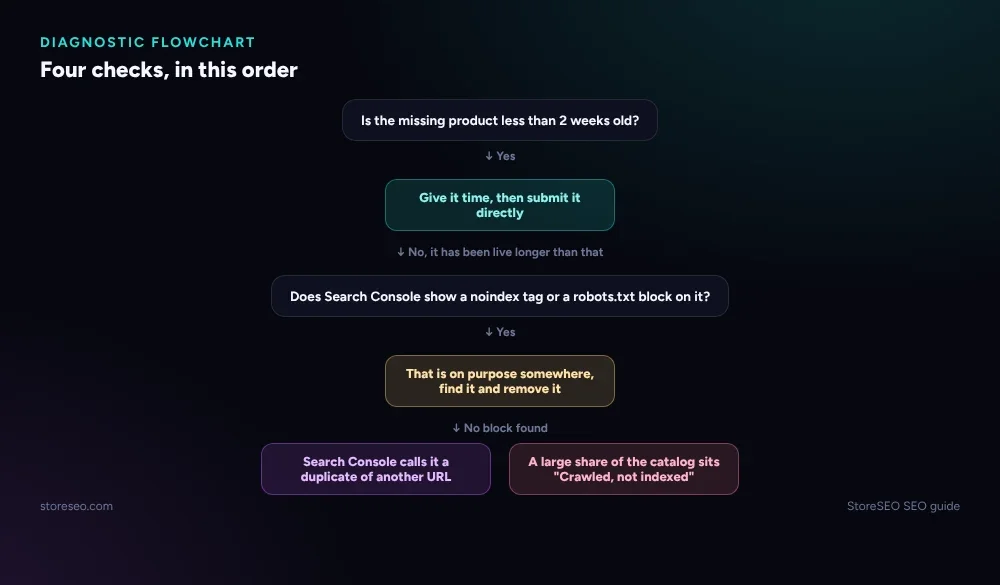 Work through these in order. Most partial-catalog cases resolve at the first or second branch.
Google’s own guidance also names the gray statuses that are working as intended rather than broken: “an expected robots.txt rule on your site, a noindex tag on the page, a duplicate URL, or a 404 for a page that you’ve removed.” That is the real split this post walks through: a status that needs no action, and one that does.
Are the Missing Products Just New?
The simplest cause is also the one Google’s own help documentation leads with: “the missing pages, or your site, is new,” and it can take a week or so for Google to start crawling and indexing a new page. If every unindexed product in the list was published in the last several days, this is very likely the whole story, not a technical fault.
Two things speed this up on a Shopify store rather than waiting it out. Shopify maintains its own sitemap automatically, split into chunks it updates in real time (a live fetch of the Dawn demo theme’s sitemap.xml shows separate sitemap_products_1.xml, sitemap_collections_1.xml and sitemap_pages_1.xml files, none of them hand editable), so a new product is already discoverable through the sitemap without any extra step. What a merchant can still do on top of that is ask Google to look sooner: StoreSEO’s Sitemap submission, instant indexing feature submits a new or changed URL straight to Search Console rather than waiting for Google to revisit the sitemap on its own schedule, documented in store-not-appearing-in-google-search-results. For a handful of new products that is usually the fastest fix available; for a bulk import of hundreds at once, expect the week-ish window Google itself describes, even with instant indexing in use.
Are They Being Blocked or Deindexed on Purpose?
Before assuming anything is broken, check whether the missing pages are blocked deliberately, because this is the second status Google’s own report calls expected rather than a problem. A disallow rule in robots.txt and a noindex tag are both legitimate tools, not always mistakes.
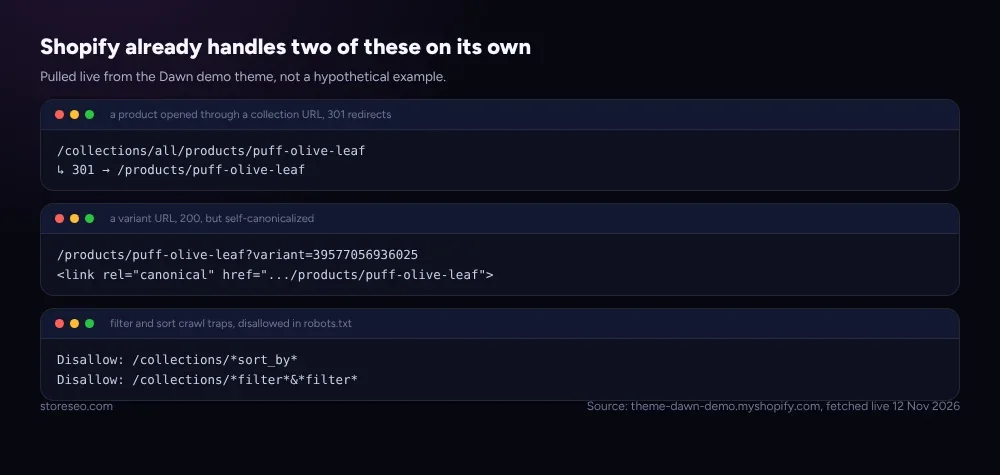 None of this is hypothetical: all three snippets are pulled from the Dawn demo theme live.
A live fetch of theme-dawn-demo.myshopify.com/robots.txt on 12 Nov 2026 shows Shopify’s default theme already disallowing the URL patterns most likely to waste crawl budget on a large catalog: sort order combinations (Disallow: /collections/*sort_by*), multi-filter combinations (Disallow: /collections/*filter*&*filter*), and a handful of preview and tracking parameters. None of these rules touch a plain product or collection URL, so if a real product page is missing, robots.txt on a default Shopify theme is rarely the reason; the more common culprit is a noindex tag added by an app, a theme customization, or a merchant following outdated advice. Check the specific URL with Search Console’s own inspection tool rather than guessing from the sitemap alone, since that is the only way to see which rule, if any, is actually attached to that page.
Are They Duplicates of Another URL?
Shopify generates more than one URL for the same product by design, and Search Console’s “Duplicate” statuses are how Google reports what it did about that. The same live fetch shows Shopify already resolving the two most common cases on its own, before a merchant has to do anything: opening a product through a collection path like /collections/all/products/puff-olive-leaf returns a 301 redirect straight to the bare /products/puff-olive-leaf URL, and a variant-specific URL like /products/puff-olive-leaf?variant=39577056936025 answers 200 but carries its own <link rel="canonical"> tag pointing back at the bare product URL. Google’s own documentation on the “Duplicate without user-selected canonical” status confirms this is working as intended: “Google does not serve duplicate pages,” and the page that is not shown is not an error unless the wrong one was chosen as canonical.
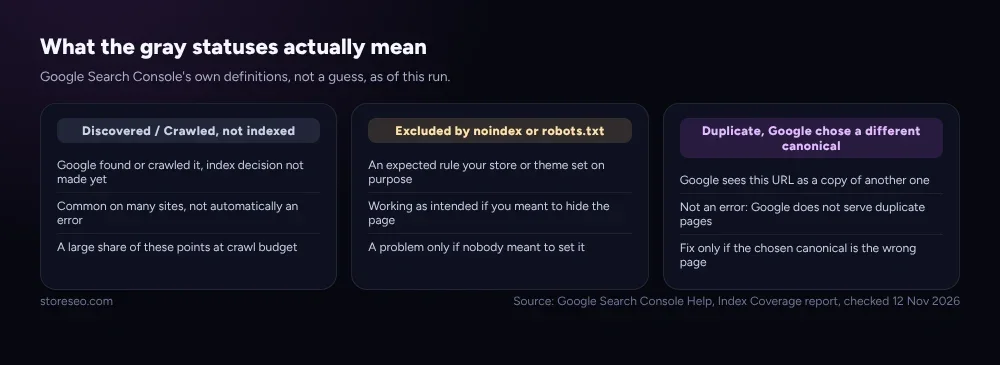 Two of the three categories here need no fix at all. The only one worth acting on is a canonical pointed at the wrong page.
The one version of this worth investigating is a genuine mistake: two different, real products sharing near-identical descriptions (a common pattern with supplier or dropshipping copy), or the same catalog syndicated to a second storefront without a cross-domain canonical. Use the URL Inspection tool’s “Google-selected canonical” field to confirm which page Google actually picked before changing anything; if it picked correctly, this status is not a problem to fix.
Is Your Catalog Too Big for Its Crawl Budget?
If new-page delay, deliberate blocks and genuine duplicates are all ruled out and a large share of the catalog still sits in “Crawled, currently not indexed,” the remaining cause is crawl budget: how much of Google’s attention your store earns relative to its size. Google’s own crawl budget guide names this explicitly as a concern for specific tiers of site, not every store: large sites with over a million unique pages that change weekly, medium or larger sites with over 10,000 pages that change daily, or any site where a large share of its URLs sit in “Discovered, currently not indexed”. A small or mid-sized Shopify catalog rarely reaches those thresholds on its own.
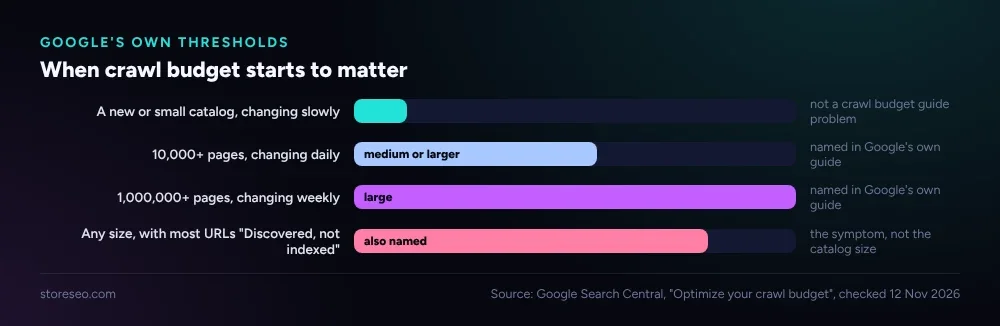 Google names these as rough estimates to classify a site, not exact cutoffs.
Where it does bite, Google’s own best practice is specific and worth quoting exactly, because it contradicts the instinct most merchants reach for: “consolidate duplicate content” so crawling focuses “on unique content rather than unique URLs,” and block the low-value pages that cannot be consolidated using robots.txt, not noindex, since “Google will still request, but then drop the page when it sees a noindex meta tag,” wasting the crawl it was trying to save. That is the same mechanism covered above in the robots.txt section: Shopify’s own crawl-trap disallow rules already do exactly this for filter and sort URLs, which is one reason a default Shopify theme rarely runs into crawl budget trouble on its own.
When Should You Ask for Help?
Most partial-indexing cases resolve at one of the first three branches within a week or two. Treat it as worth escalating when the share of indexed products has stayed flat for several weeks despite no blocking rule and no duplicate canonical issue, when a large, established catalog (the tier Google’s own guide actually targets) shows no improvement after consolidating duplicates, or when the Page Indexing report’s total URL count is far smaller than the store’s actual page count, which Google’s own guidance calls a sign that “Google isn’t finding pages on your site” at all, not merely choosing not to index them. For a genuine, site-wide indexing anomaly that does not match any of the explanations above, Google provides its own form to report an indexing issue rather than guessing further.
This flowchart only covers a catalog that is already live and partly indexed. If a store is brand new and nothing at all has appeared in Google yet, start with How To Index Your Shopify Online Store In Google Search instead. Each of the four gray statuses named above has its own full writeup, with more examples and screenshots, in Shopify Search Console Indexing Statuses, Explained. And because a partially indexed catalog is one entry on a longer list, Common Shopify SEO Problems, Ranked by Impact ranks it against the platform’s other frequent issues by how much traffic each one actually costs.
Frequently Asked Questions (FAQs)
1. How long should I wait before worrying about a new product not being indexed?
About a week, by Google’s own estimate. If the product is still showing as “Discovered, currently not indexed” after that, check for a noindex tag or robots.txt rule before assuming it is simply a timing issue.
2. Does a high “Discovered, currently not indexed” count always mean a problem?
No. Google’s own documentation treats this as common and often not an issue on its own, particularly right after a bulk import. It becomes worth investigating only if the count stays high for weeks with no new products being added.
3. Can I manually force Google to index one product page?
Search Console’s URL Inspection tool lets you request indexing for a single URL, which can speed things up for one page. It does not override a noindex tag or a canonical pointing elsewhere; those need to be fixed first.
4. Why does Search Console show my product as “Duplicate, Google chose different canonical than user”?
Google decided a different URL than the one you intended better represents the content, often because the two pages are close to identical. Use the URL Inspection tool to see which URL Google actually picked, and only change anything if that choice looks wrong.
5. Does deleting old out-of-stock products help the rest of the catalog get indexed?
It can, if those pages were adding thin or duplicate content that was absorbing crawl attention. It is only a meaningful fix at the crawl-budget scale Google’s own guide describes, not for a catalog of a few hundred products.
6. Is a product being indexed the same as it ranking?
No. Indexing means Google has the page available to show in results at all. Ranking is a separate decision about how high it appears for a given search, and a fully indexed catalog can still rank poorly for reasons indexing status does not touch.
Most partially indexed Shopify catalogs are not broken, they are just waiting on one of four ordinary explanations, and working through them in order usually finds the real one faster than guessing. try StoreSEO on the Shopify App Store
Keep reading
Noindex vs Nofollow vs Disallow: Shopify's 3 Blockers
Noindex removes a page from Google's results, nofollow stops credit passing through one link, and robots.txt disallow only blocks crawling, never indexing.
Read article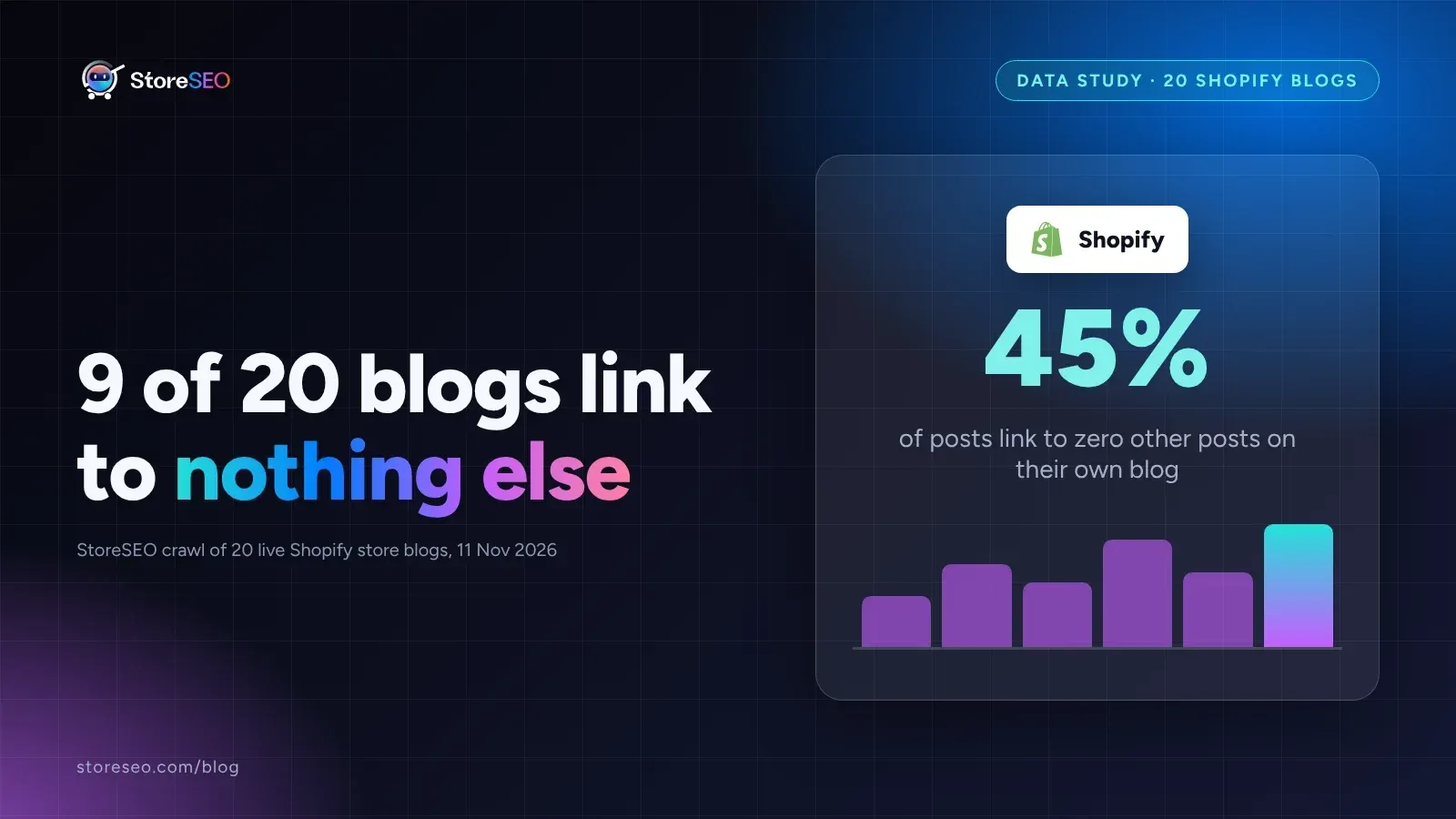
We Crawled 20 Shopify Blogs for Orphaned Posts
We crawled 20 live, public Shopify store blogs and found that 9 of them, fully 45 percent, link to zero other posts anywhere on their own blog.
Read article
Shopify Collection Filters: Index or Noindex?
Shopify canonicalizes most filtered collection URLs by default, so the real decision is only for a few edge cases, not every filter combination you have.
Read article