
Common Shopify SEO Problems, Ranked by Impact

The costliest Shopify SEO problems, in order, are a sitemap never submitted, duplicate or missing meta tags, missing structured data, no content strategy, unoptimized product images, and canonical tag mistakes on multi-collection products. All six showed up in a 100+ store audit, each fixable in an afternoon or less.
TL;DR: the table below ranks each problem by severity (1 to 5), how often it showed up in our audit of 100+ Shopify stores, and how long a real fix takes.
| Problem | Severity (1 to 5) | How common (our audit) | Time to fix |
|---|---|---|---|
| No sitemap submitted, or submitted wrong | 5 | 65% of stores | About 15 minutes |
| Duplicate or missing meta titles and descriptions | 4 | 78% of stores | 1 to 2 hours, bulk editor |
| No structured data beyond Shopify’s own minimum | 4 | 88% of stores (only 12% have any) | 1 afternoon |
| No content strategy, blog or FAQ pages | 4 | 70% of stores | Ongoing, weeks not hours |
| Unoptimized images, missing alt text | 3 | 80% of stores | 1 afternoon, bulk tool |
| Duplicate content and canonical tag issues | 2 | Not separately counted; seen on several stores in the same audit | 30 minutes to check |
Why Does a Missing or Broken Sitemap Cost You the Most?
A page Google cannot find cannot rank, full stop, which is why a broken sitemap sits at severity 5. In the same 100+ store audit, we found that nearly 65% of stores had never submitted a sitemap to Google Search Console, or had done so incorrectly. Shopify generates a sitemap automatically at /sitemap.xml, but automatic is not the same as submitted: Search Console only crawls what you register, on the schedule Google’s own sitemap documentation describes.
If your store’s problem looks bigger than a bad sitemap such as pages that were indexed once and then dropped, a stalled crawl budget, or whole sections missing from search, our indexing guide for Shopify stores walks through the deeper causes. StoreSEO’s own SEO Analysis and score tool flags a missing or stale sitemap submission as part of every scan, so you are not guessing whether yours is current.
Why Do Duplicate or Missing Meta Tags Hurt So Much?
This was the single most common issue in the audit: 78% of stores had critical on-page gaps, and missing or duplicate meta titles and descriptions were the most frequent one. A title and description Google rewrites for you, or copies from another page, is a title you did not choose, and Google’s own guidance on titles and snippets confirms it will do exactly that when yours is missing, duplicated, or too generic to be useful.
The fix is mechanical once you can see the whole catalog at once: StoreSEO’s SERP Preview Snippets let you write and preview a title and description per product or page, and a bulk pass across a catalog of a few hundred products takes an afternoon, not a redesign. If your traffic has already dropped rather than just stalled, our step-by-step organic traffic diagnosis is the faster starting point than working through every product by hand.
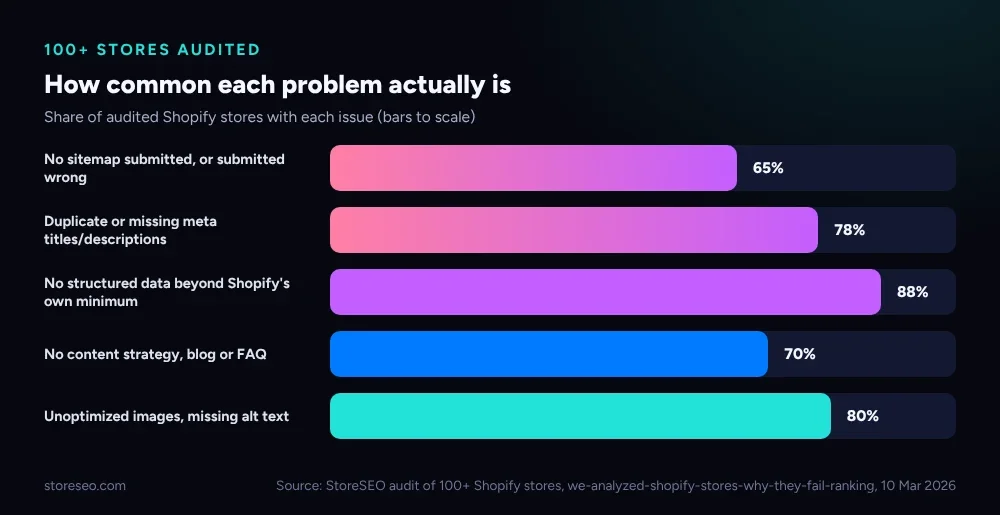 Share of audited stores with each issue. Source: StoreSEO’s audit of 100+ Shopify stores, 10 March 2026.
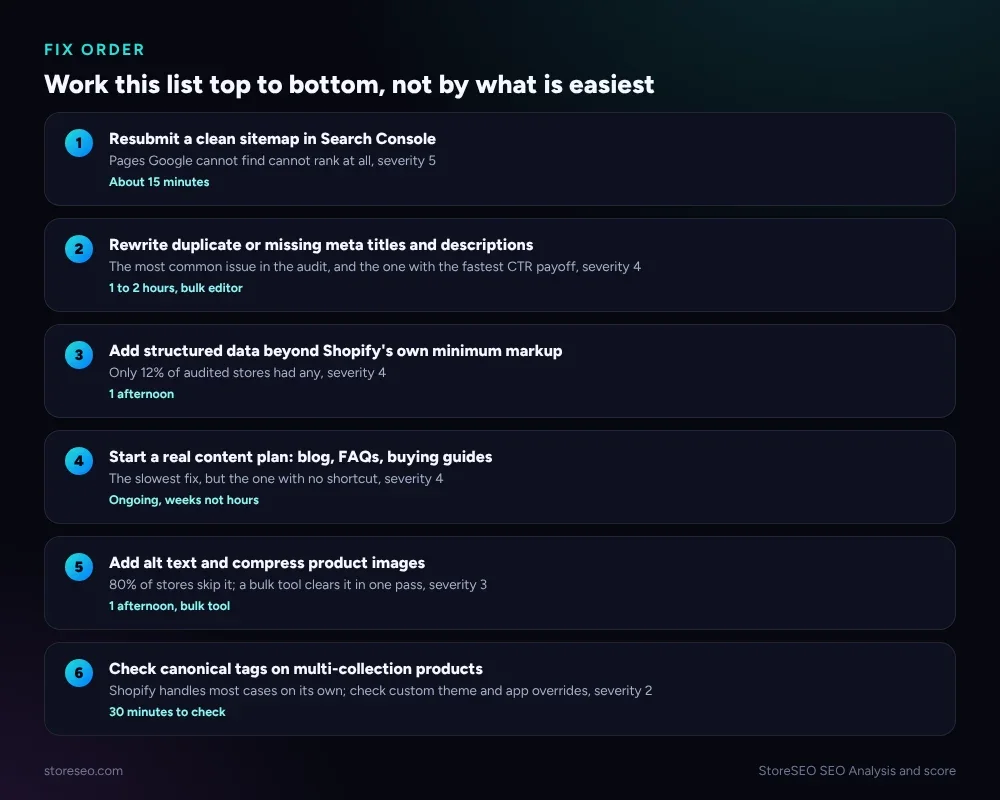 The full fix order from this page, in one place, if you want to skip ahead to the work.
What Does Missing Structured Data Actually Cost You?
Only 12% of audited stores had implemented any meaningful schema markup beyond what Shopify’s theme writes on its own, which means 88% are missing structured data that helps Google and AI engines understand what a page actually sells. Our separate, larger study, an audit of 300+ Shopify product pages for schema, found the same gap in more detail: most themes ship Product markup with price and availability, and stop there, with no Review, AggregateRating or BreadcrumbList field at all.
Google’s documentation on structured data is explicit that it does not change ranking directly, but it is how a search engine, or an AI assistant summarizing a page, confirms what a product is, what it costs, and whether it is in stock. StoreSEO’s Customize JSON-LD feature adds the fields a default Shopify theme leaves out, without touching the theme’s own code.
Why Does “No Content Strategy” Rank as a Top-Tier Problem?
70% of audited stores had zero content strategy: no blog, no FAQ pages, no long-form guidance for a shopper who is still comparing options. It is slower to fix than a meta tag, which is exactly why it still ranks severity 4 rather than lower: a store with nothing to show an AI assistant or a “best X” searcher is invisible at the exact moment a buyer is deciding, and the same audit found only 5% of stores had taken any steps to optimize for AI search at all.
Our myths piece on Shopify SEO debunks the idea that product pages alone are enough; they answer “will this work for me” but not “what should I even be looking for,” which is the question content fills. Starting small works: one FAQ page per common objection beats a stalled 12-post content calendar nobody finishes.
How Much Does Skipping Alt Text and Image Optimization Really Cost?
80% of audited stores had unoptimized product images: no alt text, oversized files, or both. Google’s own guidance on image SEO treats alt text as the primary signal for what an image shows, since Google cannot otherwise tell a product photo from a lifestyle shot or a size chart, and a blank alt="" tells it nothing at all.
This is the cheapest fix on the list to batch: StoreSEO’s bulk image alt text generator writes descriptive alt text across a whole catalog in one pass rather than product by product, and the same tool resizes and compresses the files, so the accessibility fix and the page-weight fix happen together.
When Do Duplicate Content and Canonical Tags Actually Become a Problem?
Shopify creates more than one URL for the same product whenever it appears in a collection: a product can load at /products/art-deco-cyclamen and at /collections/all/products/art-deco-cyclamen. Checked live on Shopify’s own Dawn demo theme on 21 October 2026, both URLs returned 200, and both carried the identical canonical tag pointing at the plain /products/ path, exactly as Shopify’s own documentation on avoiding duplicate content says the platform is supposed to do by default.
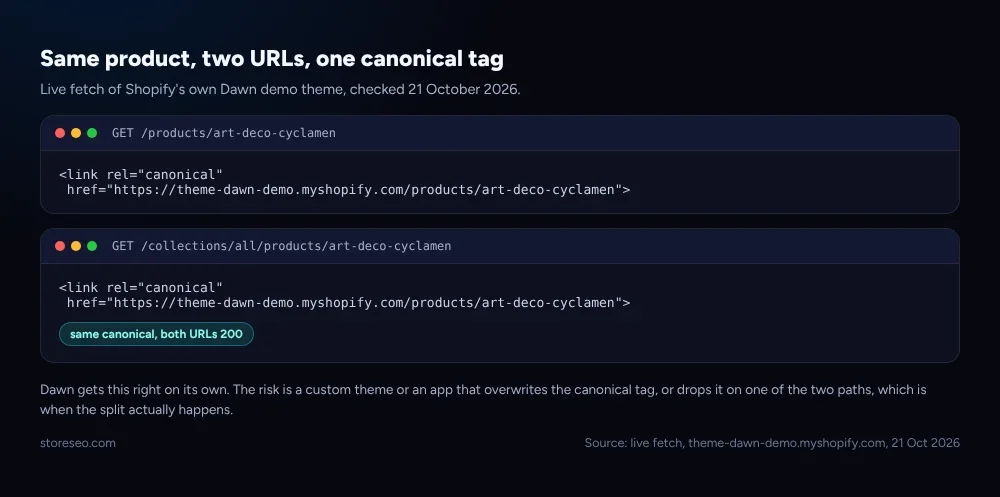 Live fetch of Shopify’s own Dawn demo theme, checked 21 October 2026.
That is why this problem ranks lowest on the list at severity 2: on a default theme, Shopify already protects you. The real risk is a custom theme or an app that overwrites the canonical tag, or drops it on one of the two paths, and that happens often enough in edge cases that it is worth a 30 minute check rather than assuming it never happens to you.
How Do You Find Which of These Your Store Has?
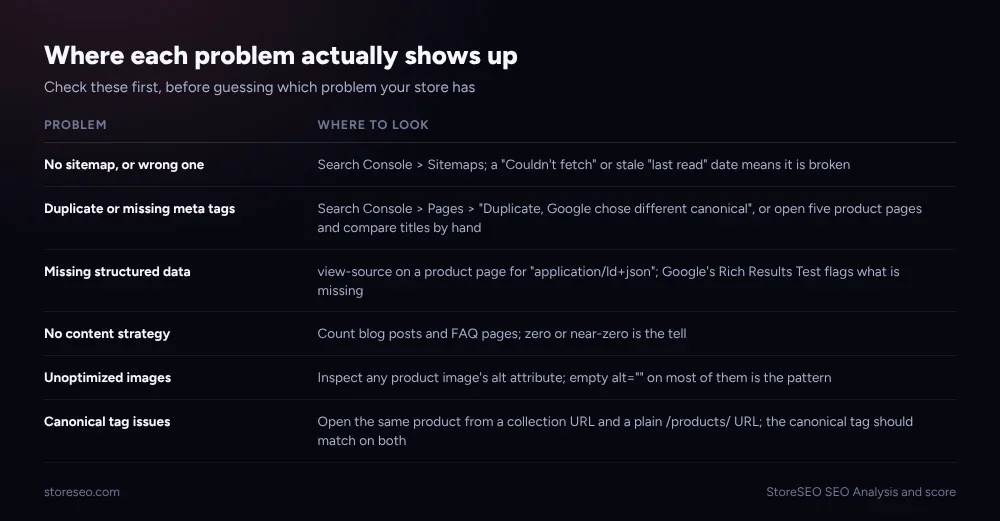 Check these before guessing which problem your store has.
Most of these show up in Search Console without any extra tooling: the Sitemaps report for problem one, the Pages report’s “Duplicate, Google chose different canonical” label for problems two and six. The rest need a quick manual look: view-source on a product page for application/ld+json to check structured data, a count of your blog’s published posts for content strategy, and a glance at any product image’s alt attribute. A full SEO Analysis and score scan surfaces all six in one pass, with detailed fix instructions attached to each flagged item, instead of six separate manual checks.
Frequently Asked Questions (FAQs)
1. What is the single most common Shopify SEO problem?
Missing or duplicate meta titles and descriptions, found in 78% of the stores in our audit. It is also one of the fastest fixes, since StoreSEO’s bulk editor can rewrite an entire catalog’s titles and descriptions in an afternoon.
2. Can I fix all six of these myself, without a developer?
Yes. Five of the six, sitemap, meta tags, images, canonical checks, and structured data through an app, need no code at all. Only a genuinely custom theme override, which is rare, would call for a developer.
3. Does Shopify fix duplicate content automatically?
On a standard or lightly customized theme, yes: Shopify writes a matching canonical tag on both URL forms of a product, as confirmed by a live check on its own Dawn demo theme. A heavily customized theme or certain apps can still break this, so it is worth a periodic check rather than assuming it forever.
4. How long before fixing these problems shows up in rankings?
It depends on the problem. A sitemap resubmission can get new pages crawled within days, while a content strategy, the slowest fix on this list, typically takes weeks to months before it shows up in rankings at all.
5. Do these problems also affect how AI assistants like ChatGPT recommend a store?
Several of them do directly. Missing structured data and a thin content strategy both limit what an AI assistant can confirm about a product or a store, and only 5% of audited stores had taken any steps toward AI search specifically, which leaves most of the category wide open.
Fix the sitemap first, then the meta tags, and the smaller problems stop compounding on their own. If you would rather run one scan than chase six separate checks, try StoreSEO on the Shopify App Store.
Keep reading
Crawl, Understand, Recommend: A Shopify SEO Model
Most Shopify stores pass the crawl layer, fail the understand layer, and never reach the recommend layer where AI engines cite pages by name.
Read article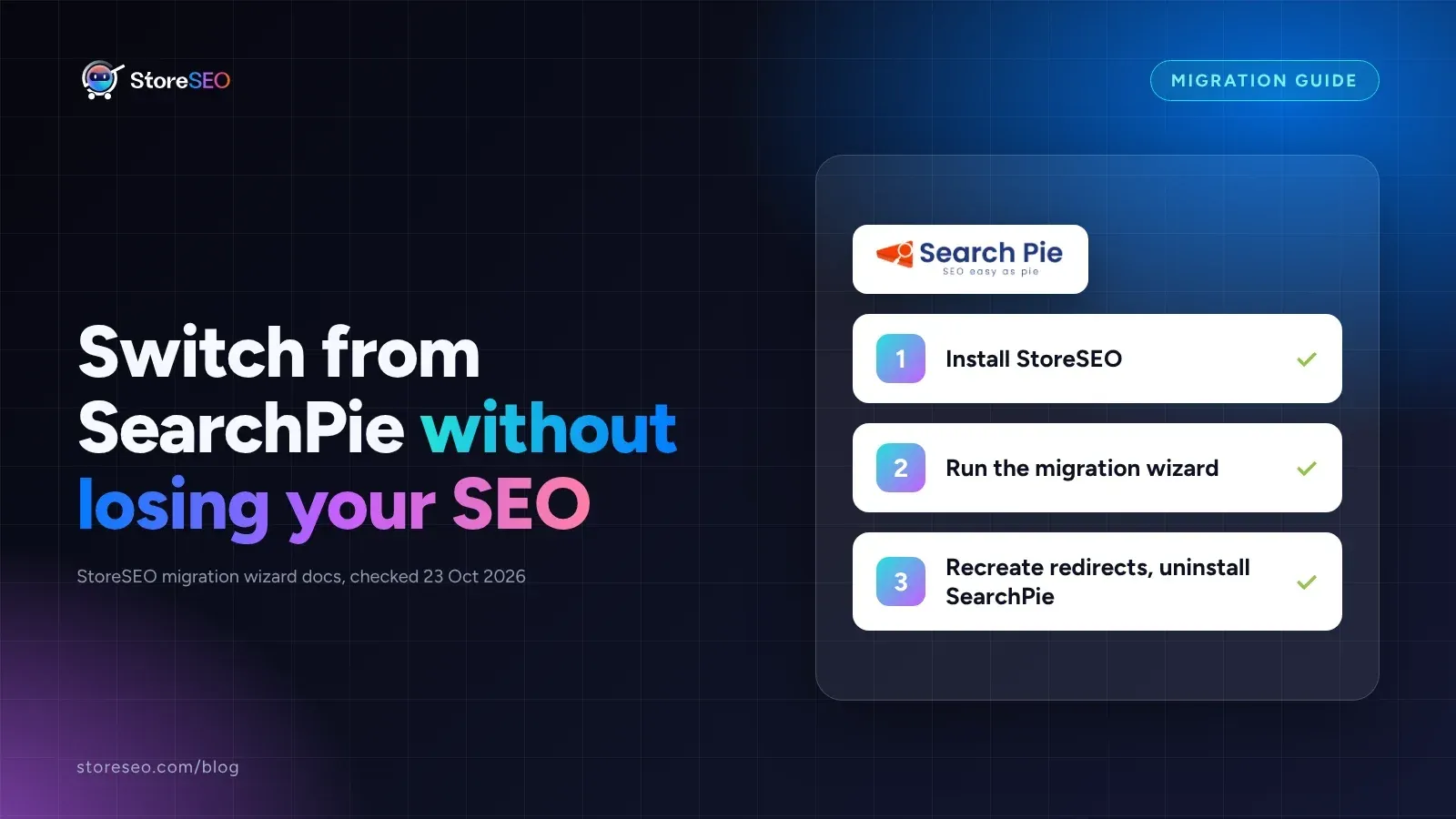
Migrate From SearchPie to StoreSEO (Step by Step)
Switching from SearchPie to StoreSEO takes about ten minutes with the built-in wizard, and your meta titles and schema carry over automatically.
Read article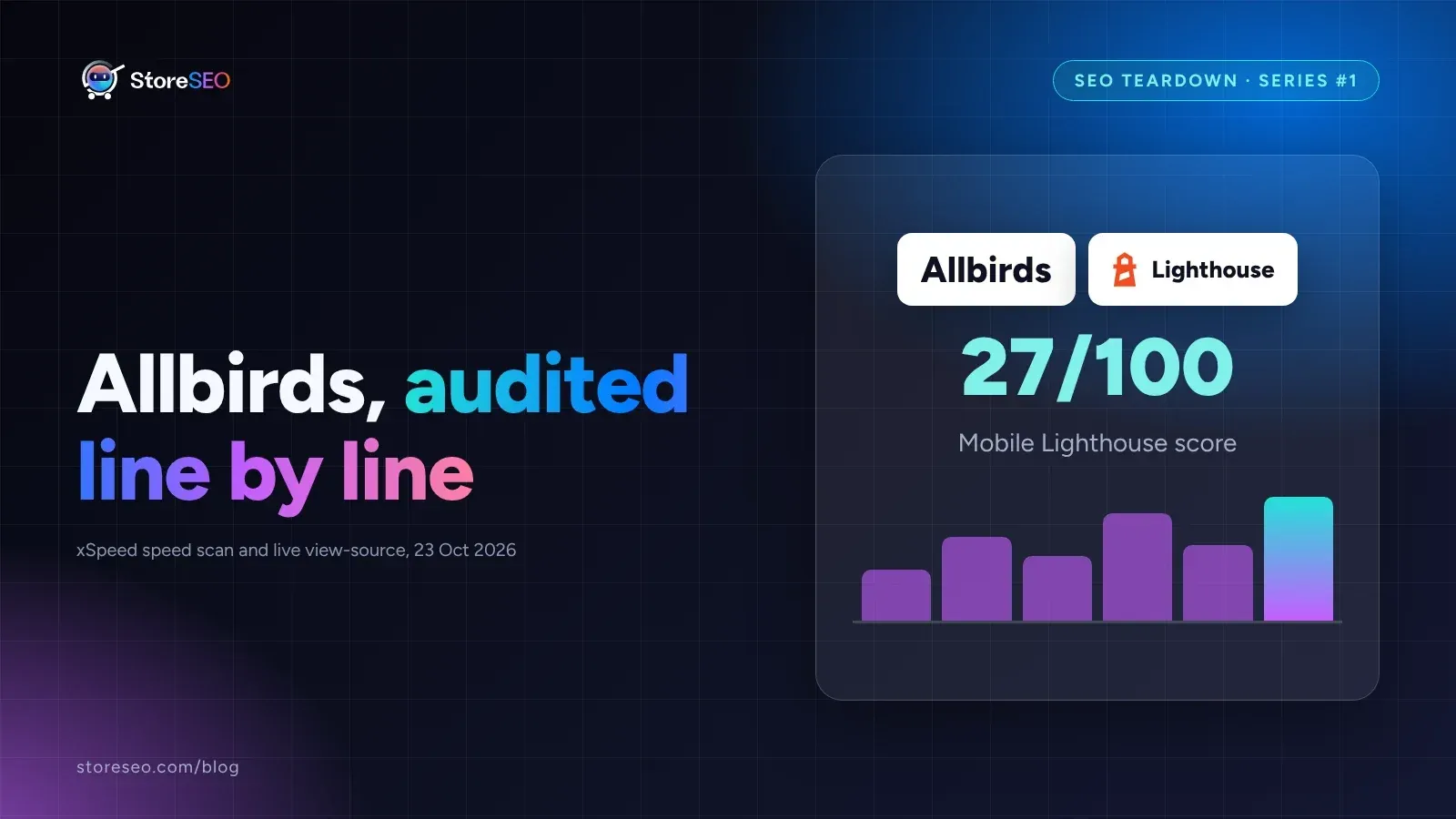
Shopify SEO Teardown #1: Allbirds
We audited Allbirds.com's live pages and found a 27 mobile Lighthouse score, zero homepage schema, three h1 tags, and a typo in the title tag.
Read article