
11 Shopify SEO Myths, Checked Against Google's Docs
 Written by M Asif Rahman
Most Shopify SEO advice circulating in forums and old blog posts is either outdated or was never accurate. We checked 11 common claims directly against Google’s own developer documentation and Shopify’s help center: seven turn out false, four are only partly right, and one source is barely five months old.
TL;DR: all 11 verdicts, each checked against the document that actually settles it.
| Myth | Verdict | Source |
|---|---|---|
| The meta keywords tag helps your ranking | False | Google, 2009 |
| A longer meta description ranks higher | False | Google, meta descriptions |
| Submitting a sitemap guarantees indexing | False | Google, Sitemaps overview |
| Duplicate content means an automatic penalty | Partly | Google, duplicate URLs |
| A canonical tag forces Google to show that URL | Partly | Google, Canonicalization |
| FAQ schema still works for rich results | False | Google, FAQPage |
| Blocking GPTBot hurts your Google ranking | False | OpenAI, GPTBot |
| Noindex removes a page from Google instantly | False | Google, robots meta tag |
| Longer content always outranks shorter content | False | Google, SEO Starter Guide |
| You must manually submit every page to get indexed | Partly | Google Search Console Help |
| Shopify’s native SEO settings are all you need | Partly | Shopify Help Center |
Seven of these cost nothing but wasted effort. Four are more dangerous: they lead to real technical mistakes on a live store.
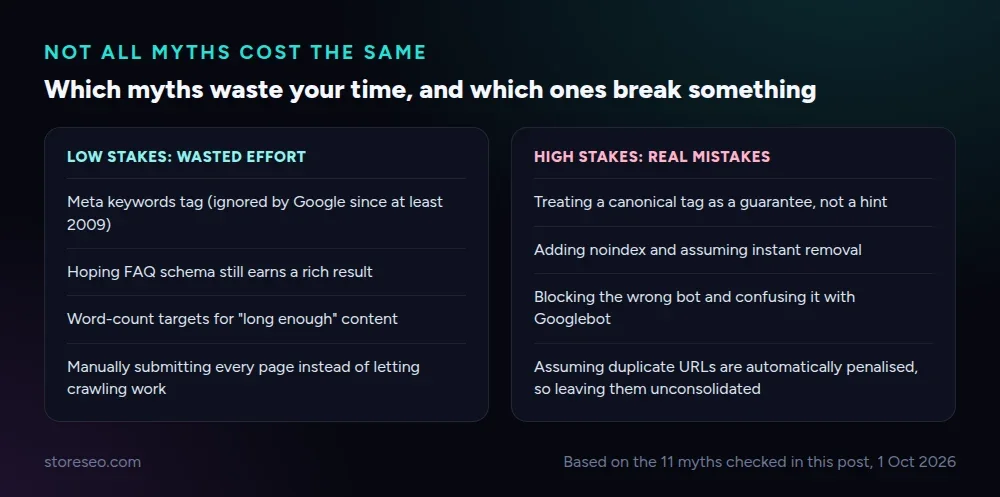 Grouped by consequence, not by topic, from the 11 myths checked in this post.
Does the Meta Keywords Tag Help Shopify SEO?
False. Google said so directly in 2009 and has never reversed it: the keywords meta tag “is not used in our web search ranking.” Shopify’s product editor still has a field some apps map to it, and filling it costs nothing, but it will not move a single ranking position. Spend that time on the product title and description instead, which Google does use.
Does a Longer Meta Description Rank You Higher?
False, and this is a common mix-up. Google’s own guidance on writing meta descriptions frames the field purely as snippet material: it shapes what the preview text says, not where the page lands. Google states plainly that it “primarily uses the content on the page to automatically determine the appropriate snippet” and only pulls from your meta description when it describes the page better. Write one anyway (StoreSEO’s gate requires 140 to 155 characters here for exactly this reason), because the snippet still decides whether someone clicks.
Does Submitting a Sitemap Guarantee Google Indexes Every Page?
False. Google’s sitemaps documentation says this almost word for word: a sitemap “helps search engines discover URLs on your site, but it doesn’t guarantee that all the items in your sitemap will be crawled and indexed.” Shopify regenerates sitemap.xml automatically on every product change, which covers discovery, but a thin or duplicate page can still sit un-indexed even while it is listed there.
Does Duplicate Content Trigger an Automatic Google Penalty?
Partly. Google’s own documentation on consolidating duplicate URLs frames this as a crawling and indexing problem to solve, not a punishment to fear: you pick one canonical version and tell Google about it, and Google folds the signals from the others into it. Ordinary Shopify duplication, like a product reachable through several collection paths, is exactly this case. It wastes crawl budget and splits signals; it is not, on its own, a penalty.
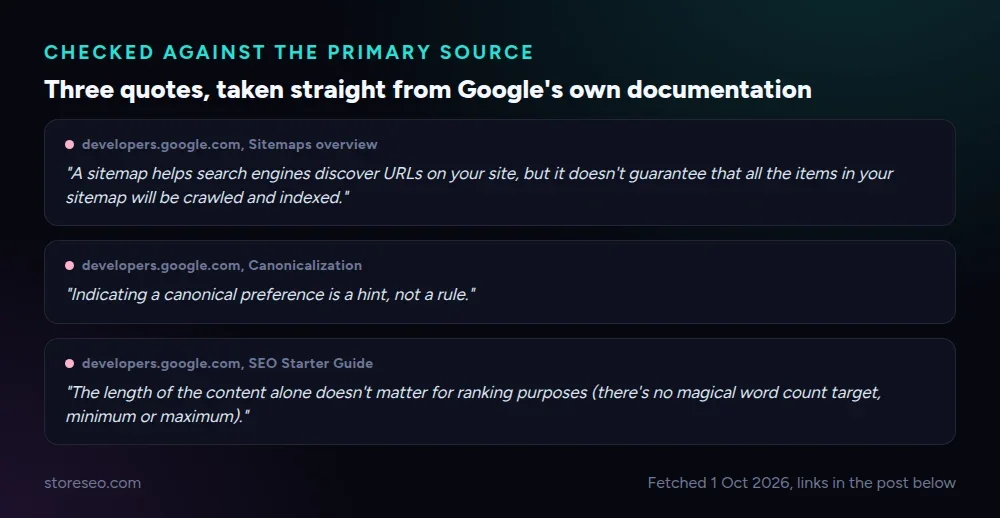 Pulled verbatim from the pages linked throughout this post, fetched 1 October 2026.
Does a Canonical Tag Force Google to Show That URL?
Partly. Google’s canonicalization guide is blunt about this: “indicating a canonical preference is a hint, not a rule.” Google can and does choose a different URL than the one you specify, usually because the two pages are not similar enough or because other signals (internal links, the sitemap) point elsewhere. If your canonical keeps losing, the fix is consistency across those signals, not a stronger tag.
Does FAQ Schema Still Get You a Rich Result in Google?
False, since 7 May 2026. Google updated its FAQPage documentation to say the feature “is no longer shown in search results” for ordinary sites, restricted now to well-known, authoritative government and health websites. StoreSEO’s FAQ schema pillar covers what changed in full. That does not make the markup worthless: StoreSEO’s FAQ Schema feature still structures the content so AI answer engines can quote it cleanly, a different payoff than the one this myth was chasing.
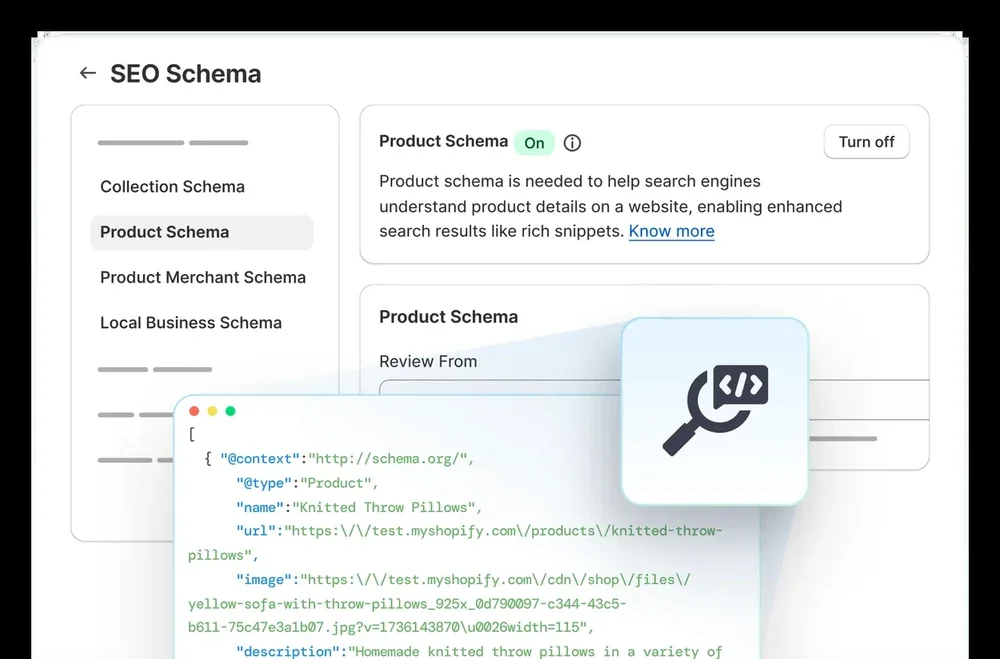 StoreSEO’s schema settings, storeseo.com, 1 October 2026.
Does Blocking GPTBot in Robots.txt Hurt Your Google Ranking?
False. GPTBot is OpenAI’s training-data crawler, and blocking it opts your store out of being used to train future models; it has no connection to Googlebot or Google Search ranking, which OpenAI’s own GPTBot documentation and Google’s crawler list both confirm are separate crawlers with separate rules. If you also want your store readable by AI shopping assistants, StoreSEO’s guide to implementing llms.txt is the more relevant lever than robots.txt either way.
Does Adding Noindex Remove a Page From Google Instantly?
False. Google’s own robots meta tag documentation notes that these settings “can be read and followed only if crawlers are allowed to access the pages that include” them, which means Google has to crawl the page again before it sees and acts on a new noindex tag. Removal happens on the next crawl, not the moment you save the change, and a popular page can take days to drop out.
Does Longer Content Always Outrank Shorter Content?
False, directly from Google’s SEO Starter Guide: “the length of the content alone doesn’t matter for ranking purposes (there’s no magical word count target, minimum or maximum).” A 400-word answer page that fully resolves the query beats a padded 2,000-word one. Match the length to the structure the question needs, not a target number.
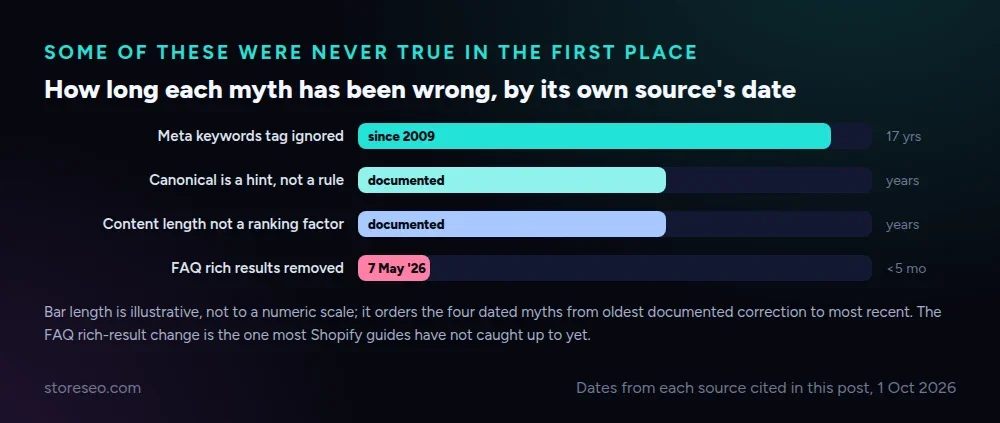 Dates from each source cited in this post, 1 October 2026.
Must You Manually Submit Every New Page to Get It Indexed?
Partly. Google crawls Shopify stores the same way it crawls any site: by following links it has already found, aided by your sitemap. Search Console’s own “Request indexing” tool exists precisely because this is optional, not mandatory. It can speed up discovery for an important new page, but an ordinary product added to a well-linked collection does not need it.
Is Shopify’s Native SEO All You Need, With Apps Adding Nothing?
Partly, and the honest answer depends on catalog size. Shopify’s own Improving SEO documentation lists what ships natively: editable meta fields, a robots.txt template, keyword guidance and an automatic sitemap. Is Shopify Good for SEO? The Honest Answer breaks down exactly where those defaults stop, at structured data beyond products, bulk edits across a large catalog and AI-search readiness. That is the gap StoreSEO exists to close, and it is honest to say most single-product stores never hit it.
Why Do These Myths Spread?
Three reasons, consistently. Advice written for one platform gets repeated for another without checking whether it still applies: the meta keywords myth came from general SEO folklore, not anything Shopify-specific. Google changes its own documentation quietly, the way the FAQ rich-result restriction landed with no fanfare on 7 May 2026, and most guides simply have not been reread since. And some claims were always a misreading of a real mechanism, like treating “canonical” as a command when Google always called it a hint.
If you are following every rule here and your store still is not moving, the problem usually is not a missing myth fix; see why Google ranking has not improved for the more common causes, and StoreSEO’s Ultimate SEO Checklist for the fundamentals that have not changed at all.
Frequently Asked Questions (FAQs)
1. Which of these myths costs Shopify merchants the most traffic?
Treating the canonical tag as a guarantee. Merchants assume Google will always show their preferred URL and build their link structure around that assumption, then watch Google quietly pick a collection-scoped duplicate instead because the internal links disagreed with the tag. Fixing the internal links, not the tag, is what actually works.
2. If meta description doesn’t affect ranking, should I stop writing one?
No. It still decides your click-through rate, since it is the preview text searchers read before clicking. Google only writes its own snippet when yours is missing or does not describe the page well, so a clear, honest 140 to 155 character summary is still worth the two minutes it takes.
3. Is FAQ schema still worth adding if it no longer shows a rich result?
Yes, for a different reason. The structured markup makes your question-and-answer content easier for AI answer engines like ChatGPT and Gemini to extract and quote, even though Google Search itself stopped showing the visual rich result for ordinary sites on 7 May 2026. Add it for AI visibility, not for the search snippet it used to produce.
4. How do I know if an SEO rule I believe is now outdated?
Check the date on Google’s own documentation page for that specific rule, not a blog post repeating it. Every page in Google’s Search Central documentation shows a “last updated” date, and the SEO Starter Guide and the structured data pages are revised often enough that a rule you learned two or three years ago is worth rechecking.
5. Does StoreSEO automate any of the fixes in this guide?
Yes, for the technical ones. StoreSEO’s SEO Analysis flags thin meta descriptions and missing schema automatically, and its FAQ Schema and SEO Schema tools generate the structured data by hand would be error-prone to write. The judgment calls, like which canonical URL actually deserves the traffic, still need a person.
Check What You Believe, Not What You Were Told
Most Shopify SEO myths are not malicious, they are just old, borrowed from a different platform, or a misreading of a real mechanism. The fix is the same every time: find the primary source, check the date, and act on what it says now rather than what a forum post said three years ago. try StoreSEO on the Shopify App Store
Keep reading
Shopify Image Filenames Are Hurting Your SEO: The Fix
Shopify publishes your uploaded filename straight into the live image URL, so a camera default like IMG_4821.jpg stays that way until you rename it.
Read article
Common Shopify SEO Problems, Ranked by Impact
Six Shopify SEO problems ranked by real cost, each scored for how common it is in our 100+ store audit, how severe, and how fast you can fix it.
Read article
12 Shopify SEO Questions Merchants Ask Most
These are the 12 Shopify SEO questions merchants ask most often, answered straight with sources, from Google indexing to AI search visibility.
Read article