
Is Shopify Good for SEO? The Honest Answer
 Written by M Asif Rahman
Yes, with a catch. Shopify switches on canonical tags, an automatic sitemap and a clean default robots.txt for every store, so the technical baseline is solid on day one. What it will not do is edit its own fixed URLs, rewrite that sitemap by hand, or add the structured data most stores are missing.
TL;DR: what Shopify gets right, where it stops, and how to close the gap.
| Strength | Limit | Fix |
|---|---|---|
| Canonical tags, hreflang and modern image formats ship on by default | URL prefixes like /products/ and /collections/ are fixed; you edit only the handle | Keep the handle keyword-first and use StoreSEO’s AI URL Handle Optimization |
| Sitemap regenerates automatically on every product change | You cannot hand-edit it or add non-product pages to it | Submit it once in Search Console and let Shopify keep it current |
| robots.txt already blocks admin, cart, checkout and filter crawl traps | Editing it means adding a robots.txt.liquid template, which Shopify calls an unsupported customization | Add named bot groups only for the crawlers you actually want to control |
| Product and breadcrumb schema ship by default | Local Business and FAQ schema are not native; only 12% of stores in a 2026 audit had schema beyond that default | Add Local Business Schema and FAQ schema through an app such as StoreSEO |
Most Shopify stores never touch any of these settings, and for a single-brand catalog that is often fine. The gap shows up once a store wants more than the default gets it.
What Does Shopify Do Well for SEO?
Shopify’s defaults cover the fundamentals most platforms leave to a plugin. Every store gets canonical tags on product, collection and variant pages without configuration, so duplicate URLs from color or size options do not split ranking signals. Images are served in modern formats automatically, and hreflang tags for Shopify Markets stores are generated the same way, so a multilingual catalog does not need a separate SEO setup for each locale.
The sitemap is one of the clearest wins. It regenerates on every product or collection change and resubmits itself to search engines with no manual step, which is the opposite of the stale, hand-maintained sitemaps common on self-hosted platforms. The default robots.txt is similarly thorough: fetched fresh from Shopify’s Dawn demo theme, it runs to 116 lines and already disallows admin, cart, checkout, account and the filter and sort combinations that waste crawl budget on large catalogs, as StoreSEO’s robots.txt guide breaks down in full.
Shopify is also ahead on AI-agent readiness before a merchant does anything: its own demo store already serves llms.txt, an agents.md file and an agent commerce endpoint with no setup, a head start that StoreSEO’s Shopify vs WooCommerce comparison found WooCommerce does not match without a plugin.
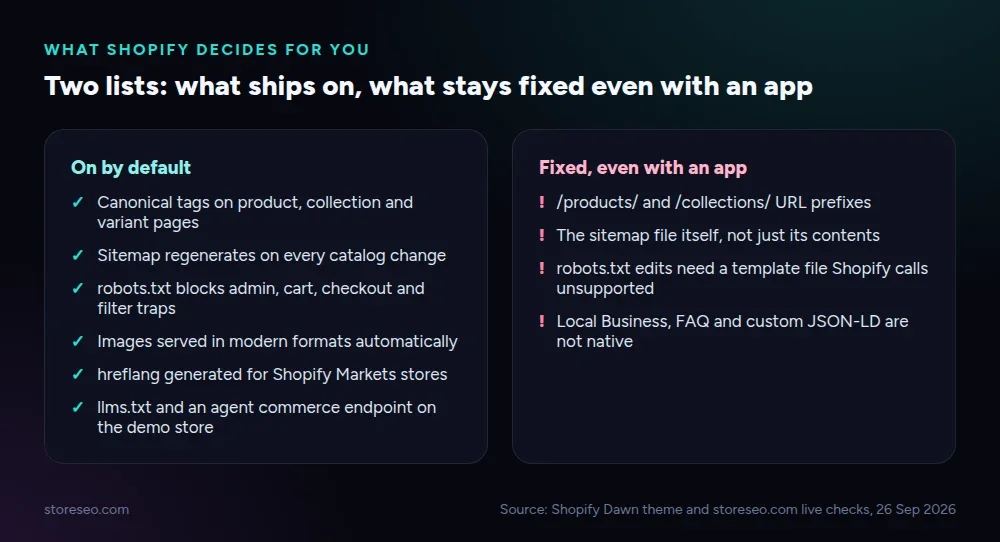 Source: Shopify Dawn theme and storeseo.com live checks, 26 September 2026.
Where Does Shopify Hold You Back?
The same defaults that make Shopify easy also make it inflexible. URL prefixes are fixed: every product lives under /products/ and every collection under /collections/, and you can only edit the handle after the slash, never the prefix itself. A store that wants a flatter or fully custom URL structure cannot get one on Shopify at all.
The sitemap you cannot edit is the same one you cannot extend: there is no way to add a non-product page, a custom priority or a change frequency, so any page outside Shopify’s own template is invisible to it. robots.txt is technically editable, but only by adding a templates/robots.txt.liquid file in the theme code editor, a change Shopify itself documents as an unsupported customization with no official support if it breaks something.
Structured data is the widest gap, and StoreSEO’s audit of 100+ Shopify stores (published 10 March 2026) puts a number on it: 78% of the stores audited had critical on-page SEO gaps, missing or duplicate meta titles and descriptions being the most common single issue, and only 12% had any structured data beyond Shopify’s minimal default output. Local Business Schema, FAQ Schema and custom JSON-LD are not part of that default at all.
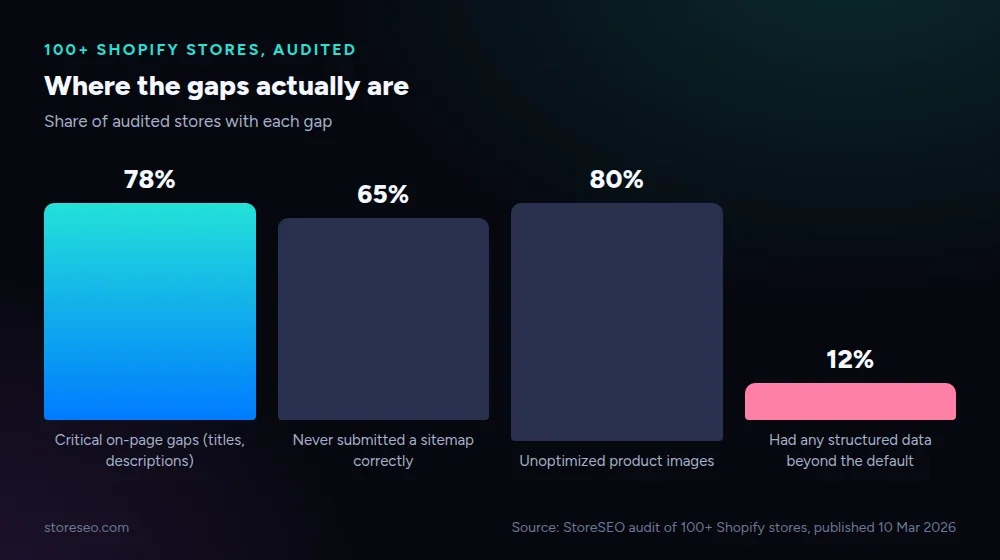 Source: StoreSEO audit of 100+ Shopify stores, published 10 March 2026.
Which Limits Can You Fix, and How?
Two of the three limits above are fixable without touching code, and one is not.
The URL prefix is permanent, so the fix is to stop fighting it and optimize what you control: the handle. A keyword-first, hyphenated handle is the only lever Shopify gives you on a product or collection URL, and StoreSEO’s AI URL Handle Optimization rewrites existing handles in bulk instead of one product at a time.
The schema gap is the one worth the most attention, because it is the one closest to zero across the platform. StoreSEO adds product, organization and breadcrumb schema automatically, and for stores that want more, Local Business Schema is one of the app’s newer additions. Whether it helps depends on the store: a merchant with a physical address, a service area or a Google Business Profile gets a real local-search benefit from marking that up, because it gives Google and AI answer engines an entity to match against a location query. A purely online catalog with no physical presence gets little from Local Business Schema specifically, since there is no location signal for it to reinforce, and structured data on its own has never been a ranking factor. FAQ Schema is a better default add for most online-only stores, since it targets question-shaped queries directly.
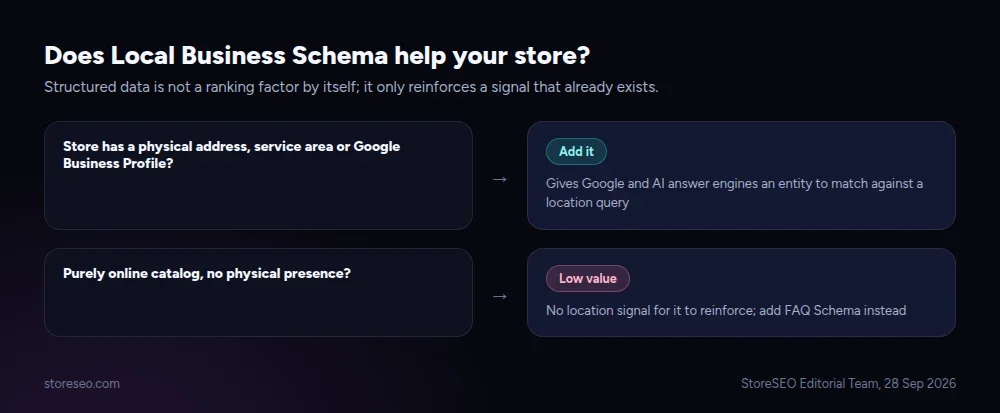 StoreSEO Editorial Team, 28 September 2026.
robots.txt is the one limit that stays partly manual: adding named groups for AI crawlers like GPTBot, ClaudeBot or PerplexityBot still means editing robots.txt.liquid by hand, and no app can remove that step because Shopify does not expose the file through its API.
How Does It Compare With WooCommerce and Wix?
Against WooCommerce, the trade is control for convenience. StoreSEO’s full comparison found WooCommerce gives free, fully editable permalinks, a hand-editable core sitemap and a real robots.txt file you can replace outright, none of which Shopify allows. The cost is that WordPress hosting, security and the SEO plugin stack are the store owner’s job, where Shopify bundles hosting and a security baseline into the platform itself. A single-brand store with no developer on staff generally reaches a clean technical baseline faster on Shopify; a content-heavy site publishing dozens of articles a month has more room to grow on WooCommerce.
Wix runs on the same closed-platform model as Shopify: fixed URL patterns, a generated sitemap and no direct file access, so the two share most of the same structural limits. The practical difference for SEO is ecosystem depth. Shopify’s app store carries a far larger set of dedicated SEO tools built specifically for its data model, which matters once a store needs bulk fixes across hundreds of products rather than a single settings page.
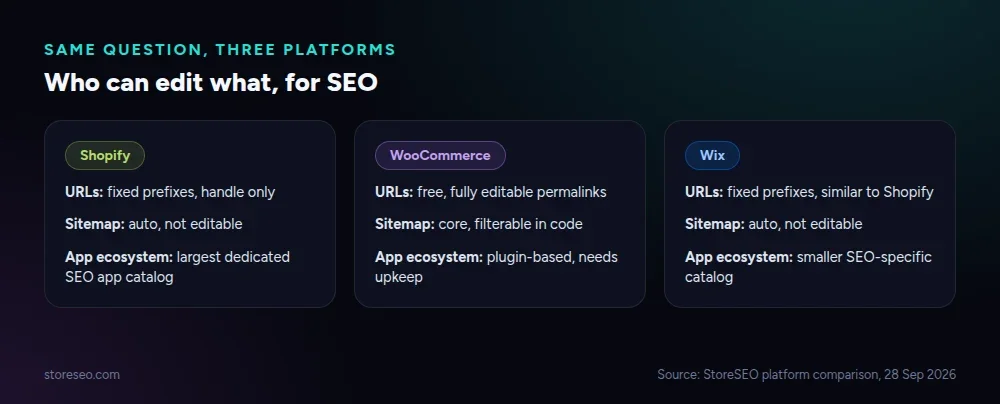 Source: StoreSEO platform comparison, 28 September 2026.
So Should You Choose Shopify for SEO?
For most single-product and single-brand stores, yes. The defaults cover canonicals, images, hreflang and crawl control well enough that a new store’s biggest SEO problems will not come from the platform itself. The stores that hit Shopify’s ceiling are the ones that need a custom URL structure, a hand-built sitemap, or heavy structured data beyond products, and for those, either WooCommerce or an SEO app that fills the schema and handle gaps closes most of the distance.
If your store already runs on Shopify and you want the fixed limits above turned into a working checklist, StoreSEO’s ultimate SEO checklist walks through every step in order, and StoreSEO’s guide to search engine optimization covers the terms this page assumes you already know.
Frequently Asked Questions (FAQs)
1. Is Shopify good for SEO without installing any app?
Yes, for the fundamentals. Canonical tags, an automatic sitemap and a working default robots.txt are on for every store with no setup. What is missing without an app is structured data beyond products, bulk meta title and description control, and any way to edit the sitemap or URL prefixes.
2. Can I edit Shopify’s sitemap directly?
No. Shopify generates sitemap.xml automatically from your products, collections and pages, and there is no interface or file to hand-edit it. The only lever you have is which products and collections you choose to include, and whether you resubmit it in Search Console after a large catalog change.
3. Does Shopify hurt my SEO compared to a self-hosted platform like WooCommerce?
Not by default, but it caps how far you can go. Shopify’s technical baseline (canonicals, image formats, crawl control) is generally stronger out of the box, while WooCommerce allows deeper customization of URLs, redirects and content types. Which one “hurts” your SEO depends on whether you need that customization or would rather have the baseline handled for you.
4. Do I need an SEO app on Shopify?
Not to reach a working baseline, but most stores need one to close the gaps Shopify leaves open: structured data beyond products, bulk meta title and description edits, and AI-search readiness like llms.txt and agent-facing content. An app such as StoreSEO adds those without touching theme code.
5. Does adding structured data actually improve Shopify search rankings?
Structured data helps search engines and AI answer engines understand and display your pages correctly; it is not itself a ranking factor. Local Business Schema specifically helps stores with a physical address or service area appear correctly in local results, while FAQ Schema helps question-shaped content get quoted in AI answers regardless of location.
6. What is the single biggest SEO limitation on Shopify?
The fixed URL structure. Every product and collection lives under a prefix you cannot change, so a store that needs a flatter or fully custom URL pattern cannot get one on Shopify at any plan level, and that limit has no app-based fix.
Pick the Platform, Then Close the Gaps
Shopify is good for SEO by default and gets better once you fix the three things it will not fix for you: the handle on every URL, the structured data it does not ship, and the AI-bot rules in robots.txt. try StoreSEO on the Shopify App Store
Keep reading
Shopify Image Filenames Are Hurting Your SEO: The Fix
Shopify publishes your uploaded filename straight into the live image URL, so a camera default like IMG_4821.jpg stays that way until you rename it.
Read article
Common Shopify SEO Problems, Ranked by Impact
Six Shopify SEO problems ranked by real cost, each scored for how common it is in our 100+ store audit, how severe, and how fast you can fix it.
Read article
12 Shopify SEO Questions Merchants Ask Most
These are the 12 Shopify SEO questions merchants ask most often, answered straight with sources, from Google indexing to AI search visibility.
Read article