
Shopify vs WooCommerce for SEO: What You Control
 Written by M Asif Rahman
Pick Shopify if you want strong SEO defaults, fast hosting and native multilingual without touching a server. Pick WooCommerce if you need full control of URLs, robots.txt, redirects and content, and you have someone to maintain it. For most single-brand stores, Shopify reaches a clean technical baseline sooner; for content-heavy sites, WooCommerce goes further.
TL;DR: the short version, before the detail.
| If you… | Pick | Why |
|---|---|---|
| Sell one product line and have no developer | Shopify | Canonicals, sitemap, hreflang and image formats are handled for you |
| Run a large catalog with filters and variants | Shopify | Its default robots.txt already blocks sort and filter crawl traps |
| Publish more content than products | WooCommerce | WordPress is a full CMS with free permalinks and custom content types |
| Need custom URL paths or regex redirects | WooCommerce | Shopify’s /products/ and /collections/ paths are fixed |
| Want to sell inside AI assistants soon | Shopify | Its demo store serves llms.txt, agents.md and an agent commerce endpoint with no setup |
A quick note on where we stand. This is the StoreSEO blog, and StoreSEO is our product, an SEO app that runs only on Shopify. That gives us a reason to like Shopify, so every capability claim below links to the platform’s own documentation, the proof table comes from two live stores we fetched ourselves, and we say plainly where WooCommerce wins.
This post is about SEO only. If you want the general platform comparison (payments, themes, pricing plans), our Wix vs Shopify comparison covers that ground for another pair, and the ultimate SEO checklist covers what to do once you have chosen.
The SEO Capability Table: Shopify vs WooCommerce
This is the table to bookmark. Each row is one thing that affects how search engines and AI answer engines crawl, understand and rank your store. “Who wins” means who wins for a typical merchant, not who has the longest feature list.
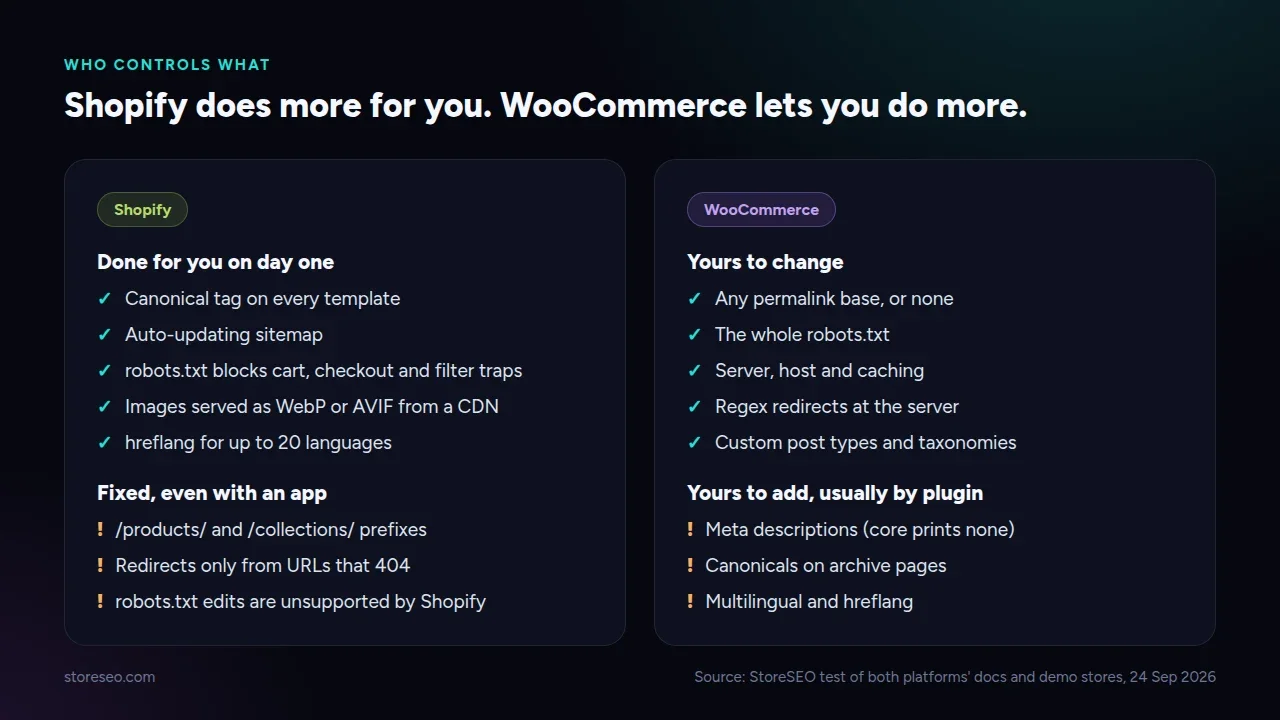 Shopify does more of the technical baseline for you; WooCommerce hands you more of the controls.
| SEO control | Shopify | WooCommerce | Who wins |
|---|---|---|---|
| URL structure | Fixed prefixes: /products/, /collections/, /pages/, /blogs/; you edit only the handle | Free permalinks: product base, category base and custom bases are all editable | WooCommerce |
| robots.txt | Detailed default; edit through robots.txt.liquid, which Shopify calls an unsupported customization | Minimal virtual file; replace it with a physical file or a plugin | WooCommerce (control) |
| Sitemap control | Generated automatically and cannot be edited by hand | Core sitemaps since WordPress 5.5, filterable in code or replaced by a plugin | WooCommerce |
| Canonical tags | Themes print canonical_url on every template, collections included | rel_canonical runs on single pages only; archives need a plugin | Shopify |
| Structured data out of the box | Dawn outputs Organization plus Product or ProductGroup via the structured_data filter | WooCommerce outputs Product, BreadcrumbList, Review and WebSite via WC_Structured_Data | Tie (different gaps) |
| Page speed and hosting responsibility | Hosted by Shopify on its CDN; you cannot pick the server | You pick and pay the host; WooCommerce asks for PHP 8.3, MySQL 8.0 and 256 MB memory | Shopify |
| Core Web Vitals defaults | Theme Store themes need an average Lighthouse score of 60 or more on home, product and collection pages | No platform floor; depends on host, theme and caching | Shopify |
| Redirects | Admin URL redirects with CSV import, 100,000 limit (20 million on Plus), only from URLs that return 404 | WordPress redirects old post slugs itself; plugins or server rules handle regex and anything else | WooCommerce |
| Image optimization | The CDN serves WebP or AVIF automatically to browsers that support them | WordPress accepts WebP uploads since 5.8; conversion and compression come from a plugin or your host | Shopify |
| Multilingual and hreflang | Native: up to 20 languages (30 on Plus), subfolder URLs and hreflang added automatically | Core has no multilingual layer; you add a plugin | Shopify |
| Blog and content capability | A built-in blog with articles, tags and comments | WordPress is a full CMS: custom post types, taxonomies, block editor | WooCommerce |
| Apps vs plugins (and what each costs) | Paid apps on top of a plan that starts at $29 a month billed yearly | Core is free; extensions run $29 to $299 a year each, hosting $25 to $350 a month | WooCommerce (price), Shopify (effort) |
| AI answer engine readiness | Our fetch found llms.txt, agents.md, a UCP endpoint and an agentic sitemap by default; product data syndicates to agentic storefronts | Our fetch found no llms.txt or agents.md (404); you add them with a plugin | Shopify |
| Maintenance burden | Shopify patches the platform, hosting and security | You update WordPress, WooCommerce, plugins, PHP and backups | Shopify |
Count the last column and Shopify takes seven rows, WooCommerce five, with one tie and one split on cost. That score hides the point, though. The five WooCommerce rows are all about control, and control only pays off if someone on your team will use it.
What Did We Find When We Fetched Both Platforms’ Defaults?
Documentation tells you what a platform can do. A live store tells you what it actually does before anyone touches it. So on 24 September 2026 we fetched the robots.txt, the sitemap and one product page’s JSON-LD from two public demo stores:
- Shopify:
theme-dawn-demo.myshopify.com, Shopify’s own demo store for its free Dawn theme. - WooCommerce:
demo.athemes.com/botiga, the demo for the free Botiga theme, running WordPress 6.9.9 and WooCommerce 11.0.1 with no SEO plugin installed (its robots.txt is served at the network root,demo.athemes.com).
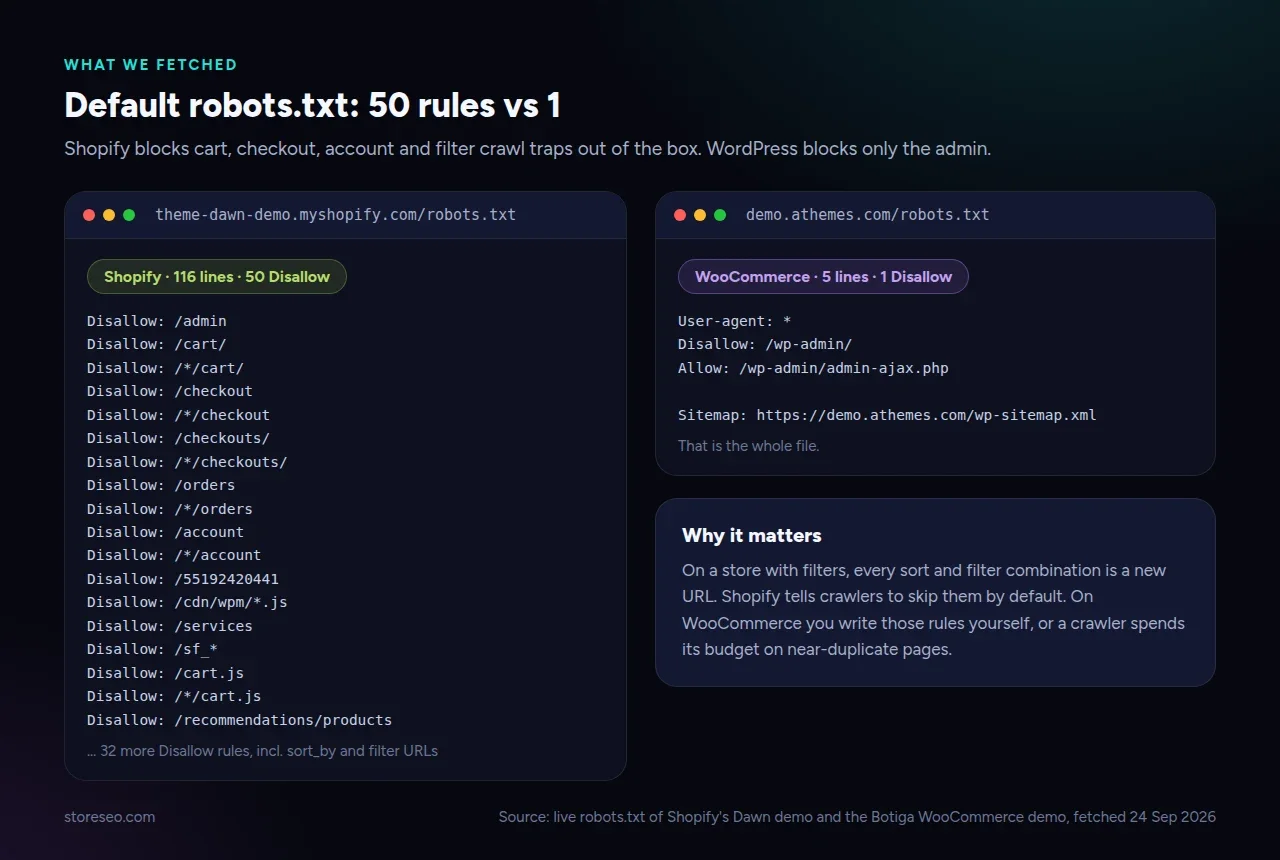 The two robots.txt files as we fetched them on 24 September 2026.
| What we checked (24 Sep 2026) | Shopify, Dawn demo | WooCommerce, Botiga demo |
|---|---|---|
| robots.txt size | 116 lines, 50 Disallow rules | 5 lines, 1 Disallow rule |
| What robots.txt blocks | Admin, cart, checkout, account, sort and filter crawl traps, preview URLs | /wp-admin/ only |
| Sitemap index | /sitemap.xml: products, pages, collections, plus an agentic discovery sitemap | /wp-sitemap.xml: posts, pages, products, categories, product categories, users |
| Product URL | /products/thelma-sandal | /botiga/product/facial-treatment-essence-pitera-essence/ |
| Product JSON-LD types | Organization, ProductGroup with 42 variant Products, each with an Offer | BreadcrumbList, Product with one Offer |
| Useful fields present | brand, category, price, currency, availability per variant | sku, sale and list price, priceValidUntil, seller |
| Fields missing | sku, gtin, aggregateRating, BreadcrumbList | brand, gtin, aggregateRating; last breadcrumb item has an empty name |
| Canonical on a category page | Present on /collections/all | Absent on /product-category/cosmetics/ |
| Meta description on the product | Present, generated from the description | Absent |
llms.txt and agents.md | Both return 200 | Both return 404 |
Two things stood out. First, neither default is complete: Shopify’s variant schema is richer, but WooCommerce ships a breadcrumb and a SKU that Dawn leaves out. Second, WordPress core prints no meta description at all, which is why almost every WooCommerce store installs an SEO plugin on day one.
Which Platform Gives You More SEO Control?
WooCommerce, clearly. Because you own the server and the code, nothing is off limits. You can change /product/ to /shop/ or drop the base entirely, write any robots.txt you like, add regex redirects at the server, and shape the sitemap with a few lines of PHP.
Shopify is more fenced in. The URL prefixes are fixed and Shopify’s own redirect docs say you cannot redirect those fixed paths. You can edit robots.txt, but through a Liquid template that support will not help with. Redirects only fire when the old URL returns a 404, so you cannot redirect a page that still loads.
Here is the honest part for us: no Shopify app can change those limits, StoreSEO included. What an app can do is work inside them. StoreSEO lets you choose which products appear in your sitemap, edit meta titles and descriptions in bulk, and extend Dawn’s product markup through its SEO Schema feature, which you can adjust with Customize JSON-LD to add the fields (like brand details or breadcrumbs) that the default leaves out.
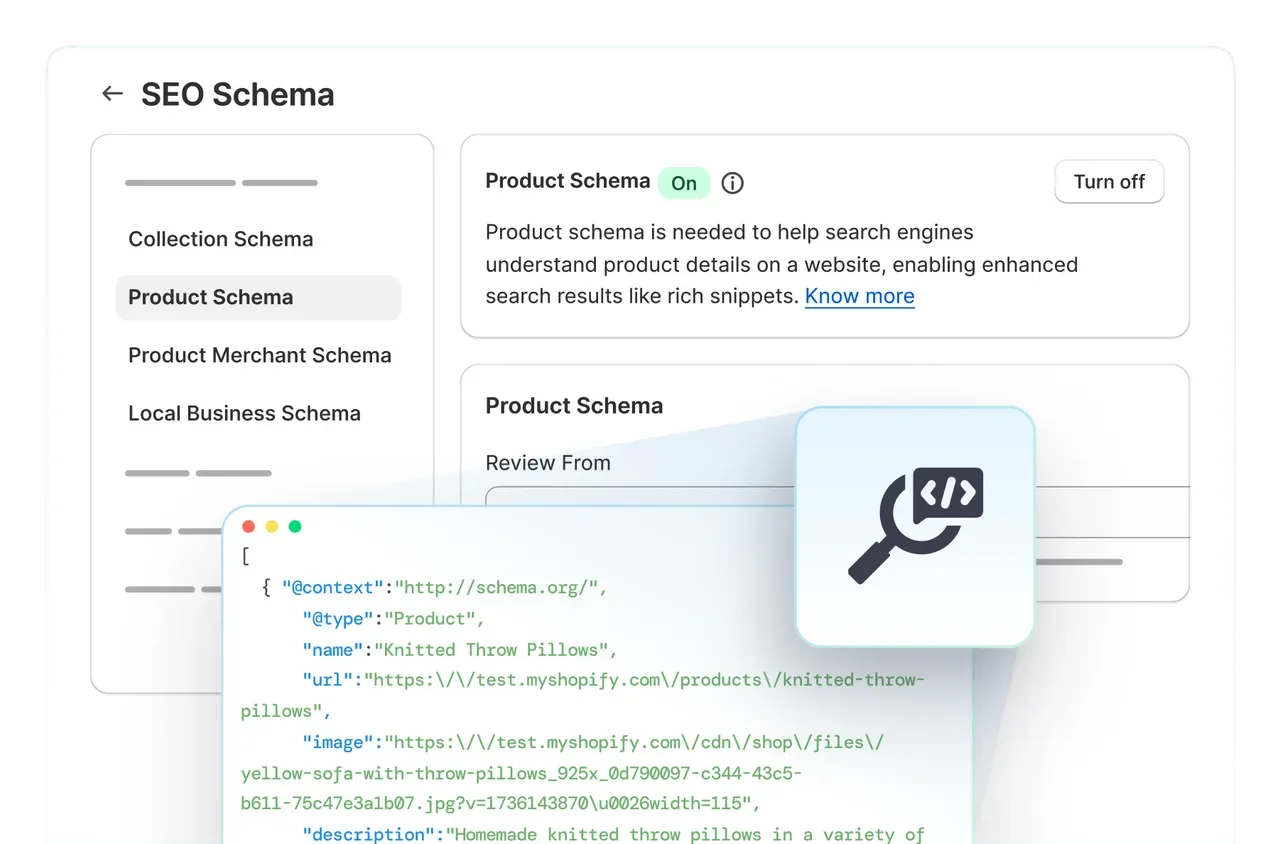 StoreSEO’s SEO Schema settings, where Product, Collection and Local Business schema are switched on per store.
Where the Extra Control Actually Matters
For most stores, the fixed Shopify paths never cost a ranking. Google reads /products/linen-shirt as easily as /linen-shirt. Control starts to matter in three situations:
- You are migrating a large site whose old URLs carry backlinks and you want to keep them identical.
- You run faceted navigation with thousands of filter combinations and need custom crawl rules.
- Your content strategy depends on custom content types, such as recipes, guides or a knowledge base with its own taxonomy.
If none of those describe you, the control gap is mostly theoretical.
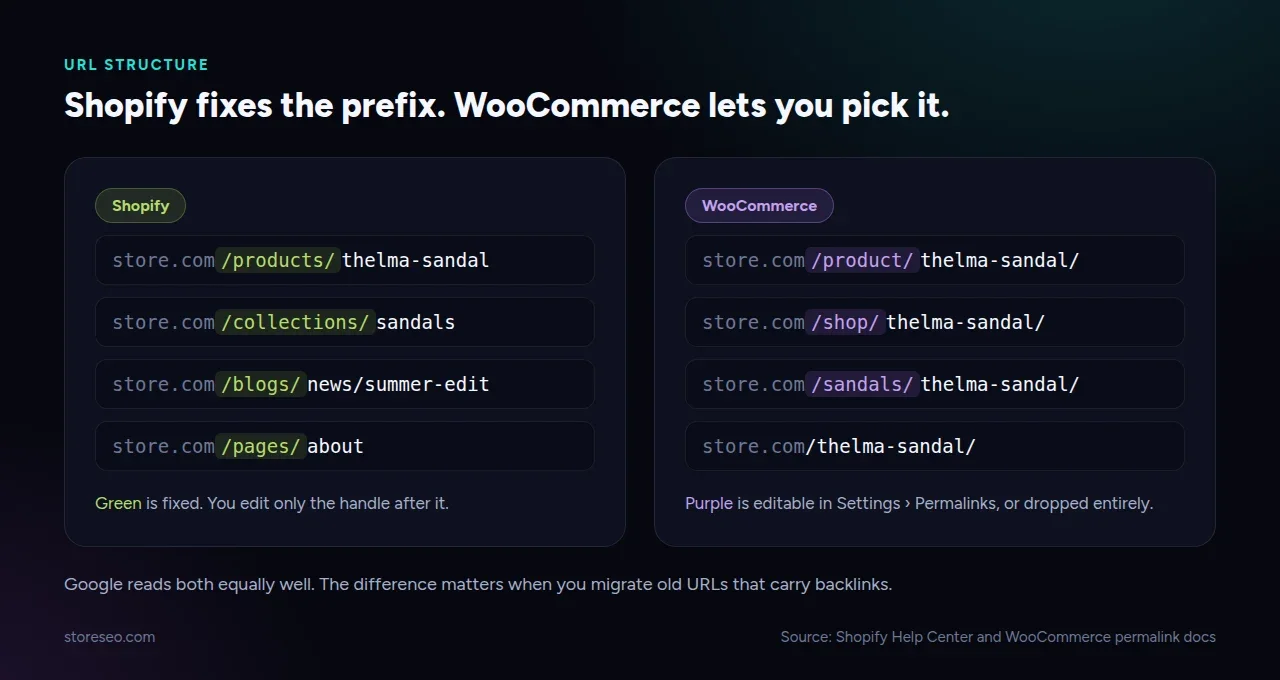 Shopify fixes the prefix; WooCommerce lets you choose it or drop it.
Which Ranks Faster Out of the Box?
Neither platform gets a ranking bonus of its own. What differs is how much of the technical baseline is already done on day one, and on that measure Shopify is ahead.
A fresh Shopify store has a canonical tag on every template, an auto-updating sitemap, a robots.txt that blocks cart, checkout and filter traps, images served in modern formats from a CDN, and a meta description on every product. A fresh WooCommerce store has a canonical on single pages, a basic sitemap, a five-line robots.txt and no meta descriptions until you install a plugin.
Speed Depends on Who Runs the Server
Speed follows the same pattern. Google uses Core Web Vitals as part of page experience, and Shopify sets a performance floor for every Theme Store theme. WooCommerce speed depends on your host, theme and caching, which means it can be faster than Shopify on a well-tuned server and much slower on cheap shared hosting. You can compare real-user pass rates for both platforms in the HTTP Archive Core Web Vitals Technology Report, and our Shopify Core Web Vitals guide covers what to fix on the Shopify side.
If you go WooCommerce, you will be choosing a host and an SEO plugin. Two of the options, xCloud (hosting) and ThinkRank (a WordPress SEO plugin), are made by our company, so weigh that if you see them mentioned elsewhere on our sites.
Which Is Better for AI Search (ChatGPT, Gemini, Perplexity)?
Right now, Shopify. AI answer engines read three things: what they can crawl, how clearly your data is structured, and whether a store exposes machine-readable files for agents.
On the crawl side, both platforms let AI crawlers in by default. On structure, the two demos were close, each with gaps. The difference is agent files. The Shopify demo store we checked serves an llms.txt, an agents.md, a Universal Commerce Protocol endpoint and a dedicated agentic discovery sitemap. Shopify also says product data can reach agentic storefronts such as ChatGPT and Microsoft Copilot through Shopify Catalog, independently of your robots.txt.
WooCommerce can match this, but you build it. You add the files with a plugin or by hand and you keep them current. That is doable, and some WooCommerce stores already do it well. It just is not the default.
| AI readiness signal | Shopify default | WooCommerce default |
|---|---|---|
llms.txt | ✓ | ✗ |
agents.md | ✓ | ✗ |
| Commerce endpoint for agents | ✓ | ✗ |
| Product schema with price and availability | ✓ | ✓ |
| BreadcrumbList schema | ✗ | ✓ |
The default Shopify llms.txt is generic, though. It describes how agents can shop, not what makes your products worth recommending. That is the part you still have to write, and our guide on implementing llms.txt on Shopify walks through it.
What Does SEO Cost on Each Platform?
The honest answer is that WooCommerce is cheaper in money and more expensive in time. Here is the breakdown using each vendor’s own published pricing, checked on 24 September 2026.
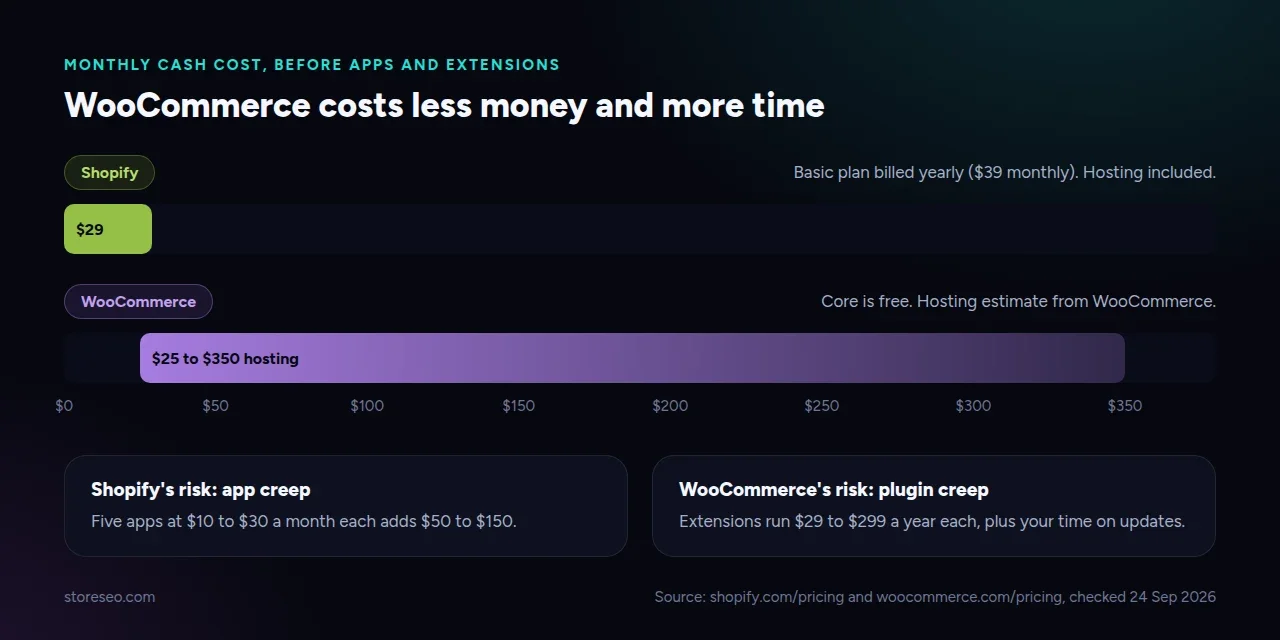 Published prices, checked 24 September 2026.
| Cost line | Shopify | WooCommerce |
|---|---|---|
| Platform | Basic plan $29 a month billed yearly, $39 monthly | Free |
| Hosting | Included | $25 to $350 a month, per WooCommerce’s own estimate |
| SEO tooling | An SEO app (many, including StoreSEO, have a free plan) | An SEO plugin (free tiers are common) |
| Other extensions | App subscriptions, priced per app | $29 to $299 a year per extension |
| Updates and security | Included | Your time, or a developer’s |
| Verdict | Predictable monthly bill | Lower cash cost, higher maintenance cost |
On Shopify, the risk is app creep: add five apps at $10 to $30 a month each and the bill climbs fast. On WooCommerce, the risk is plugin creep: every plugin is another update, another possible conflict, and more code on every page load.
Which Should You Pick for Your Store Type?
Match the platform to the kind of store you run, not to a feature count.
| Store type | Pick | The deciding reason |
|---|---|---|
| DTC single product or small range | Shopify | Nothing to tune; the defaults cover almost everything a small catalog needs |
| Large catalog (thousands of SKUs, variants, filters) | Shopify, unless you need custom crawl rules | Filter crawl traps are blocked by default; ProductGroup schema handles variants |
| Content-heavy store (guides, recipes, editorial) | WooCommerce | WordPress content modelling is far ahead of Shopify’s blog |
| B2B with custom catalogs and pricing | Either; lean WooCommerce if you have developers | Custom pricing and catalog logic is easier on code you own |
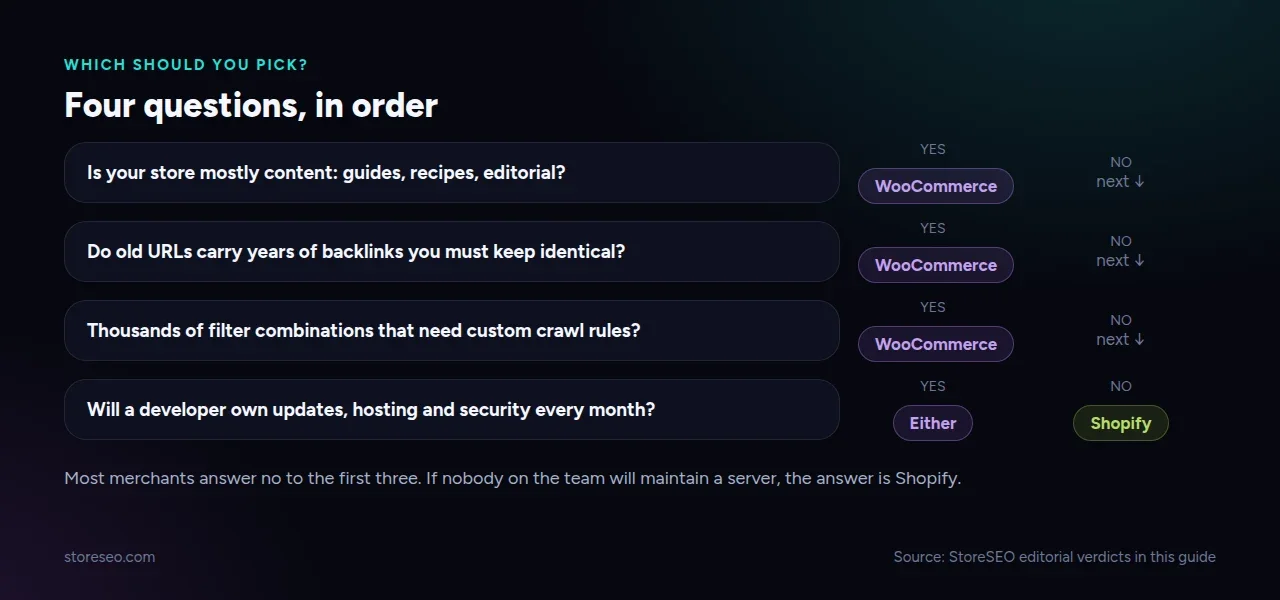 Answer in order; the first yes decides.
When to Choose WooCommerce Instead
Choose WooCommerce, even as a Shopify-focused team, if you already run a strong WordPress site and want the shop inside it, if your URLs carry years of backlinks you cannot afford to change, or if you have a developer who will genuinely own updates. Those are real advantages, and Shopify cannot replicate them.
How Do You Migrate Without Losing Rankings?
Map every old URL to its new one before you switch. Moving from WooCommerce to Shopify, /product/linen-shirt/ becomes /products/linen-shirt, so every product and category needs a 301 redirect. Shopify’s CSV import handles up to 100,000 of them.
After launch, watch for the URLs you missed. StoreSEO’s Bulk URL Redirect Manager helps you catch and fix those in bulk, and its Redirect on Out of Stock setting keeps sold-out products from turning into dead ends. Our Shopify SEO migration guide has the full step-by-step checklist.
Frequently Asked Questions (FAQs)
Here are short answers to the questions merchants ask most about Shopify and WooCommerce SEO.
1. Is Shopify or WooCommerce better for SEO?
For most merchants, Shopify, because more of the technical SEO is correct by default and nothing needs maintaining. WooCommerce is better if you need full control over URLs, robots.txt and redirects, or run a content-heavy site. Neither gets a ranking advantage from Google simply for being the platform.
2. Can you change Shopify’s /products/ URL structure?
No. The /products/, /collections/, /pages/ and /blogs/ prefixes are fixed on every Shopify store. You can edit the handle after the prefix, and Shopify offers to create a redirect from the old handle when you do.
3. Does WooCommerce add schema markup without a plugin?
Yes. WooCommerce outputs Product, Offer and BreadcrumbList structured data on product pages by default, as our fetch of a plugin-free demo store confirmed. It does not add brand, GTIN or rating fields unless your data or a plugin provides them.
4. Do I need an SEO app on Shopify or a plugin on WooCommerce?
On WooCommerce, almost always, because WordPress core prints no meta description. On Shopify, the basics work without one, but an app like StoreSEO saves time on bulk meta tags, schema gaps, redirects and image optimization. Start with the free tier on either platform and upgrade only when you hit a limit.
5. Will structured data get my products rich results?
Structured data makes your products eligible for enhanced listings, but Google decides what to show and does not guarantee any rich result. Accurate price, availability and review data is still worth having because Google Shopping surfaces and AI answer engines read it.
6. Which platform is better for international SEO?
Shopify, for most stores. It creates language subfolders and adds hreflang tags automatically, while WordPress needs a multilingual plugin to do the same. Our hreflang setup guide for Shopify covers the details.
Choose the Platform You Can Maintain
The best SEO platform is the one your team will keep healthy. Shopify gives you a strong baseline and asks little in return. WooCommerce gives you every lever and asks you to pull them yourself. If you are on Shopify, start with what StoreSEO does and how it works, then work through the gaps the proof table above exposed.
When you are ready, try StoreSEO on the Shopify App Store.
Keep reading
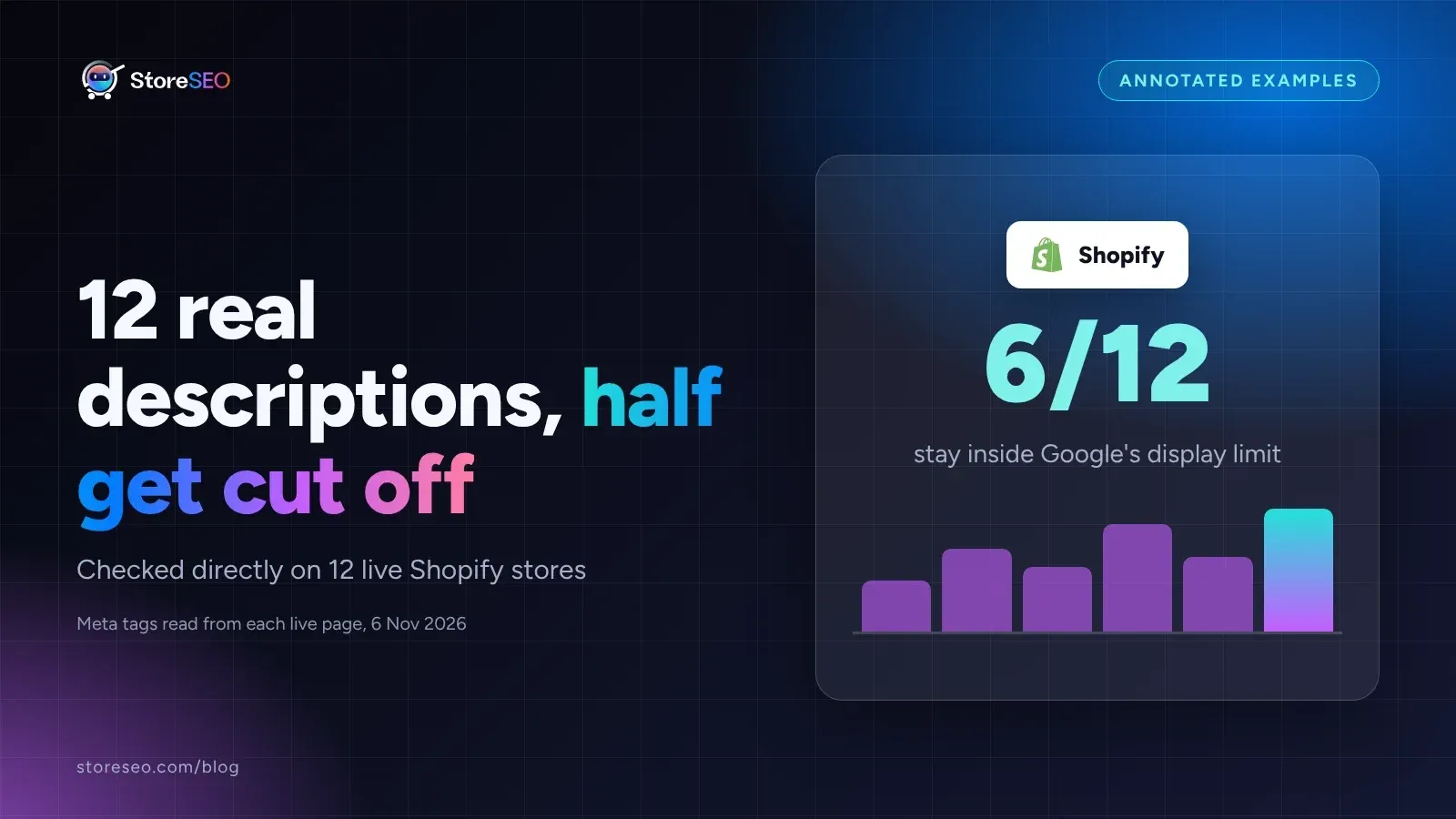
12 Shopify Meta Descriptions That Get Clicked
Twelve real Shopify meta descriptions, from 28 to 298 characters, show exactly where Google starts cutting a search snippet off mid-sentence.
Read article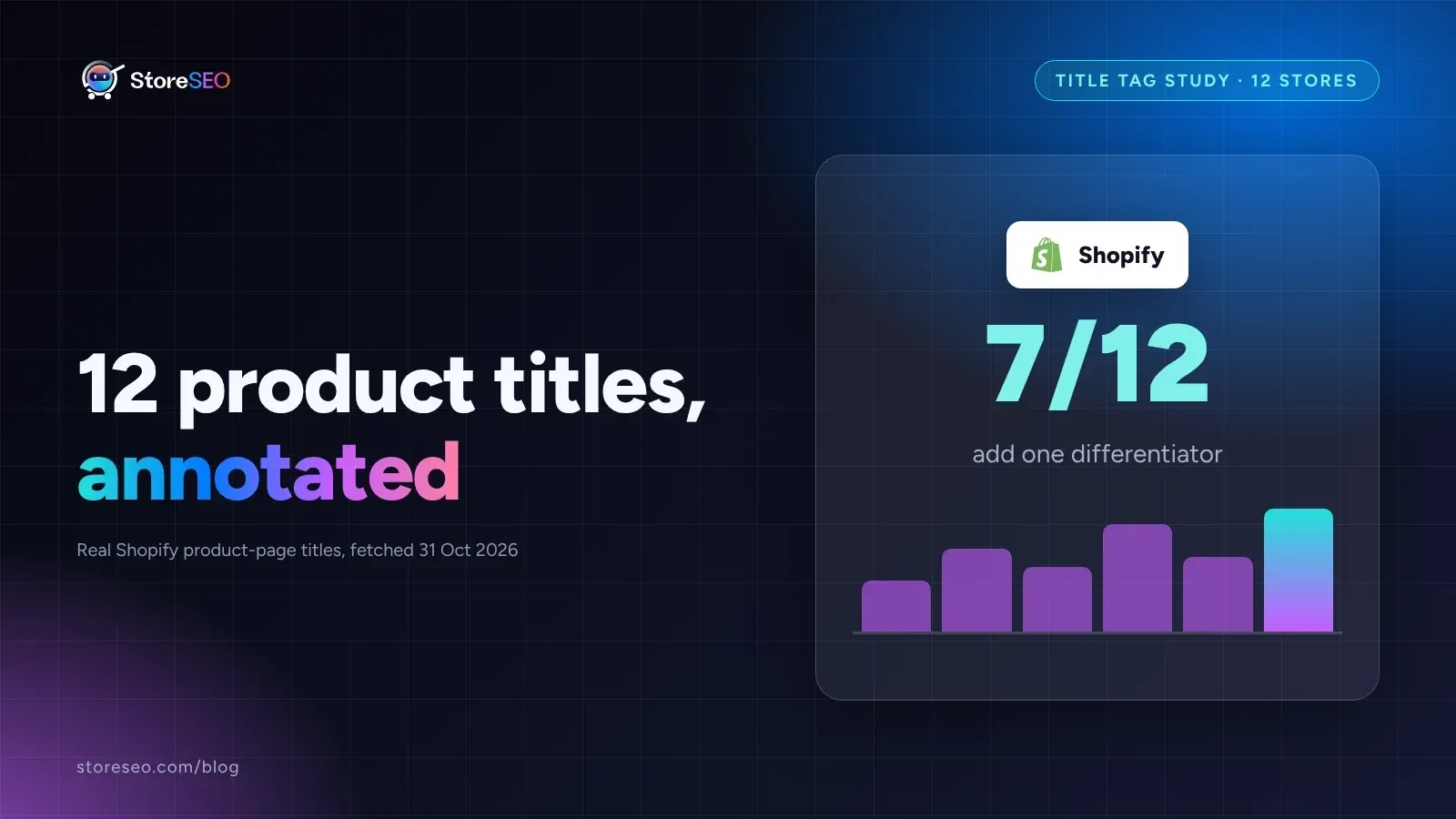
12 Shopify Product Titles That Rank (Annotated)
Twelve real Shopify product titles share three habits that work: name the product type, add exactly one differentiator, and put the brand name last.
Read article
What Happens When You Skip Google Product Category?
Skipping Google Product Category rarely blocks a sale, but in apparel, phones, software and alcohol it can quietly get a listing disapproved.
Read article