
Hreflang Setup for Shopify with StoreSEO: International SEO Made Simple

Expanding your Shopify store into new countries opens the door to more customers but it also introduces a challenge many merchants do not notice until traffic starts to drop.
Say you launch a French storefront for Canadian shoppers while keeping your original English store for U.S. customers. Both sell the same products but for different audiences. Without the right signals, Google has to guess which page belongs to which visitor and it does not always guess right.
As a result, French shoppers land on English pages, U.S. customers see Canadian pricing and your international SEO efforts lose effectiveness.
This is exactly what hreflang solves. It tells search engines which version of a page is meant for which language or region. If you are using Shopify Markets, the recommended path for international selling, hreflang is largely handled for you but understanding how it works is still essential to getting it right.
TL;DR
| Topic | Key Takeaway |
| What hreflang does | Tells search engines which language/region version of a page to show each user |
| Why it matters | Improves international visibility and routes shoppers to the correct localized page |
| Best setup | Shopify Markets auto-generates hreflang for supported domains and languages |
| Manual setup | Only needed for custom storefronts or non-standard configurations |
| How to check | View page source or run an SEO crawl |
| StoreSEO’s role | Optimizes the metadata, images, and schema that help localized pages actually rank |
| Audit frequency | After every new market launch, plus a full review each quarter |
What Is Hreflang?
Hreflang stands for Hypertext Reference Language.
It is an HTML link attribute (rel="alternate" hreflang="x") used to tell search engines which language and geographic. It tells search engines multiple versions of the same page exist for different languages or regions, so Google treats them as intentional alternatives rather than duplicate content.
For example, a skincare brand might have:
- example.com/products/vitamin-c-serum (United States)
- example.com/en-ca/products/vitamin-c-serum (Canada, English)
- example.com/fr-ca/products/vitamin-c-serum (Canada, French)
The products are identical, but pricing, language and shipping info may differ. Hreflang explicitly tells Google which page to serve to which audience, creating a better search experience while letting each localized page compete in its own market.
Why It Matters for Shopify SEO
Translating your storefront is not enough. Search engines need explicit technical signals to understand how your pages relate. Without hreflang, Google may show the wrong language, split ranking signals across versions, or under-serve your localized content.
Example
A shopper in Montréal searches in French for a moisturizer. You have a fully translated French page, but without hreflang configured, Google shows the English U.S. version instead and the customer bounces immediately. Nothing is “broken” in the traditional sense, but you’ve lost the sale because Google didn’t know which page belonged to that audience.
Does Every Store Need It?
No. If your store serves one country in one language, skip it. You need hreflang once your store has multiple languages, multiple regional storefronts, localized pricing, country-specific domains, or region-specific content, which is exactly what Shopify Markets is built for.
How Shopify Markets Handles Hreflang
Shopify Markets can automatically generate hreflang tags once your markets, languages, and domains are configured, removing the need to hand-code dozens of tags into your theme. For a setup like:
- example.com (US)
- example.com/en-ca (Canada, English)
- example.com/fr-ca (Canada, French)
- example.com/en-gb (UK)
Shopify understands the relationships and generates the tags for you. That said, “automatic” doesn’t mean ‘unchecked’, verify your setup after launching a new market, changing domains, or redesigning your theme.
How to Check If Your Store Already Has It
Checking whether your store already has hreflang tags configured is a quick process that takes less than a minute. Before diving into automated tools or complex audits, you can directly inspect your store’s underlying HTML code to see if search engines are receiving the correct regional routing signals.
Open a product page. Right-click → Inspect. Search for hreflang.
As an example, we are showing Allbirds to demonstrate how a technically correct implementation looks in your source code:
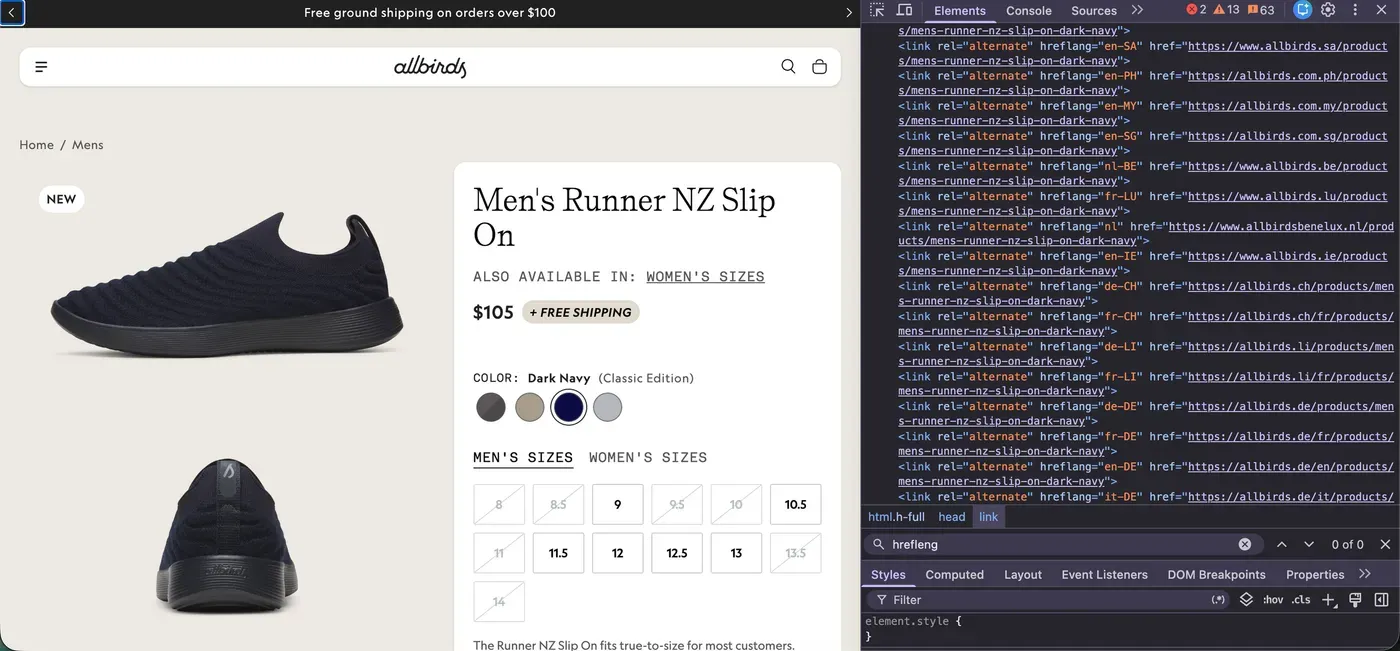
<!-- Main Localized Markets (Enforced Lowercase Standards) -->
<link rel="alternate" hreflang="en-us" href="https://allbirds.com">
<link rel="alternate" hreflang="en-au" href="https://allbirds.com.au">
<link rel="alternate" hreflang="en-nz" href="https://allbirds.co.nz">
<!-- Global Fallback Target -->
<link rel="alternate" hreflang="x-default" href="https://allbirds.com">
If tags are missing or point to the wrong URLs, revisit your Shopify Markets configuration.
About x-default**:** this tag acts as the fallback for visitors from countries you have not configured a storefront for. It is a single line, but it helps Google route unmatched international traffic sensibly instead of guessing.
How to Set Up Hreflang with Shopify Markets
To begin configuring your international SEO architecture, log into your Shopify store admin panel securely using your merchant credentials. Also, make sure StoreSEO is installed in your Shopify store. Afterward, follow the step-by-step guide below.
Step 1: Configure Your Markets
Go to ‘Shopify Admin’ → ‘Markets’ and set up each region’s target countries, currency, languages and domain/subfolder structure.
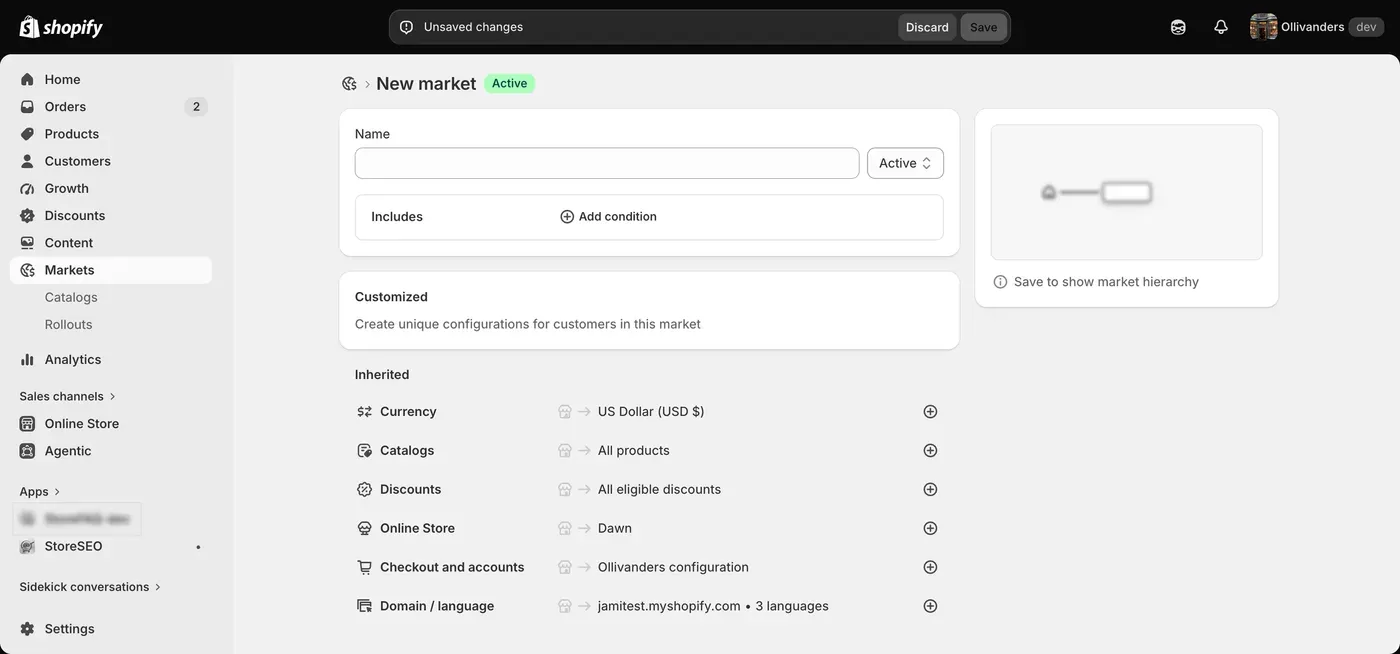
Here is a practical example of a clean, multi-market international setup:
| Market | Language | Currency | URL Structure |
| United States | English | USD | yourstore.com |
| Canada | English | CAD | yourstore.com/en-ca |
| Canada | French | CAD | yourstore.com/fr-ca |
| United Kingdom | English | GBP | yourstore.co.uk |
Step 2: Choose a URL Structure
- Country-specific domains (yourstore.ca), strongest local signal, more to manage
- Subdomains (ca.yourstore.com), good for larger operations
- Subfolders (yourstore.com/en-ca), usually the easiest to maintain, and the most common choice
Step 3: Enable & Localize Languages
Under ‘Settings’ → Languages, publish each target language, and make sure titles, descriptions, navigation, and metadata are actually translated.
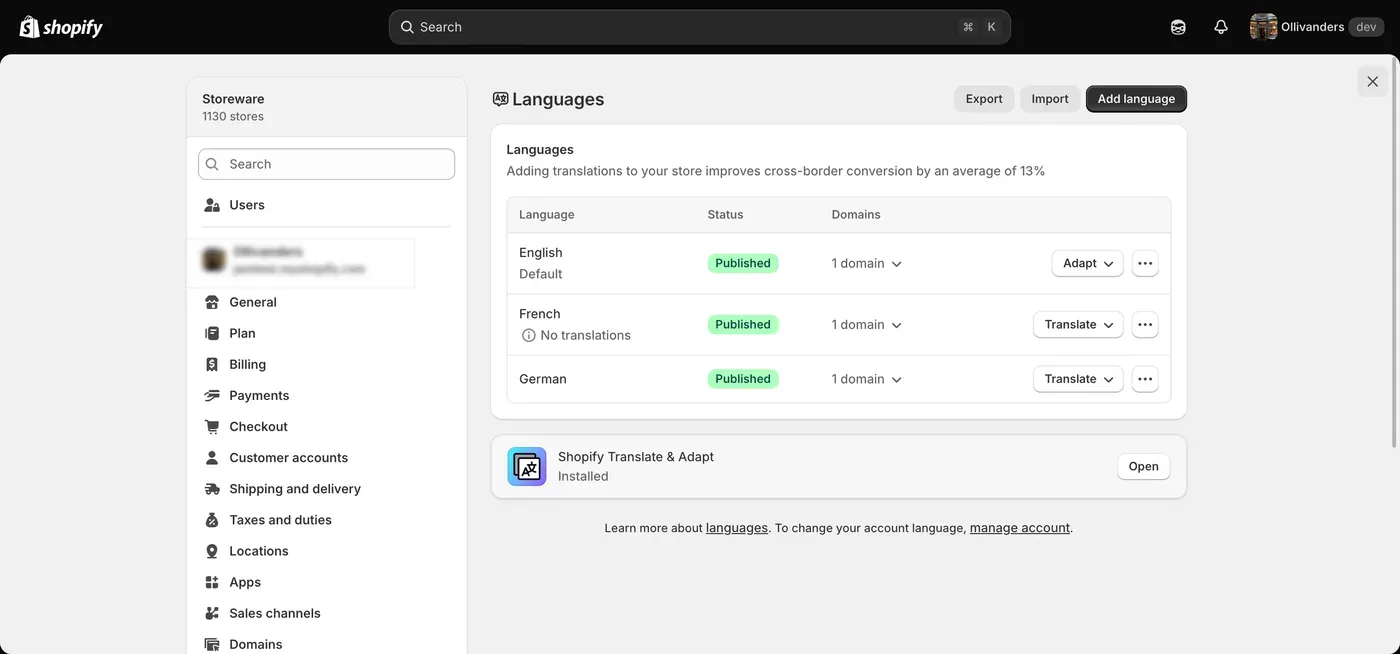
⚠️ Important Note: A technically correct hreflang tag pointing to an un-translated page creates a frustrating user experience and damages your dwell-time metrics.
Step 4: Let Shopify Generate the Tags
Once your specific markets, domains, and languages are saved within the backend dashboard, Shopify automatically injects the corresponding compliant hreflang strings directly into your theme’s code. No manual theme editing or Liquid file manipulation is required in standard setups.
Step 5: Optimize Localized SEO Elements with StoreSEO
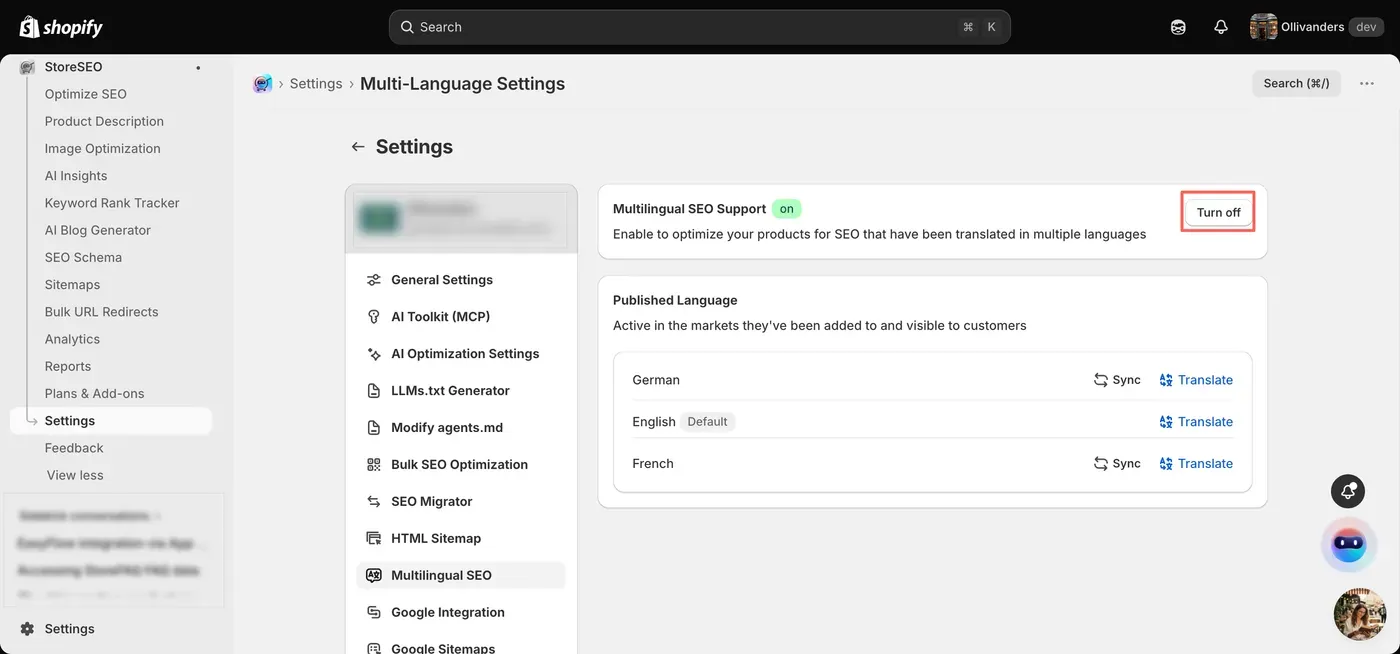
Once your global subfolders are properly mapped, use StoreSEO’s Multilingual SEO Support to fine-tune your on-page optimization for each audience profile. Now, open StoreSEO settings and make sure you have ‘Multilingual SEO Support’ turned on.
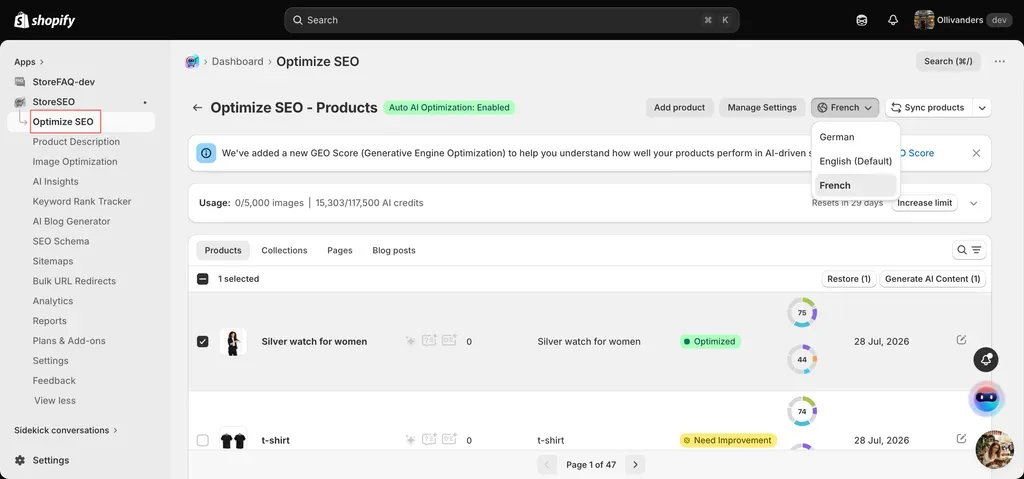
Afterward, go to the ‘Optimize SEO’ option and choose the language you want to optimize. Now, choose the product and optimize the SEO content accordingly.
When You Still Need Manual Implementation
While Shopify Markets automatically manages international targeting for standard stores, certain architectural setups require you to override the system and manage your tags manually. Manual hreflang is typically only necessary for:
- Custom storefronts built on Shopify’s APIs (headless setups)
- Multiple separate Shopify stores per country (e.g., brand.com, brand.co.uk, brand.de)
- Custom localization logic, such as personalized routing on enterprise stores
If you do implement manually, tags go in the and must use proper ISO codes — en-US, fr-CA, de-DE — not plain-language labels like “English” or “Canada.”
How to Validate Your Hreflang Setup
Do not assume your tags are working perfectly just because your backend settings are active. Regular quality audits prevent indexing drops.
- View page source on key localized pages and confirm all versions, correct URLs and x-default are present.
- Run an SEO crawler for stores with large catalogs, manual checks aren’t realistic at scale, and crawlers catch missing tags, wrong language codes, and broken alternate URLs.
- Watch Google Search Console for indexing issues and traffic shifts after a market launch, hreflang errors are one of the first things to check if rankings dip.
Hreflang Setup Checklist
To keep your configuration highly readable, we have divided your launch requirements into technical routing rules and content optimization targets.
- [ ] Markets configured correctly
- [ ]All target languages published
- [ ] Correct domain/URL structure per market
- [ ] Translated pages properly connected
- [ ] Hreflang tags present on localized pages
- [ ] x-default included
- [ ] URLs return status 200
- [ ] Pages reciprocally link to each other
- [ ] Metadata optimized per market
- [ ] Images and structured data localized where relevant
Common Mistakes to Avoid
The hreflang architecture relies on a strict, interlocking web of cross-references, even a single broken tag or a minor formatting oversight can completely break your international indexing.
Google’s crawlers handle targeting rules with zero flexibility. If your signals contain conflicting data, the search engine will simply disregard them and make its own assumptions about where to route your traffic. To protect your global search visibility from unexpected ranking drops, keep a close watch out for these frequent storefront errors:
- Hreflang without real localization, tagging a page as French when the content is still English creates a technically valid but user-hostile setup.
- Wrong language/region codes, use en-ca and fr-ca, not ‘Canada’ or ‘French.’ A formatting error can cause Google to ignore the tag entirely.
- Missing reciprocal links, if your US page references the French version, the French version must reference the US page back. One-directional signals are often ignored.
- Confusing hreflang with canonical tags, canonical tells Google which URL is the primary version; hreflang tells Google which version to show which audience. International stores typically need both, working together, not in conflict.
- Tagging pages that shouldn’t be indexed, hreflang is useless if the referenced page is blocked by robots.txt, marked noindex, or redirects incorrectly.
- Forgetting hreflang during migrations, domain changes, theme switches and platform migrations can silently break international SEO that took months to build. Add hreflang verification to every migration checklist.
💡 A language selector is a UX feature, it does not tell search engines anything. Hreflang is what search engines actually read. You need both, but they solve different problems.
Hreflang Gets You Found & On-Page SEO Gets You Ranked
Hreflang solves targeting: it tells Google which page belongs to which audience. It does not guarantee rankings. A perfectly tagged French product page can still underperform if the title is generic, the description is thin, images lack alt text, or schema is incomplete.
Think of it as two systems working together:
- Technical targeting (Shopify Markets, hreflang, localized URLs) → ‘Show this page to this audience.’
- Page optimization (keywords, metadata, images, schema, content quality) → ‘This page deserves to rank.’
This is where a Shopify app like StoreSEO fits in, not by managing hreflang itself but by strengthening the on-page layer underneath it: optimizing titles and meta descriptions across markets, improving image alt text, and reinforcing structured data so localized pages have a real shot at ranking once Google knows where to show them. That matters more as catalogs scale. A store with 500 products across 5 markets can easily generate thousands of localized pages needing consistent optimization.
A Practical International SEO Workflow
To scale your global storefront without breaking your indexation, treat your expansion as a continuous checklist rather than a one-time configuration chore. Follow this step-by-step deployment timeline for every new market you launch:
- Build your market structure; countries, languages, currencies, domains
- Create genuinely localized content; translated pages, navigation, metadata
- Verify hreflang; alternate URLs, language codes, x-default, reciprocal links
- Optimize every page; titles, descriptions, images, schema
- Monitor performance; rankings, traffic, indexing, recurring SEO issues
Do You Need a Dedicated Hreflang App?
For most merchants using Shopify Markets, no. Consider additional tooling only if you’re running multiple separate Shopify stores, hundreds of international domains, a custom storefront, or enterprise-level localization. A store expanding into two or three markets can typically manage everything through Shopify Markets alone; complexity, not country count, is what should drive the decision.
Start Selling Globally without Losing Ground in Search
International Shopify growth needs both a clear localization strategy through Shopify Markets and a strong SEO foundation across every localized page. Hreflang tells Google where your pages belong. On-page optimization is what earns them visibility once they get there.
For the admin fields beyond hreflang itself, URL structure, canonical URLs, sitemaps and crawler access, see our full Shopify Markets SEO settings breakdown. Hreflang handles the targeting, but it cannot fix weak meta titles, missing alt text, or thin product descriptions on its own. Pairing your hreflang structure with strong on-page SEO practices, the kind StoreSEO helps you maintain across your entire catalog, gives your international pages a genuine chance to rank once they are reaching the right audience. For the full walkthrough, from translating your catalog to turning on StoreSEO’s own Multilingual SEO Support, see our guide to enabling multilingual SEO on Shopify. If your Shopify store is ready to expand globally, now is a good time to audit both your technical setup and your on-page SEO foundation together.
Let us know your thoughts and if you found this blog helpful; subscribe to our blogs for more tips, guides and insights on Shopify SEO.
Keep reading
Switch From TinySEO to StoreSEO Without Losing Data
Switching from TinySEO to StoreSEO takes about ten minutes with the built-in wizard, and your schema and image alt text carry over automatically.
Read article
Does a Sitemap Actually Speed Up Shopify Indexing?
A sitemap helps Google and Bing discover new Shopify pages faster, but IndexNow, StoreSEO's instant-indexing feature, never reaches Google at all.
Read article
12 Shopify Product Titles That Rank (Annotated)
Twelve real Shopify product titles share three habits that work: name the product type, add exactly one differentiator, and put the brand name last.
Read article