
Shopify Markets SEO Settings: Every Option Explained

Shopify Markets handles most SEO mechanics on its own: hreflang tags, canonical URLs and sitemaps update themselves as you add markets. The one setting that is actually yours to choose is URL structure, subfolder, subdomain or country domain, which decides how much SEO value each market starts with, and StoreSEO covers the piece Shopify does not: optimizing translated content.
TL;DR
| Admin Field | What It Controls | SEO Effect | Recommendation |
|---|---|---|---|
| Market domain, subfolder or subdomain (Settings > Markets) | Whether a market gets its own subfolder, subdomain or top-level domain | Decides whether the market shares your main domain’s authority or starts fresh | Use a subfolder unless you need a separate country domain |
| Online Store > Preferences > Automatic hreflang tags | Whether Shopify writes hreflang tags for every market automatically | Tells search engines which language version to show; turning it off without a replacement risks a duplicate-content flag | Leave it on unless a theme or app already adds its own tags |
| Canonical URL (set automatically, no toggle) | Which market version of a page search engines treat as primary | Stops translated pages from reading as duplicates of each other | No action needed; do not add a manual canonical override |
| Sitemap (generated automatically per market) | Which market URLs are listed for search engines to crawl | A market with no working domain or subfolder is not represented in it | Submit the sitemap once for each domain you use |
| robots.txt.liquid (Online Store > Themes > Edit code) | Whether crawlers can reach every market version of the store | A rule written for one market can block a path every market needs | Leave the default rules unless you have a specific reason to change them |
| StoreSEO > Settings > Multilingual SEO | Turns on per-language SEO optimization inside StoreSEO, synced from Shopify’s Translate and Adapt app | Lets you fix titles, meta descriptions and schema separately for every translated market | Turn it on once translations exist, and sync after every content change |
| StoreSEO > Optimize SEO > Products, language selector | Which translated version of a product you are currently optimizing | Optimizing only the default language leaves every translated market’s fields unscored | Work through each published language, not only the store’s default |
How Does Your Market’s URL Structure Affect SEO?
Shopify gives every market one of three URL shapes: a subfolder (yourstore.com/fr/), a subdomain (fr.yourstore.com) or a top-level domain (yourstore.fr), set from Settings > Markets when you add or edit a market’s domain. The choice is not cosmetic. A subfolder shares your primary domain’s accumulated authority from the first day, which is why Shopify recommends it for most stores: it is also the cheapest to set up, since no separate domain registration is involved. A subdomain is treated by some search engines as a distinct site, so it builds its own authority over time instead of borrowing yours, which is the right trade when a market genuinely needs separation, a different legal entity or a different brand presence. A country-code top-level domain sends the strongest single signal that a site targets that country, at the highest setup and maintenance cost of the three.
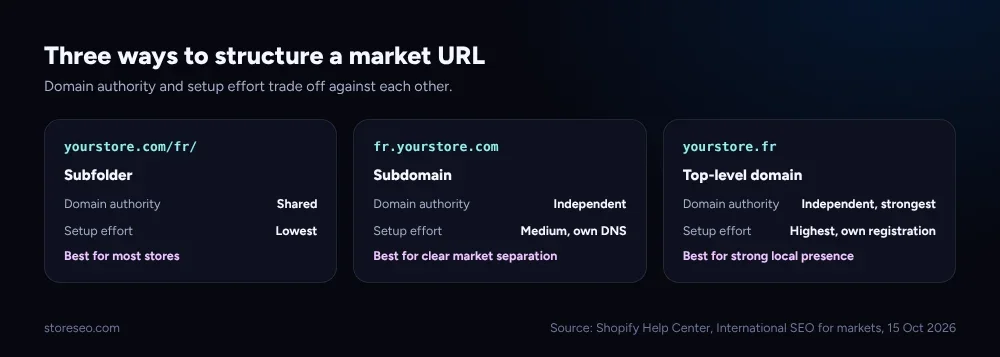 Subfolders start with the most inherited authority and the least setup work; top-level domains start with neither, but send the strongest local signal.
What Does The Automatic Hreflang Tags Setting Do?
Hreflang tags tell a search engine which language or region version of a page to show a given searcher, so a French shopper lands on the French page instead of the English one appearing in a French result. Per Shopify’s own international SEO documentation, these are generated automatically once a market has its own domain, subfolder or subdomain with a language assigned to it: no manual markup is required, and the tags update the moment you add, remove or change a market’s domain or language. The setting itself lives at Online Store > Preferences, under Automatic hreflang tags, and it is on by default for every store. Turn it off only if a theme or app already writes its own hreflang tags, since running both at once creates duplicates; turning it off with nothing in its place is what actually risks the duplicate-content flag the tags exist to prevent. This page covers every Markets SEO setting; our dedicated hreflang setup guide goes deeper on the tag mechanics alone, for a store that wants that one piece in more detail.
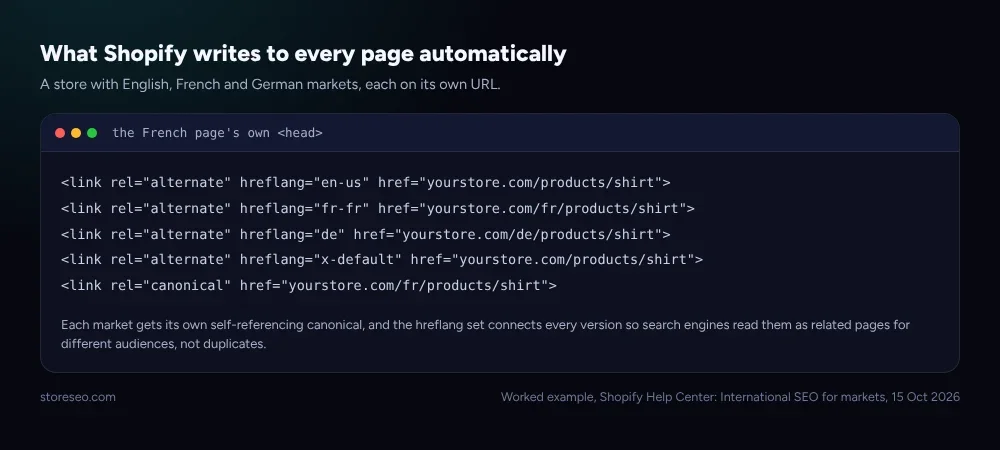 Each market version carries its own canonical and a full set of hreflang alternates, which is what tells search engines these are related pages, not copies.
Does Shopify Handle Canonical URLs And Duplicate Content Automatically?
Yes, and there is no admin field to configure it; this one simply happens. When the same product exists at yourstore.com/products/shirt and yourstore.com/fr/products/shirt, each URL gets a canonical tag pointing at itself, not at one “master” version, and the hreflang set on both pages links them together. That combination is what tells a search engine the two pages are intentional, audience-specific versions of one product rather than one page duplicated by accident. The failure mode worth knowing about is self-inflicted: adding a manual canonical tag through a theme edit or an app on top of Shopify’s own creates two conflicting signals on the same page, which is strictly worse than leaving the automatic one alone.
How Do You Optimize Translated Product Content For SEO?
Shopify’s own Translate and Adapt app produces the translated content; it does not score or optimize that content’s SEO fields. That is the gap StoreSEO’s Multilingual SEO Support fills. Once your products are translated, open StoreSEO’s dashboard and go to Settings > Multilingual SEO to turn the feature on, then hit Sync next to the published language your products have been translated into. From there, StoreSEO > Optimize SEO > Products gets a language selector at the top: pick a translated language, and the SEO score, basic analysis and detailed analysis on the right all switch to that language’s version of the product, so a French title, meta description and schema can be fixed without touching the English original. See the Multilingual SEO Support docs for the full Growth-and-Advanced-plan walkthrough.
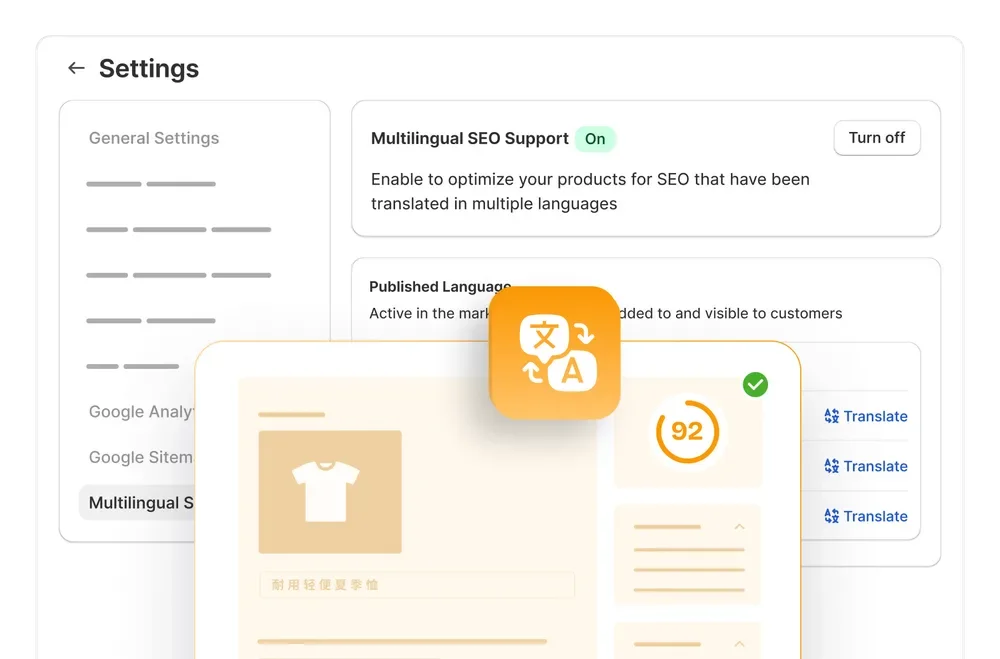 Turning on Multilingual SEO Support inside StoreSEO is the step after Shopify’s own Translate and Adapt app, not a replacement for it.
A store that translates its products but never opens this screen ends up with perfectly good French or German product pages carrying English-language titles and meta descriptions, since Shopify’s translation tool and StoreSEO’s optimization tool are two separate steps. Our own international SEO changes we track log covers the broader platform shifts around AI and search that touch every market, not only translated ones.
How Do International Sitemaps And Crawler Access Work For Every Market?
Shopify builds one sitemap that already includes every market-specific URL, with hreflang annotations on each entry so a crawler can see how the versions relate without visiting every page first. Add a new market with its own subfolder, subdomain or domain, and the sitemap updates to include that market’s pages without any manual step. Crawler access works differently from customer access on purpose: a customer visiting your store from France can be redirected automatically to the French market, but Shopify excludes known search-engine crawlers from that redirect, so a crawler always gets the content for the exact URL it requested. That is what lets every market version get indexed independently instead of only the one a crawler happened to land on first. Customizing crawler access beyond that default lives in the theme’s robots.txt.liquid file, which is also where a rule meant for one market can accidentally block a path another market needs.
Which Settings Break SEO If You Get Them Wrong?
Most of Shopify Markets’ SEO mechanics are automatic specifically so there is little to misconfigure, but the settings a store does touch are the ones worth checking after any markets change.
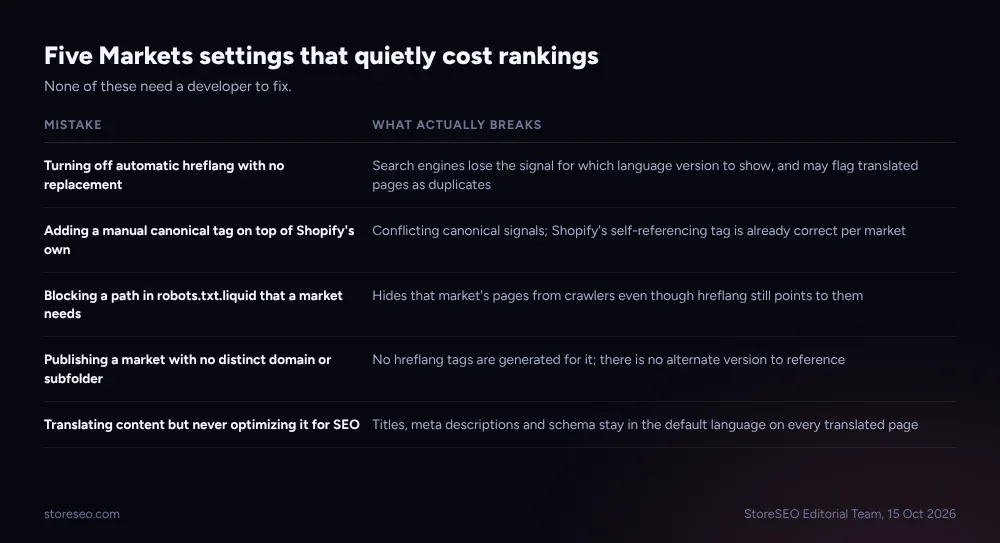 None of these five need a developer to fix; all five are either a toggle, a file edit or a step inside StoreSEO.
The pattern across all five is the same: Shopify’s defaults are already correct, and almost every mistake here is something a store actively did on top of them, not something Shopify left broken. Before publishing a new market, it is worth loading its homepage and one product page and checking the page source for a self-referencing canonical and a full hreflang set; both should be there without any extra work on your part.
Markets settings are one layer of a wider technical setup; our honest answer on whether Shopify itself is good for SEO covers the platform-level basics these settings sit on top of, and our Shopify SEO glossary defines the terms this piece uses, hreflang and canonical included, in plain language.
Frequently Asked Questions (FAQs)
1. Do I need to manually add hreflang tags if I use Shopify Markets?
No. Shopify generates hreflang tags automatically once a market has its own domain, subfolder or subdomain with a language assigned, and the Automatic hreflang tags setting in Online Store > Preferences is on by default. Only turn it off if a theme or app is already adding its own tags, since running both creates duplicates.
2. Will my translated product pages be flagged as duplicate content?
Not if Shopify’s own markets setup is left in place. Each market version gets a self-referencing canonical URL plus a hreflang set connecting it to the other versions, which signals related, audience-specific pages rather than accidental duplicates. The risk appears only when a store adds a manual canonical on top of that or disables hreflang with nothing to replace it.
3. Should I use a subfolder or a separate country domain for a new market?
A subfolder is the better starting point for most stores, since it shares your existing domain’s authority and needs no new domain registration. A country-code top-level domain is worth the extra setup only when a market needs the strongest possible local signal and you have the resources to manage a second domain long-term.
4. Does StoreSEO replace Shopify’s Translate and Adapt app?
No, it builds on it. Translate and Adapt creates the translated product content inside Shopify; StoreSEO’s Multilingual SEO Support then lets you score and fix that translated content’s SEO fields, title, meta description and schema, language by language, which Translate and Adapt does not do on its own.
5. Do search engine crawlers get redirected to their local market version?
No. Shopify’s automatic market redirection applies to customers, and known search-engine crawlers are excluded from it by design, so a crawler receives the content for the exact URL it requests. That is what allows every market version of a page to be crawled and indexed on its own rather than only one version being seen.
6. What happens if I turn off automatic hreflang tags?
Shopify stops generating hreflang tags for your markets, and you become responsible for adding your own through your theme or an app; the warning in Shopify’s own settings panel says this can hurt SEO if nothing replaces it. Automatic canonical URLs are a separate setting with no toggle, so they keep working either way.
Most of what keeps a multi-market Shopify store out of duplicate-content trouble is already switched on by default; the part worth actually doing is picking the right URL structure once and optimizing each translated language inside StoreSEO afterward. try StoreSEO on the Shopify App Store