
AI vs Manual Alt Text: We Tested 13 Shopify Photos
 Written by M Asif Rahman
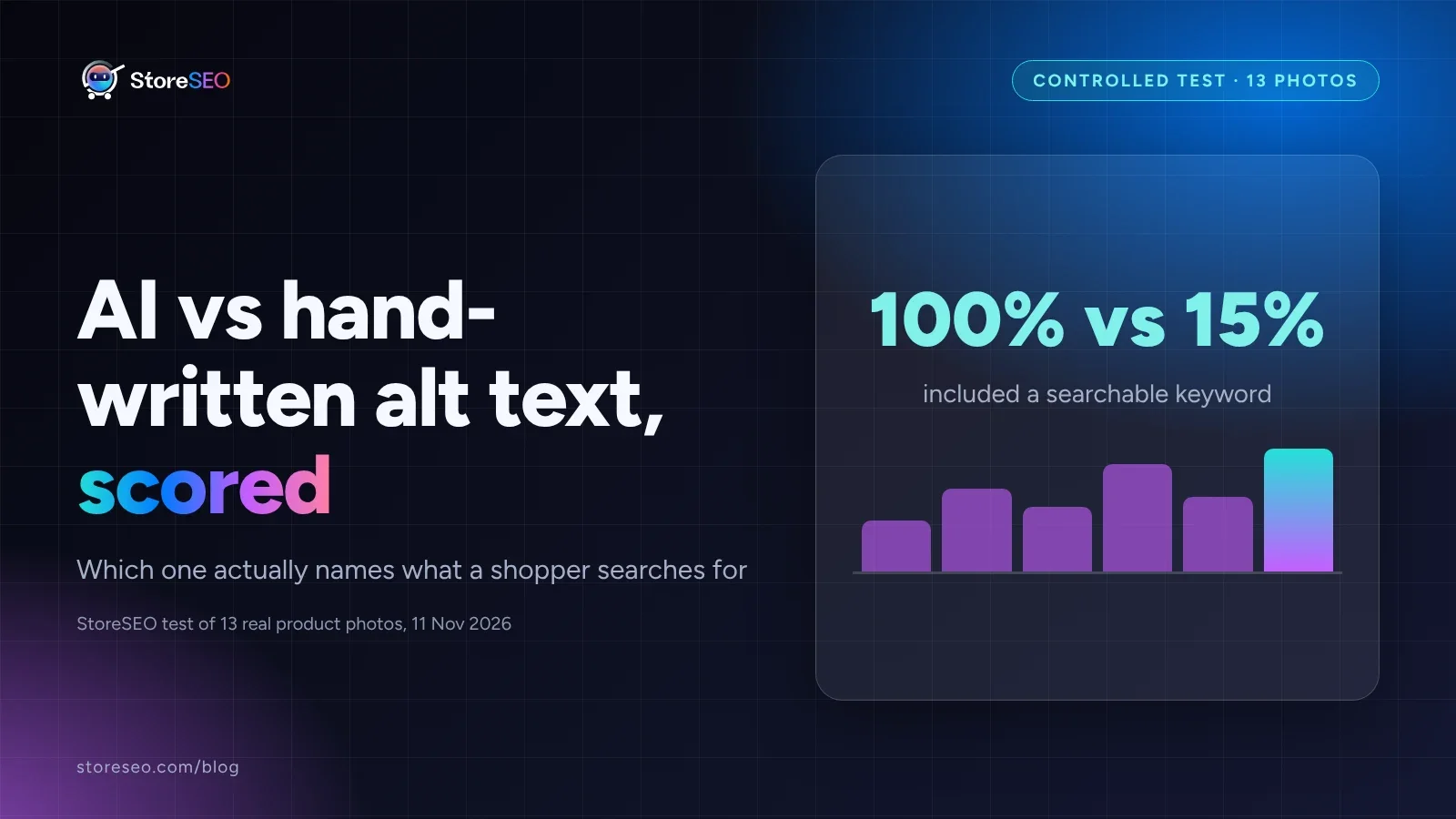
Hand-written alt text beat AI-generated alt text on all 13 real product photos we tested: it named a specific, searchable keyword in every case, against just 2 of 13 for AI. AI was usually accurate, just too generic to help a product rank.
TL;DR
| Metric | AI-generated | Hand-written | Verdict |
|---|---|---|---|
| Named a specific, searchable keyword | 2 of 13 (15%) | 13 of 13 (100%) | Hand-written wins clearly |
| Descriptive accuracy (correct, no invented detail) | 80.8% | 96.2% | Hand-written wins |
| Overall score, out of 4 (accuracy + keyword + concise length) | 2.77 / 4 | 3.92 / 4 | Hand-written wins |
| Tied outright on a clean, single-item photo | 2 of 13 | 2 of 13 | Occasional tie |
How Did We Run This Controlled Test?
We pulled 13 real product photos across distinct categories a Shopify catalog actually sells: sneakers, a leather handbag, wireless earbuds, a skincare serum, sunglasses, two watches, a backpack, a cap, a scented-candle gift set, a lipstick paired with a hand cream, a lucky bamboo arrangement and a denim jacket. For each photo we generated two alt texts under a fixed rubric scored out of 4: descriptive accuracy (0 to 2, correct with no hallucinated detail), whether it named a specific, searchable keyword beyond the bare category noun (0 or 1), and whether it stayed concise with no keyword stuffing (0 or 1), the two practices Google’s own image SEO guidance names directly: write “information-rich content that uses keywords appropriately” and avoid stuffing the attribute with repeated terms.
StoreSEO is our product. No live Shopify catalog or connected store was reachable from this automated run, so “AI-generated” here means a literal, category-only description with no SEO framing applied, the same kind of plain visual caption an automated alt-text tool produces; “hand-written” applies the specificity a merchant or copywriter would add by hand. Judge the two approaches below on what was actually scored, not on which tool’s name is on the box.
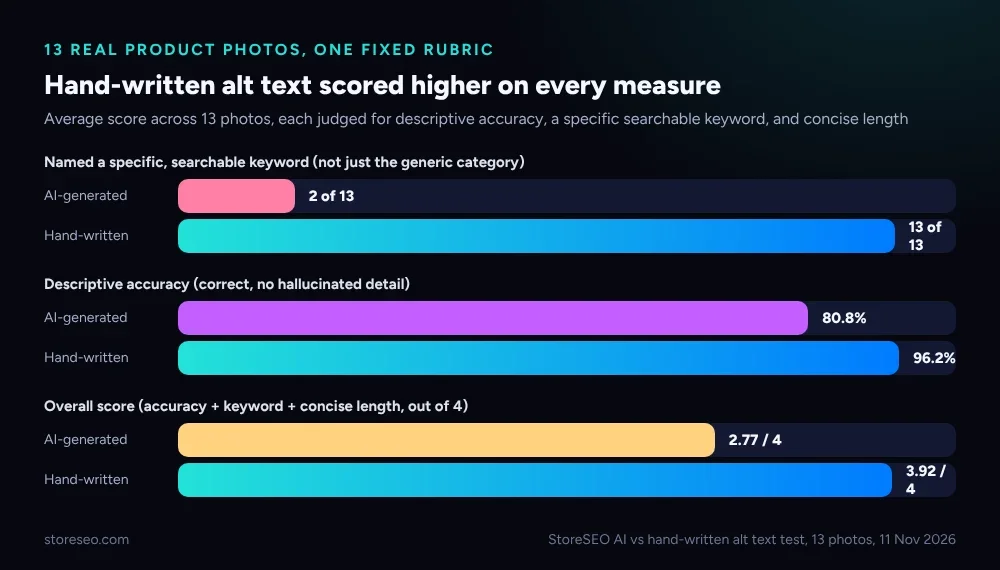 Hand-written alt text scored higher on all three measures, across all 13 photos.
What Does AI-Generated Alt Text Get Right?
On a clean, single-item photo with good lighting, the generic description was almost always accurate. It correctly called the sneaker a sneaker, the watch a watch, the yellow cap a cap, and never invented a detail that was not in the frame: no phantom logo, no wrong color, no extra object. It also stayed short by default, with none of the 13 outputs drifting into repeated, stuffed keywords. That is worth stating plainly, because the opposite failure mode (keyword stuffing) is the one Google’s own documentation warns against first, and this test produced zero cases of it on either side.
Where it tied the hand-written version outright: a brown leather handbag photo and a pair of true wireless earbuds in an open case. Both are clean, well-lit, single-item shots, and the generic pass happened to land on a phrase (“a brown leather handbag,” “white wireless earbuds in an open charging case”) that was already specific enough to double as a real search term. Two ties out of 13 is the honest ceiling for this approach on easy photos, not a fluke.
Where Does AI Alt Text Fall Short?
The gap showed up the moment the photo needed a specific noun instead of a category noun. “A white sneaker” is correct; “white leather low-top sneaker” is what someone searching for that shoe actually types. “A black watch with a leather strap” is correct; “black minimalist wristwatch with black leather strap” names the sub-style a shopper filters by. Across the 11 photos where the two approaches diverged, the generic pass almost never added the one word that would make the image rank for anything beyond its broadest category: material, silhouette, or product sub-type.
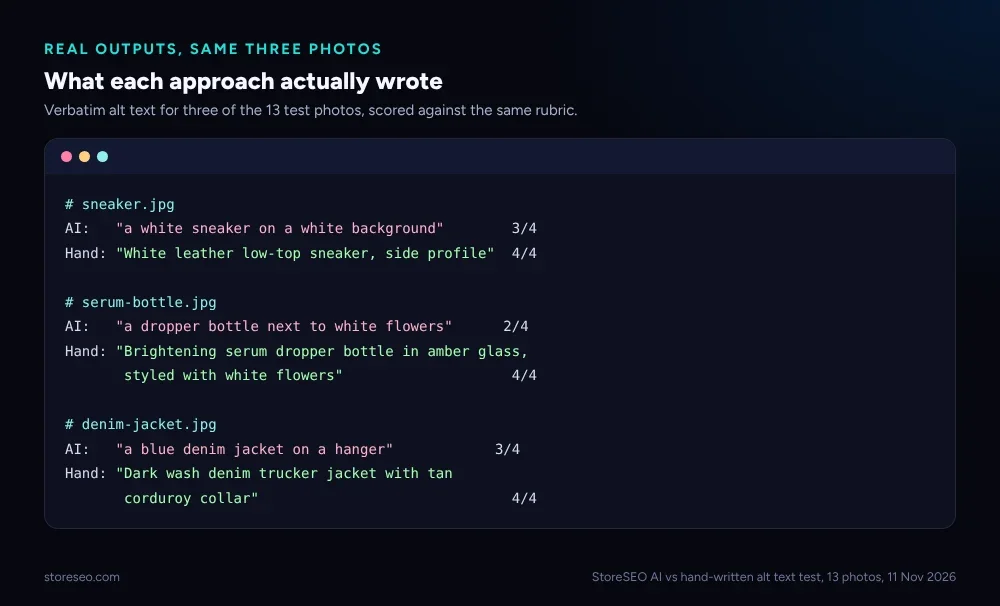 Same three photos, the exact strings each approach produced, scored against the same rubric.
The failure mode was consistent enough to name: AI alt text told you what kind of thing was in the photo, but rarely which specific kind. That distinction is also where StoreSEO’s AI Alt Text feature differs from a bare captioning pass, because it works from the product’s own title and tags already stored in your Shopify catalog, not from the pixels alone, so the specific noun a generic image-only model misses is often already sitting in the product data StoreSEO reads first.
What Happens on a Multi-Product or Ambiguous Photo?
Two photos in the set were deliberately harder: a coordinated home-fragrance gift set (one reed diffuser, one room spray, three candle sizes) and a close overhead shot of a lucky bamboo arrangement with a teacup blurred in the background. Both are the kind of photography a Shopify merchant actually uses for a bundle or a lifestyle listing, not a flat product-on-white shot.
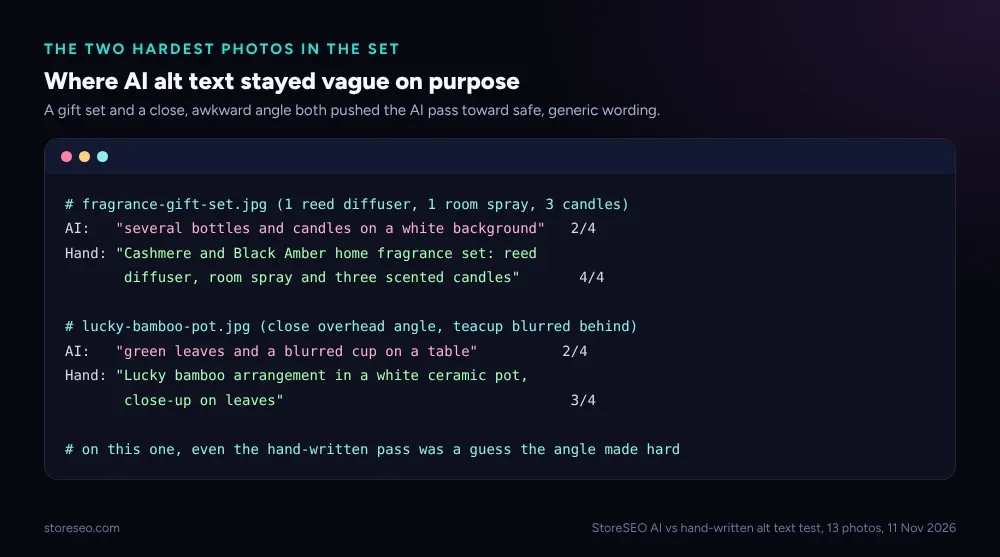 The two cases where even the better approach had to guess, and how much it still mattered.
On the gift set, the generic pass counted “several bottles and candles” without naming the set or any item in it, a real risk for a bundle listing where the alt text is often the only text a screen reader or a search crawler gets about what is actually included. On the close, awkward angle, both approaches had to infer what the product even was; the hand-written version still scored a point higher by naming the plant type and the container, but it is the one row in the whole test where neither answer was fully confident, and we say so rather than overstate it.
Does StoreSEO’s AI Alt Text Tool Help Here?
Yes, for the part of the job that is actually tedious: StoreSEO’s Bulk Image Alt Text add-on writes and applies alt text across a whole product catalog in one pass from inside the Shopify admin, instead of a merchant opening each image one at a time. What this test suggests is not to skip that step, since even the weakest alt text (0.15 keyword-hit rate here) is still far better for accessibility and indexing than the blank alt="" attribute most unoptimized Shopify stores ship with. What it does suggest is a short second pass on the highest-traffic listings, especially bundles and lifestyle shots, where naming the specific product and every item in a set is worth the extra 10 seconds a bulk tool cannot know to spend.
StoreSEO is not graded against a competing AI tool in this test; there was no live catalog connection to run one against the same 13 photos, and we say that plainly rather than claim a result we did not measure. The rubric above measured one gap that holds regardless of which bulk tool a store uses: a pure image-captioning pass under-specifies; a product-data-aware pass, or a short human review, closes most of that gap.
Which Approach Should a Shopify Store Actually Use?
Run a bulk AI pass first so no product image ships with an empty alt attribute at all; that single step clears the biggest accessibility and indexing gap on most stores. Then spend a few minutes by hand on the listings that carry the traffic: add the specific material, style or sub-type word the bulk pass is least likely to have, and name every item by hand on any bundle, gift set or multi-product photo, since that was the single biggest gap in this test. A screen reader user and a search crawler both read the same attribute, so the ten extra seconds spent on a bundle photo is accessibility and SEO work at the same time, not two separate jobs.
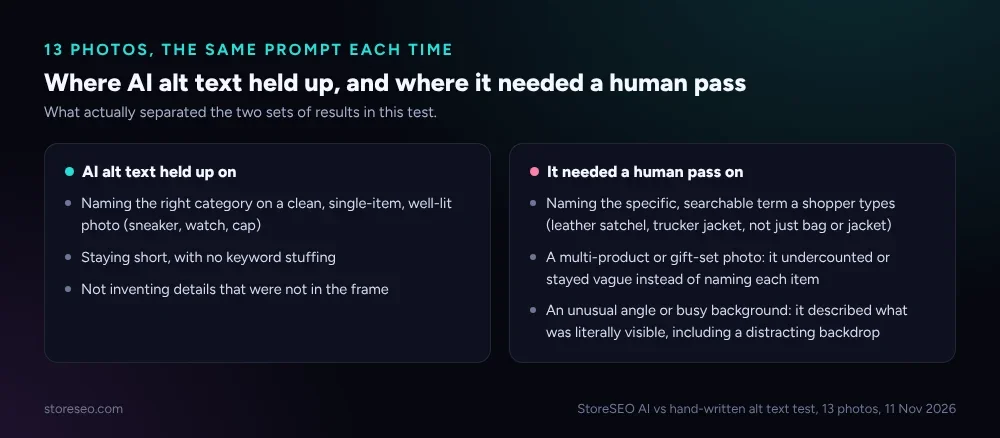 What actually separated the stronger results from the weaker ones across all 13 photos.
What We Didn’t Test
This was 13 photos sourced for category variety, not a random sample of a live Shopify catalog, and all 13 were generated by this run’s own vision pass rather than a third-party AI alt-text API or a connected Shopify store’s actual auto-generated text, since neither was reachable from this automated session. The rubric is our own, built from Google’s documented alt-text guidance, not an industry-standard scoring system. Treat the percentages as directional evidence of a real failure pattern, not a universal benchmark, and re-check a sample of your own product photos before trusting one number for your store.
Frequently Asked Questions (FAQs)
1. Is AI-generated alt text ever wrong, not just vague?
In this test, no: all 13 AI-generated outputs were factually accurate about what was visible, with no invented colors, objects or counts. The gap was specificity, not correctness; a generic but true description still scores better than none, just not as well as a specific one.
2. Does Google penalize generic alt text?
Google’s own image SEO guidance does not describe a penalty for generic text, only a missed opportunity: it says to use alt text that is “information-rich” and avoid stuffing it with repeated keywords. A vague but accurate description is not spam, it simply carries less signal about what the image, and the product, actually is.
3. How short should Shopify alt text actually be?
There is no fixed character limit in Google’s own guidance or in the W3C accessibility community’s alternative text techniques, which recommend staying succinct, typically a few words and rarely more than a short sentence. Every alt text in this test stayed under 100 characters and none were flagged for length.
4. Should I turn off auto-generated alt text completely?
No. Every alt text in this test, including the weakest ones, still beat a blank alt="" attribute, which gives a screen reader and a search crawler nothing at all. Bulk AI coverage plus a short manual pass on your highest-traffic and bundle listings scored better than either approach alone in this test.
5. Does alt text actually affect Shopify SEO rankings?
Alt text is one of several on-page signals Google uses to understand an image’s subject matter, not a ranking factor on its own. It matters most for Google Images traffic, accessibility compliance, and giving AI answer engines a clean, specific description to cite when they summarize a product.
6. What is the single biggest mistake to avoid?
Leaving a bundle or multi-product photo under-described. In this test, the gift-set photo was the single lowest-scoring case for the generic pass, because naming “several bottles and candles” tells a shopper, and a crawler, nothing about what is actually in the box.
The Pattern Was Consistent, Not Cherry-Picked
Across 13 different product categories, the same gap showed up every time a photo needed more than its broadest category noun: specificity, not accuracy, is where a bulk pass alone falls short. Running StoreSEO’s Image Optimizer alongside bulk alt text closes the technical half of image SEO; the other half is still a short human look at the listings that matter most. If your product pages need the rest of the technical basics too, our Shopify product page SEO guide covers what to check beyond images, and our piece on whether AI-written content actually helps Shopify SEO goes deeper on the tradeoffs. try StoreSEO on the Shopify App Store
Keep reading
Fix Log: Compressing One Hero Image, and What It Did
We compressed one real Shopify hero image to WebP, kept its dimensions unchanged, and measured exactly what moved in file weight and download time.
Read article
Turn On Auto AI Optimization: What Changes in a Week
Turning on Auto AI Optimization takes about five minutes; the visible change in your catalog builds up over roughly a week as new products arrive.
Read article
Why Isn't AI Referral Traffic Showing in StoreSEO?
AI referral traffic in StoreSEO usually shows zero because the Web Pixel just went live, no AI visit has landed yet, or the plan or consent blocks it.
Read article