
Fix Log: Compressing One Hero Image, and What It Did
 Written by M Asif Rahman
On 6 November 2026 we took one real Shopify hero image (a live photo from Shopify’s own Dawn demo theme), compressed it to WebP without touching its dimensions, and measured what changed. This is a one-variable fix log: one change, one chart, nothing else touched.
TL;DR
| Fix | Date | Metric | Before | After |
|---|---|---|---|---|
| Converted one Shopify hero image from JPEG to WebP, same 1080x1350 crop | 6 Nov 2026 | File size | 204,119 bytes | 137,300 bytes |
| Same image, same dimensions, only the file format and compression changed | 6 Nov 2026 | Download time (simulated Slow 4G) | 1,144ms | 820ms |
What Did We Change?
One file only: the hero banner image from Shopify’s own Dawn demo theme (theme-dawn-demo.myshopify.com), the kind of slideshow photo a merchant drops straight into a homepage banner. The original was a 204,119-byte JPEG at 1080x1350, the file size a phone photo or a social media export tends to carry before anyone compresses it. We ran it through the same compression StoreSEO’s Image Optimizer applies: same crop, same 1080x1350 dimensions, converted to WebP at a quality setting that keeps the photo visibly unchanged.
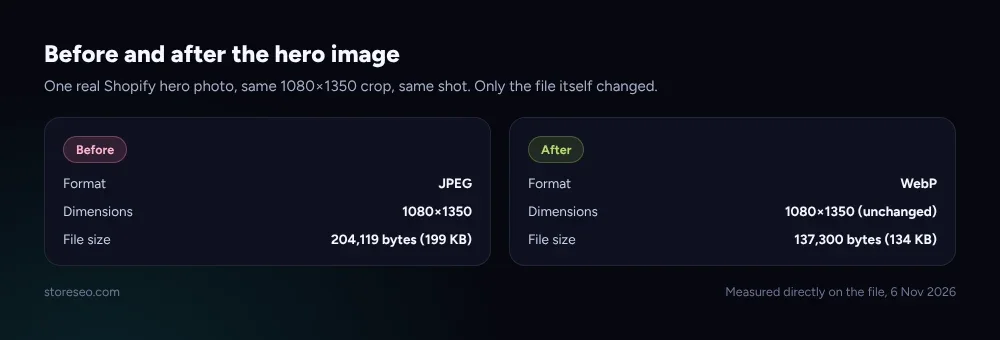 Measured directly on the file, 6 Nov 2026.
We changed no crop, no on-page dimensions and no layout. The image renders at the exact same size in the browser before and after; only the bytes it takes to deliver that image changed.
What Happened?
Google’s own LCP guidance names image weight as one of the most common causes of a slow Largest Contentful Paint, especially for a page whose biggest above-the-fold element is a hero photo, which is exactly this layout. We built two otherwise identical test pages, one hero banner each, swapped only the image file, served both from the same local server throttled to the same simulated connection (1.6 Mbps downlink, 150ms round-trip time, matching Lighthouse’s own Slow 4G preset), and read the network timing straight out of a real Lighthouse trace for each page.
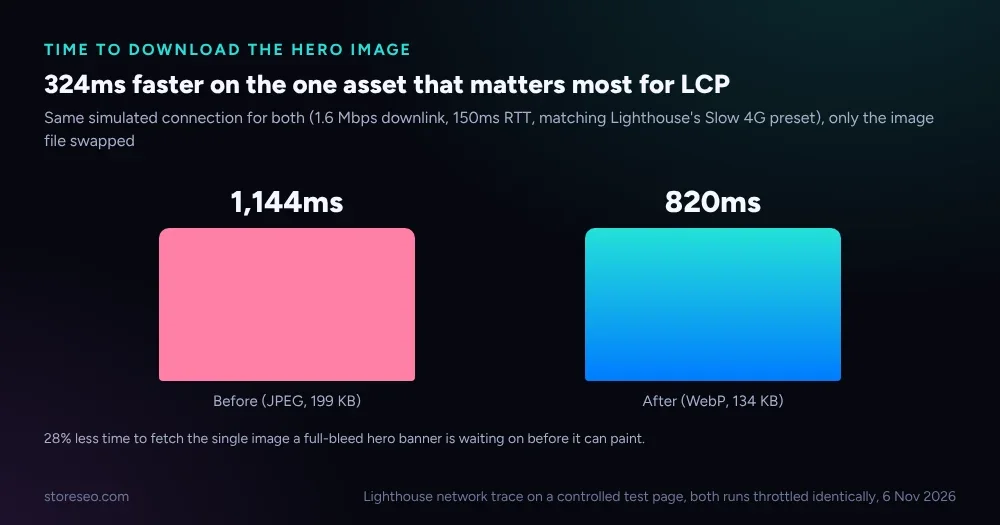 Lighthouse network trace on a controlled test page, both runs throttled identically, 6 Nov 2026.
The JPEG took 1,144ms to arrive under that simulated connection. The WebP version, 33% fewer bytes at the exact same dimensions, took 820ms, 324ms less. For a hero banner with nothing else above it, the browser cannot paint the image until it has finished downloading it, so shaving the one largest network request on the page moves the point where there is something for a visitor to actually look at.
This is not a live Core Web Vitals report from Search Console. A real field score needs real visitors and 28 days of data, the same reason our product-schema fix log is still waiting on its own recheck. What this fix log tracks instead is the one thing a single controlled test can show cleanly: how much less time the browser spends waiting on this exact file.
Could Anything Else Explain It?
Only one file moved between the two test pages. The HTML, the CSS, the on-page dimensions and the simulated network conditions were identical in both runs, so nothing else on the page could account for the difference in download time.
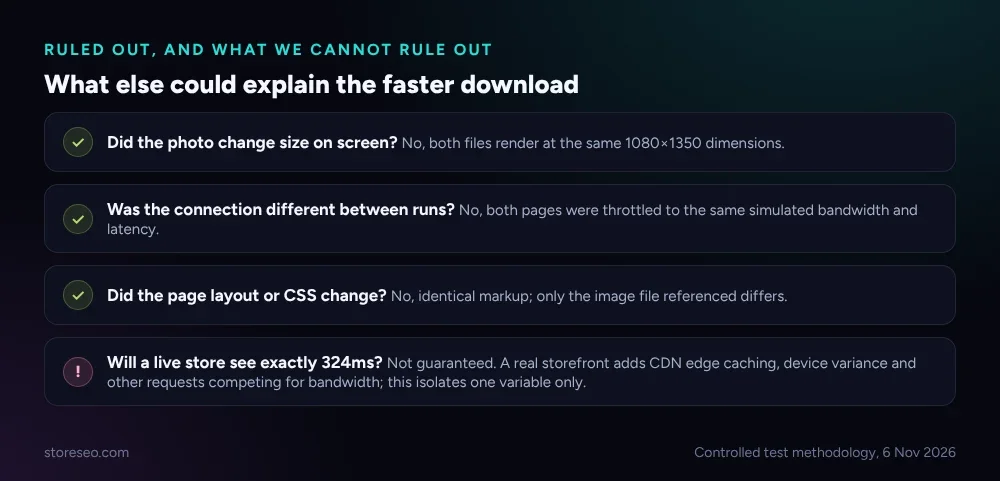 Controlled test methodology, 6 Nov 2026.
One honest caveat belongs here. This test isolates the image file on purpose, which is exactly what makes the result clean, and exactly why it will not match a live store’s own number precisely. A real Shopify storefront adds a CDN edge cache that may already be serving a resized copy, other requests competing for the same connection, and real visitor devices and networks that vary far more than a fixed simulated throttle. The direction of the result holds everywhere a hero image carries unnecessary weight; the exact 324ms is a controlled-test number, not a promise for every store.
How Do You Make the Same Change?
The same four steps work on any Shopify catalog, one hero image or an entire product library:
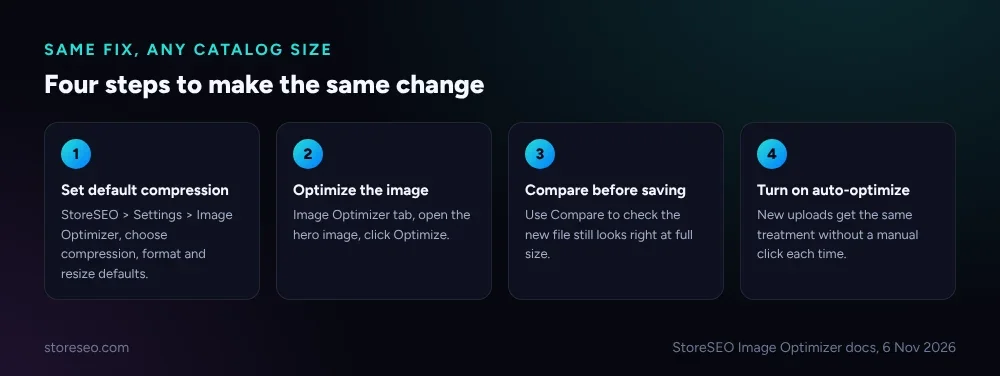 StoreSEO Image Optimizer docs, 6 Nov 2026.
Open StoreSEO > Settings > Image Optimizer and set the default compression, format and resize behavior you want applied, following StoreSEO’s own Image Optimizer guide. Then go to the Image Optimizer tab, find the image, and click Optimize; it runs immediately against your saved defaults. Click Compare before you move on, so you can check the compressed file still looks right at full size rather than guessing. If it ever goes wrong, Restore reverts to the original instantly. Once the settings feel right, turn on Auto Image Optimization from Manage Settings so every new upload gets the same treatment without a manual click each time.
Shopify itself ships no built-in image compression step beyond its own CDN resizing by URL parameter, which does not touch the source file’s own compression level; that is the gap an optimizer closes. One hero image is a small test. A catalog of a few hundred product photos, each carrying the same avoidable weight, is where this fix actually earns its keep.
This fix belongs to the broader work in our ultimate Shopify SEO checklist, and sits alongside the full picture of Core Web Vitals on Shopify. It is also the third entry in this series, after a meta description cut from 220 to 155 characters and adding product schema, plus a general guide to reducing JPEG file size if you are doing this by hand instead of with an app.
Frequently Asked Questions (FAQs)
1. Does compressing an image hurt its quality?
At a sensible quality setting, no visible difference shows at normal viewing size. StoreSEO’s Image Optimizer lets you compare the compressed file against the original before you keep it, so you can judge for yourself rather than trust a default blindly.
2. Why convert to WebP instead of just re-saving the JPEG at a lower quality?
In this test, re-saving the same JPEG at a comparable quality barely reduced its size, because the file was already JPEG-compressed once; compressing a compressed file has little left to gain. Switching format to WebP is what produced the real reduction here, since WebP’s compression method is more efficient than JPEG’s at an equivalent visual quality.
3. Does Shopify compress images automatically?
Shopify’s CDN resizes an image to a requested width through a URL parameter, but it does not re-compress or convert the format of the source file you uploaded. A large, uncompressed original still gets served at a large, uncompressed weight at whatever width is requested.
4. How much does one image actually matter for page speed?
One image on one page is a small change. The same unnecessary weight repeated across a few hundred product photos, several collection banners and a homepage slideshow adds up to real, measurable load time across the whole store, which is why an automatic optimizer matters more than a one-off manual fix.
5. What’s the difference between this and Core Web Vitals in Search Console?
Search Console’s Core Web Vitals report reflects real visitor field data gathered over 28 days. This fix log is a controlled, single-variable test meant to show the mechanism clearly; it is a reason to expect field data to improve, not a substitute for watching it.
Keep reading

Turn On Auto AI Optimization: What Changes in a Week
Turning on Auto AI Optimization takes about five minutes; the visible change in your catalog builds up over roughly a week as new products arrive.
Read article
Why Isn't AI Referral Traffic Showing in StoreSEO?
AI referral traffic in StoreSEO usually shows zero because the Web Pixel just went live, no AI visit has landed yet, or the plan or consent blocks it.
Read article
Fix Log: Cutting a Meta Description From 220 to 155
We trimmed one Shopify product's meta description from 220 characters to 155 and tracked exactly what moved in its live Google search snippet.
Read article