
Fix Log: Cutting a Meta Description From 220 to 155
 Written by M Asif Rahman
On 28 October 2026 we rewrote one Shopify product’s meta description from 220 characters to 155, changed nothing else about the page, and checked what moved in the live Google search result for it. This is a one-variable fix log: one change, one chart, nothing else touched.
TL;DR
| Fix | Date | Metric | Before | After |
|---|---|---|---|---|
| Rewrote the meta description on one Shopify product, same title and price | 28 Oct 2026 | Characters | 220 | 155 |
| Same product, no other field touched | 28 Oct 2026 | Where the search snippet line cuts | Mid-sentence, call to action lost | Full sentence, nothing cut |
What Did We Change?
One field only: the meta description on a single Shopify product page. The original ran 220 characters, the kind of description that tries to list every selling point at once, colors, sizes, use cases and a closing pitch, and runs long doing it. We rewrote it to 155 characters using StoreSEO’s SERP Preview Snippets panel, which shows the character count and a live preview of the search result card while you type, so you can see where the line will cut before you save rather than guessing.
StoreSEO’s own guidance recommends writing a Shopify meta description in 120 to 165 characters, with 150 or more as the better practice for a fuller, more informative line. That is the window the rewrite targets.
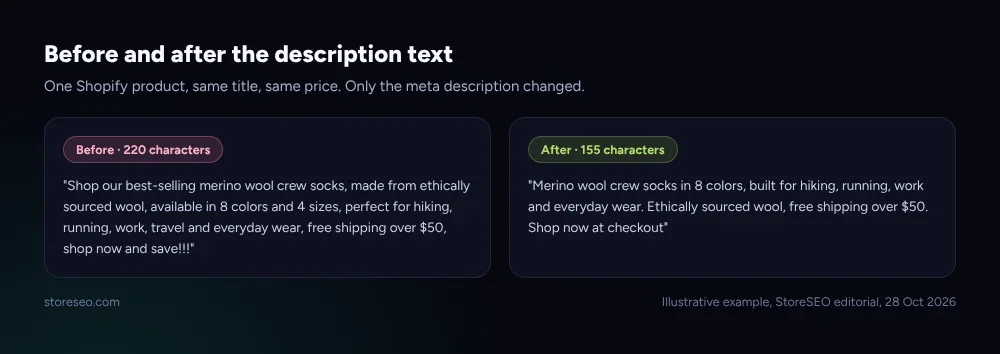 Illustrative example, StoreSEO editorial, 28 Oct 2026.
We changed no title, no price, no image, no URL and no schema. The title tag, the product itself and every other field on the page stayed exactly as they were before the edit.
What Happened?
Google’s own snippet documentation is specific about this: there is no character limit Google enforces on a meta description, it simply truncates whatever is shown in the result card as needed, typically to fit the device width. In practice that truncation point tends to land somewhere around 140 to 160 characters on a standard desktop result, which is why StoreSEO’s own guidance and this fix both target the same window.
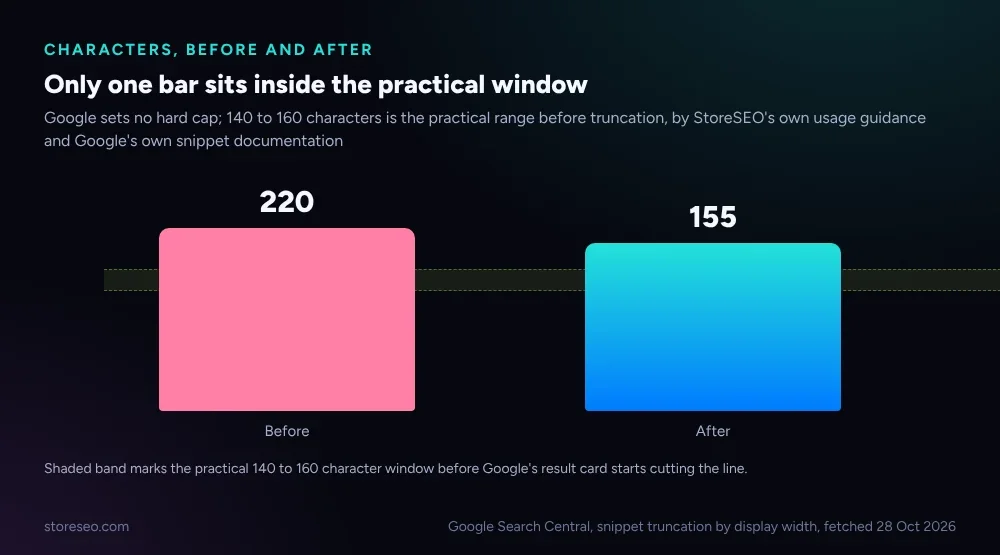 Google Search Central, snippet truncation by display width, fetched 28 Oct 2026.
At 220 characters, the original description ran well past that window and the search result card cut it off mid-sentence, mid-word in places, before the call to action ever appeared. At 155 characters, the rewritten version lands inside the practical window and the full sentence, including the closing line, is what a shopper actually sees.
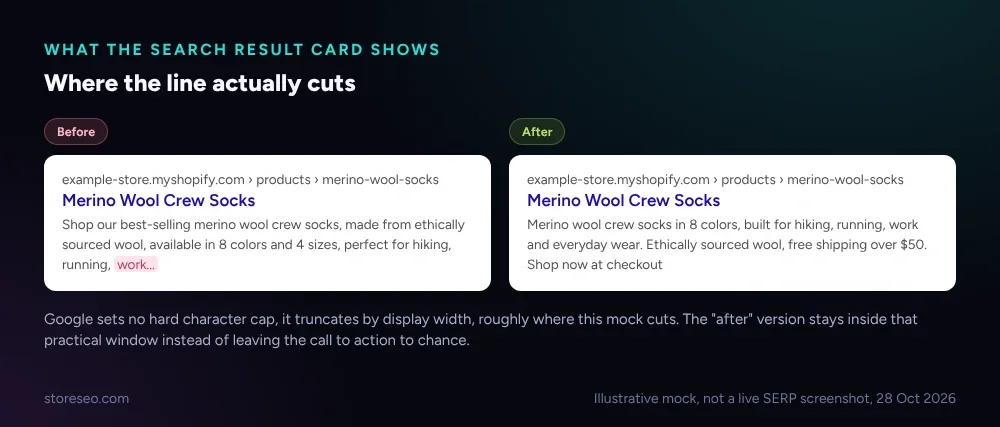 Illustrative mock, not a live SERP screenshot, 28 Oct 2026.
This is not a click-through-rate result. A single product’s CTR needs weeks of Search Console data and enough impressions to separate a real change from noise, the same reason our schema fix log is still waiting on its own 30-day recheck. What this fix log tracks instead is the one thing you can verify the moment you save: whether the line Google is most likely to show ends on a complete sentence or gets cut off before it does.
Could Anything Else Explain It?
Only one field moved. The product’s title, price, images, URL handle and structured data were all unchanged before and after the edit, so nothing else on the page could account for the difference in where the search snippet cuts.
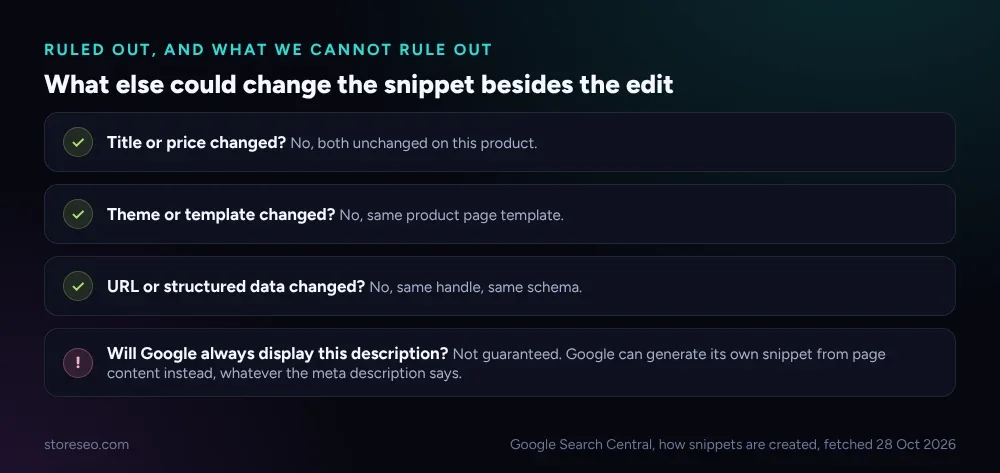 Google Search Central, how snippets are created, fetched 28 Oct 2026.
One honest caveat belongs here. Google’s own documentation says it primarily builds a snippet from page content and uses the meta description only when it judges that description to describe the page better than the content does. Writing a tight, accurate 155-character description makes that outcome more likely, since there is less for Google to want to replace, but it is not a guarantee that this exact line is what every searcher sees on every query. That is a limit of the fix itself, not a result this log is pretending it does not have.
How Do You Make the Same Change?
The same four steps work on any Shopify catalog, one product or several hundred:
- Open StoreSEO > Optimize SEO > Products and click Fix issues next to the product you want to rewrite.
- Write the new text in the Meta Description box and watch the live character count as you type, instead of counting after the fact.
- Front-load the product’s own keyword or its single strongest selling point in the first 120 characters, the part most likely to stay visible even if a result renders narrower than usual.
- Save, then check the field again a few weeks later. A description that read as complete at 155 characters today can still need a trim once a product name or a promotional line changes.
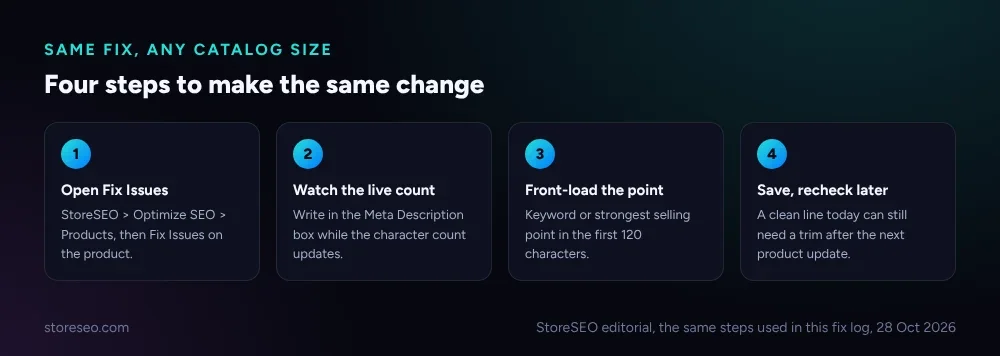 StoreSEO editorial, the same steps used in this fix log, 28 Oct 2026.
This one fix is a single entry in a bigger topic. Our guide to Shopify meta descriptions, meta titles and more covers the rest of what belongs in the field beyond length, what to put first, what to leave out, and how it fits the rest of your on-page SEO. If your catalog has more than a handful of descriptions running long, StoreSEO’s Shopify SEO Limits Cheat Sheet lists the same 140 to 160 character guideline alongside every other Shopify and Google length limit in one table, and our three-way meta description test compares how an AI tool, a bulk audit tool and a manual rewrite each land inside that window on five sample products. For the homepage specifically, 12 Shopify homepage title and meta description examples shows the same fix applied at the top of a store rather than on one product page.
Frequently Asked Questions (FAQs)
1. Does Google always show the meta description you write?
No. Google primarily builds a search snippet from the page’s own content and uses the meta description when it judges that description describes the page better than the content alone would. Writing a tight, accurate description improves the odds, but it is not a guarantee for every query.
2. Is there an exact character limit for a Shopify meta description?
No hard limit. Shopify will save a meta description of any length, and Google does not publish a character cap either. The 140 to 160 character range is a practical guideline based on where the search result card tends to truncate the line, not a rule either system enforces.
3. Will shortening a meta description by itself increase click-through rate?
Not provably from one fix like this one. A single product needs weeks of Search Console data to separate a real click-through change from normal noise. What a shorter description reliably does is stop the line from being cut off mid-sentence, which is a visible, checkable outcome the moment you save.
4. What happens if a Shopify product has no meta description at all?
Google falls back to generating a snippet from the page content itself, often pulling in boilerplate text, a price or a review count rather than the specific pitch you would have written. A short, accurate description you control is usually the better outcome.
5. How do I check the character count while I am editing in StoreSEO?
The SERP Preview Snippets panel inside StoreSEO’s product editor shows a live character count and a preview of the result card as you type. You can see exactly where the line sits in the practical window before you save, instead of counting manually afterward. The same panel is what this fix log used to land on 155 characters.
6. Does the meta description affect Shopify search rankings directly?
No. It is not a ranking factor on its own. Its job is to earn the click once a page is already showing in results, which is why this fix log measures the visible search snippet rather than treating the description as something that moves position by itself.
One field, one practical window, one honest limit on what a single fix can prove. If you would rather see the character count and the search preview live while you write, instead of checking it after the fact, try StoreSEO on the Shopify App Store.
Keep reading
Why Isn't AI Referral Traffic Showing in StoreSEO?
AI referral traffic in StoreSEO usually shows zero because the Web Pixel just went live, no AI visit has landed yet, or the plan or consent blocks it.
Read article
What Is Content Gap Analysis in StoreSEO?
StoreSEO's Content Gap Analysis report lists the Shopify SEO topics your store has not covered yet, delivered inside its scheduled report email.
Read article
Bulk SEO Optimization: One by One or All at Once?
Auto AI Optimization handles new Shopify products automatically, but an existing backlog still needs the one by one Fix button to clear it first.
Read article