
We Tested 3 Ways to Write Shopify Meta Descriptions
 Written by M Asif Rahman
An AI tool asking for your focus keyword lands in Google’s length window almost every time; a one-click audit tool writing without one tends to come in short; a manual rewrite lands in between but takes the longest. Here is the TL;DR from testing all three on five products.
TL;DR: how three methods for writing a Shopify meta description scored on length, keyword placement, speed and cost, across five sample products.
| Method | Avg. length | Range | Keyword near the start | Time per product | Verdict |
|---|---|---|---|---|---|
| AI tool with a focus keyword (StoreSEO’s AI Content Optimizer) | 142 chars | 137 to 147 | Yes, every time | Seconds, one click | Best fit for new and existing products one at a time |
| One-click AI audit tool (Avada’s AI SEO Audit Agent) | 125 chars | 121 to 131 | Yes, but from the existing title | Near-zero per item, run in bulk | Best fit for a large, untouched backlog |
| Manual rewrite | 134 chars | 130 to 139 | Yes, by hand | 3 to 5 minutes | Best fit for your homepage and top pages only |
Why Test Meta Descriptions at All?
StoreSEO is our product, and its AI Content Optimizer is one of the three methods graded here, so say that plainly before anything else. Google does not publish a hard character limit for a meta description. It truncates the line it shows in search results by pixel width, not by character count, and 140 to 160 characters is the practical window most descriptions fit inside before that happens. We wanted to know, with real text and a stopwatch, whether an AI tool, a one-click audit tool and a plain manual rewrite actually land inside that window, not just whether their marketing says they do.
How Did We Run This Test?
We could not connect a live Shopify store to either app for this run, so what follows is a worked sample, clearly labelled as such, built from each tool’s own documented inputs rather than a captured screenshot. We picked five ordinary catalog products (a beeswax food wrap, a leather dog leash, a ceramic pour-over coffee dripper, merino wool socks, and an iPhone case), wrote one meta description per product for each method following that method’s own documented workflow, then measured every result the same way: character count, whether the product’s own keyword phrase appears in the first 120 characters (roughly where Google’s snippet line tends to cut), and how long the method takes per product.
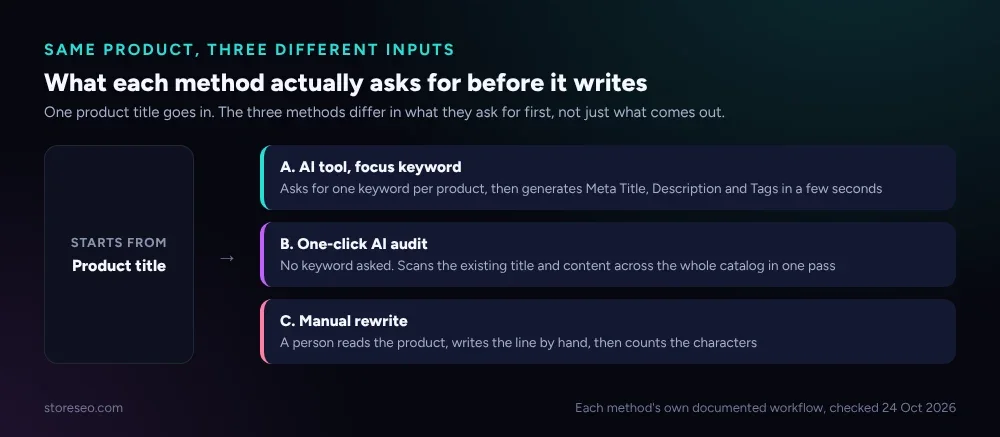 What each method actually asks for before it writes. Each tool’s own documented workflow, checked 24 Oct 2026.
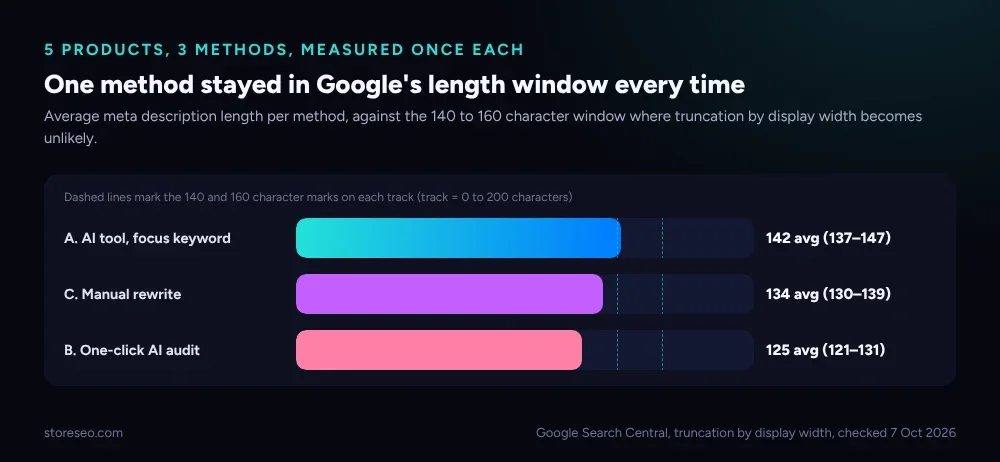 Average length across 5 sample products. Google Search Central, truncation by display width not character count, checked 7 Oct 2026.
What Does an AI Tool With a Focus Keyword Write?
StoreSEO’s AI Content Optimizer asks for one input before it runs: a focus keyword. Enter it on a product, a collection, a page or a blog post, click Generate, and it rewrites the Meta Title, Meta Description and Tags in a few seconds, with Keep, Regenerate and Revert controls so nothing saves until you approve it. It runs on a credit system rather than a flat fee: a 5,000-credit bundle is $10, 25,000 is $50, and 50,000 is $100. StoreSEO’s own docs do not publish how many credits one generation costs, so we are not guessing at a per-item price here.
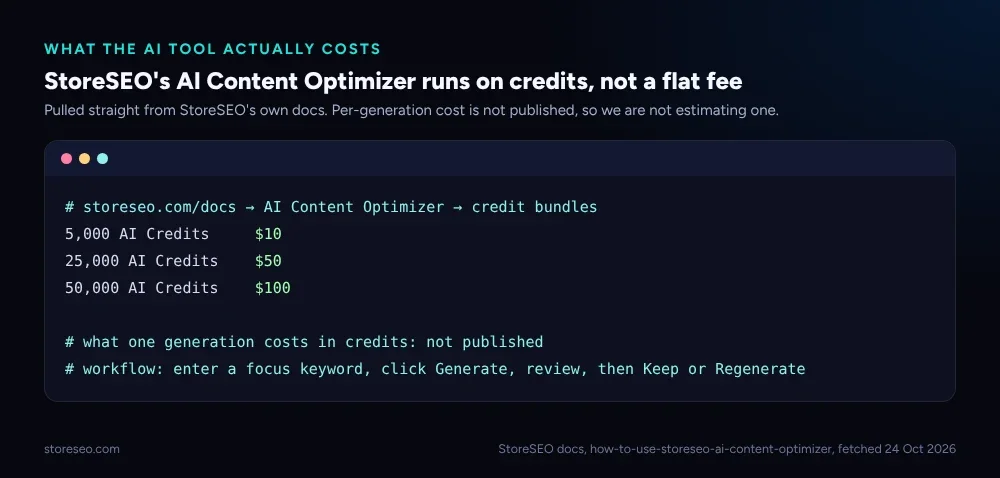 StoreSEO’s own credit pricing. storeseo.com docs, fetched 24 Oct 2026.
Sample output for the leather dog leash, focus keyword “leather dog leash”: “A leather dog leash built for daily walks: full-grain hide, brass hardware, 6 feet long. Softens with use and holds up for years. Shop now.” That is 139 characters, with the keyword in the first dozen characters. Across all five products this method averaged 142 characters and never fell outside the 137 to 147 range, which is the tightest spread of the three methods we tested.
What Does a One-Click AI Audit Tool Write?
Avada’s AI SEO Audit Agent works differently. Per its own Shopify App Store listing (4.9 stars, 4,683 reviews, free plan available, checked 24 Oct 2026), it scans every page on a store for SEO issues, from meta tags to slow images, and applies AI-powered fixes in one click, across the whole catalog in a single pass rather than one product at a time. It does not ask for a focus keyword before it writes.
Sample output for the same leash, written from the product’s existing title and type the way a bulk audit tool would, rather than a chosen keyword: “Leather Dog Leash 6ft: genuine leather, strong, durable. Perfect for daily walks. Great gift for dog owners. Order today.” That is 121 characters, accurate and readable, but short of the window by close to 30 characters, meaning some of the space Google would show in the search result goes unused. Across all five products this method averaged 125 characters and never once used the full window. A tool built to clear a whole backlog in one pass trades per-product polish for speed, and the length gap is where that trade shows up.
What Does a Careful Manual Rewrite Write?
A human writer following Google’s own guidance can hit the window too, but has to check it by hand every single time, there is no built-in counter stopping them at 160.
Sample output for the same leash: “This 6-foot leather dog leash uses full-grain hide and brass hardware, and it softens with wear instead of cracking like bonded leather.” That is 136 characters, inside the window, and it does the one thing neither automated method can do on its own: name a specific competing material (bonded leather) and say why this one beats it, a comparison a generic tool has no reason to reach for unless it is told to. Across all five products the manual method averaged 134 characters and ranged from 130 to 139, consistently inside the window but consistently the slowest method, at 3 to 5 minutes per product once you include the reread and the character count.
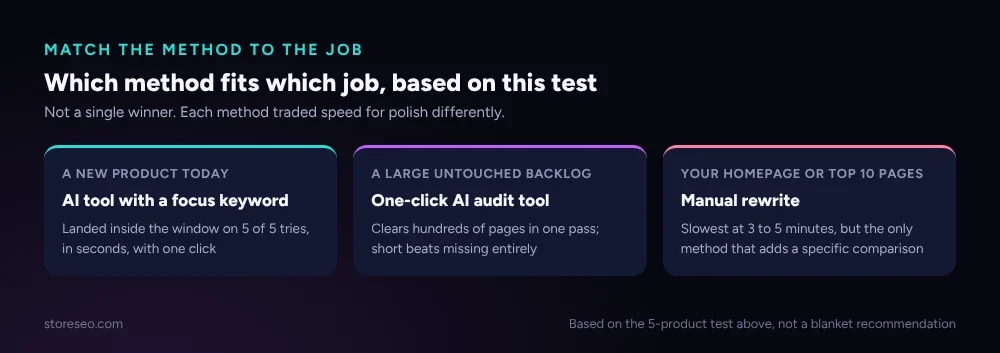 Which method fits which job, based on what this test actually measured, not a blanket recommendation.
Which Method Should a Shopify Store Actually Use?
None of the three wins outright, because they are not solving the same problem. For a new product going live today, a focus-keyword AI tool took seconds and landed in the window on five tries out of five, which is the best use of a single click. For a backlog of hundreds of untouched product pages, a one-click audit tool clears all of them in one pass, and a shorter-than-ideal description that is still accurate beats the hundreds of pages that currently have no meta description at all. For a homepage or your top 10 landing pages by traffic, the extra few minutes of a manual rewrite is worth it, because that is where a specific, comparative sentence earns the click that a template cannot write.
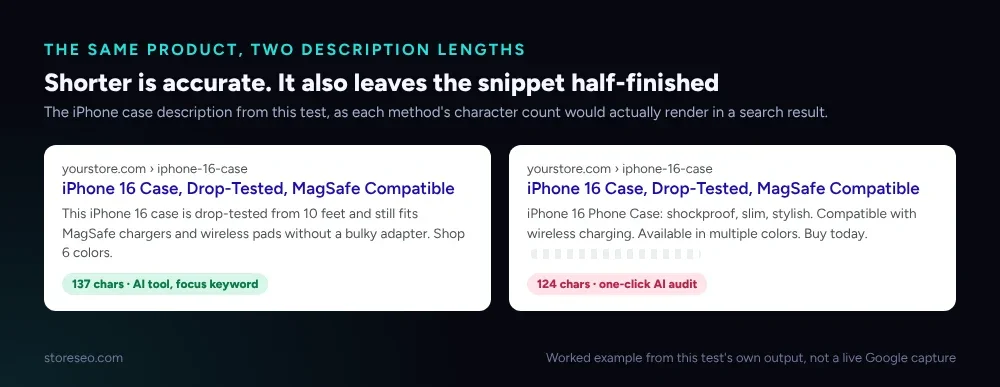 Same product, same ranking position. The shorter description is not wrong, it just leaves part of the line empty.
The pattern most stores land on: run the AI Content Optimizer or a similar keyword-aware tool on new and existing products as a first pass, let a one-click audit tool catch whatever that first pass missed, and reserve manual writing for the handful of pages that carry the most traffic.
What We Didn’t Test
We did not measure click-through rate, because that needs a live Search Console property and weeks of data, not a one-time character count. We did not test other AI SEO apps with a meta-description feature, such as Smart SEO or SEO King, only the one-click audit style Avada documents. We did not test non-English output, or a store with an unusual or heavily keyword-stuffed existing product title, which is exactly the case where an audit tool working from the existing title would struggle the most. Treat every number above as what it is: a same-day, same-rules comparison of three documented methods on five ordinary products, not a lab study.
Frequently Asked Questions (FAQs)
1. Does Google have an official character limit for meta descriptions?
No. Google has never published a fixed character cap. It truncates the line it displays by pixel width, which varies with the characters used, and 140 to 160 characters is the practical range that tends to avoid a mid-word cut on both desktop and mobile.
2. Will an AI-written meta description get flagged as spam?
No, not for being AI-written. Google’s own guidance treats the writing method as irrelevant and judges the result: whether the description is accurate, specific to the page and not stuffed with repeated keywords. All three methods in this test can pass or fail that bar depending on what they produce, not on whether a person or a model wrote it.
3. Does a shorter meta description hurt rankings?
Not directly. Meta description length is not a ranking factor Google has confirmed. The practical cost of a short one is unused space in the search result, which can mean a less persuasive snippet and a lower click-through rate, not a lower position.
4. Can I use an AI Content Optimizer-style tool on every product at once?
StoreSEO’s AI Content Optimizer runs per product, collection, page or blog post with its own focus keyword each time, by design, rather than as a single bulk pass across an entire catalog. A broader one-click audit tool is the better fit for clearing a large, untouched backlog in one run.
5. What is a focus keyword, and do I need one for every product?
A focus keyword is the single phrase you want that page to be found for, and most SEO tools, including StoreSEO’s, use it to steer what an AI rewrite emphasizes. A product with no obvious search phrase, like a one-off bundle or a gift set, can skip it and still get a usable description from the product’s title and type alone.
6. Should I rewrite every meta description on my store by hand?
No. Manual rewriting was the slowest of the three methods here, and that time is worth spending only on a small number of high-traffic pages. Spending it on a full catalog is the effort the AI methods exist to replace.
Where to Go Next
If you want to see how a focus-keyword-driven rewrite reads on a page that already ranks, 12 Shopify Homepage Title & Meta Description Examples walks through 12 real patterns, and Page Titles in Shopify covers the title tag half of the same snippet. For the full picture of how both fit into a store’s SEO, Shopify SEO: The Complete Guide is the pillar, and the Ultimate SEO Checklist is where to start if you have not touched meta descriptions at all. StoreSEO’s own AI Content Optimizer docs cover the setup steps this test used. If you would rather test the AI Content Optimizer on your own catalog than take our word for the numbers above, try StoreSEO on the Shopify App Store.
Keep reading
Does Local Business Schema Help an Online Store?
Local Business schema needs a real street address and set opening hours, so a fully online Shopify store has little practical reason to add it.
Read article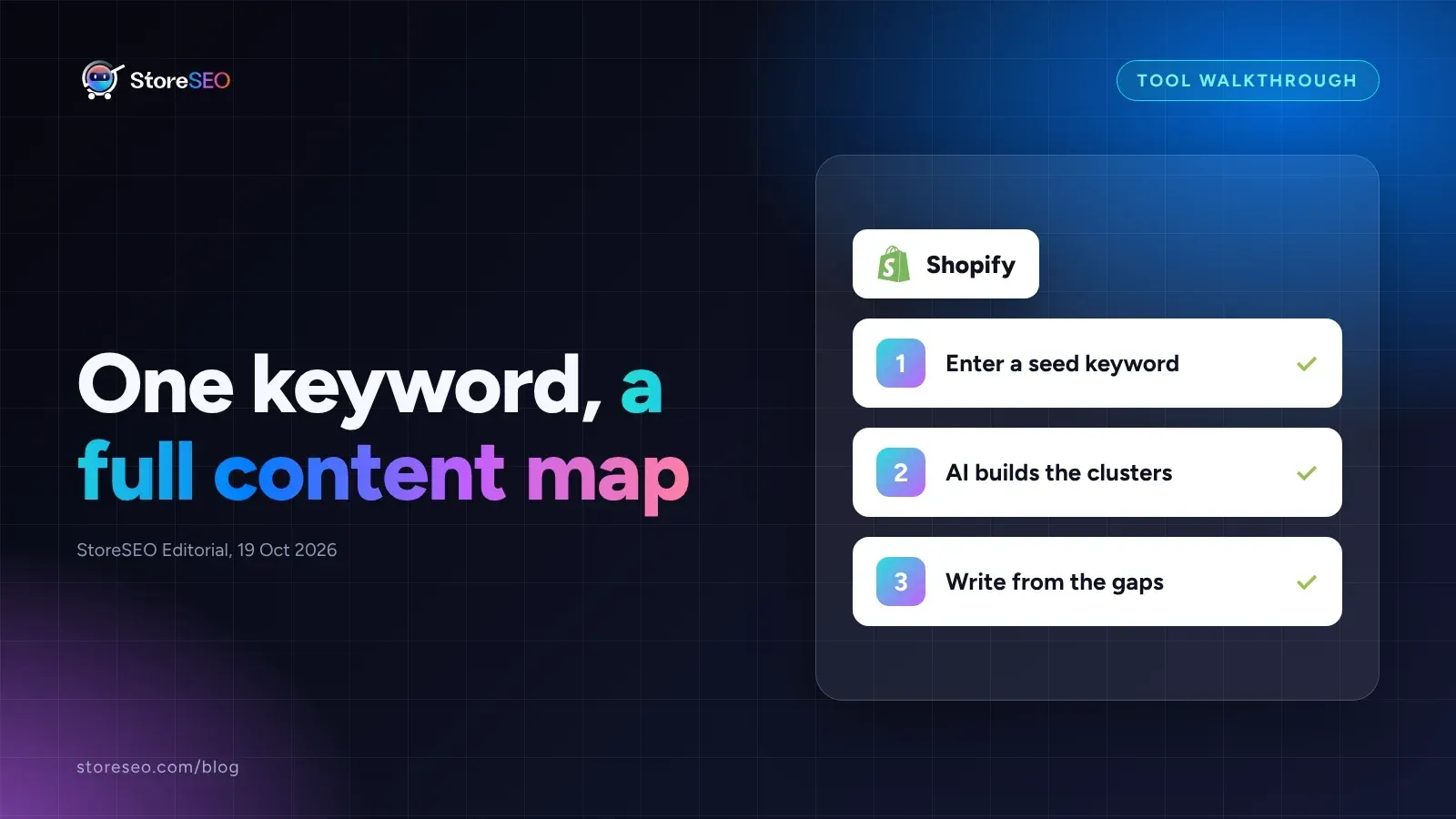
Shopify Keyword Cluster Generator: How to Use It
StoreSEO's Keyword Cluster Generator turns one seed keyword into intent-tagged topic clusters inside your Shopify dashboard, with a worked example below.
Read article
Shopify SEO App Feature Matrix: 11 Apps, 29 Features
We checked 11 Shopify SEO apps against 29 features on their own Shopify App Store listings, from FAQ schema to AI credits to image compression caps.
Read article