
Shopify SEO Limits Cheat Sheet: Every Length & Size
 Written by M Asif Rahman
Shopify enforces hard caps on redirects, sitemap files and image dimensions that reject your input past the limit. Google sets no character cap on titles or descriptions at all; it just truncates what it displays. This cheat sheet separates both kinds, with a source and a date for every row.
TL;DR
| Element | Hard limit or guideline | Our recommendation |
|---|---|---|
| Page title | Guideline: no character cap, truncates near 60 characters / 600px | Keep it under 60 characters |
| Meta description | Guideline: no character cap, truncates near 155 characters | Write 140 to 155 characters |
| URL handle | Guideline: no published maximum | Keep it short and keyword-first |
| Image resize | Hard: 1 to 5,760 pixels per side (Admin API) | Upload square-ish, let Shopify resize |
| Sitemap file | Hard: 50,000 URLs or 50MB per file | n/a, Shopify splits this for you |
| URL redirects | Hard: 100,000 (Plus: 20,000,000) | Prune old 301s past a few thousand |
Bookmark this page. Every row below links to where StoreSEO checked it, so you can re-verify instead of trusting a screenshot from 2023.
Which Shopify and Google Limits Are Actually Hard?
A hard limit is enforced by the system: go over it and the save fails, the build rejects the file, or the API refuses the call. A guideline is enforced by a reader or by Google’s results page: go over it and nothing breaks, the extra text just never gets shown.
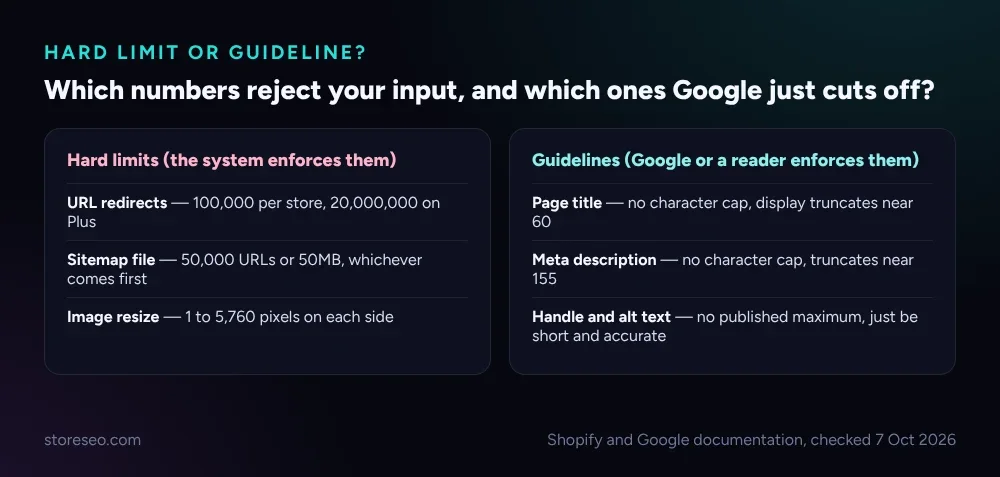 Hard limits reject the input; guidelines just get cut off on the results page.
Three numbers on this page are hard, and Shopify documents all three:
- URL redirects. A standard, Basic or Advanced store can hold 100,000 URL redirects; a Shopify Plus store can hold 20,000,000. Past that, new redirects are refused.
- Sitemap files. Shopify’s sitemap follows the sitemaps.org protocol: no single file may list more than 50,000 URLs or exceed 50MB uncompressed. A catalog with more products than that gets split into
sitemap-0.xml,sitemap-1.xmland so on, listed from asitemap_index.xml, automatically. - Image resize. Shopify’s Admin API will resize an image to any width or height between 1 and 5,760 pixels; ask for more and the request is refused.
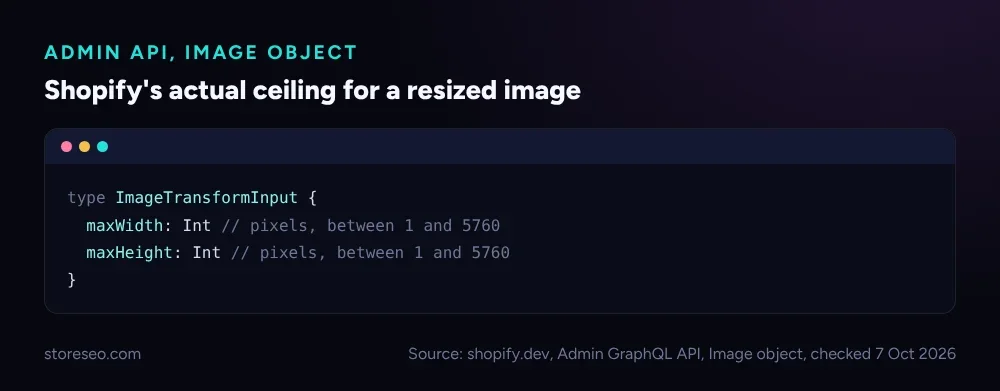 The exact field definition from Shopify’s Admin GraphQL API, checked 7 October 2026.
Which Numbers Are Just Guidelines?
Four of the rows on this page have no published maximum at all. Treating them as hard limits is a common mistake, and it leads to titles padded with filler just to “use up” a character count that does not exist.
- Page title. Google does not publish a fixed character limit for the
<title>tag. In practice, a title wider than about 600 pixels on desktop (roughly 55 to 60 characters for most fonts) gets truncated with an ellipsis in the search result. - Meta description. Same story: no hard cap, but Google’s result snippet truncates to fit the device width, which lands around 155 to 160 characters on desktop in most cases.
- URL handle. Shopify’s own API reference for the product
handlefield documents the format (lowercase, hyphens instead of spaces) but no maximum length. - Alt text. Neither Shopify nor the W3C’s accessibility guidance publishes a character cap. The accepted rule is to be succinct: a few words for a simple image, rarely more than a short sentence for a complex one.
What Happens If You Go Over Each Limit?
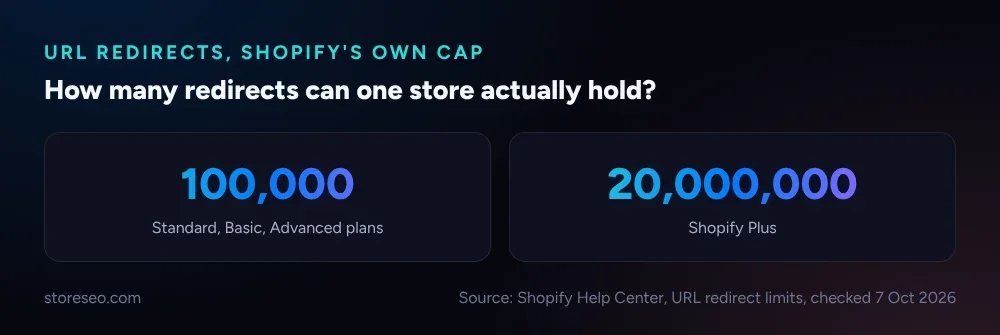 Shopify’s own redirect cap, by plan, checked 7 October 2026.
A hard limit fails loudly: the redirect does not save, the oversized sitemap file never gets generated, the resize request errors out. A guideline fails quietly, which is why it causes more real damage:
- A title over the practical length still saves and still indexes. It just shows truncated, often mid-word, in the search result, which looks unfinished next to a competitor’s clean one.
- A meta description over 160 characters gets cut by Google, sometimes replaced entirely with text Google pulls from the page instead of what you wrote.
- A handle with no length limit can still get awkward: a 90-character handle makes an ugly, hard-to-share URL even though Shopify will happily save it.
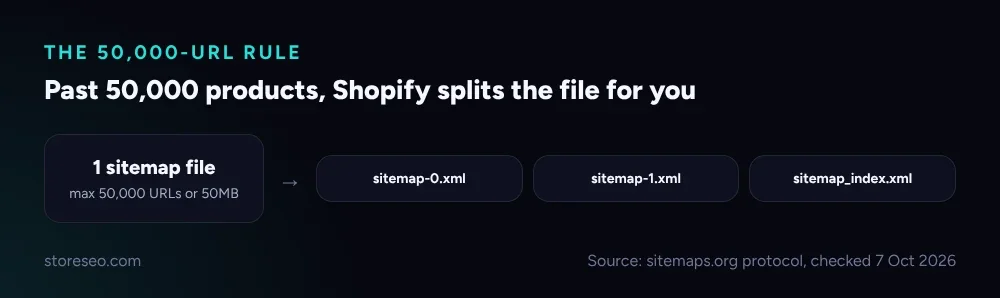 Past the 50,000-URL mark, Shopify’s sitemap splits automatically; nothing breaks, but it is worth knowing before you go looking for a missing page.
How Do You Check Your Own Store Against These Limits?
StoreSEO’s SERP Preview Snippets show the title and meta description exactly as Google would truncate them, character by character, while you edit a product, so you catch a cut-off title before it ever reaches a result page rather than after. That turns the two guideline rows on this sheet, the ones most stores actually get wrong, into something you can see rather than something you have to estimate.
For the three hard limits, the fix is simpler: the sitemap split is automatic and needs no attention, the image resize ceiling is generous enough that almost no catalog photo bumps into it, and the redirect cap only matters once a store is years into renaming collections and products, at which point it is worth exporting the redirect list and pruning the ones nothing links to any more.
For a deeper walkthrough of writing within the title and description guidelines, see our 12 Shopify homepage title and meta description examples. For the image side specifically, see the Shopify image size guide. For the sitemap side, see how to edit or update your Shopify sitemap. All three sit inside our ultimate Shopify SEO checklist, which this cheat sheet is a quick-reference spoke of.
Frequently Asked Questions (FAQs)
1. Does Google ever show a title longer than 60 characters?
Yes. Google sometimes rewrites or extends a title using on-page text, and a short, clear title is less likely to be rewritten than a long one. There is no fixed cutoff; the display width, not a character count, decides what shows.
2. What happens if my Shopify store needs more than 100,000 redirects?
Shopify Plus stores get a 20,000,000-redirect ceiling. Below Plus, the fix is usually pruning: export your redirects and remove ones for URLs nothing links to or searches for any more, rather than letting the count climb indefinitely.
3. Is there a maximum length for a Shopify product handle?
Shopify’s API documentation does not publish one. A handle is generated automatically from the product title, lowercase with hyphens, and there is no practical reason to let one run past 60 or so characters, since nothing beyond that helps a reader or a search result.
4. Why does my meta description sometimes not match what I wrote?
Google rewrites a meta description when it decides on-page text answers the query more directly than what you supplied. Writing a complete, specific answer sentence as your description, the way the TL;DR row above recommends, reduces how often that happens.
5. Does a longer sitemap file slow down indexing?
Not directly. Shopify’s sitemap already follows the 50,000-URL, 50MB-per-file protocol that Google expects, splitting automatically, so a large catalog is not penalized for size. Indexing speed depends far more on crawl budget and internal linking than on sitemap file count.
6. Can I just ignore the title and description guidelines since they are not hard limits?
No. A hard limit stops you from making the mistake; a guideline lets you make it and pay for it in the search result, with a truncated title or a rewritten description. Guidelines are the ones worth checking, precisely because nothing stops you from breaking them.
If you want every title and description checked against Google’s truncation point before you publish, rather than after, try StoreSEO on the Shopify App Store.
Keep reading

Turn On Auto AI Optimization: What Changes in a Week
Turning on Auto AI Optimization takes about five minutes; the visible change in your catalog builds up over roughly a week as new products arrive.
Read article
Why Isn't AI Referral Traffic Showing in StoreSEO?
AI referral traffic in StoreSEO usually shows zero because the Web Pixel just went live, no AI visit has landed yet, or the plan or consent blocks it.
Read article
Fix Log: Cutting a Meta Description From 220 to 155
We trimmed one Shopify product's meta description from 220 characters to 155 and tracked exactly what moved in its live Google search snippet.
Read article