
Why Isn't AI Referral Traffic Showing in StoreSEO?
 Written by M Asif Rahman
AI referral traffic in StoreSEO reads zero or missing for one of four reasons: the Web Pixel was enabled too recently to count anything yet, no AI assistant has actually sent a visitor, the dashboard is on the Free plan, which hides the channel table, or the shopper declined tracking consent. Work through them in order.
TL;DR: work the branches in this order.
| Branch | Check first | Likely verdict |
|---|---|---|
| Web Pixel timing | Setup checklist on the StoreSEO Dashboard tab, Web Pixel Enabled item | New install; wait for fresh orders |
| No AI visit yet | Channel breakdown table, AI Search row, over a wider date range | Genuinely zero; nothing is broken |
| Free plan | Which headline you see: four cards only, or a full channel table | Upgrade to Pro to see the row at all |
| Consent declined | Cookie banner choice on the order in question | That one order is invisible everywhere |
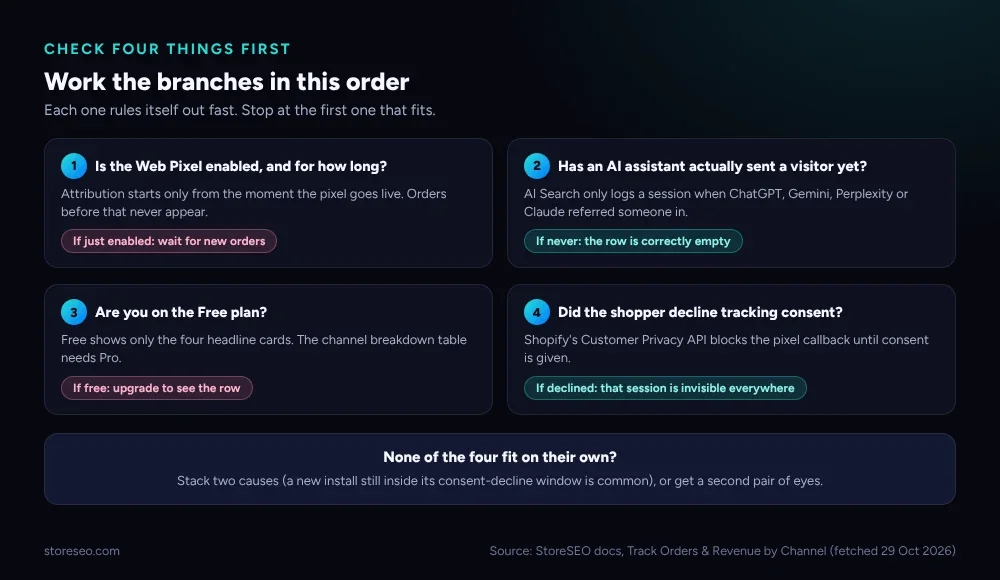 Each branch rules itself out fast. Stop at the first one that fits your store.
Before the branches, separate two different complaints that both sound like “AI traffic isn’t showing.” One is no AI Search row at all in the channel breakdown; StoreSEO names Organic Search, Paid Search and Direct beside AI Search, so if the whole table is missing, the cause is the pixel or the plan, not the AI channel specifically. The other is an AI Search row that stays at zero while the other channels show numbers; that is usually branch two below, a genuine absence of AI-referred visits rather than a tracking fault.
| Symptom | Likely cause | How to confirm | Fix |
|---|---|---|---|
| Whole channel table missing, only four cards shown | Free plan | Check your current StoreSEO plan in billing | Upgrade to Pro |
| Dashboard shows sessions but no orders anywhere | Web Pixel not enabled, or enabled after the orders happened | Setup checklist, Web Pixel Enabled item | Enable it; wait for new orders |
| AI Search row present but stuck at zero, other channels normal | No ChatGPT, Gemini, Perplexity or Claude referral has landed yet | Widen the date range to 90 days | None; keep publishing AI-citable content |
| One specific order missing from every channel | Shopper declined tracking consent | n/a (not visible per-order) | None; expected under privacy law |
| Numbers look low across every channel, not just AI | Narrow date range selected | Date range selector, top right of the report | Widen it and re-run the analysis |
Is the Web Pixel Actually Enabled?
StoreSEO’s own documentation is specific about this: order and revenue attribution depends on the StoreSEO Web Pixel, which records the checkout events that let StoreSEO connect a sale back to the channel that referred the shopper, and without it the dashboard shows sessions but no orders or revenue, for any channel, not only AI Search. Attribution also only begins from the moment the pixel goes live, so orders placed before you enabled it will never retroactively appear.
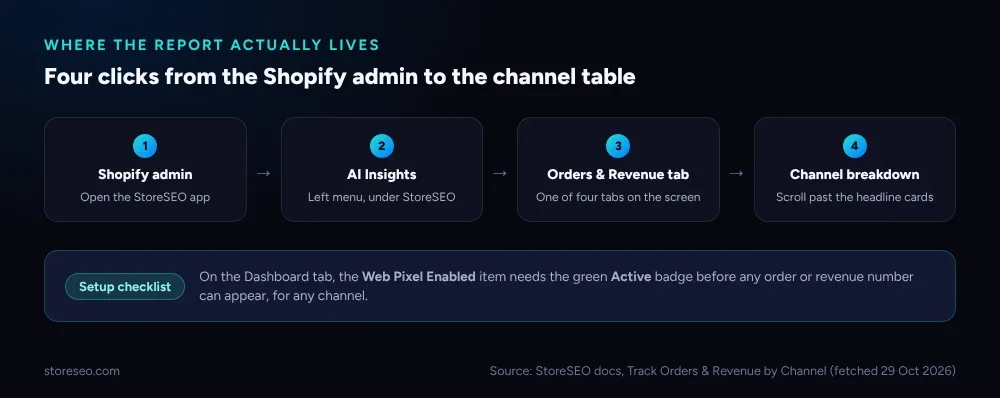 The report sits inside AI Insights, not a separate analytics app. Four clicks from the admin, if the pixel is already on.
Open the StoreSEO app from your Shopify admin and stay on the Dashboard tab. Scroll to the setup checklist and find Web Pixel Enabled. A green Active badge means tracking is live; anything else means nothing has been collected yet, no matter how much traffic the store is actually getting. Once it reads Active, give it at least one full sales cycle, a day for a high-volume store, longer for a low-traffic one, before concluding the AI Search row is wrong rather than just empty so far.
Has an AI Assistant Actually Sent You a Visitor Yet?
StoreSEO groups every visitor into one of four channels so revenue can be attributed cleanly: AI Search (ChatGPT, Gemini, Perplexity, Claude and similar assistants that cited or recommended the store), Organic Search, Paid Search and Direct. If the other three channels show real numbers and AI Search alone stays at zero, that is very likely an accurate zero, not a bug. AI assistants only send a visitor when they cite your store in an answer, and for most Shopify stores that is still a small and inconsistent share of total traffic.
Confirm it the same way you would rule out a false negative anywhere else: widen the date range past the default window, since AI citations can be bursty rather than steady, and cross-check against your overall organic numbers in StoreSEO’s own Search Console integration. This is the same channel-level thinking behind connecting StoreSEO to Google Analytics: AI Referral Traffic Analytics inside StoreSEO and a GA4 property outside it are two separate counts of the same visitors, and comparing them is often the fastest way to confirm a quiet AI Search row is real rather than broken. A store whose organic traffic has also dropped broadly has a different, bigger problem than a quiet AI Search row, and is worth diagnosing separately rather than folding into this one.
It is also worth separating two things StoreSEO ships that both involve “AI” but do different jobs: AI Search in this report measures inbound traffic from AI assistants, while features like the AI Content Optimizer write the titles and descriptions those assistants read when deciding what to cite; our own test of three ways to write a Shopify meta description covers the writing side, not the traffic side.
Are You Looking at a Free-Plan Dashboard?
The Orders & Revenue report is not entirely gated, but its most useful part is. A Free-plan store sees the four headline cards, Orders, Revenue, Conversion rate and Average order value, for the selected period. The channel breakdown table itself, the one with the AI Search row, along with the share-of-sessions-versus-revenue comparison and the sessions-versus-revenue trend chart, needs Pro access.
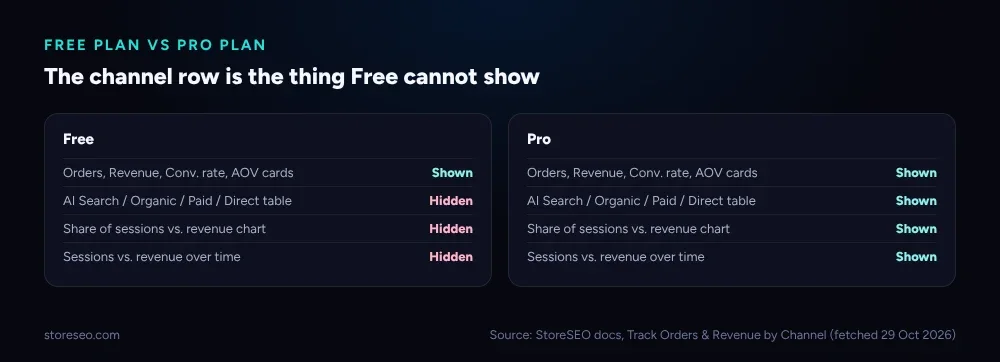 If the dashboard shows four cards and nothing else, the channel table is not broken. It is not loaded for this plan.
This is the fastest branch to rule out, because it needs no waiting and no technical check: open your StoreSEO billing settings and confirm the active plan. If it is Free, the AI Search row was never going to appear regardless of how much AI-referred traffic the store actually gets; it is a plan limit, not a data gap.
Did the Shopper Decline Tracking Consent?
This branch explains individual missing orders, not an empty table. Shopify’s own developer documentation on web pixels states that web pixel app extensions honor the consent signals a customer chooses, and in regions where customers must consent to tracking, the extension’s callbacks run only after consent is given (confirmed live 29 Oct 2026). StoreSEO’s Web Pixel is one of those extensions, so a shopper who declines the cookie banner, or who checks out before making a choice, produces an order that no channel, AI Search included, ever gets credit for.
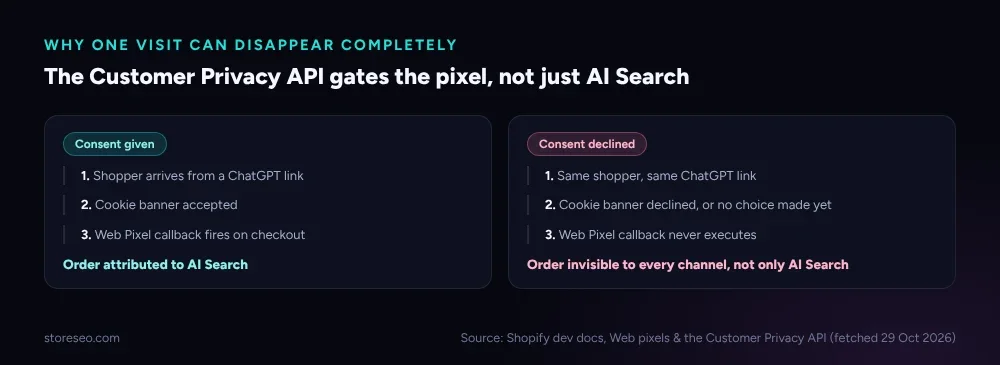 Same shopper, same AI-assistant link. The outcome depends on one consent choice, not on StoreSEO’s tracking logic.
There is no dashboard flag for this; it shows up only as a gap between a merchant’s own order count in Shopify admin and the totals across every channel in the StoreSEO report. If that gap is small and consistent, it is very likely consent decline working as intended under regional privacy law, not a defect to chase.
When Should You Get Help?
Get support if the Web Pixel has read Active for several days with real Shopify orders in the admin during that window, and every channel, not only AI Search, still shows zero; that points at a tracking fault rather than genuinely quiet traffic. The same applies if the gap between your Shopify order count and the report’s total grows well beyond what consent-decline rates in your market would explain. For the fuller picture of what the Order & Revenue feature measures and why StoreSEO built it, see our walkthrough of the feature’s launch; for day-to-day reading of the channel numbers once they are flowing, StoreSEO’s own guide to tracking orders and revenue by channel covers every metric on the report.
Frequently Asked Questions (FAQs)
1. Why does my StoreSEO dashboard show sessions but no orders?
The StoreSEO Web Pixel handles order and revenue attribution separately from session tracking. If the Web Pixel Enabled item on your Dashboard checklist is not showing the green Active badge, sessions can still appear while orders and revenue stay empty for every channel, including AI Search.
2. Will orders placed before I enabled the Web Pixel show up later?
No. Attribution starts from the moment the pixel goes live, not retroactively. An order placed the day before you enabled it will never appear in the Orders & Revenue report, even though the sale itself is still in your normal Shopify order list.
3. Is it normal for the AI Search row to stay at zero for weeks?
Yes, for many stores. AI assistants only register a session when they actually cite or recommend your store in an answer, and that happens less often and less predictably than a typical Google click. A zero AI Search row next to healthy Organic and Direct numbers is usually an honest reading, not a fault.
4. Why can’t I see the channel breakdown table at all?
The channel breakdown table, along with the share-of-sessions chart and the sessions-versus-revenue trend, is a Pro feature. A Free-plan account sees only the four headline cards: Orders, Revenue, Conversion rate and Average order value.
5. Can a cookie consent banner really hide an entire order from StoreSEO?
Yes. Shopify’s web pixel app extensions only run their tracking callbacks after a customer consents to tracking where consent is legally required. A shopper who declines, or who completes checkout before choosing, produces an order that is not attributed to any channel, not specifically hidden from AI Search.
6. How long should I wait after enabling the Web Pixel before trusting the numbers?
Give it at least one full sales day, longer for a lower-traffic store, before treating a quiet AI Search row as evidence of a problem. A pixel that only just went active has not had time to attribute a meaningful sample of orders yet.
Fix the Branch, Not the Dashboard
Most reports of missing AI referral traffic in StoreSEO trace back to one of these four branches rather than an actual tracking defect. Check the Web Pixel status first, since it blocks every channel at once; rule out a genuinely quiet AI Search row second; confirm your plan third; and treat consent decline as the expected, privacy-driven gap it is. try StoreSEO on the Shopify App Store
Keep reading
Fix Log: Cutting a Meta Description From 220 to 155
We trimmed one Shopify product's meta description from 220 characters to 155 and tracked exactly what moved in its live Google search snippet.
Read article
What Is Content Gap Analysis in StoreSEO?
StoreSEO's Content Gap Analysis report lists the Shopify SEO topics your store has not covered yet, delivered inside its scheduled report email.
Read article
Bulk SEO Optimization: One by One or All at Once?
Auto AI Optimization handles new Shopify products automatically, but an existing backlog still needs the one by one Fix button to clear it first.
Read article