
Does Multi-Currency Checkout Hurt Shopify SEO?
 Written by M Asif Rahman
No, not on its own. Shopify’s automatic currency conversion changes the price a visitor sees without changing the page’s URL, and Google’s own crawler ignores location, so it only ever indexes one version. The real risk shows up only when a store relies on that same-URL switch for a market it actually wants to rank in.
TL;DR: three common multi-currency setups, and what each one costs you in Google’s index.
| Setup | SEO Risk | Fix |
|---|---|---|
| Automatic currency conversion only, same URL | Low. Google indexes one currency; the page and its schema stay internally consistent | None needed; this is Shopify’s own default behavior |
| A currency-selector app with no market-specific URLs | Medium. The price a shopper sees can drift from the price Google crawled and cached | Pair the selector with Shopify Markets so each priority market gets its own URL |
| Shopify Markets, a subfolder, subdomain or domain per market | None. Canonical tags and hreflang are generated automatically for every market | Already the fix; confirm it is turned on for the countries that matter |
What Does Automatic Currency Conversion Get Right?
Shopify’s built-in currency conversion, the one every store gets through Shopify Payments without installing anything, changes only what a shopper sees at checkout and on priced pages. The URL, the HTML, and the product’s structured data stay the same for every visitor. That matters because of how Googlebot actually crawls: Google’s own documentation on locale-adaptive pages states plainly that its crawler’s IP addresses “appear to be based in the USA,” and that it “sends HTTP requests without setting Accept-Language in the request header.” In practice this means Google is not switching currencies the way a real shopper’s browser does, so there is no scenario where it indexes three different currencies for the same URL and gets confused. It sees one, consistently, every time it crawls.
That consistency is why a single-currency Shopify store with no Markets setup at all is not being penalized for anything. StoreSEO’s SEO Analysis and score reads the same canonical, title and schema fields Google does, and a same-URL currency switch does not touch any of them, so the score does not move because a shopper in Toronto sees CAD instead of USD.
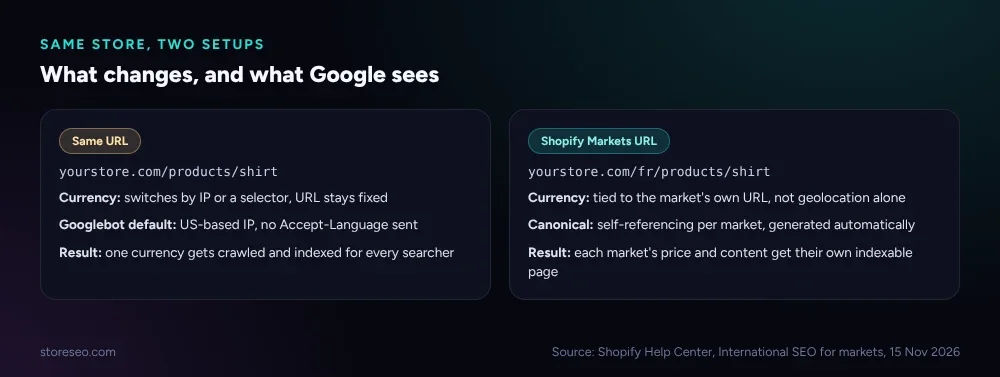 Source: Shopify Help Center, International SEO for markets, 15 Nov 2026.
Where Does Multi-Currency Checkout Create Real SEO Risk?
The risk is not the currency conversion itself. It is treating a same-URL currency switch as a substitute for ranking in a market the store actually wants to compete in. Because Google’s crawler defaults to a US IP and sends no language preference, a store that relies on geolocation alone to show, say, GBP pricing to UK visitors is showing Google nothing different from what a US visitor sees. Google quite reasonably indexes and ranks that one version, and has no signal that a distinct UK-priced, UK-relevant page exists to rank instead.
That gap widens the moment a store layers on content that is meant to vary by market, not just the currency symbol, things like shipping thresholds, duty disclosures or region-specific promotions written into the page copy. If none of that gets its own URL, it never gets crawled on its own terms, and the version Google ranks is whichever one its US-based crawl happened to see.
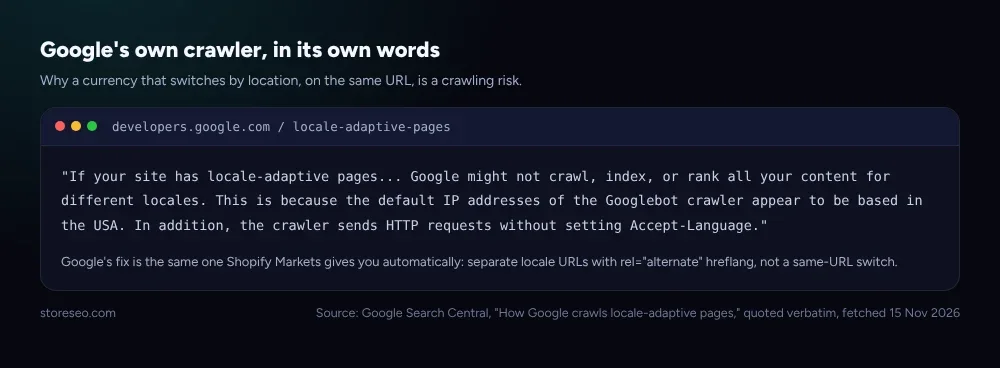 Source: Google Search Central, “How Google crawls locale-adaptive pages,” quoted verbatim, fetched 15 Nov 2026.
Which Risk Can You Fix, and How?
Three steps close the gap, in order:
- Check whether your currency switch also changes the URL. Open the store through a VPN or the storefront’s own market selector and watch the address bar. If it stays on
yourstore.com/products/shirtfor every market, you are in the same-URL case above. - Turn on Shopify Markets for the countries that actually matter to the business, and give each one its own subfolder, subdomain or domain. Shopify’s own Markets SEO documentation confirms that once a market has its own URL, canonical tags and hreflang annotations are generated automatically, with no theme code to write.
- Re-run a page audit after the change. StoreSEO’s SEO Analysis checks that the new market URLs carry correct, self-referencing canonicals rather than all pointing back at the original, which is the most common mistake stores make when they add Markets after the fact.
A store that only sells in one currency and has no plan to expand does not need any of this. The fix is for the specific case of wanting to rank in a second country, not a blanket recommendation to turn on Markets everywhere.
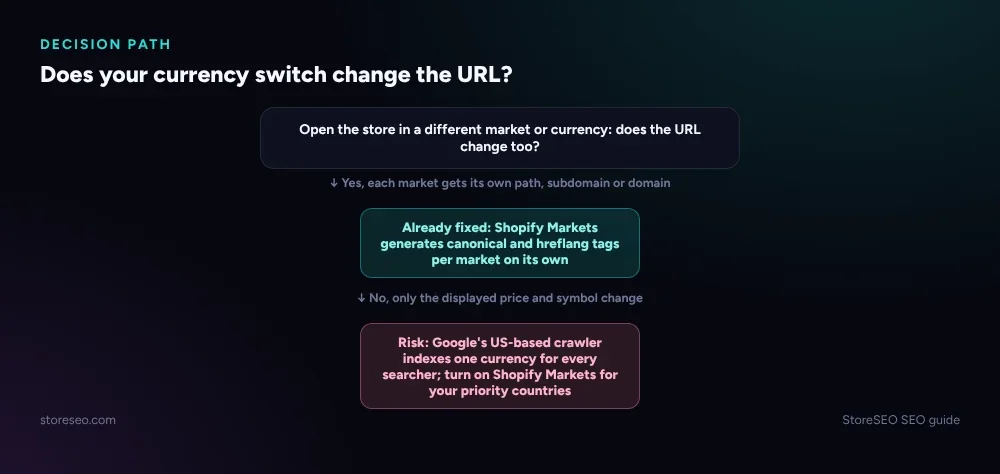 StoreSEO SEO guide, 15 Nov 2026.
How Does a Currency Selector Compare With Shopify Markets?
Shopify documents three ways to structure market URLs once Markets is turned on, and the choice affects how much of your existing domain authority a new market inherits.
| Option | Example | Domain authority | Best for |
|---|---|---|---|
| Subfolders | yourstore.com/fr/ | Shared with the primary domain | Most stores; lowest setup effort |
| Subdomains | fr.yourstore.com | Builds independently over time | Stores that want clear market separation |
| Top-level domains | yourstore.fr | Independent, strongest local signal | A strong, resourced presence in one country |
None of these three options is “multi-currency checkout” by itself; they are what makes a market’s currency, price and content crawlable as its own page rather than a geolocation-only display change. A currency selector with no Markets URL behind it does not appear anywhere in this table, because Google never sees it as a distinct market at all, it sees one page.
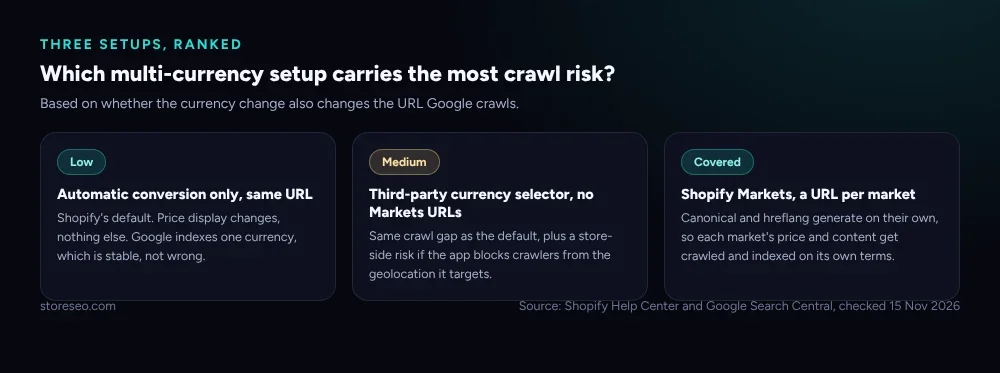 Source: Shopify Help Center and Google Search Central, checked 15 Nov 2026.
So Does Multi-Currency Checkout Hurt Your Shopify SEO?
Not by itself, and not for a store that only wants to show the right symbol to the right visitor. The cost only appears when a store mistakes that symbol change for the work of ranking in a new market, since Google’s crawler never sees the switch the way a shopper does. If international reach matters to the business, Shopify Markets is the documented fix, and it is worth pairing with the broader hreflang setup most international Shopify stores need rather than treated as a separate project. Stores still deciding between platforms before they build any of this out can see how the underlying URL and canonical defaults compare in StoreSEO’s Shopify versus WooCommerce breakdown, and a store that already has canonical confusion from an unrelated cause should start with canonical versus redirect versus noindex on Shopify before adding markets on top of it.
Frequently Asked Questions (FAQs)
1. Does showing different currencies to different visitors hurt my Google rankings?
Not directly. Shopify’s automatic currency conversion changes only the displayed price, and Google’s crawler indexes one consistent version of the page regardless of a visitor’s location. Rankings are affected only if a store relies on currency alone where it actually needs a separate, crawlable market URL.
2. Do I need Shopify Markets to accept multiple currencies?
No. Shopify Payments supports multi-currency checkout without Markets, and that is fine for a store that is not trying to rank in a second country. Markets becomes useful once you want a specific market’s price, content and search presence to be independently indexable.
3. Will Google index the wrong currency for shoppers outside the United States?
Google will index whichever currency its crawler sees, and its own documentation says that crawler defaults to a US-based IP with no language preference set. That is not “wrong” so much as singular: everyone searching sees the same cached version, regardless of where they are.
4. Does switching currency by location count as cloaking?
No. Cloaking is showing search engines fundamentally different content than real visitors see to manipulate rankings. A currency display change driven by Shopify’s own checkout is a standard commerce feature, not an attempt to deceive a crawler, and it is explicitly the scenario Google’s locale-adaptive-pages guidance addresses rather than penalizes.
5. How do I check which currency and content Google actually sees on my store?
Fetch the page with a tool that does not set a location header or Accept-Language, which approximates Googlebot’s own request, and compare it with what a logged-out browser in your target country shows. A mismatch in price or promotional copy, on the same URL, is the gap Shopify Markets is built to close.
6. Does StoreSEO check multi-currency or Markets setups specifically?
StoreSEO’s SEO Analysis reads canonical tags, titles and schema on every page a store publishes, including each market’s own URL once Markets is enabled, and flags a canonical that still points back at the original market by mistake. It does not configure currencies or Markets itself; that setup lives in Shopify’s own admin.
One URL Per Market You Want to Win
Multi-currency checkout on its own changes a price tag, not a search result. The SEO question only becomes real once a store wants a second market to rank, and the fix Shopify already documents, a distinct URL per market with automatic canonical and hreflang tags, is the same one that makes the currency question moot. try StoreSEO on the Shopify App Store
Keep reading
5 ChatGPT Prompts for Thin Collection Descriptions
Five ChatGPT prompts rewrite duplicated, missing, or keyword-stuffed Shopify collection descriptions, each tested on a real, live collection page.
Read article
A Shopify Product Title Template You Can Fill In
A Shopify product title works when it fills four blanks in order, product type, key feature, use case, and brand, not when it names the category alone.
Read article
What Happens to SEO When You Merge Shopify Variants?
Merging Shopify products into native variants keeps the old page's SEO value only if you redirect each deleted URL yourself; Shopify never does it for you.
Read article