
What Happens to SEO When You Merge Shopify Variants?
 Written by M Asif Rahman
Merging separate Shopify products into one product’s native variants keeps your ranking signal only when you add a manual URL redirect for every deleted product page; Shopify deletes the page but never creates that redirect itself. Skip it and each old URL 404s, taking its backlinks and ranking history with it.

TL;DR: what happens to each old product URL depending on how you merge, and what to do about it.
| Scenario | What Google Does | What AI Engines Do | What to Do |
|---|---|---|---|
| Native variant merge, you add the redirect | Follows the 301 and shifts ranking signal to the surviving URL | Updates its citation to the new URL on its own refresh cycle | Create the redirect the moment the old product is deleted |
| Native variant merge, no redirect added | Treats the vanished URL as a 404 and drops it from the index | Stops citing or recommending the old page within days | Redirect every deleted product’s URL yourself; Shopify will not |
| Shopify Plus Combined Listing, child products | Keeps indexing each child product’s URL exactly as before | Keeps citing whichever child page it already knew | Nothing; the child URLs are never touched |
| Shopify Plus Combined Listing, new parent product | Treats it as a brand-new, unranked URL | Has nothing to cite yet | Expect it to rank from zero like any new page |
| Adding one more option to an already-single-URL product | Nothing changes; the URL never moved | Nothing changes | No action needed; this was never a URL merge |
A 301 redirect is the only mechanism that carries ranking signal from an old product URL to a new one. Without it, deleting a product is indistinguishable from simply taking the page down.
What Happens in Week 1, Month 1 and Month 3 After You Merge?
In week 1, the moment you delete the old product and save its option as a variant on the surviving product, that old URL stops resolving to anything. If you created the redirect first, visitors and crawlers land on the survivor instantly. If you did not, the URL returns a broken “Page not found” response right away, because deleting a product is not a redirect on its own.
By month 1, the outcome has split. A redirected URL has already passed its ranking signal to the survivor, the same way a 301 works anywhere else on the web. A non-redirected URL has started showing as “Not found (404)” under Page indexing in Search Console, and Google treats that as confirmation the page is gone.
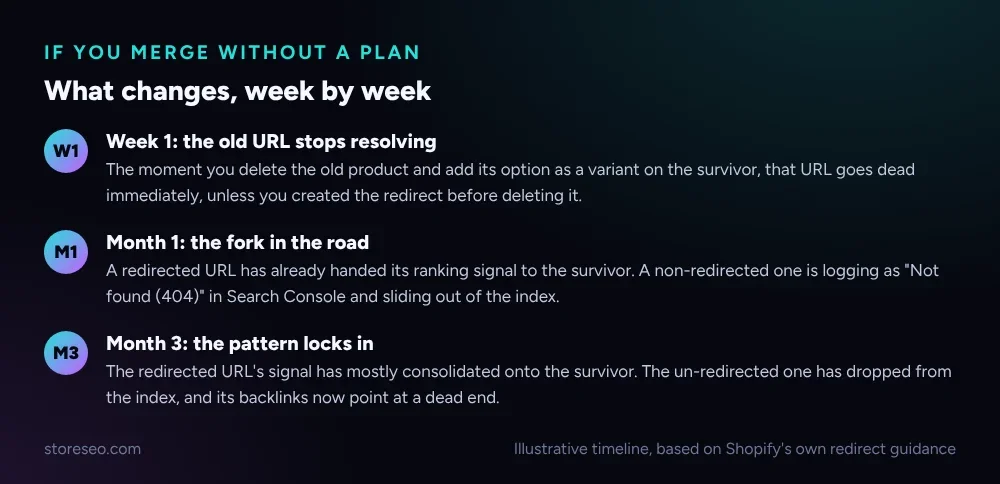 Illustrative timeline, based on Shopify’s own redirect guidance.
By month 3, the pattern has locked in. The redirected URL’s signal has mostly consolidated onto the survivor, which is the same behavior Out-of-Stock Shopify Products: Keep or Redirect? documents for a 301 used in a different scenario. The un-redirected URL has dropped from the index entirely, and relisting the same variant later at a new URL starts from zero, because Google has never seen it.
Which Option Actually Keeps Rankings: Redirect, Combined Listing, or Delete?
Three real paths exist once you decide to merge separate product listings, and only one of them throws ranking signal away for certain.
| Option | What Happens to Rankings | Best When | Risk if You Get It Wrong |
|---|---|---|---|
| Manual merge with a redirect | Most ranking signal transfers to the surviving URL | You are consolidating a handful of near-duplicate listings into true variants | Forgetting the redirect loses the signal completely |
| Shopify Plus Combined Listing | Each child product keeps its own ranking, untouched | You want one merchandised page without losing any child’s SEO history | Only available on Plus, and the new parent product starts with no history of its own |
| Delete with no redirect | All ranking signal is lost | Almost never the right call | Years of backlinks and index history disappear with the page |
Shopify’s own documentation on Combined Listings describes the mechanism plainly: child products “have their own images and URL handles and can be merchandised separately,” and a combined listing’s parent product is created fresh, carrying none of the sales history or inventory of the products it merchandises alongside. That is the opposite trade-off from a manual merge, where the old URLs disappear and one surviving URL absorbs everything, covered in more depth in Shopify Tags vs Collections vs Filters: What Google Indexes for the related question of which Shopify-generated URLs are worth indexing at all.
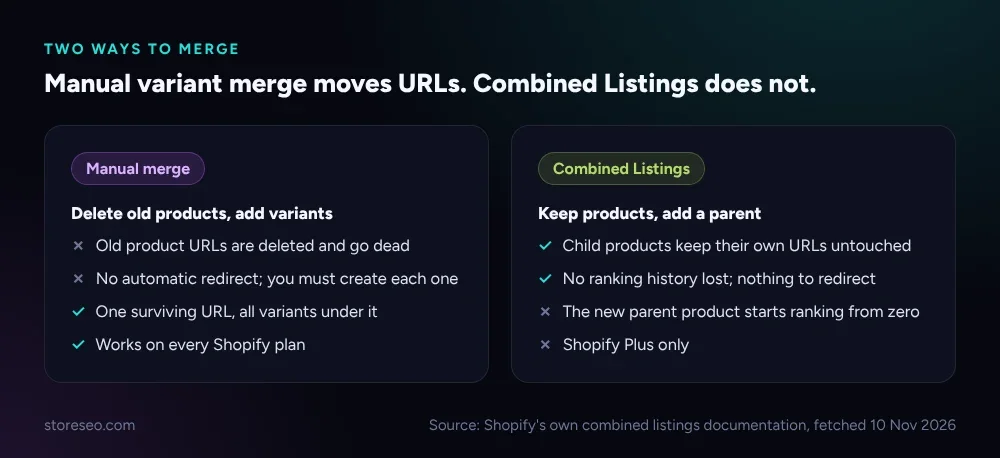 Source: Shopify’s own combined listings documentation, fetched 10 Nov 2026.
How Do You Set Up the Redirect in Shopify’s Admin?
Shopify’s own Help Center is explicit that deleting a product does not create a redirect by itself: “if you delete a product, then you can set up a URL redirect so that when customers enter the URL for that product, they’re redirected to a similar product on your store.” It also states a redirect only works on a URL that is already broken, so the order matters: merge the variant onto the survivor, delete the old product, then create the redirect in the same session, before any crawler has a chance to find the dead URL.
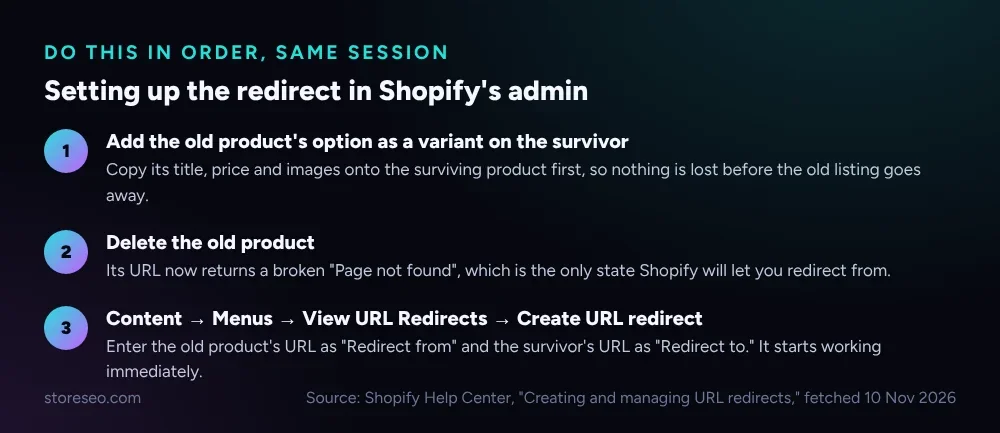 Source: Shopify Help Center, “Creating and managing URL redirects,” fetched 10 Nov 2026.
The practical path is Content → Menus → View URL Redirects → Create URL redirect, entering the deleted product’s old URL as “Redirect from” and the surviving product’s URL as “Redirect to.” It starts working immediately once saved, and because it needs a broken URL to attach to, running it before the deletion simply fails. If you are instead choosing which of several existing near-duplicate URLs deserves to stay indexed rather than redirecting a deletion, Canonical vs Redirect vs Noindex: What’s the Difference for Shopify? walks through the three mechanisms side by side.
Do the Variant URLs on the Surviving Product Need Redirects Too?
No. Once the merge is done, every variant of the surviving product already shares one URL, with the selected variant’s ID appended as a ?variant= query string rather than a new path. A live fetch of Shopify’s own Dawn demo theme confirms this directly: the product’s default URL and the same product with a specific ?variant= value both returned the identical <link rel="canonical"> tag, pointing at the one clean product URL.
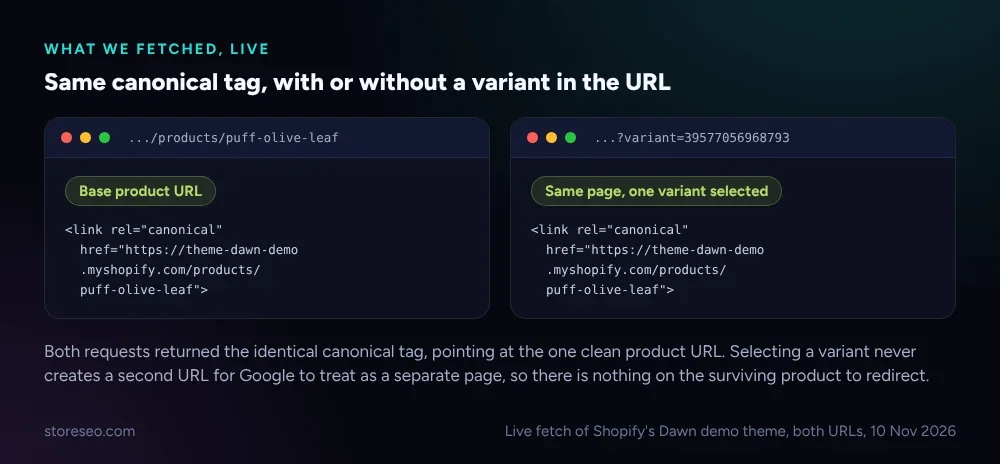 Live fetch of Shopify’s Dawn demo theme, both URLs, 10 Nov 2026.
That is also how Shopify’s own canonical_url Liquid object is documented to work: it is the canonical URL for the current page, and selecting a variant does not change which page that is. So the only URLs at risk in a merge are the ones you delete, never the variant query strings on the page that survives. If the merge also changes the surviving product’s own handle, StoreSEO’s AI URL Handle Optimization feature flags a handle that no longer matches what the page is about, the same scan it runs across the rest of your catalog.
Which Should You Pick for Your Store?
If you are consolidating a handful of near-duplicate listings, such as the same shirt published once per color, into true variants of one product, the manual path works on every plan and gives you one clean URL to build authority on, provided you treat the redirect as part of the merge, not an afterthought. If you are on Shopify Plus and the real goal is a richer merchandising display rather than a URL cleanup, a Combined Listing avoids the redirect question entirely by never touching the child URLs in the first place, at the cost of a brand-new parent URL that has to earn its own rankings from nothing. Either way, StoreSEO’s SEO Analysis still checks the surviving page once the merge is done, so a mismatched title or a thin description left over from one of the merged listings gets flagged rather than sitting unnoticed. Our Shopify Product Page SEO: Tips and Best Practices covers the fundamentals either path still has to get right.
Frequently Asked Questions (FAQs)
1. Does merging Shopify products into variants hurt SEO?
Not by the merge itself. The risk is entirely in what happens to the old product’s URL: redirected, it keeps most of its ranking signal; left to 404, it loses that signal completely.
2. Does Shopify automatically redirect a deleted product’s URL?
No. Shopify’s own Help Center states plainly that deleting a product does not create a redirect by itself. If you want the old URL to point anywhere, you have to create that redirect yourself, under Content, Menus, View URL Redirects. Skip that step and the old product’s URL simply goes dead the moment the product is removed.
3. What happens if I forget to add the redirect?
The deleted product’s URL returns a broken “Page not found” response. Within about a month it shows as 404 in Search Console and drops out of the index, and that ranking history does not come back by relisting the same item later.
4. Can I merge products into variants without Shopify Plus?
Yes, the manual method, deleting the old products and adding their option values as variants on a surviving product, works on every Shopify plan. Combined Listings, which keeps every product’s own URL instead, is restricted to Shopify Plus.
5. Do Combined Listings keep each product’s own rankings?
Yes, for the child products. Shopify’s own documentation describes child products as keeping their own images and URL handles, merchandised separately, while only the new parent product created by the listing starts without any ranking history of its own.
6. Does the surviving product’s variant URL need its own redirect?
No. A product’s variants share one canonical URL, with the selected variant appended as a query string rather than a separate path, confirmed on a live fetch of Shopify’s own Dawn demo theme. The only URLs a merge puts at risk are the ones you delete.
Merging Shopify variants is a one-time decision with a permanent downside if the redirect step gets skipped, and an easy one to get right if you treat the redirect as part of the merge rather than cleanup you can do later. try StoreSEO on the Shopify App Store
Keep reading

Shopify vs Etsy for SEO: Which Actually Ranks?
Shopify lets you edit titles, descriptions and robots.txt; Etsy locks all three to your first-published title but sends buyers from its own search anyway.
Read article
12 Shopify Meta Descriptions That Get Clicked
Twelve real Shopify meta descriptions, from 28 to 298 characters, show exactly where Google starts cutting a search snippet off mid-sentence.
Read article
12 Shopify Product Titles That Rank (Annotated)
Twelve real Shopify product titles share three habits that work: name the product type, add exactly one differentiator, and put the brand name last.
Read article