
Canonical vs Redirect vs Noindex on Shopify
 Written by M Asif Rahman
Three different signals, one confused question: which one stops Google from showing the wrong version of a page. Canonical points at a preferred URL while both stay live. Redirect sends visitors and Google to a new URL and retires the old one. Noindex keeps a page working but out of search results entirely.
TL;DR: here is what each signal does, whether the page stays indexed, and when to reach for it.
| Signal | What it tells Google | Still indexed? | Do this when |
|---|---|---|---|
Canonical (rel="canonical") | This URL is the preferred version; both stay crawlable | ✓ (preferred URL only) | Two or more live URLs show the same content and you want one to rank |
| Redirect (301 / 308) | The old URL is gone for good; show the target instead | ✓ (target only) | The old URL should stop existing: a merged collection, a renamed product, a removed page |
| Noindex | Crawl this page, but never show it in results | ✗ | The page should stay reachable (a cart, a search-results page, an internal filter) but never rank |
What Is a Canonical Tag?
A canonical tag is a line in a page’s <head> that tells Google “this other URL is the one to index.” It does not remove either URL: both still answer 200, both are still crawlable, and a visitor who lands on either one sees content. It is a strong signal, not a command. Google’s own documentation on specifying a canonical URL lists redirects, canonical tags and sitemap inclusion as the three ways a site can indicate a preference, in that order of strength, and says plainly that none of them is required: if you specify nothing, Google decides on its own which version to show.
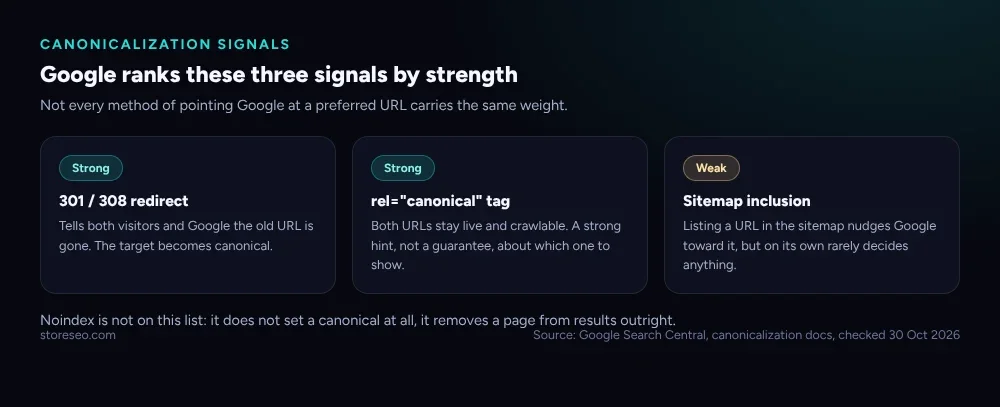 Redirects and canonical tags are both strong signals; sitemap inclusion on its own is weak. Noindex is not on this list at all, since it never sets a canonical.
On Shopify, this is exactly the situation a collection-scoped product URL creates. /collections/summer/products/canvas-tote and /products/canvas-tote can both serve the same product, and Shopify’s own canonical_url Liquid object is how the theme tells Google which one counts, a mechanism StoreSEO covered in detail in Google Chose Different Canonical: Shopify Fix.
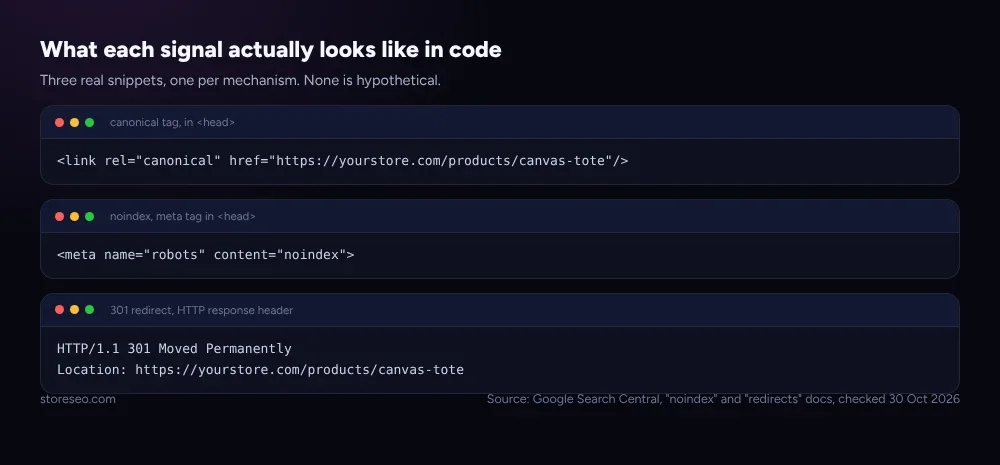 Three real snippets, one per mechanism: a
 rel="canonical" link, a noindex meta tag, and a 301 redirect’s Location header.
What Does Noindex Do?
Noindex is a <meta> tag or an HTTP response header that tells a crawler to drop the page entirely from search results, whoever links to it. It is the only one of the three that removes a URL from Google’s results while leaving the URL itself fully working: visitors can still reach it, Shopify can still render it, and other pages can still link to it. Google’s own documentation on blocking indexing with noindex is explicit about the one condition that has to hold: the page must not be blocked by robots.txt, because a crawler that never reaches the page never sees the noindex rule, and the page can still appear in results through links from elsewhere.
StoreSEO’s own guide, Should You Noindex It? A Shopify Decision Tree, walks through the specific Shopify pages this applies to: cart, search-results and some filtered pages are the usual candidates, never a product or collection page you actually want found.
What Is a Redirect, and How Is It Different?
A redirect, almost always a 301 on Shopify, answers every request for the old URL by sending the visitor and the crawler to a new one. Unlike canonical and noindex, the old URL stops serving content at all: it answers 301, not 200. Google treats a permanent redirect as the strongest canonicalization signal there is, because it reads as a direct instruction that the target should become canonical, not a hint. A temporary redirect (302) behaves differently: Google keeps showing the source page in results rather than the target, which is why a genuine “this URL is retired” situation needs a 301, not a 302.
StoreSEO’s Bulk URL Redirect Manager, covered in Bulk Shopify URL Redirects: Step-by-Step Setup, is built for exactly this: pointing old URLs at their replacements in bulk, without touching Shopify’s Menus page one redirect at a time.
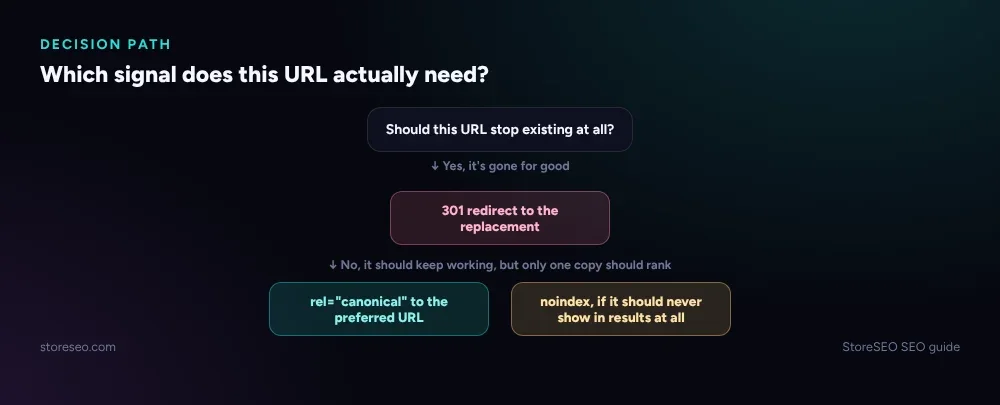 If the old URL is gone for good, redirect it. If it should keep working but only one copy should rank, canonical. If it should never show up in results at all, noindex.
Which of These Causes Duplicate Content on Shopify?
None of the three causes duplicate content on its own; duplicate content is what happens when none of them is applied and two live URLs serve the same thing with nothing telling Google which one to prefer. Shopify generates this situation by default in a few places: a product reachable through more than one collection path, a tag page that mirrors a collection’s products with a different URL, and sort or filter parameters appended to an otherwise identical page.
Picking the wrong one of the three is its own problem. A canonical tag on a page that should not exist at all just tells Google which copy to prefer; the weaker copy still gets crawled and still wastes crawl budget. A noindex on a page that should simply redirect leaves a dead end live instead of sending the visitor somewhere useful. The three-column comparison below shows what a visitor and Google actually see in each case, so the mismatch is easier to spot before it ships.
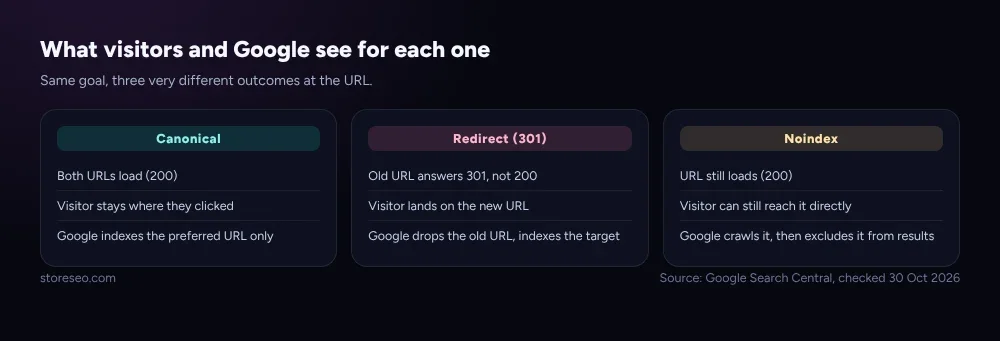 Canonical keeps both URLs live at 200. A 301 redirect retires the old URL outright. Noindex keeps the page reachable but excludes it from results.
How Do You Set Each One Up on Shopify?
Shopify sets canonical tags automatically on its own product, collection and page templates through the canonical_url object, so most stores never touch this directly unless a custom app or a theme edit introduces a second URL path. Redirects are built into the Shopify admin’s URL Redirects screen for one at a time, or available in bulk through an app. Noindex needs either a theme edit to the relevant template’s <head> or an app that can add the tag per page or per page type.
StoreSEO’s SEO Analysis gives detailed fix instructions for exactly this kind of mismatch: it flags a page missing a canonical tag, a broken redirect chain, or a page that should carry noindex and doesn’t, and names the specific fix rather than a generic warning. That is the same detection StoreSEO uses across a whole catalogue at once, so a store does not have to check every collection and tag URL by hand. For a broader look at how these fit into the rest of a store’s SEO health, Common Shopify SEO Problems, Ranked by Impact covers where canonical and indexing issues rank against the rest.
If the page in question is about whether an AI assistant, not just Google, can read and cite it correctly, that is a different check: AIScan’s free agent-readiness checker scans a URL for exactly that, separate from the Search Console-facing fixes above.
Frequently Asked Questions (FAQs)
1. Can I use canonical and noindex on the same page?
No, and Google’s own guidance warns against it. A noindex tag already removes the page from results, so a canonical tag pointing elsewhere on the same page sends a mixed signal that some crawlers will not resolve consistently. Pick one: noindex if the page should never rank, canonical if it should rank under a different URL.
2. Does a canonical tag stop a page from being crawled?
A canonical tag does not stop a page from being crawled. Both the canonical URL and the page carrying the tag stay fully crawlable, and canonical only affects which one Google shows in results. Backlink and ranking signals pointing at either URL still get credited to whichever one Google treats as canonical.
3. What happens if I redirect a page instead of noindexing it?
Visitors and Google both land on the new URL instead of a dead end. That is usually the better outcome when a real replacement page exists; use noindex only when there is genuinely nowhere better to send the visitor, like an internal search-results page.
4. Why does my collection URL still get indexed after I added a canonical tag?
A canonical tag is a strong hint, not a guarantee. If the collection-scoped URL is linked from many places, returns a 200, and genuinely differs in page content (different filters, different sort order), Google can still decide to index it. Checking whether the URL even needs to exist, rather than just tagging it, is usually the more durable fix.
5. Should filtered or sorted Shopify URLs be noindexed?
Usually yes, since they repeat a parent collection’s products under a different URL and rarely earn their own ranking. The decision tree above applies: if the filtered URL should keep working for visitors who land on it directly but never show up in search, noindex is the right call over canonical or a redirect.
6. Can a redirect loop happen on Shopify?
Yes, most often when a theme edit and a manually added redirect both try to send the same URL somewhere, or two redirects chain into each other. Shopify’s URL Redirects screen will generally flag a direct loop, but a chain through several hops is easier to miss and worth checking by hand after a bulk redirect import.
Getting this right across a whole store, not just one page, is what detailed, page-by-page fix instructions are for rather than a one-time cleanup. try StoreSEO on the Shopify App Store
Keep reading
Crawl, Understand, Recommend: A Shopify SEO Model
Most Shopify stores pass the crawl layer, fail the understand layer, and never reach the recommend layer where AI engines cite pages by name.
Read article
Migrate From SearchPie to StoreSEO (Step by Step)
Switching from SearchPie to StoreSEO takes about ten minutes with the built-in wizard, and your meta titles and schema carry over automatically.
Read article
Shopify SEO Teardown #1: Allbirds
We audited Allbirds.com's live pages and found a 27 mobile Lighthouse score, zero homepage schema, three h1 tags, and a typo in the title tag.
Read article