
"Google Chose Different Canonical": Shopify Fix
 Written by M Asif Rahman
“Duplicate, Google chose different canonical” in Search Console means Google indexed a different URL than the one you marked canonical, because it decided the two pages were duplicates. On Shopify this almost always comes from a collection-scoped product URL that still answers 200 instead of redirecting. Confirm the cause, then close it with a 301.
TL;DR: the cause, how to confirm it, and the fix.
| Cause | How to confirm | Fix |
|---|---|---|
| Collection-scoped product URL answers 200 | Request /collections/{handle}/products/{handle} directly; if it loads instead of redirecting, this is it | 301 redirect the collection-scoped path to /products/{handle} |
| Old URL still linked or in an old sitemap | Search Console’s Links report, or site: search for the old path | Update the internal link, or redirect the old path |
| A near-duplicate page (variant, filtered view) | Compare the two URLs’ rendered content side by side | Make the content substantially different, or canonicalize on purpose |
| Faceted navigation or sort parameters | Check for ?sort_by=, ?filter. or similar query strings on the flagged URL | Block the parameter in robots.txt, or canonicalize to the clean URL |
Every Shopify product has two working addresses for the same page. The plain one is store.com/products/{handle}. The other is store.com/collections/{handle}/products/{handle}, reached whenever a shopper clicks through from a collection grid, a filtered view, or a link built with the collection prefix. Shopify’s theme layer marks the plain URL as canonical using the canonical_url Liquid object, but marking a URL canonical does not stop the other one from loading. If your theme does not also redirect the collection-scoped path, both URLs return 200 OK with the same content, and Google has two live pages to choose between instead of one.
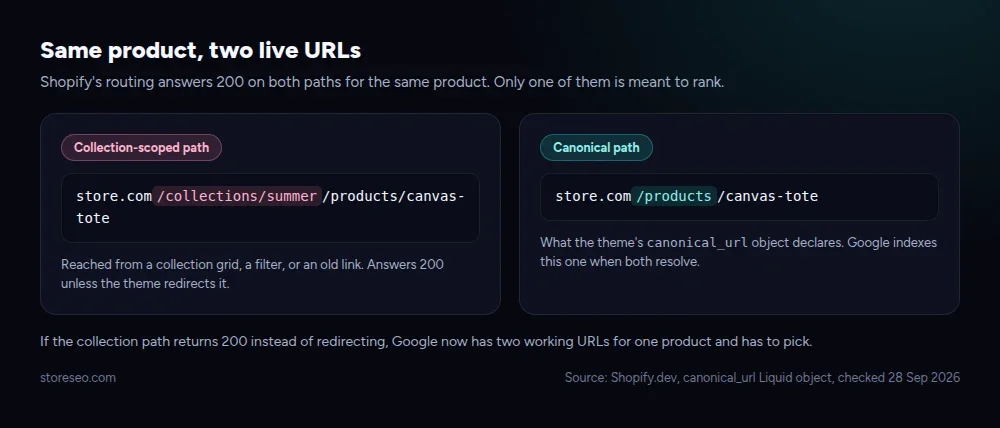 Source: Shopify.dev, canonical_url Liquid object, checked 28 Sep 2026.
What Does “Duplicate, Google Chose Different Canonical” Actually Mean?
Search Console’s own documentation is specific about this one: the page you inspected is marked canonical for a set of URLs, “but Google thinks another URL makes a better canonical.” Google has indexed the URL it picked instead of the one you declared, because it judged the two pages to be duplicates of each other. This is not a penalty and it is not a crawl error. It is Google quietly resolving a conflict you created without meaning to, and the fix is to remove the conflict rather than to fight the outcome.
Why Does Shopify Trigger This?
The most common source on Shopify is the collection-scoped product URL described above, and it is common precisely because nothing in the default setup stops it. A merchant never types that URL by hand; it appears the moment a theme builds a “view product” link from inside a collection page, and plenty of themes do exactly that. Once a handful of those links get crawled, indexed, or linked to from elsewhere, Google now has two candidates for the same content and has to arbitrate.
The same pattern shows up in three other shapes on a Shopify store: an old URL that still gets linked to internally or sits in a stale part of the sitemap after a migration, a variant or filtered view that renders close to identically to its parent, and faceted navigation, where sort and filter parameters (?sort_by=price-ascending, ?filter.p.m.custom.color=red) generate a fresh URL for every combination a shopper can select. All four are variations on the same root cause: more than one URL serves content Google considers the same, and nothing on the site tells it which one wins.
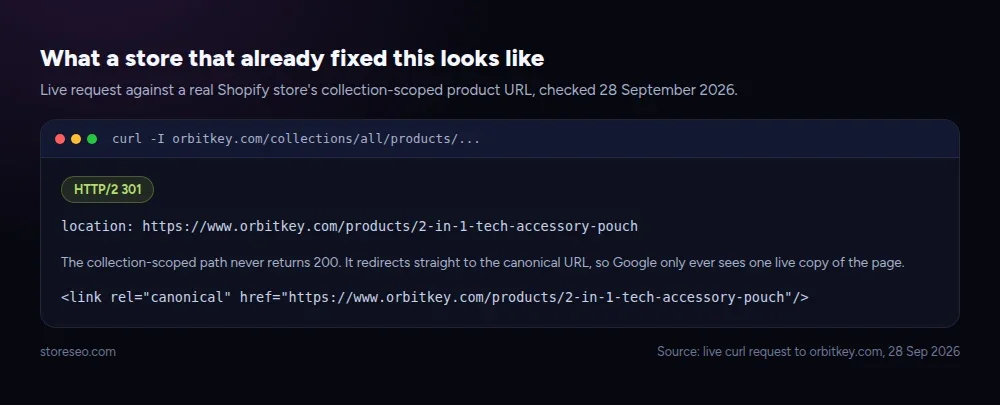 Source: live curl request to orbitkey.com, 28 Sep 2026.
How Do You Fix It Step By Step?
Confirm before you touch anything, because the fix is different depending on which of the four causes you actually have.
Step 1: read the URL Inspection report. In Search Console, inspect the affected URL and open Page indexing. You will see two lines: Google-selected canonical (the URL it chose to index) and User-declared canonical (the one your page actually declares). If those two disagree, this is confirmed.
Step 2: find where the duplicate path is still reachable. Test the exact duplicate URL in a browser or with curl -I. If it returns 200 instead of redirecting, that is a live entry point Google can still find, whether or not any page currently links to it. Check your theme’s collection template and any old sitemap files for where it might still be generated or referenced.
Step 3: close it with a redirect, not just a tag. A 301 redirect from the duplicate path to the canonical URL is the fix that actually removes the second live copy; re-declaring the canonical tag on a page that still answers 200 leaves the duplicate reachable and does not reliably change what Google decides to index. StoreSEO’s Bulk URL Redirect Manager lets you set that redirect from your Shopify admin without editing theme code, which matters here because the collection-scoped pattern can affect every product in every collection at once, not just the one URL Search Console happened to flag.
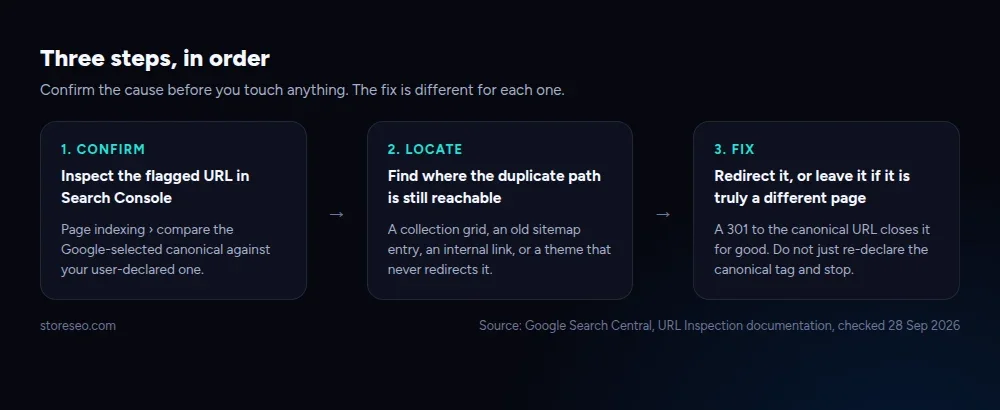 Source: Google Search Central, URL Inspection documentation, checked 28 Sep 2026.
If the cause is a stale internal link instead, update the link itself so it points at the canonical URL directly; a redirect will work, but removing the reason Google keeps finding the duplicate is the more durable fix. If it is faceted navigation, the more scalable answer is usually blocking the parameter pattern in robots.txt rather than redirecting every combination one at a time. Our guide to creating and changing SEO-friendly URLs on Shopify covers the redirect mechanics in more depth than fits here.
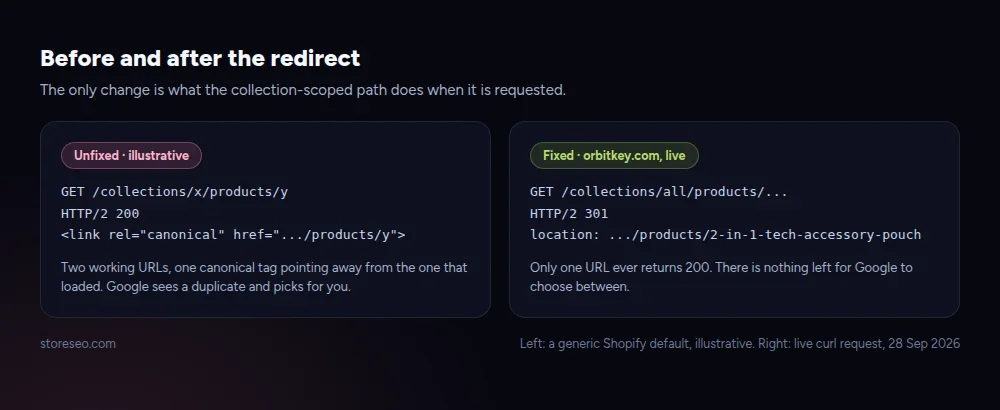 Left: a generic Shopify default, illustrative. Right: live curl request to orbitkey.com, 28 Sep 2026.
When Is It Fine To Leave It?
Not every instance of this status needs action. If the Google-selected canonical is the same page you actually wanted indexed, and the “duplicate” is a URL nobody links to and nothing sends traffic through, leaving it alone costs you nothing; Google has already resolved it the way you would have chosen yourself. It is also fine, even correct, when the two pages are not really duplicates at all: if Google has merged a variant or a filtered view into a parent page and you disagree, the right move is not to panic and delete pages, it is to make the two pages substantially different in content, or to explicitly canonicalize the way you intend using a canonical tag on a URL that does not also 200 somewhere else. The runbook is the same either way: confirm what Google actually did before changing anything, because a fix aimed at the wrong cause just creates a new inconsistency for Google to resolve next.
This is exactly the class of issue StoreSEO’s SEO Analysis is built to catch before it reaches Search Console: it flags duplicate-canonical risks against your live catalog and gives you detailed fix instructions inside your Shopify admin, rather than leaving you to reconstruct the cause from a GSC report weeks after Google already picked a side. It sits alongside the wider technical checks covered in our common Shopify SEO problems guide and the more general duplicate content and broken link fixes post, and it is worth pairing with a look at when to use Shopify’s noindex tag for pages you want out of the index entirely rather than merely de-duplicated. For the reporting side of this workflow, StoreSEO’s Google Search Console integration surfaces indexing status changes like this one without you needing to check GSC by hand every week.
Frequently Asked Questions (FAQs)
1. Is “Duplicate, Google chose different canonical” an error?
No. Search Console’s own documentation calls this expected behavior, not an error: Google is telling you it found two similar pages and picked one to index. It only becomes a problem if the page it picked is not the one you wanted ranking.
2. Will this hurt my Shopify store’s rankings?
Not directly. The page you wanted indexed can still rank if Google’s selected canonical is that same URL. The risk is indirect: if links, reviews, or social shares are split across both URLs, the canonical one does not get full credit for all of that signal until the duplicate is closed.
3. Does StoreSEO fix this automatically?
StoreSEO’s SEO Analysis flags the duplicate-canonical pattern against your catalog and gives you fix instructions inside your Shopify admin, and its Bulk URL Redirect Manager lets you set the redirect without touching theme code. You still confirm the cause first, since the fix differs by cause as shown in the table above.
4. What is the difference between a canonical tag and a redirect here?
A canonical tag is a suggestion you make on a page that still loads normally; a redirect removes the duplicate page from being reachable at all. When the duplicate URL returns 200, a redirect is the more reliable fix because it eliminates the second live copy rather than asking Google to ignore it.
5. How long does it take for Search Console to clear this status?
There is no fixed timeline; it depends on Google’s next crawl and reprocessing of the affected URLs. Request re-indexing of the canonical URL in Search Console after you apply the redirect, then re-check the URL Inspection report in the following weeks rather than expecting an immediate change.
6. Could faceted navigation cause this even without a collection-scoped product URL?
Yes. Sort and filter parameters on collection pages generate URLs that can render close to identically to the unfiltered page, and Search Console can flag the same “different canonical” status on those. The fix there is usually blocking the parameter pattern in robots.txt rather than redirecting each combination.
If this URL is one of several duplicate-canonical flags on your store, running a full SEO Analysis is the faster way to find the rest before Search Console reports them one at a time. try StoreSEO on the Shopify App Store
Keep reading
Shopify Image Filenames Are Hurting Your SEO: The Fix
Shopify publishes your uploaded filename straight into the live image URL, so a camera default like IMG_4821.jpg stays that way until you rename it.
Read article
Common Shopify SEO Problems, Ranked by Impact
Six Shopify SEO problems ranked by real cost, each scored for how common it is in our 100+ store audit, how severe, and how fast you can fix it.
Read article
12 Shopify SEO Questions Merchants Ask Most
These are the 12 Shopify SEO questions merchants ask most often, answered straight with sources, from Google indexing to AI search visibility.
Read article