
Shopify vs Etsy for SEO: Which Actually Ranks?
 Written by M Asif Rahman
Shopify lets you edit the page title, meta description and robots.txt for every page; Etsy locks all three to the title you published first and gives sellers no robots.txt access at all. Etsy’s own marketplace search still sends traffic without any of that control. Pick Shopify for Google; Etsy adds built-in buyer traffic you cannot optimize.
TL;DR: Shopify vs Etsy for SEO control
| SEO element | Shopify | Etsy | Verdict |
|---|---|---|---|
| Page title tag | Editable per page, or overridden with the title_tag metafield | Generated from your item title, no separate field | Shopify |
| Meta description | Editable per page, or set with the description_tag metafield | Not available | Shopify |
| Listing URL | You set the handle, and can change it later | Locked to the title you first publish | Shopify |
| robots.txt | Customizable through a robots.txt.liquid theme template | No seller access; one file for the whole marketplace | Shopify |
| Structured data / schema | Apps like StoreSEO add product and FAQ schema | None; only Etsy’s own marketplace-level schema | Shopify |
| Built-in buyer search | None; you rank only in Google and AI answers | Etsy’s own search sends traffic with zero setup | Etsy |
| Who actually ranks the page | You, in Google, using the controls above | Etsy’s own algorithm first, Google second | n/a |
Shopify wins on every lever you can personally pull. Etsy wins on the one lever it pulls for you: a marketplace search engine with its own built-in shoppers.
Which Platform Gives You More SEO Control?
Shopify’s product, page and collection search listings default to the resource’s own title and description, and you can override either one directly, or at scale with the title_tag and description_tag metafields in the global namespace, confirmed in Shopify’s own developer documentation. Etsy gives you none of that: its own Seller Handbook states plainly that “your item title is used to create the page title for your listing page,” with no separate field to change, and that “your listing’s URL is based on the title you enter when you first publish the listing,” locked from that point on even if you edit the title afterward, per Etsy’s own Search Engine Optimization article.
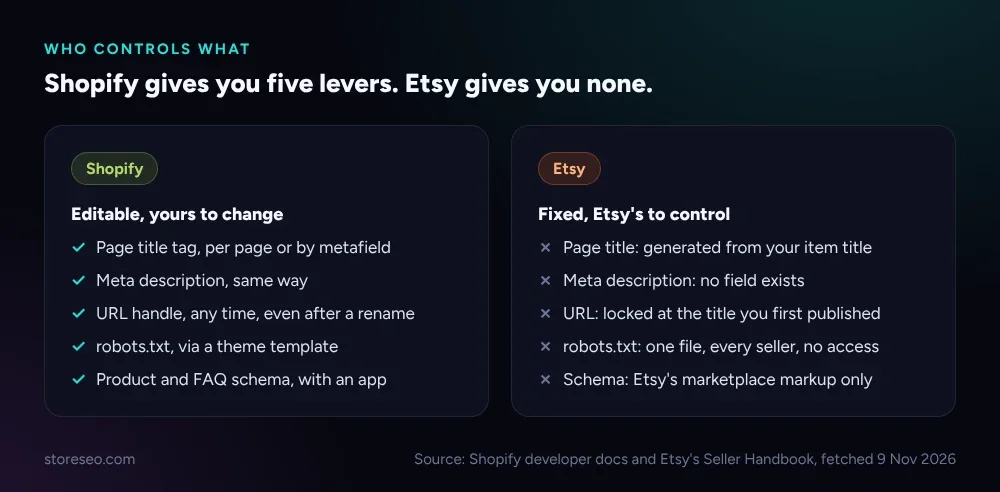 Shopify’s own developer docs and Etsy’s Seller Handbook, both fetched 9 Nov 2026.
The URL difference matters most at the moment you change a product. On Shopify, the handle after /products/ is yours to edit any time, so a renamed or repositioned product keeps a clean URL. On Etsy, that same edit does nothing to the link: the listing stays at whatever slug your first-published title generated, permanently, which is why Etsy’s own handbook suggests creating a brand-new listing rather than trying to fix a misleading URL.
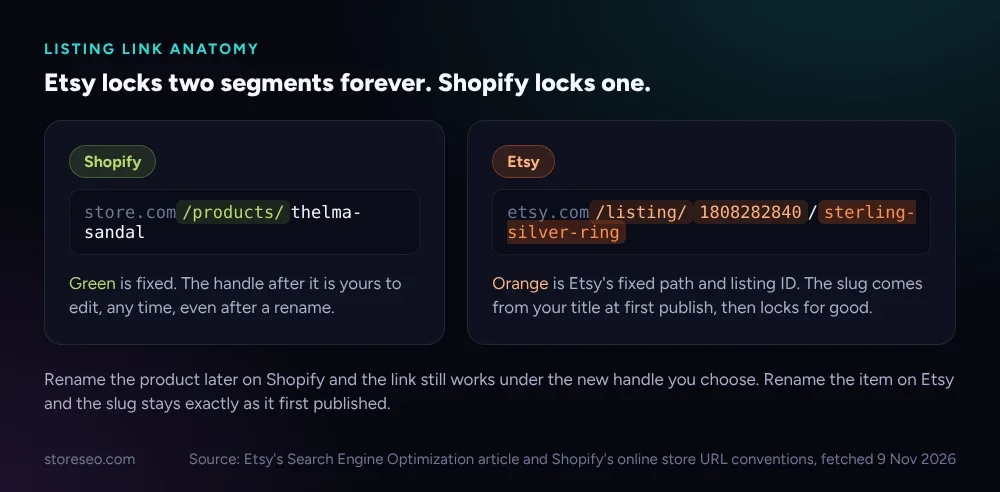 Source: Etsy’s own Search Engine Optimization article and Shopify’s online store URL conventions, both fetched 9 Nov 2026.
robots.txt follows the same pattern, just more extreme. Shopify ships a default robots.txt that the company says “works for most stores,” and a theme developer can replace it with a robots.txt.liquid template that adds, removes or rewrites rules using Shopify’s own supported objects (robots, group, rule, user_agent, sitemap, request). Etsy sellers get no equivalent at any level: etsy.com/robots.txt is a single file, more than 1,800 lines long, that applies identically to every shop on the platform, and nothing in a seller’s dashboard touches a line of it.
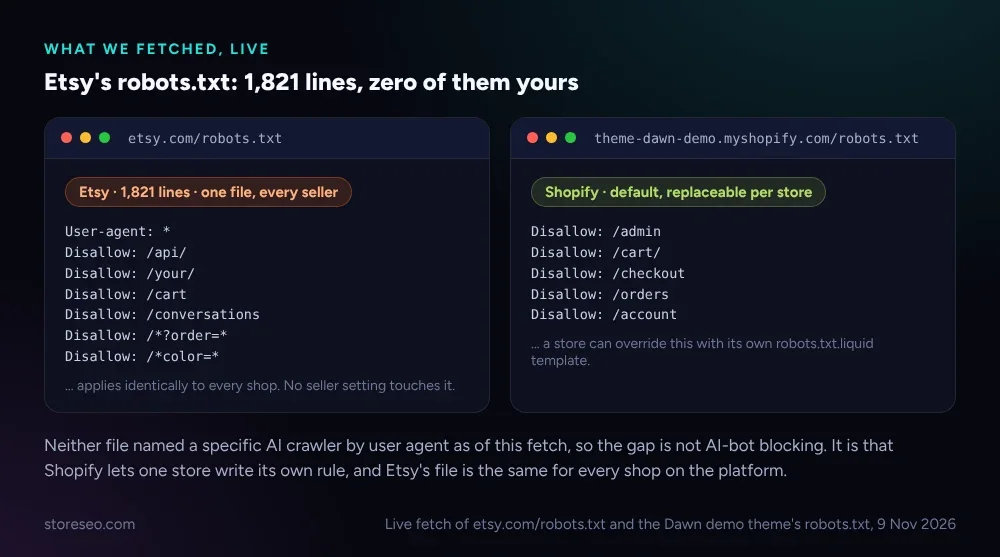 Live fetch of
etsy.com/robots.txt and Shopify’s robots.txt.liquid developer documentation, both 9 Nov 2026.
Which Platform Ranks Faster Out of the Box?
“Faster” means two different things here, and the two platforms win different ones. For your own page ranking in Google, Etsy’s own Seller Handbook is honest that there is no shortcut: “there isn’t a way to promise that your shop will appear at the top of a search engine results page,” and it warns that search engines “frequently tweak what and how results come up in a search.” A new Etsy listing competes in Google on the same page-level signals Shopify gives you more control over, title, description and schema, except you cannot touch any of them on Etsy.
For buyer-facing search, the comparison flips. Etsy’s own internal search engine, not Google, is what most Etsy buyers actually use, and Etsy’s own help center confirms one of its direct matching signals is tags, up to 13 per listing at up to 20 characters each, filled in from the same listing form every seller already uses regardless of SEO skill. A brand-new Etsy shop can appear in that search the day it lists its first item. A brand-new Shopify store has no equivalent built-in search: every visitor has to come from Google, a link or an ad you bought.
Which Platform Is Better for AI Search?
Neither platform’s default robots.txt names an AI crawler by user agent: checking both Shopify’s own Dawn demo theme and etsy.com/robots.txt live on 9 Nov 2026 found no GPTBot, ClaudeBot, PerplexityBot or similar rule on either side, just the general allow and disallow groups above. So an AI assistant that reads a page at all reads a Shopify product page and an Etsy listing on equal footing for crawl access.
The gap is structured data. An AI assistant summarizing a product benefits from the same JSON-LD a search engine does: price, availability, reviews, answered questions. Shopify stores can add that with an app, StoreSEO’s own SEO Analysis and score tool flags a product’s missing schema and fixes it, so a Shopify seller can close that gap without writing code. Etsy gives sellers no equivalent hook: whatever structured data an Etsy listing carries is Etsy’s own marketplace-level markup, not anything a seller adds or edits.
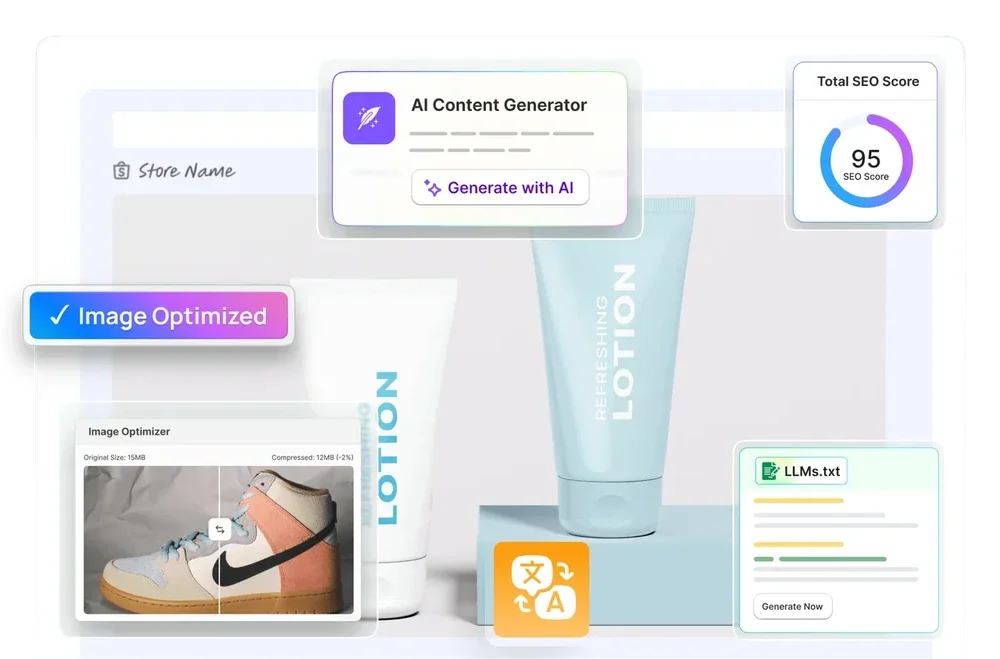 StoreSEO’s own product screen, storeseo.com, 9 Nov 2026.
Which Should You Pick for Your Store?
If you are starting from zero followers and zero traffic, Etsy’s built-in search is the faster first sale: you fill in a title, tags and attributes, and Etsy’s own shoppers can find you the same day, no technical setup at all. That is also exactly why most sellers who outgrow Etsy outgrow this limit first: you cannot differentiate your SEO from the seller next to you, because neither of you has a lever to pull beyond the same title and tags fields.
Shopify is the better pick once you want Google traffic, a brand people search for by name, or more than one sales channel. You get every control in the table above, and an app closes the remaining gap fast: run an SEO Analysis, fix the pages it flags, and you have covered in an afternoon what Etsy never lets a seller touch at all. For the fuller platform comparison, see Shopify vs WooCommerce for SEO, and for a broader look across builders, Wix vs Shopify covers the general case this article does not. Our Ultimate SEO Checklist is the starting point either way.
Frequently Asked Questions (FAQs)
1. Can I edit my Etsy listing’s meta description?
No. Etsy’s own Search Engine Optimization article does not describe a meta description field at all, and no setting in the Etsy seller dashboard exposes one. Search engines generate their own snippet from your listing’s content instead.
2. Does changing my Etsy listing title change its URL?
No. Etsy’s Seller Handbook says the URL is based on the title you entered when you first published the listing, and it stays that way even after you edit the title. If the mismatch becomes misleading, Etsy’s own guidance is to create a new listing rather than expect the link to update.
3. Can I block AI crawlers from my Shopify store?
Yes, with a custom robots.txt.liquid template. Shopify’s developer documentation supports writing a rule for a named user_agent, so a store can disallow a specific AI bot the same way it would disallow any other crawler, something an Etsy seller cannot do to the marketplace’s shared robots.txt at any level.
4. Do I need an SEO app on Shopify if I also sell on Etsy?
Not strictly, but it closes a real gap. Shopify gives you the fields; an app like StoreSEO’s SEO Analysis tool finds what is actually missing on each page (schema, a thin description, a missing alt tag) faster than checking every product by hand, which matters more the larger your catalog grows.
5. Which platform is better for a brand-new shop with no following yet?
Etsy, for the first sale. Its own search sends buyers to a listing with zero setup beyond filling in the standard fields. Shopify has no equivalent built-in audience, so a new Shopify store depends on Google, paid traffic or an existing following until its own SEO work starts to pay off.
6. Can I add FAQ or product schema to an Etsy listing?
No. Etsy does not expose any schema or structured-data setting to sellers at the listing level, so whatever markup an Etsy listing carries is Etsy’s own site-wide schema, not something an individual shop can add, edit or extend.
Etsy’s search rewards the same title, tags and category fields every seller already fills in, so there is nothing extra to configure there. Shopify rewards the opposite: real control over titles, descriptions, URLs, robots.txt and schema, but only once you actually use it, and an SEO Analysis is the fastest way to see what is still missing. try StoreSEO on the Shopify App Store
Keep reading
12 Shopify Meta Descriptions That Get Clicked
Twelve real Shopify meta descriptions, from 28 to 298 characters, show exactly where Google starts cutting a search snippet off mid-sentence.
Read article
12 Shopify Product Titles That Rank (Annotated)
Twelve real Shopify product titles share three habits that work: name the product type, add exactly one differentiator, and put the brand name last.
Read article
What Happens When You Skip Google Product Category?
Skipping Google Product Category rarely blocks a sale, but in apparel, phones, software and alcohol it can quietly get a listing disapproved.
Read article