
Shopify SEO for Subscription Box Brands
 Written by M Asif Rahman
Subscription box brands do not need the small or large catalog playbook: with a handful of box variants that rotate every cycle, the fix is a repeatable launch-day and monthly SEO checklist, not a redesign, so content stays indexable while the box contents keep changing.
TL;DR: run these checks on a cadence tied to your own box launch, not a calendar month, and the pages that matter never go stale.
| Check | When | What “good” looks like | Verdict |
|---|---|---|---|
| Launch page frozen, archive page new | Every box launch | One stable URL for the pitch, a fresh dated URL for that box’s real contents | ✓ Do both, never one page for both jobs |
| Variant and option list | Monthly | Discontinued flavours or themes removed from the live buy box, not left as a dead choice | ✓ Prune |
| Past-box archive growth | Monthly | Each past box has its own indexable page, not a shared gallery with no text | ✓ One page, one box |
| Duplicate copy across archive pages | Quarterly | Each archive page carries at least one paragraph that is not a template with swapped nouns | ✗ Needs a pass if copy repeats |
| Metadata on the active box page | Quarterly | Title and meta description describe the subscription, not a specific box that will be gone next month | ✓ Keep evergreen |
What Do You Check Every Time You Launch A New Box?
A subscription box brand publishes to the same handful of URLs far more often than a normal Shopify store touches its product pages, and that repetition is exactly where SEO quietly breaks. The box lives on one page, usually a static /pages/ page rather than a product, and the brand rewrites its contents every cycle because that is the entire point of the subscription. The fundamentals still come from Shopify product page SEO: tips and best practices; a subscription box just applies them to a page that changes on a schedule instead of once.
The real example below is a live Shopify-powered book subscription box, read on 13 November 2026. Its /pages/subscription-box page carries a generic, evergreen page title (“Subscription Box”) and an og:description that never mentions a specific month, while the on-page heading “Inside This Month’s Box” and the paragraph under it get rewritten every cycle without the URL ever changing.
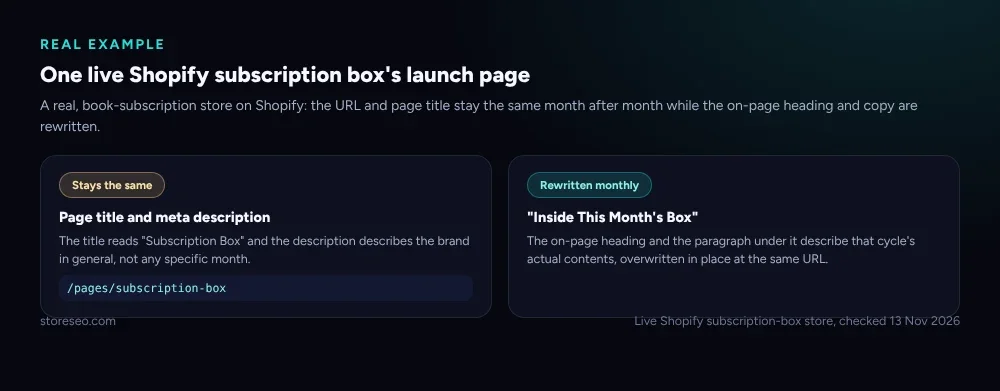 Captured from a live Shopify subscription box store on 13 November 2026: one URL, one generic title, rewritten contents every month.
That pattern is correct for the launch page itself. The mistake is stopping there. The same store keeps a second, separate collection that archives every past box as its own page, which is the part a smaller or newer brand skips. Without it, last month’s box has no URL left once this month’s copy overwrites it, so every ranking signal that page earned disappears with the edit.
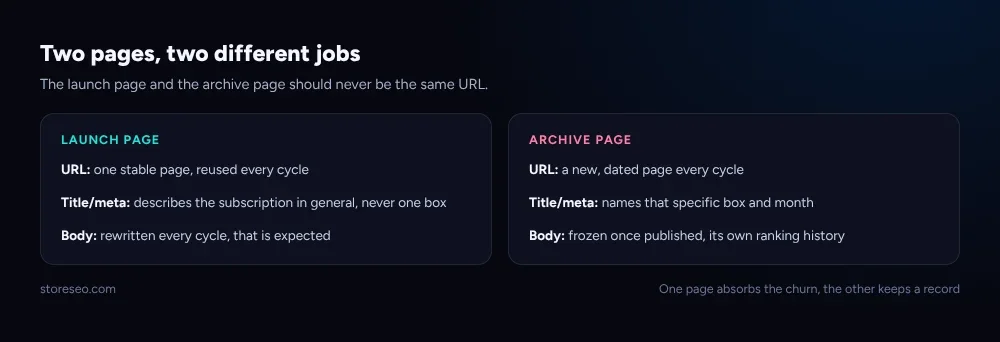 The launch page and the archive page do different jobs; one page cannot do both.
The checklist for launch day is short: confirm the live launch page’s title and meta description still describe the subscription in general, not this specific box; publish a new archive page with that box’s real contents, a real photo and at least one paragraph of unique copy; and link the new archive page from the launch page and from last month’s archive page, so the chain of past boxes stays crawlable from the one page people actually find in search.
A predictable URL and title pattern makes this fast to repeat every cycle without reinventing it each time: keep the fixed part of the slug and the title the same, and change only the part that identifies that specific box.
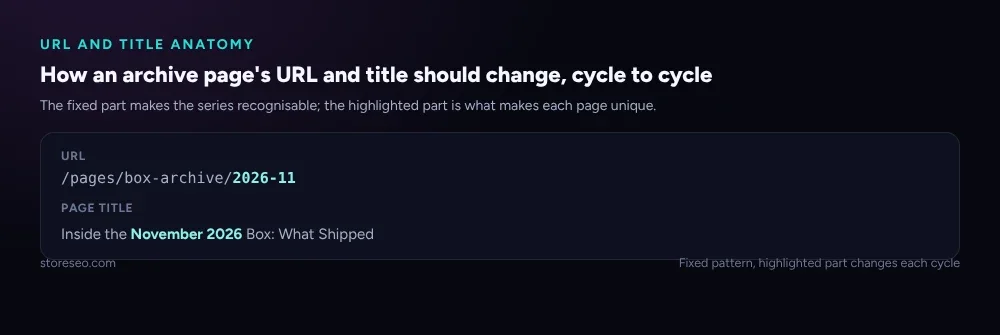 A consistent pattern turns a new archive page into a two-minute task instead of a decision every month.
What Should You Check Every Month?
Between launches, the job is pruning, not publishing. Subscription boxes add and drop flavours, themes or add-on items constantly, and Shopify’s own guidance on managing product variants is clear that an option left on a product after it is discontinued still shows as a choice a shopper can select, which reads to both shoppers and crawlers as a live item that happens to be permanently unavailable.
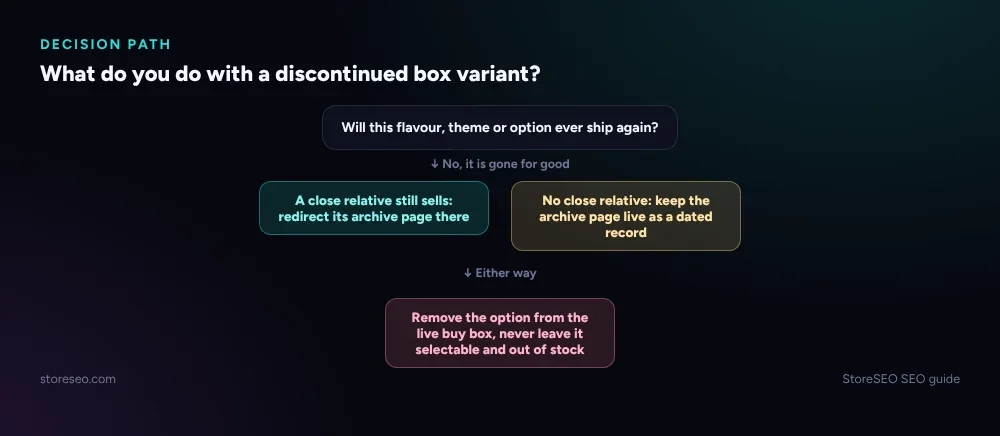 A discontinued variant is never left live and out of stock forever; it is either removed or redirected.
Run this monthly: remove any variant or option that will never ship again, rather than leaving it selectable and permanently out of stock. If a whole box theme is retired, either fold its archive page into a close relative with a redirect or keep the page live as a dated record and link to it from a “past boxes” index, but never let it 404. And check that this month’s new archive page is actually linked from somewhere a crawler can reach: a page with zero internal links is effectively invisible, however good its content is.
What Should You Check Every Quarter?
Quarterly is for the problem that only shows up once enough archive pages exist: duplicate copy. A dozen monthly box pages that each say “a hand-picked selection of our favorite items this month” with different nouns swapped in is template filler, not unique content, and Google’s own guidance on managing crawl budget on large sites treats large volumes of low-value, near-duplicate pages as exactly the kind of content that wastes crawling on pages that will never earn a click.
Spot-check five or six archive pages at random. If most of them read as the same paragraph with different items named, rewrite the opening paragraph of each to say something specific about that actual box: a real ingredient, a real theme, a real reason it is different from last month’s. One sentence of real specificity per page is usually enough to break the template pattern. While you are in there, confirm the metadata on the still-live launch page has not quietly drifted to describe a specific past box instead of the subscription in general, which happens when a seasonal promotion gets copied onto the evergreen page and never gets swapped back.
How Do You Automate The Boring Parts?
None of this needs to be manual labour every single month. StoreSEO’s Bulk SEO optimization can run meta titles, descriptions and SEO scoring across every archived box page on a schedule rather than one page at a time, and its auto AI optimization setting applies that optimization automatically to new pages as they publish, which matters most for a brand adding one new archive page every single cycle. StoreSEO’s own SEO reports and email notifications also flag pages whose score drops, which is the fastest way to catch metadata drift before it reaches the live launch page.
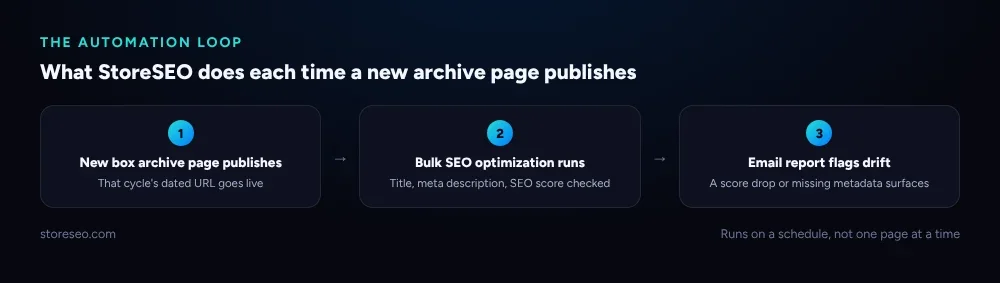 Bulk SEO optimization applies to every new archive page automatically; the email report catches what it does not.
For a brand running this cadence by hand, the quarterly duplicate-copy check is the one most likely to get skipped simply because nobody remembers to do it. Setting a recurring reminder tied to the box’s own ship date, not the calendar month, keeps it attached to the thing that actually changes.
Frequently Asked Questions (FAQs)
1. Should a subscription box’s launch page use the small-catalog or large-catalog playbook?
Neither, directly. Most subscription brands sell a handful of box variants, which looks like the case covered in Shopify SEO for small catalogs, but the real problem is a launch page whose contents get overwritten every cycle, which neither that playbook nor Shopify SEO for stores with 10,000+ products addresses. Borrow the small-catalog approach for hand-tuning the few live pages you have, and add the archive habit on top.
2. Does rewriting the same page every month hurt its ranking?
Not by itself. A single evergreen page that keeps a stable, general title and description while its body content refreshes is a normal and workable pattern. The risk is losing the specific content from last month entirely, with no archive page to carry its own ranking signals forward.
3. How many past boxes should stay archived as their own pages?
As many as you can keep from looking identical to each other. There is no fixed number, but each archive page needs at least one paragraph of real, box-specific copy to avoid reading as a template. A thin archive page is not much better than no archive page.
4. What should the launch page’s title and meta description say if the box changes every month?
Describe the subscription itself, not any single box: what kind of items ship, how often, and who it is for. Save the specific contents, photos and that month’s theme for the archive page, which can change its title every cycle because it is a new URL each time.
5. Is it safe to redirect an old box’s archive page if the theme is retired?
Yes, if a closely related page exists to redirect it to. Otherwise keep the page live as a dated record rather than deleting or redirecting it to the homepage, since a specific retired box’s page can still earn its own search traffic from people looking for exactly that past box.
This is StoreSEO’s own territory: the AI Content Optimizer and recurring SEO reports do the parts of this checklist that scale badly by hand, so the box keeps shipping on schedule and the pages behind it don’t quietly go stale.
Keep reading

The AI Shopping Revolution: How Merchants Can Survive (and Win) When Buyers Ask ChatGPT Instead of Googling
The AI shopping revolution is already reshaping eCommerce. Buyers are turning to ChatGPT, Perplexity, Gemini, and Google AI Mode for product recommendations instead of traditional search. This guide breaks down how Shopify merchants can optimize for AI visibility using AEO, GEO, schema markup, LLMs.txt, and structured content strategies.
Read article
Shopify Core Web Vitals 2026: The Complete Guide to Fixing INP
Struggling with slow interactions on your Shopify store? Learn how to fix INP (Interaction to Next Paint) with practical steps that improve Core Web Vitals, enhance user experience, and drive more conversions.
Read article
Automation to Innovation: The Top Advanced Features of AI Agents for Shopify
WIth the advance features of AI Agents, you can elevate your store’s performance and automate all the time consuming tasks.
Read article