
Shopify SEO for Stores With 10,000+ Products
 Written by M Asif Rahman
A store with 10,000 or more products runs into problems a 200-product catalog never sees: thin and duplicate pages competing for the same crawl budget, tag and filter combinations multiplying URLs, and fixes that cannot be done one product at a time. The priority order below starts with the pages Google already crawls, then works outward.
Here is the TL;DR: the priority order for a catalog that has outgrown one-by-one editing.
| If your catalog looks like… | Do this first | Why |
|---|---|---|
| 10,000+ products, with thin tag or filter pages | Audit crawl budget before writing new content | Google names this exact scale in its own crawl-budget guidance |
| Hundreds of out-of-stock products still live | Redirect or noindex them this week | Each one keeps competing for the same limited crawl budget |
| Titles and descriptions never touched since import | Run bulk AI optimization on your top sellers first | One-by-one edits never catch up at this scale |
| “Discovered, currently not indexed” is rising in Search Console | Consolidate duplicate URLs, then resubmit the sitemap | That status is Google’s own signal of wasted crawl demand |
What’s Different About SEO At 10,000+ Products?
Below a few hundred products, Google crawls and indexes almost everything a store publishes without much prompting. That stops being automatic at scale. Google’s own crawling documentation names “medium or larger sites (10,000+ unique pages) with very rapidly changing content” as one of the cases where crawl budget becomes a real constraint, alongside sites with a large share of URLs stuck “Discovered, currently not indexed” in Search Console. A catalog at exactly the size this post is about sits right on that line. This post assumes the fundamentals from our Shopify product page SEO guide are already in place; everything here is what changes once the catalog outgrows them.
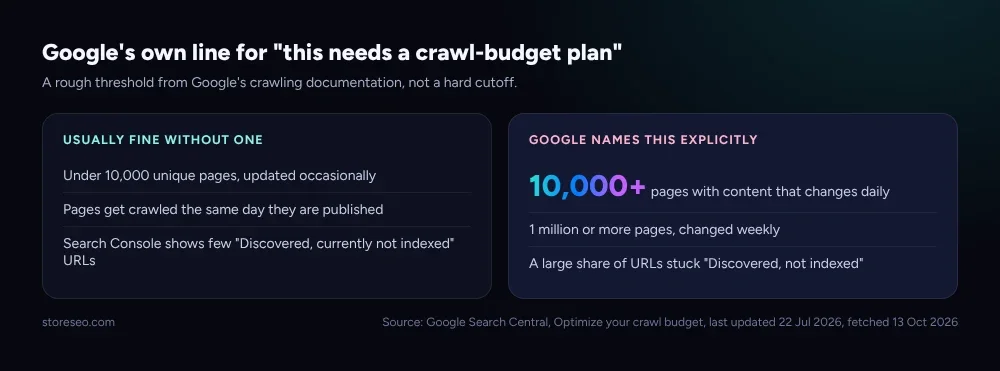 Source: Google Search Central, last updated 22 Jul 2026, fetched 13 Oct 2026.
Crawl budget is two things combined: how much of your server Google is willing to use (crawl capacity) and how much Google wants to recrawl your pages (crawl demand). Google’s guidance is explicit that duplicate or unimportant URLs waste the crawl time that should go to real inventory, which is the mechanism behind almost every recommendation below. None of this means a large Shopify catalog is unrankable. It means the order of operations matters more than it does for a small store.
Which Pages Should You Fix First?
Not the newest products, and not an alphabetical pass through the catalog. Start with the pages that already carry traffic or revenue, since those are the ones a crawl-budget or indexing problem costs you the most to lose. Pull the top 500 products by sessions or orders from Search Console or analytics, confirm their titles, descriptions and schema are current, and only then move down the list.
StoreSEO’s Auto AI Optimization setting is the practical form of what the feature map calls Bulk SEO optimization: instead of opening each of 10,000 products one at a time, it applies AI-written titles, descriptions, tags and image alt text across a whole segment of the catalog in one pass, based on each product’s own focus keyword (set it up here). The plan a store needs scales with catalog size: StoreSEO’s own tiers run from a Free plan covering 25 products up to the Advanced plan, built for exactly this segment at 10,000 products, 50,000 images and 1,000 tracked keywords.
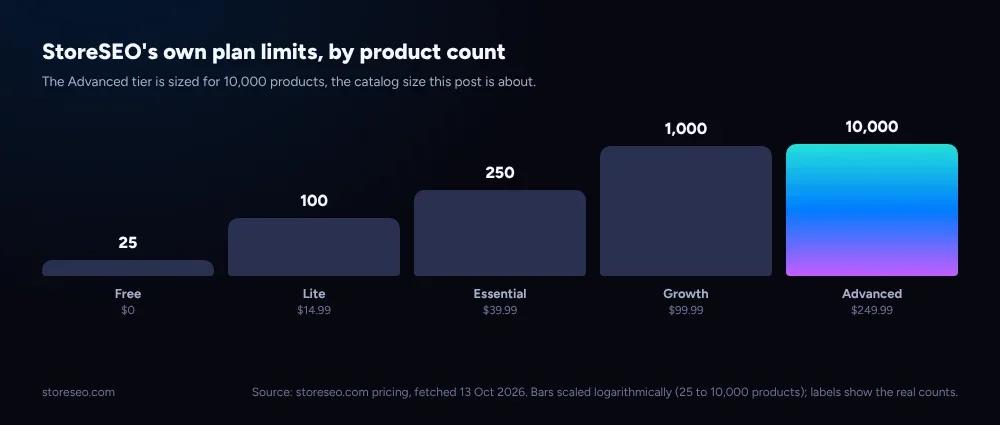 Source: storeseo.com pricing, fetched 13 Oct 2026. Bars scaled logarithmically; labels show the real counts.
If the honest answer is that your catalog is not actually this large yet, the fixes below are overkill. Our native vs app breakdown covers what Shopify already handles on its own for a smaller store, and when bulk tooling starts to pay for itself.
How Do Tags, Filters And Collections Multiply Your URLs?
A 10,000-product catalog rarely has 10,000 unique page intents. Collections, tags and storefront filters combine the same products into many URLs: a color filter on a size filter on a collection can generate dozens of crawlable combinations for one set of products, most of them answering no search query on their own. That is exactly the “perceived inventory” problem Google’s crawl-budget guide calls out: URLs Google does not need to crawl still cost crawl time it could have spent on pages that matter. Our tags, collections and filters breakdown goes through which of the three should be indexed, which should not, and why.
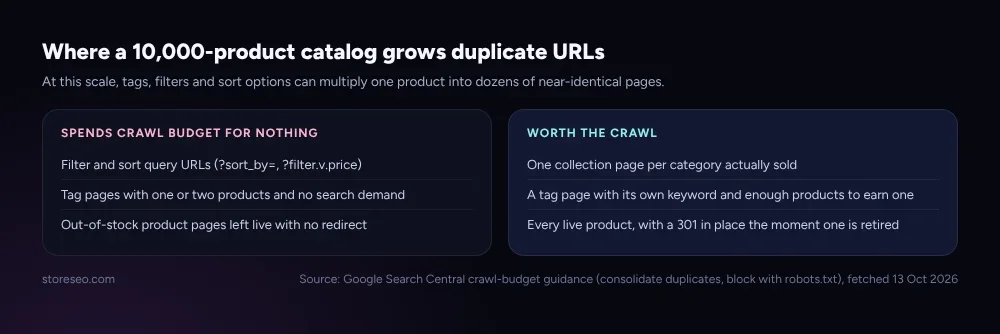 Source: Google Search Central crawl-budget guidance (consolidate duplicates, block with robots.txt), fetched 13 Oct 2026.
The fix is not deleting tags or filters merchants and customers rely on for navigation. It is making sure the URLs that exist only for sorting and filtering stay out of the index, while the handful of tag pages with their own real search demand are left to rank. At scale, a sitemap also has its own ceiling worth knowing: the sitemap protocol itself caps a single sitemap file at 50,000 URLs or 50MB, so a 10,000-product catalog with variant and collection URLs can approach that limit faster than a smaller store ever would.
What Happens To URLs When Products Go Out Of Stock?
At a few hundred products, an out-of-stock item sitting live for a week is a minor annoyance. At 10,000 products, a few hundred out-of-stock pages left unredirected is a standing drain on the same crawl budget every other fix in this post is trying to protect. Every retired or discontinued product needs a decision made at the moment it goes inactive, not months later during a cleanup project: redirect it to the closest live replacement or its parent collection, rather than leaving a live page with nothing to sell.
Shopify’s own URL Redirects tool supports a bulk CSV import and export for exactly this, with a cap of 100,000 redirects on standard plans and 20,000,000 on Shopify Plus, so the ceiling is not the constraint at this scale. Our bulk URL redirects setup guide walks through the native CSV route alongside the no-CSV alternative a Shopify SEO app adds. The goal is the same either way: no retired product should sit live and indexable past the week it stopped selling.
What Does A 30-Day Large-Catalog SEO Plan Look Like?
Fix the backlog before adding to it. A month is enough time to triage a 10,000-product catalog without stalling everything else the store is doing.
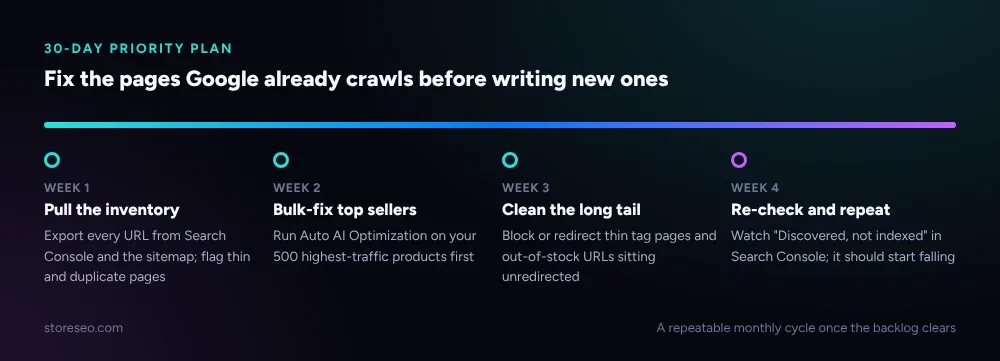 A repeatable monthly cycle once the backlog clears.
Week one is inventory, not fixes: export every indexed URL from Search Console and the sitemap, and flag which ones are thin, duplicate or out of stock. Week two is the highest-leverage week, bulk-optimizing the top sellers that already carry traffic. Week three clears the long tail, redirecting or blocking the pages week one flagged. Week four is measurement: a falling count of “Discovered, currently not indexed” URLs in Search Console is the signal that crawl demand is finally going to pages worth crawling, not pages that should never have been live.
Frequently Asked Questions (FAQs)
1. How many products counts as a “large catalog” for SEO purposes?
There is no official cutoff, but Google’s own crawl-budget documentation names 10,000 or more pages with content that changes daily as one of the thresholds worth planning around. A store well under that, with a stable catalog, usually does not need the crawl-budget measures in this post yet.
2. Does crawl budget actually matter for an ordinary Shopify store?
For most small and mid-sized stores, no: Google typically crawls and indexes new and updated pages quickly without any special management. It starts to matter once a catalog is large enough, or changes often enough, that Google cannot crawl every URL as fast as the store wants it indexed, which is the exact case this post addresses.
3. What is the fastest way to fix SEO across thousands of products at once?
Prioritize by traffic or revenue, not alphabetically, then use a bulk tool rather than editing products one at a time. StoreSEO’s Auto AI Optimization applies AI-written titles, descriptions and alt text across a segment of the catalog in one pass, which is the only practical route once a catalog passes a few hundred products.
4. Should out-of-stock products be deleted, redirected, or left live?
Leaving them live and indexable wastes crawl budget on pages with nothing to sell. Redirecting an out-of-stock product to its closest live replacement or parent collection, at the moment it goes inactive, keeps the URL useful to both shoppers and search engines instead of becoming dead weight.
5. Do tag and filter pages hurt a large Shopify catalog’s SEO?
Not by existing, but by being crawled and indexed when they only duplicate a parent collection. A tag page with its own real search demand can rank on its own; a filter or sort combination that exists only for on-site navigation should stay out of the index rather than compete with the pages a store actually wants to rank.
6. Is StoreSEO’s Advanced plan enough for a 10,000-product catalog?
Yes, on product count: the Advanced plan covers up to 10,000 products, 50,000 images and 1,000 tracked keywords. A catalog larger than that, or one adding thousands of new products a month, is a conversation worth having directly with the StoreSEO team rather than assuming any off-the-shelf plan fits.
Fix The Backlog Before The Catalog Grows Again
None of this is a one-time project. A 10,000-product catalog keeps generating new tag combinations, new out-of-stock items and new duplicate URLs every month, so the 30-day plan above is meant to repeat, not to finish. Clear the backlog first; the catalog can wait until the pages Google already knows about are worth crawling. try StoreSEO on the Shopify App Store
Keep reading
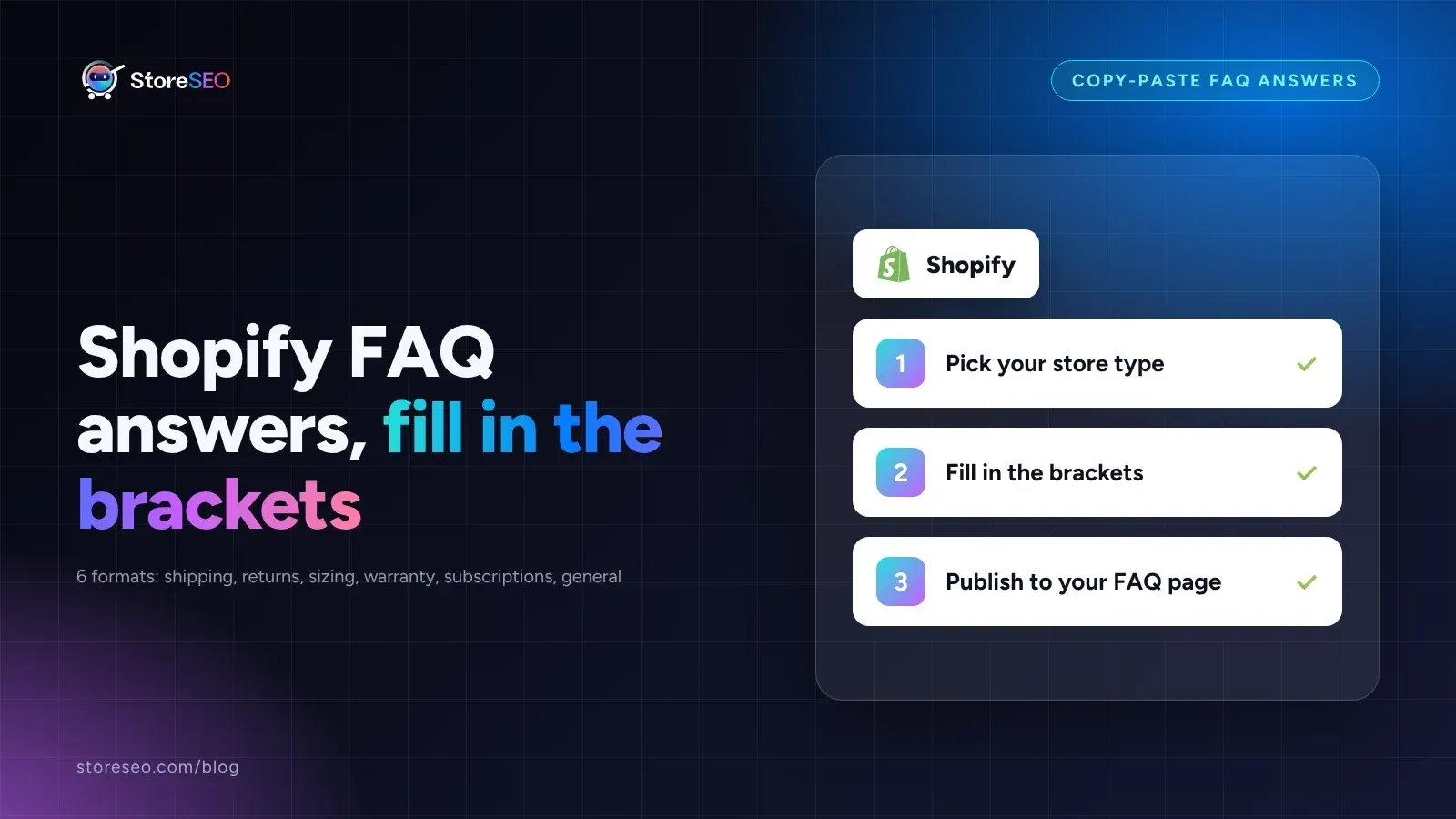
Shopify FAQ Answer Template: 6 Fill-In Formats
Six copy-paste FAQ answer templates for shipping, returns, sizing, warranty, subscriptions, and general support, ready to fill in and publish today.
Read article
Does Changing Your Shopify Theme Hurt SEO?
Switching your Shopify theme keeps your URLs and settings intact, but it can quietly change the schema markup and headings your pages output.
Read article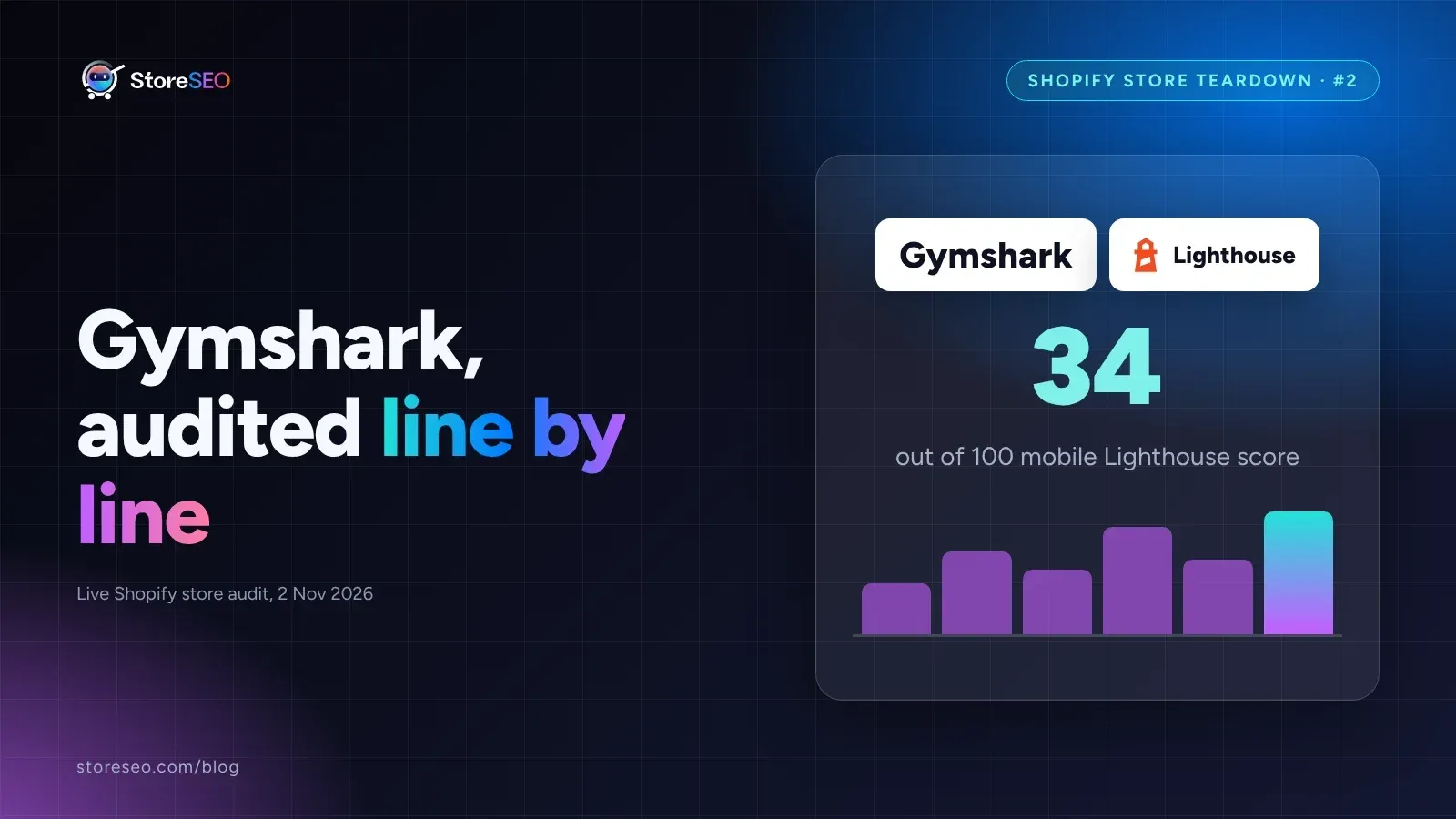
Shopify SEO Teardown #2: Gymshark
We audited Gymshark's live Shopify pages and found a 34-out-of-100 mobile Lighthouse score, a separate URL per color variant, and zero review schema.
Read article