
Do Shopify URL Handles Affect SEO Rankings?
 Written by M Asif Rahman
No, a Shopify URL handle rarely hurts rankings on its own. Clean, keyword-first handles help a little with clicks and clarity, not rankings directly. The real risk is changing an existing handle: the old URL turns into a dead 404 unless you keep the redirect checkbox checked when you save, or add one manually afterward.
TL;DR
| Situation | Do this |
|---|---|
| A new, unpublished product | Pick a clean, keyword-first handle before you publish; there is no old URL to protect yet |
| Renaming a live product, page or collection | Keep the “Create a URL redirect” checkbox checked when you save the new handle |
| A bulk handle change or CSV import | Shopify does not offer the checkbox here; export the old and new paths and add the redirects by hand or via CSV import |
| A handle you already changed without a redirect | Check storeseo.com/products/<old-handle> for a 404, then add the redirect from Content > Menus > URL Redirects |
Why Doesn’t The Handle Itself Hurt Rankings?
Google ranks a page on its content, links and overall relevance, not on how many words sit after the slash. A long, messy default handle like /products/mens-running-shoe-v2-blue-size-10-copy is harder for a shopper to read in a search result or a shared link, and it buries the keyword under filler, but it is not a ranking penalty by itself. The handle only becomes an SEO problem the moment it changes while the old one is still indexed and linked to.
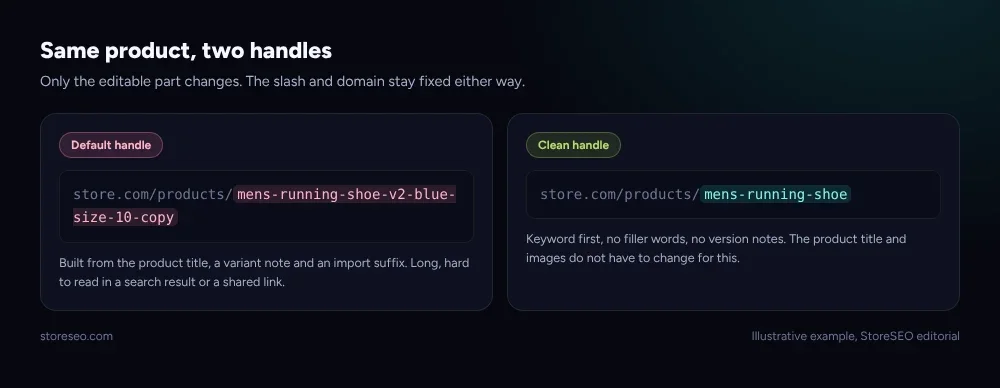 Illustrative example, StoreSEO editorial.
Why Does Changing A Handle Put A Page At Risk?
Shopify’s own rule for redirects is strict: a redirect only works when the “Redirect from” URL currently returns a 404. If the old page still loads, the redirect never fires, even if you saved it correctly. That is exactly what a handle rename creates: the moment you save a new handle, the old path stops resolving and becomes eligible for a redirect, but nothing redirects it automatically unless you act on it.
In practice, Shopify shows a “Create a URL redirect for [old handle]” checkbox, checked by default, when you rename a product’s, page’s, collection’s or blog post’s URL through its own edit screen, and leaving it checked is what closes the gap. That checkbox only appears on a single, in-editor rename, though. A bulk handle change or a CSV import does not offer it, which is the scenario that quietly costs the most rankings, because dozens of handles can change at once with no prompt at all.
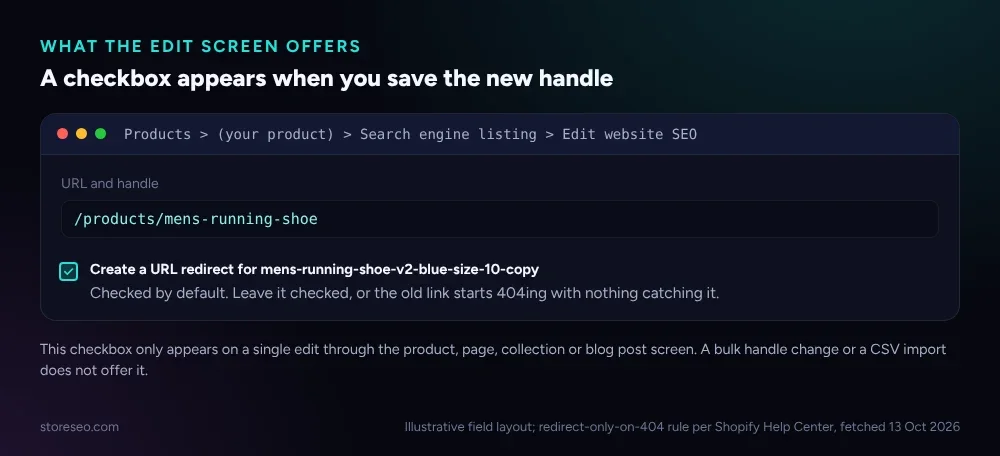 Illustrative field layout; redirect-only-on-404 rule per Shopify Help Center, fetched 13 Oct 2026.
How Do You Check Your Store’s Handles?
Open a handful of your highest-traffic product pages and read the handle after /products/. A handle carrying a variant note, a size, a colour or an import suffix like -copy or -1 is a candidate for a rename, but only rename it with intent, since every rename is also a small risk if the redirect step gets skipped. StoreSEO’s AI URL Handle Optimization suggests a clean, keyword-first handle when you create or edit a product, so the handle is right the first time and there is one less live rename to manage later; see the SEO Analysis and score docs for how the suggestion is scored alongside the rest of the page.
Two checks are worth running before and after any rename: confirm the old path now returns a 404 (it should, that is what makes the redirect eligible), then confirm the redirect itself is live by loading the old URL in a private browser window and watching it land on the new page. Our own 100 SEO score walkthrough covers the same before/after habit for the rest of a product page’s SEO fields.
What Should You Do Before You Change One?
- Decide if the gain is worth the risk. A handle that already ranks and reads fine does not need a rename just to look tidier.
- If you do rename it, keep the redirect checkbox checked, and re-check the old URL a day later to confirm the 404 resolved into a redirect rather than staying dead.
- For a bulk rename or a migration, build the old-to-new URL list first and load it as a CSV import, since the in-editor checkbox will not cover more than one handle at a time.
- If you have not renamed a handle before, our own step-by-step guide to creating and changing Shopify URLs walks through the admin screen this whole piece assumes.
Handles are one small piece of a page’s technical setup; our product page SEO guide covers the rest, from titles to schema, in one place.
Frequently Asked Questions (FAQs)
1. Does a shorter URL handle rank better than a longer one?
Not on length alone. A shorter, keyword-first handle is easier to read and share, which can help click-through from a search result, but Shopify and Google do not reward brevity by itself. Content, links and relevance decide the ranking; the handle only risks that ranking when it changes without a redirect.
2. Do I need to rename every messy handle on my store?
No. Renaming only matters when a handle is actively hurting readability or keyword clarity on a page that still needs to grow, and every rename carries a small redirect risk. Leave long-standing, already-ranking handles alone unless there is a real reason to touch them.
3. What happens if I forget to check the redirect box?
The old URL starts returning a 404 the moment you save the new handle, and nothing catches the traffic or the SEO signal pointing at it. You can still fix this afterward by creating the same redirect manually from Content > Menus > URL Redirects in the Shopify admin.
4. Does changing a handle guarantee a rich result or an instant ranking change?
No. A handle change affects whether the URL resolves correctly, not whether a page is eligible for rich results, which depends on structured data instead. Any ranking movement from a clean handle, if it happens at all, shows up gradually as the new URL accumulates its own signals.
A clean handle is a small, permanent edit; a careless rename is the part that actually risks a page. If you would rather have the handle, the redirect check and the rest of a product’s SEO fields suggested inside your own store instead of tracked by hand, try StoreSEO on the Shopify App Store.
Keep reading

Turn On Auto AI Optimization: What Changes in a Week
Turning on Auto AI Optimization takes about five minutes; the visible change in your catalog builds up over roughly a week as new products arrive.
Read article
Why Isn't AI Referral Traffic Showing in StoreSEO?
AI referral traffic in StoreSEO usually shows zero because the Web Pixel just went live, no AI visit has landed yet, or the plan or consent blocks it.
Read article
Fix Log: Cutting a Meta Description From 220 to 155
We trimmed one Shopify product's meta description from 220 characters to 155 and tracked exactly what moved in its live Google search snippet.
Read article