
Shopify Horizon Theme SEO Audit: What It Ships
 Written by M Asif Rahman
Horizon, Shopify’s newer theme family, writes Product and Organization schema on its own and auto-fills image alt text, a real improvement over Dawn’s blank default. It still ships no breadcrumbs and no review schema, and a live speed check found a real gap between its desktop and mobile load.
TL;DR: what Horizon ships, and what you still owe it
| Check | Horizon outputs | Missing? | Fix |
|---|---|---|---|
| Product schema (JSON-LD) | Organization + Product/ProductGroup, with brand, variant SKUs and an Offer block | ✗ | none needed, it is automatic |
| BreadcrumbList schema | not present, on home or product | ✓ | add it with an SEO app or a theme edit |
| Image alt text | auto-filled per variant (“Colour | Product Name”) on every image checked | ✗ | none needed, though the text is generic |
| AggregateRating / Review schema | no field in the Product object | ✓ | add it through your reviews app |
| Canonical tag | present on the product URL | ✗ | none needed |
| Meta description | a short, product-specific line, not the raw description | ✗ | none needed |
| Mobile Lighthouse score | 66/100, desktop scores 97/100 on the same page | ✓ | close the mobile LCP gap first |
StoreSEO’s SEO Schema feature covers the two rows marked missing, because Horizon, like Dawn before it, was never built to add breadcrumb or review markup on its own.
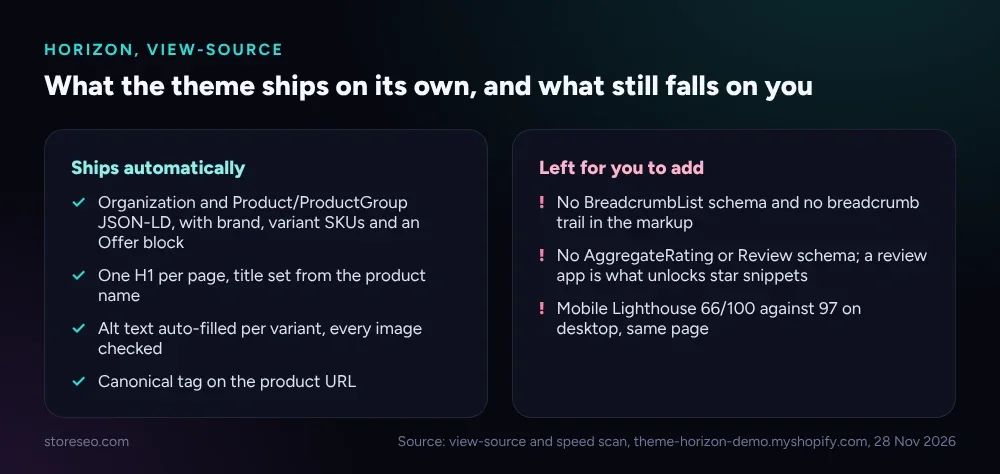 What Horizon’s template ships on its own, next to what a merchant still has to add by hand.
What Schema Does Horizon Output?
A live fetch of a public Horizon demo store’s product page on 28 November 2026 showed the same two-block pattern Dawn uses: a sitewide Organization object, then a ProductGroup object carrying brand, a hasVariant array with per-variant SKUs and images, and an Offer for each variant with price, priceCurrency and availability. That is enough for Google’s own structured data guidelines for the basic Product result.
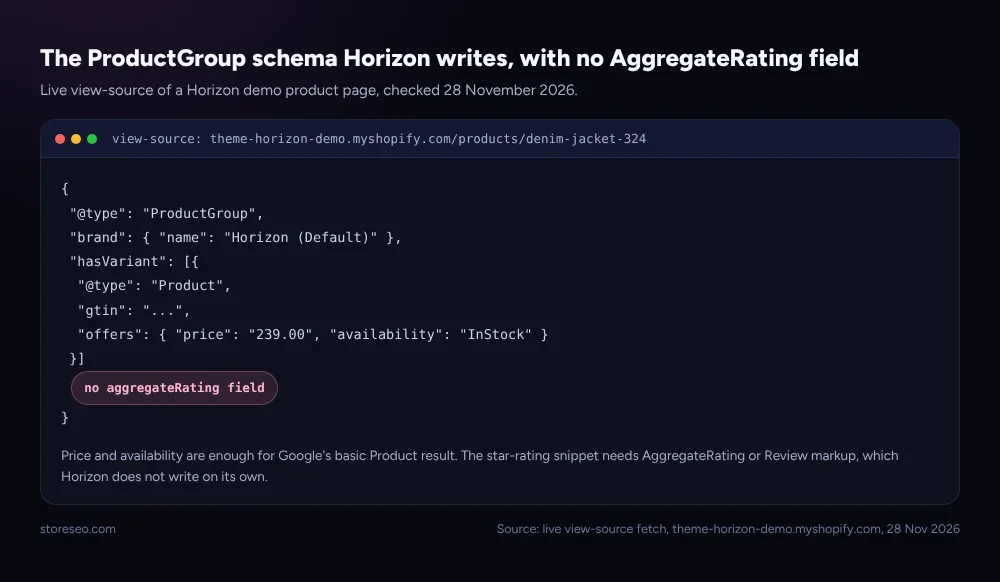 A Horizon theme product page’s own schema block, live-fetched, no app involved.
What is not in that object, same as Dawn, is aggregateRating or Review. Star ratings in search results come from one of those two fields, and neither theme’s own markup carries them. Neither page carries a BreadcrumbList object either, and there is no visible breadcrumb trail rendered in the HTML, so a shopper landing on a product page from search has no path back to the collection.
Our own product-page schema audit found this exact pair of gaps, review markup and breadcrumbs, across 300 live stores regardless of theme, and our product page SEO guide covers the fuller checklist a schema audit alone does not. StoreSEO’s SEO Schema feature, covered in the schema markup docs, adds BreadcrumbList and extends the Product object without a theme edit.
How Are Headings and Alt Text Handled?
Heading structure passes clean, same as Dawn: one <h1> per product page, set from the product title, with the theme’s own H2s used for collapsible sections.
Alt text is where Horizon genuinely differs from Dawn. Our Dawn theme audit found 9 of 20 images shipped with a blank alt="" on a live Dawn demo product, because Dawn only prints whatever a merchant has typed into the admin. On the Horizon product page checked for this audit, all 41 image tags carried non-empty alt text, in a consistent “Colour | Product Name” pattern (alt="Indigo | Denim Jacket") that Horizon appears to generate from variant data rather than leave blank. The text is generic, not a hand-written description, but it is a real floor under what Dawn offers, where the floor is nothing.
How Fast Is It?
Not evenly. A live scan of the same Horizon product page on 28 November 2026 scored 97/100 on desktop Lighthouse and only 66/100 on mobile, with a mobile Largest Contentful Paint of about 9.2 seconds against Google’s 2.5-second target, even though 4 of the page’s images carry a fetchpriority="high" hint meant to speed up exactly that metric. Cumulative Layout Shift was a clean 0 on both devices, so nothing is jumping around; the gap is purely how long the largest element takes to paint on a simulated mobile connection. Our Dawn audit measured a full page load under 0.7 seconds on desktop for that theme; Horizon’s own desktop number here is in the same range, so the mobile figure is the outlier worth fixing, not a sign the theme is slow everywhere.
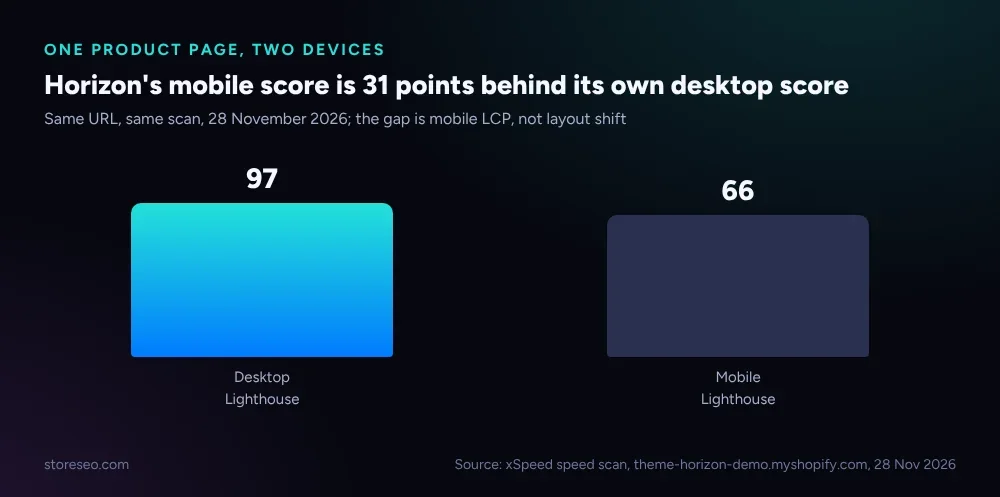 Same URL, same scan, two devices: the gap sits in mobile LCP, not layout shift or desktop speed.
A canonical tag is present on the product URL in both themes, which keeps variant query parameters from splitting a page’s ranking signal either way.
What Should You Add?
Three fixes, in the order they pay off, cover what this audit found.
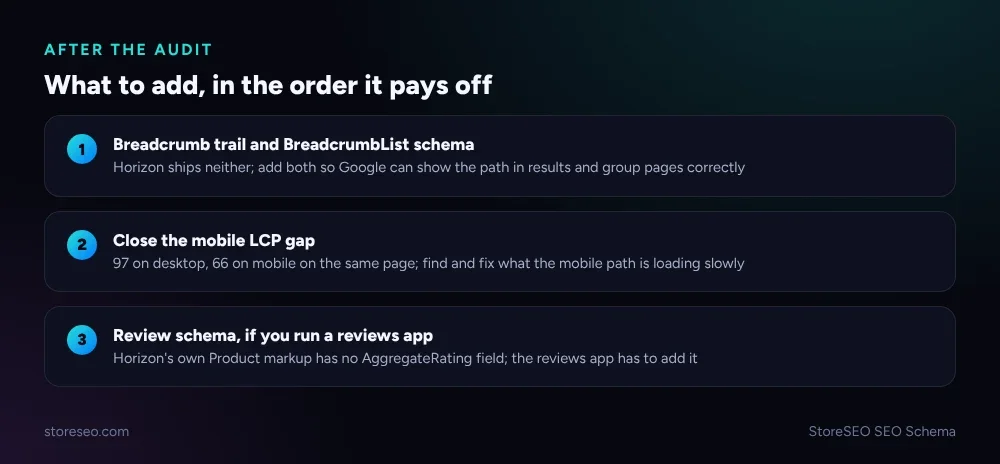 The gaps from this audit, ranked by how much they cost you left unfixed.
Breadcrumbs come first, the same call our Dawn audit made, because BreadcrumbList is a documented signal for how Google groups and displays a page and a visible trail helps shoppers regardless of theme. Mobile load speed is second: a 9.2-second mobile LCP on a page that already scores 97 on desktop points at image weight or render-blocking work specific to the mobile path, worth a dedicated pass before adding anything new. Review schema is third, worth adding only once a reviews app is actually collecting ratings on your store.
StoreSEO’s SEO Schema feature, documented at local SEO and schema markups, handles the breadcrumb and review-schema rows on Horizon the same way it does on Dawn, without a theme edit. For the canonical and redirect side of the same technical-SEO picture, see our canonical vs redirect vs noindex guide.
Frequently Asked Questions (FAQs)
1. Does Horizon automatically add Product schema to my store?
Yes. A live-fetched Horizon product page carried an Organization object plus a ProductGroup object with brand, variant SKUs and offers, with no setup required. That covers Google’s basic Product result; it does not cover star ratings, which need separate review markup.
2. Does Horizon fix Dawn’s blank alt text problem?
Largely, yes. Every image checked on the Horizon product page carried non-empty alt text generated from the variant’s colour and product name, where the same check on Dawn found 9 of 20 images blank. The text is generic rather than descriptive, so it is still worth reviewing on your best-selling products.
3. Why does the same page score so differently on desktop and mobile?
Lighthouse simulates a slower, throttled connection and device for its mobile run, so render-heavy or image-heavy pages often lose more points there than on desktop. A 97 desktop and 66 mobile score on one Horizon demo page shows the mobile path, not the theme overall, is where the real-world gap sits.
4. Should I add review schema even if I do not have a reviews app yet?
No. aggregateRating and Review fields are meant to reflect real customer reviews. Adding them with no reviews behind them risks a markup you cannot stand behind if Google or a shopper checks it against your store.
5. Is Horizon’s missing breadcrumb schema the same gap as Dawn’s?
Yes, the same shape exactly. Neither theme renders a BreadcrumbList object on its own. Neither one shows a visible breadcrumb trail in the rendered HTML either, on the home, collection or product page.
6. Do I need a developer to fix any of this?
Not for the schema gaps, since StoreSEO’s SEO Schema feature adds BreadcrumbList and review markup without touching theme code. The mobile speed gap is different and may need a developer, if it traces to a custom section or an added app script rather than Horizon’s own defaults.
Checking your own theme for these gaps takes a few minutes of view-source and one speed scan, and the schema fixes need no theme edit at all. try StoreSEO on the Shopify App Store
Keep reading
Cyber Monday 2026: The Last 48-Hour Checklist
With Cyber Monday 48 hours away, the only Shopify SEO tasks that still matter are stock-out redirects, AI-ready copy and daily Search Console checks.
Read article
Shopify SEO Teardown #4: Ruggable
We audited Ruggable's live Shopify pages and found a 42-out-of-100 mobile Lighthouse score, three duplicate H1 tags, and genuinely strong product schema.
Read article
Does Shopify Duplicate Content Hurt Rankings?
Shopify's duplicate content is not a ranking penalty: it's a crawl-budget and consolidation issue, and canonical tags already fix most of it by default.
Read article