
Shopify SEO Teardown #4: Ruggable
 Written by M Asif Rahman
Ruggable runs a Shopify store with a genuine strength this series has not found yet: complete, well-formed product schema, AggregateRating included. It also carries a 42-out-of-100 mobile Lighthouse score, three homepage <h1> tags, two of them identical, and a sitemap entry that no longer matches its own canonical URL. The highest-value fix is mobile page weight.
TL;DR: Ruggable.com, scored
| Area | Grade | Evidence, and the fix |
|---|---|---|
| Product schema | A | ProductGroup with AggregateRating (4.7/5, 5,507 reviews) and nested Review objects, plus BreadcrumbList, OfferShippingDetails and MerchantReturnPolicy; no fix needed |
| Homepage schema | C | Only OnlineStore and WebSite present; no Organization, no BreadcrumbList; fix: add both |
| Heading structure | C | Product page: exactly one <h1>, clean; homepage: three <h1> tags, two of them an identical hero line; fix: collapse the duplicate |
| Title tags | B+ | Product title 30 characters, tight and clean; homepage title 60 characters and repeats “Ruggable” twice; fix: trim the repetition |
| Meta descriptions | B | Homepage 151 characters, in range; product template only 130, under the roughly 150 to 160 that fill the snippet; fix: lengthen the product template |
| Mobile performance | F | 42/100 Lighthouse, 10.7s LCP, 8.0MB transferred on one product page; fix: compress and lazy-load product imagery |
| Sitemap hygiene | C | One checked product URL in the sitemap is not its own canonical, pointing to a slug the product was renamed from; fix: update or drop the stale entry |
| Crawl hygiene | A | robots.txt blocks checkout, cart, account and sort-parameter traps; sitemap declared; no fix needed |
This is the fourth in our Shopify SEO Teardowns series: one public, real store, audited the same way every time, from rendered view-source, a live mobile Lighthouse run and a schema check, with StoreSEO’s own on-page tools as the lens. Our first teardown audited Allbirds, our second audited Gymshark, and our third audited Brooklinen; Ruggable is picked the same way, for scale and category fit in home goods, not because anything here is unusual. This is factual commentary on public pages only; it implies no relationship with, and no endorsement by, Ruggable.
What Does This Store Get Right?
Start with what already works, because a teardown that only lists faults is not useful to copy from.
Ruggable’s product page carries the fullest schema this series has checked so far. Its ProductGroup markup declares the brand, the size-based variant axis, and a complete AggregateRating of 4.7 out of 5 across 5,507 reviews, with individual dated Review objects nested underneath it, plus OfferShippingDetails and MerchantReturnPolicy. That is a genuine step up from our first and second teardown subjects, both of which shipped a live reviews widget with no rating data written into their schema at all. The product page also renders exactly one <h1> (“Cambria Persian Tufted Rug” on the unit we checked), the single clearest topic signal a page can send.
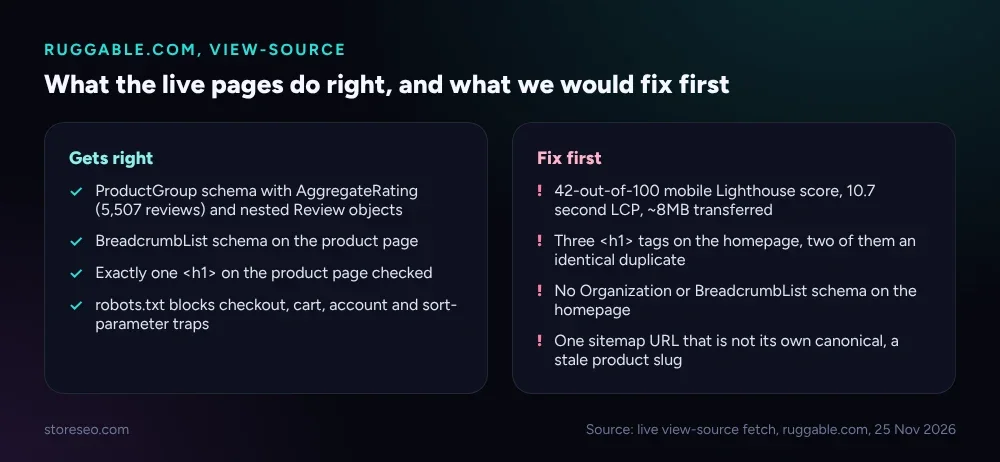 Rendered view-source fetch of ruggable.com’s homepage and a product page, checked 25 November 2026.
robots.txt is clean too: it blocks the usual Shopify crawl traps, checkout, cart, account and sort-parameter query strings, rather than leaving them open for a crawler to burn budget on, and it declares a sitemap. Worth noting for context: the storefront itself runs on Next.js hosted on Vercel behind Cloudflare, a headless setup layered in front of Shopify’s own cart and checkout, rather than a standard Liquid theme. The schema and heading gaps below show up the same way regardless of which rendering stack sits in front of Shopify’s commerce engine.
Which 5 Things Would We Fix First?
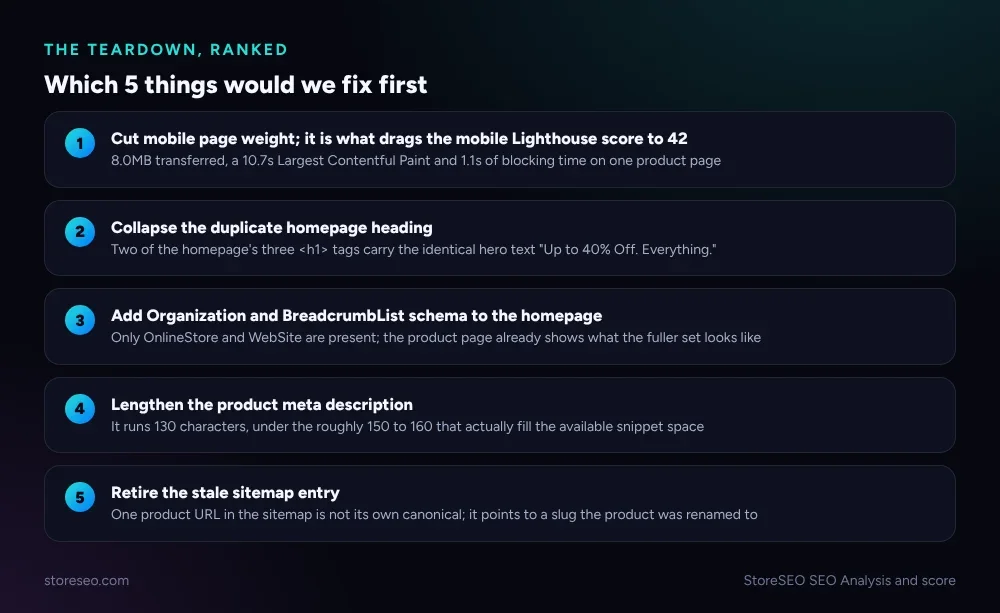
Here is where the pages we audited lose ground, ranked by how much each one is likely costing.
1. Mobile page weight. The product page scores 42 out of 100 on a mobile Lighthouse run, with a Largest Contentful Paint of 10.7 seconds against the 2.5 seconds Google’s own Core Web Vitals guidance calls “good”, and 8.0MB transferred on a single product page load. The desktop run on the same URL scores a cleaner 58 out of 100 with a 1.4-second LCP, so this is specifically a mobile-rendering problem, not a server problem: the same page weight lands far worse on a throttled mobile connection.
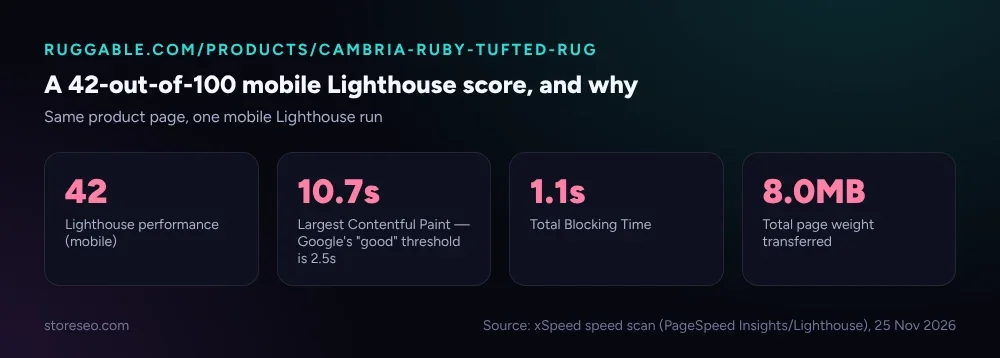 Source: xSpeed speed scan (PageSpeed Insights/Lighthouse), run against ruggable.com/products/cambria-ruby-tufted-rug, 25 November 2026.
2. A duplicated homepage heading. The homepage renders three <h1> tags: one reading “Washable Rugs,” and two more, word for word identical, both reading “Up to 40% Off. Everything.” That is almost certainly a promotional hero banner marked up twice rather than once, a pattern common in carousel and slide components, and it means the page sends three competing “this is the main topic” signals instead of one clear one.
3. No Organization or BreadcrumbList schema on the homepage. The homepage carries OnlineStore and WebSite JSON-LD, declaring the store and its search box, but nothing identifies who runs the site in a machine-readable way, and nothing tells a crawler how the homepage sits above the rest of the catalog. The product page, by contrast, already carries a full BreadcrumbList, so the capability clearly exists on this storefront; it simply is not applied to the homepage.
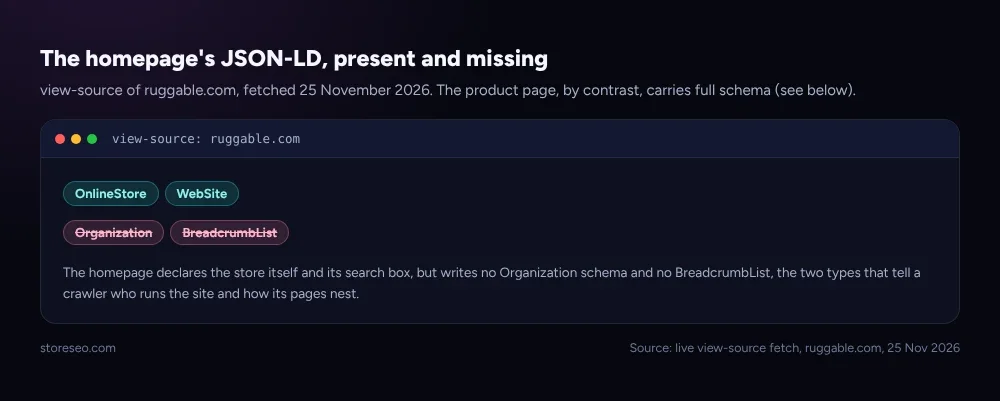 view-source of ruggable.com, fetched 25 November 2026.
4. A product meta description running short. The product template we checked carries a 130-character meta description, well under the roughly 150 to 160 characters Google typically shows before cutting a snippet off. The homepage’s own description runs 151 characters, close to the ideal window, which makes the shorter product template read as an inconsistency rather than a deliberate choice.
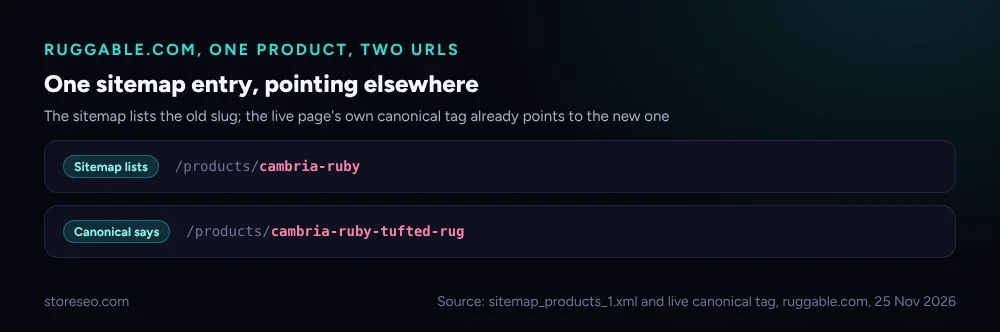
5. One sitemap entry that is not its own canonical. ruggable.com/sitemap_products_1.xml lists /products/cambria-ruby as a product URL, but that page’s own <link rel="canonical"> tag points to a different, renamed slug, /products/cambria-ruby-tufted-rug. Spot-checking three other sitemap entries found each one self-canonical, so this reads as one stale leftover from a rename rather than a sitewide pattern, but it is still a crawler being sent to a URL that immediately declares itself not the real one.
 Ranked by estimated impact: the fixes that touch the most traffic, or the easiest wins, come first.
What Can Your Store Copy?
Copy the product schema outright. Writing AggregateRating and dated Review objects straight into ProductGroup markup, the way Ruggable does, is exactly what turns an on-page reviews widget into something a search engine or an AI answer engine can actually read and cite; two of our first three teardown subjects in this series shipped a visible reviews widget with none of that data reaching their schema at all.
 Source:
sitemap_products_1.xml and the live canonical tag, ruggable.com, 25 November 2026.
The gaps are just as worth copying as fixes, not as faults to repeat. StoreSEO’s SEO Schema feature, documented at how to configure and enable SEO schema markups in Shopify, adds Organization, Breadcrumb and Product markup across every template a store runs, homepage included, rather than leaving schema coverage to vary page by page. It is built to catch exactly the kind of gap this teardown keeps finding: strong schema on one template, none on another, on the same site. StoreSEO is our product, and we built the SEO Schema feature to close precisely the gaps a teardown like this one keeps finding.
If product-page detail is more your concern than a single teardown, our Shopify product page SEO guide covers the checklist version of everything audited here. Our common Shopify SEO problems page is the pillar these teardowns keep pointing back to, and it now links forward to all four entries in this series.
Frequently Asked Questions (FAQs)
1. Does Ruggable run on Shopify?
Yes, though not through a standard Liquid theme. The storefront we checked renders through Next.js, hosted on Vercel, sitting in front of Shopify’s own cart, checkout and account routes, confirmed by robots.txt’s own comment (“we use Shopify as our ecommerce platform”) and by the Shopify-specific paths it disallows.
2. Why does having strong product schema but weak homepage schema matter?
Search engines and AI answer engines evaluate a site page by page, not as a single average. A product page with complete ProductGroup, AggregateRating and BreadcrumbList markup gives a crawler everything it needs there, but the homepage, often the first page a new crawler or an AI agent actually lands on, gives it almost none of that same context about who runs the site.
3. What’s the actual problem with two identical <h1> tags?
It splits the single clearest “this is the topic of this page” signal a page can send. A crawler parsing the homepage sees three candidate main headings instead of one, two of which are word-for-word the same promotional line, which is noise rather than a stronger signal.
4. Does a mobile Lighthouse score of 42 mean the site is actually slow to use?
For most visitors, yes in a meaningful sense: a 10.7-second Largest Contentful Paint means the main content is not finished painting until well past the point most mobile visitors have either scrolled away or lost patience. The same page scores a cleaner 58 on desktop, so the gap is specifically about what a mobile connection has to download and render, not a server-side issue.
5. Why does one mismatched sitemap URL matter if the canonical tag already fixes it?
The canonical tag does prevent duplicate-content confusion once a crawler reaches the page. The cost is upstream of that: a crawler following the sitemap spends a request visiting a URL that immediately tells it to look elsewhere, which is wasted crawl budget on a catalog with thousands of product pages, even though nothing about the live page itself is broken.
6. How do I run this same teardown on my own Shopify store?
Render your homepage and a product page in a real browser (view-source alone can miss JavaScript-rendered schema on a headless storefront like this one), search for application/ld+json to see what schema is present, count your <h1> tags, and check your title and meta-description character counts against your sitemap’s canonical URLs. StoreSEO’s SEO Schema feature runs a version of this same check automatically and lists exactly what is present and what is missing, no manual view-source required.
A store with genuinely complete product schema and clean crawl-trap blocking is already doing more right than most of this series’ earlier subjects, and the gaps here, a homepage carrying less structured data than its own product pages, a duplicated heading, an 8MB mobile product page, and one sitemap entry pointing at a URL that has moved on, are the same handful of fixes that show up store after store, famous brand or not. Run this same check on your own home and product pages before assuming a strong product template means every template is covered, and try StoreSEO on the Shopify App Store
Keep reading
Does Shopify Duplicate Content Hurt Rankings?
Shopify's duplicate content is not a ranking penalty: it's a crawl-budget and consolidation issue, and canonical tags already fix most of it by default.
Read article
Does Shopify Markets Replace Hreflang?
Shopify Markets auto-generates hreflang tags and canonical URLs, but only for markets you give their own domain, subdomain or subfolder and a language.
Read article
Shopify SEO Teardown #3: Brooklinen
We audited Brooklinen's live Shopify pages and found a 37-out-of-100 Lighthouse score, two conflicting schema blocks, and a 427-character meta description.
Read article