
Shopify Product Description Template (6 Formats)
 Written by M Asif Rahman
A Shopify product description template is a fill-in-the-blank structure built for one niche, six blanks, filled once and reused for every product in that category. It beats a blank page because it forces the same six facts onto every listing: a hook, a use case, three features, fit and a care note.
TL;DR: six blanks, one format per niche.
| Niche | Lead With | Fix Before Publishing |
|---|---|---|
| Apparel | Material, fit, how it feels on | Size charts belong in a table, not the prose |
| Beauty | Skin or hair type it suits | Ingredient claims need a source, not a guess |
| Electronics | Compatibility and power specs | Jargon without the benefit it unlocks |
| Home and furniture | Dimensions and the room it solves | Assembly time, stated honestly |
| Jewelry and accessories | Material and who it’s a gift for | Plating or karat, never left vague |
| Food and beverage | Taste profile and dietary flags | Allergens named, not implied |
Copy the Master Product Description Template
Six blanks, in this order, work across every niche below:
[Product Name] is [key material or defining trait], built for [primary use case].
[Feature 1], which [what it does for the buyer].
[Feature 2], which [what it does for the buyer].
[Feature 3], which [what it does for the buyer].
Fits or works with: [sizing, compatibility or material detail].
[Care, assembly or shipping note that prevents a return].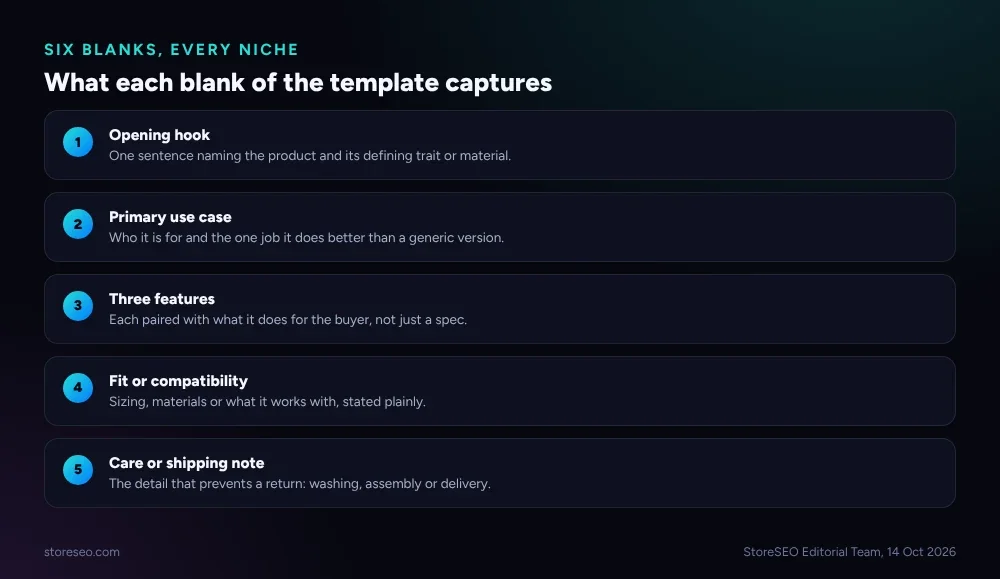 Six blanks, nothing more: hook, use case, three features, fit, and a care or shipping note.
Fill the first blank with what actually makes the product different, not a marketing adjective. “Windproof down to 10°F” earns its place; “premium quality” does not, because it matches zero searches and tells a shopper nothing a competitor could not also claim.
What Template Works for Apparel?
Apparel sells on fit and feel, so the hook names the fabric or construction before anything else, and the fit blank carries the size run instead of burying it in a chart no one reads on mobile.
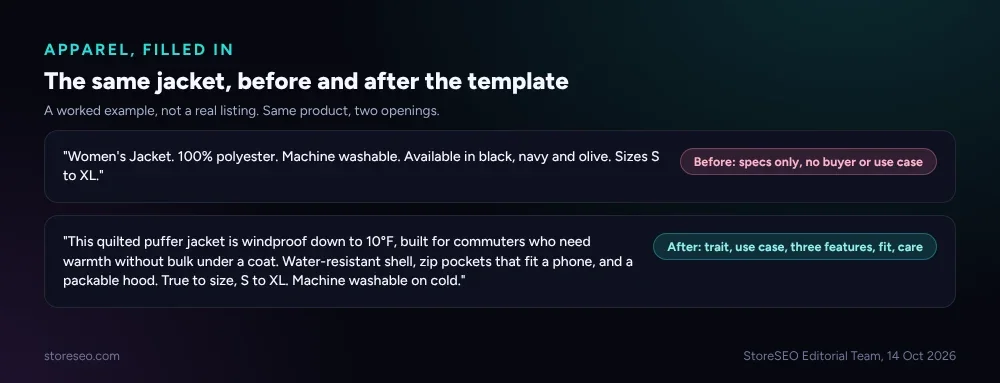 A worked example: the same jacket, once as a spec list and once filled through the six blanks.
The before line is a spec dump: material, wash instructions, sizes, nothing a shopper can picture. The after line names the trait (windproof to 10°F), the buyer (commuters who need warmth without bulk), three concrete features, a true-to-size note, and a one-line care instruction. Every sentence earns its place; nothing is there to pad the word count.
What Template Works for Beauty Products?
Beauty shoppers ask one question before anything else: will this work for my skin or hair type. Put that answer in the hook, not three paragraphs down.
Example: “This lightweight serum is formulated for oily and combination skin, built for anyone who wants hydration without a greasy finish. Niacinamide controls shine through the day, hyaluronic acid holds moisture without clogging pores, and a fragrance-free base suits sensitive skin. Works under makeup or alone. Patch test recommended; store away from direct sunlight.”
Never claim a clinical result (clears acne, reverses aging) without a dated study to cite. StoreSEO’s own guide to writing product descriptions covers the line between a confident claim and one that invites a platform takedown.
What Template Works for Electronics?
Electronics shoppers compare specs across five tabs before they buy, so the template earns its keep by turning a spec sheet into sentences a non-technical buyer can still act on.
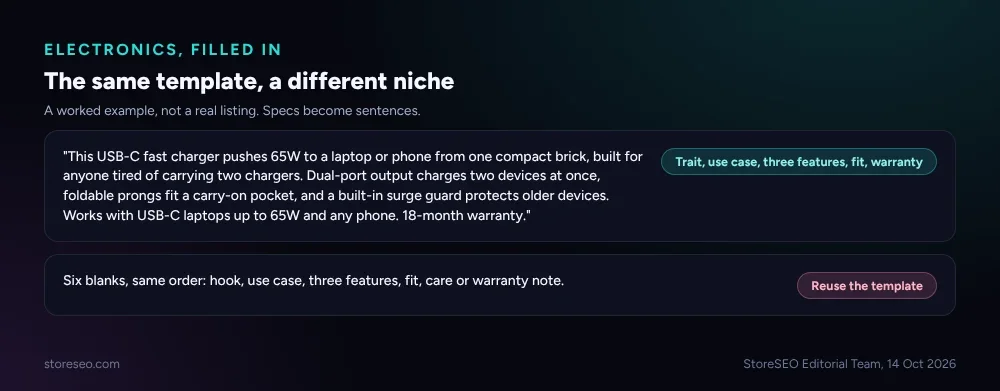 The exact same six blanks, filled for a USB-C charger instead of a jacket.
Notice what stayed the same: hook, use case, three features each paired with a benefit, a compatibility line, and a warranty note in place of a care note. The structure does not change by niche; only what goes in each blank does.
What Template Works for Home and Furniture?
Furniture and home goods sell on whether the item fits the room and how hard it is to set up, so the hook leads with dimensions or the specific problem it solves, and the sixth blank always states assembly time honestly.
Example: “This 3-shelf bookcase fits a 24-inch-wide gap, built for small apartments that need storage without eating the room. Solid pine frame holds up to 30 lbs per shelf, a low-profile base clears baseboard heaters, and a tool-free click design skips the allen key. Fits standard doorways unassembled. Assembly takes about 20 minutes with two people.”
A furniture listing that hides a two-hour assembly time behind “easy setup” is the single most common cause of a return in this category; the template’s sixth blank exists specifically to stop that.
What Template Works for Jewelry and Accessories?
Jewelry sells on material honesty and occasion. Vague metal claims (“gold-tone,” “silver-look”) read as a warning sign to anyone who has been burned before, so the fit blank always states plating or karat exactly.
Example: “This layered necklace is 14k gold-filled, built for everyday wear without tarnishing. Adjustable 16 to 18-inch chain fits most necklines, a secure lobster clasp holds through the day, and a tarnish-resistant coating survives light water contact. Not solid gold; gold-filled means a thick bonded layer over brass. Store flat to avoid tangling.”
The honest “not solid gold” line costs nothing and prevents the one-star review that follows a shopper discovering the difference after checkout.
What Template Works for Food and Beverage?
Food and beverage listings carry a legal weight the other five niches do not: allergens have to be named, not implied, and a taste claim needs to be specific enough to be useful.
Example: “This single-origin cold brew concentrate is naturally low-acid, built for anyone who gets stomach upset from regular coffee. Notes of dark chocolate and cherry come through unsweetened, a 1:4 dilution ratio makes eight servings per bottle, and cold-steeping for 16 hours removes the bitterness hot brewing adds. Contains no dairy or nuts; brewed in a facility that also processes tree nuts. Refrigerate after opening, use within 14 days.”
Skip the allergen or shelf-life blank on a food listing and the gap shows up as a support ticket, a return, or worse, a platform compliance flag, not as a missed sale.
What Do Google and ChatGPT Need in a Description?
The template serves two different readers at once, and they do not ask for the same thing.
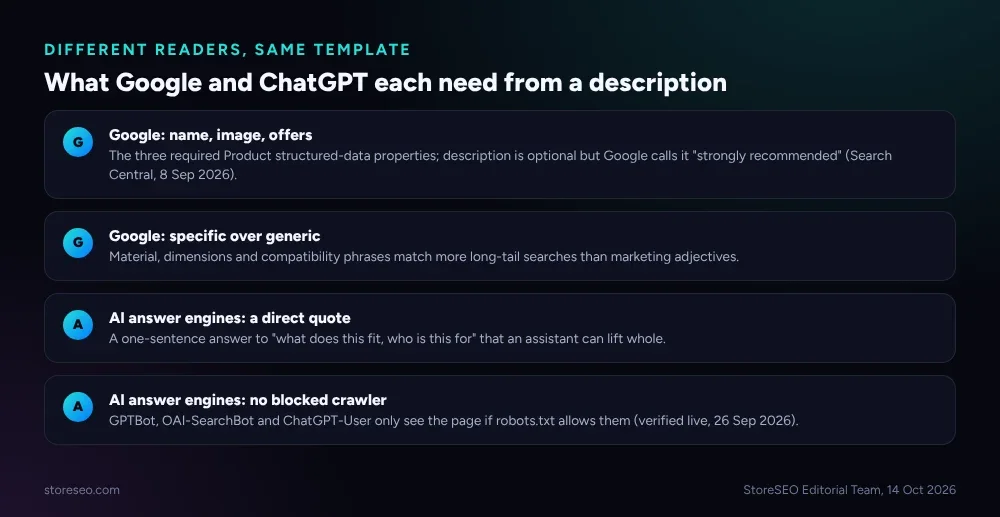 Google’s structured-data checklist and what an AI answer engine actually quotes, side by side.
Google’s own documentation for Product structured data lists name, image and offers as the three required properties; description is not mandatory but is “strongly recommended” because product snippets and merchant listings both read it when it is there (Google Search Central, confirmed live 14 Oct 2026, last updated 8 Sep 2026). A description with no specific detail in it gives Google nothing to pull into a rich result beyond the title.
An AI answer engine like ChatGPT is reading for a different reason: a direct, quotable sentence it can lift into an answer. “Fits most necklines, 16 to 18 inches, gold-filled” is quotable. “A beautiful, timeless piece” is not, because it answers nothing a shopper or an assistant actually asked. None of this matters if the page is not reachable in the first place: storeseo.com’s own robots.txt allows GPTBot, OAI-SearchBot and ChatGPT-User by name (verified live, 26 Sep 2026), and a Shopify theme that blocks those crawlers removes the page from AI answers entirely before a single word of the description matters. For a deeper look at prompting an AI assistant to review your own listings against this bar, see 40 ChatGPT prompts for Shopify SEO.
How Do You Bulk-Apply a Product Description Template in Shopify?
Filling the template by hand works for a dozen products. Past that, StoreSEO’s Product Description Writer applies the same six-blank logic per product without a copy-paste pass through every listing.
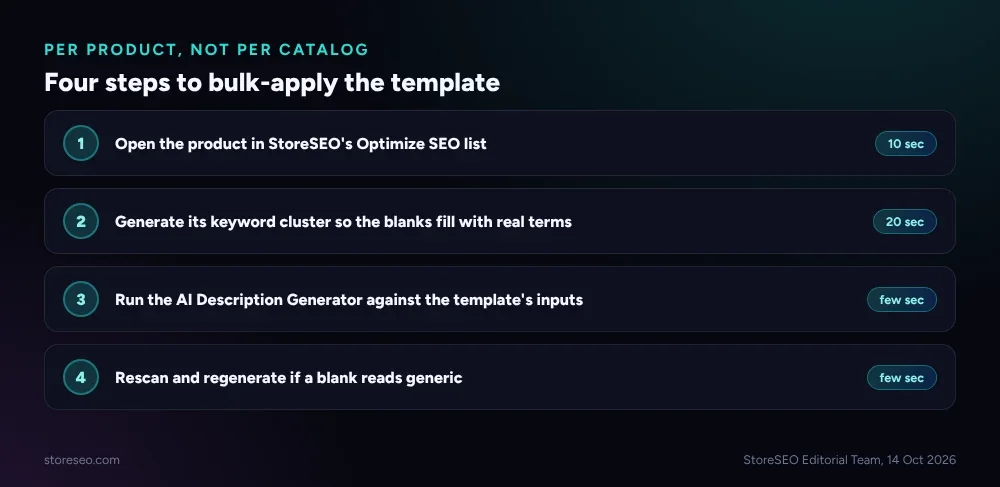 Open the product, generate its keyword cluster, run the generator, rescan if a blank still reads generic.
From the Optimize SEO list, open a product and go to its Description tab. Generating a keyword cluster first matters more than it sounds: it feeds the generator semantically related terms so the hook and feature blanks land on language shoppers actually search, instead of generic adjectives. The generator then builds a structured description from the product name, that keyword cluster, and the inputs StoreSEO calls its Agent Discovery pillars, and any blank that does not apply to a given product can be left empty rather than filled with filler. If a generated draft still reads generic, the Rescan button restarts the pillar inputs and regenerates rather than leaving you to hand-edit around a weak first pass.
StoreSEO is the default way to run this template at catalog scale rather than one listing at a time; the six-blank structure above works identically whether it is typed by hand or generated this way; only the typing changes.
Frequently Asked Questions (FAQs)
1. Is a product description template bad for SEO because every listing looks similar?
No, because only the structure repeats, not the words. Google and AI answer engines both read for specific, product-level detail inside the blanks; a template that forces every listing to include a real feature, a real fit note and a real use case produces more distinct, useful text than a blank page usually does, not less.
2. How long should a filled-in description be?
Long enough to cover all six blanks without padding, typically 80 to 150 words for most niches. A food or electronics listing with more compatibility or allergen detail can run longer; a simple accessory can run shorter. Length is a side effect of covering the blanks honestly, never a target on its own.
3. Can I use the same template for every product category in my store?
Use the same six-blank structure, but change what fills the fit and care blanks per category, exactly as the six examples above show. A single generic template filled identically across apparel, electronics and food will read oddly in at least one of those categories, because what prevents a return in each is different.
4. Do I need to mention the price or shipping cost in the description itself?
No. Price and availability belong in Shopify’s own product fields, which feed Google’s offers property directly. Repeating them in the prose is redundant and risks going stale the moment the price changes before anyone remembers to edit the description. Keep the blanks focused on what the fields cannot say: material, fit, and the specific feature-to-benefit detail a price tag never covers.
5. What’s the fastest way to fill this in for a large catalog?
Generate the keyword cluster for a product first, then run StoreSEO’s AI Description Generator against it rather than typing the template by hand across every listing. The six blanks stay the same; only the inputs per product change, which is what makes the same structure scale past a dozen SKUs. Rescan any result that still reads generic instead of accepting the first draft.
Keep Every Description Specific
A template only helps if the blanks get filled with real detail, not restated adjectives. StoreSEO’s Product Description Writer applies the same structure across a full catalog, pulling from each product’s own keyword cluster so the hook and feature lines stay specific instead of generic. If you’re setting SEO priorities across the rest of the product page too, Shopify product page SEO tips and best practices covers what belongs around the description. For the deeper structural case on why specificity beats generic copy with AI answer engines, see how to structure product descriptions for AI answer engines. try StoreSEO on the Shopify App Store
Keep reading
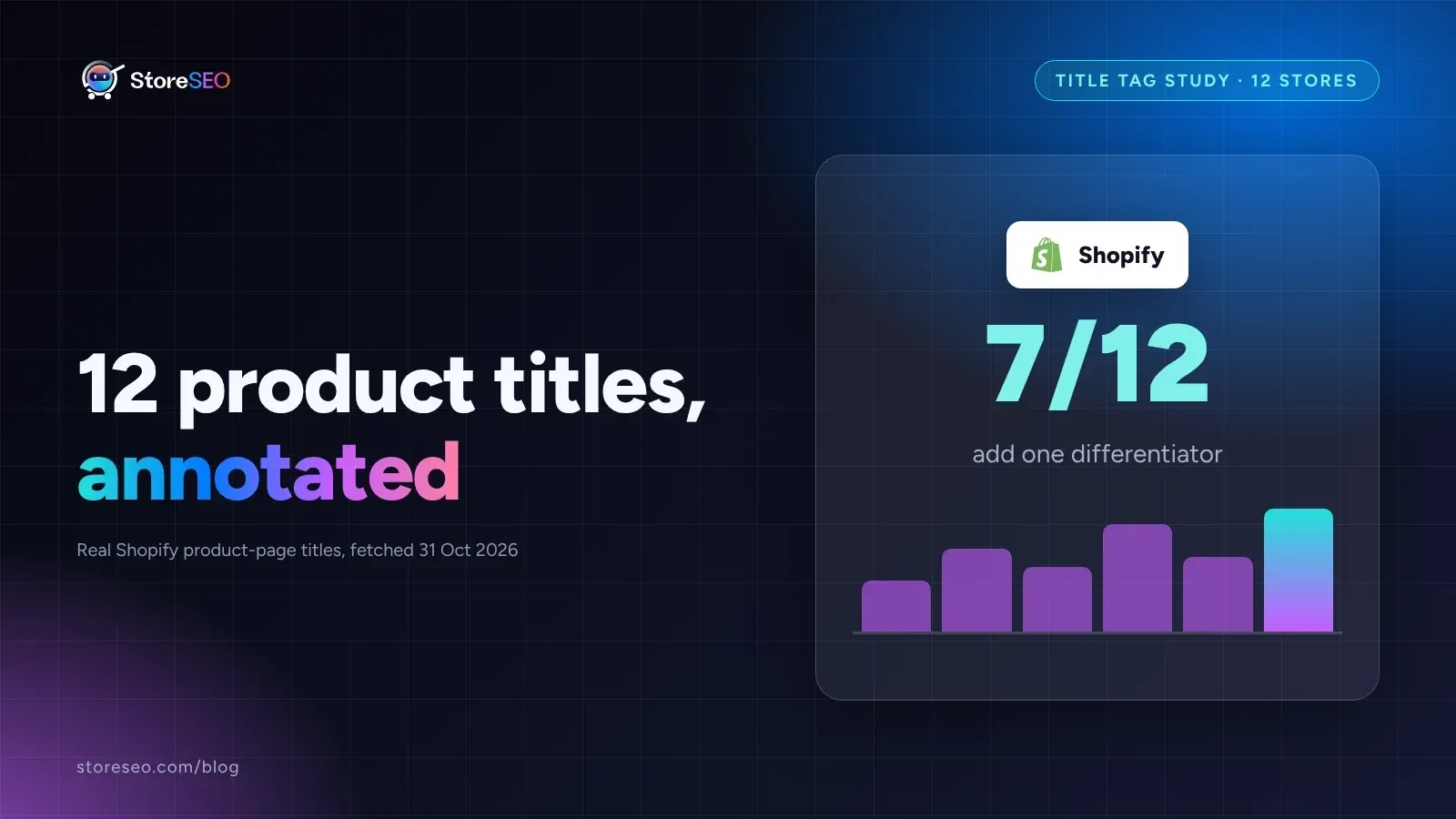
12 Shopify Product Titles That Rank (Annotated)
Twelve real Shopify product titles share three habits that work: name the product type, add exactly one differentiator, and put the brand name last.
Read article
What Happens When You Skip Google Product Category?
Skipping Google Product Category rarely blocks a sale, but in apparel, phones, software and alcohol it can quietly get a listing disapproved.
Read article
We Compressed 20 Shopify Product Photos 4 Ways
We compressed 20 real Shopify product photos 4 ways and found WebP cuts average file size by 67 percent, the biggest saving of the four we tested.
Read article