
Crawl, Understand, Recommend: A Shopify SEO Model
 Written by M Asif Rahman
Crawl, Understand, Recommend is a three-layer model for grading Shopify SEO: can a search engine or AI crawler reach the page, can it tell what the page is about, and would it recommend that page as the answer. Most Shopify stores clear layer one, half-clear layer two, and almost never reach layer three.
TL;DR: the three-layer model
| Layer | Question It Answers | Most Stores | What to Fix |
|---|---|---|---|
| 1. Crawl | Can a search engine or an AI crawler even reach the page? | 65% never submit a working sitemap | A submitted sitemap, a clean robots.txt, correct canonicals |
| 2. Understand | Does the page say, in code and in copy, what it actually is? | 88% ship no real structured data; 78% ship duplicate or missing meta tags | Unique meta titles, product schema, an honest SEO score |
| 3. Recommend | Would an AI assistant cite this page as the answer? | Fewer than 5% have done anything for AI search | A direct answer, a real FAQ, AI crawlers let in |
StoreSEO is a Shopify app built around exactly this gap: most Shopify SEO advice stops at layer one, because layer one used to be the whole game. It is not anymore.
What Does the Crawl Layer Check?
Crawl is the oldest and best-understood layer, and it is still where most stores lose the most ground. The question is narrow: can a search engine’s crawler, or an AI company’s crawler, physically reach every page you want found, and does it hit anything confusing along the way.
The checks are mechanical. Is a sitemap submitted to Google Search Console, and does Google report it as read without errors. Does robots.txt block the pages that should be blocked (cart, checkout, account) without accidentally blocking the ones that should not be. Do canonical tags point at the one URL a product should rank under, since Shopify can expose the same product at both /products/x and /collections/y/products/x. Are there broken internal links or redirect chains eating into crawl budget.
In StoreSEO’s audit of 100+ Shopify stores, 65% had never submitted a sitemap to Google Search Console, or had done so incorrectly. That single number says something uncomfortable: most Shopify SEO failures are not sophisticated. They are a setting nobody checked.
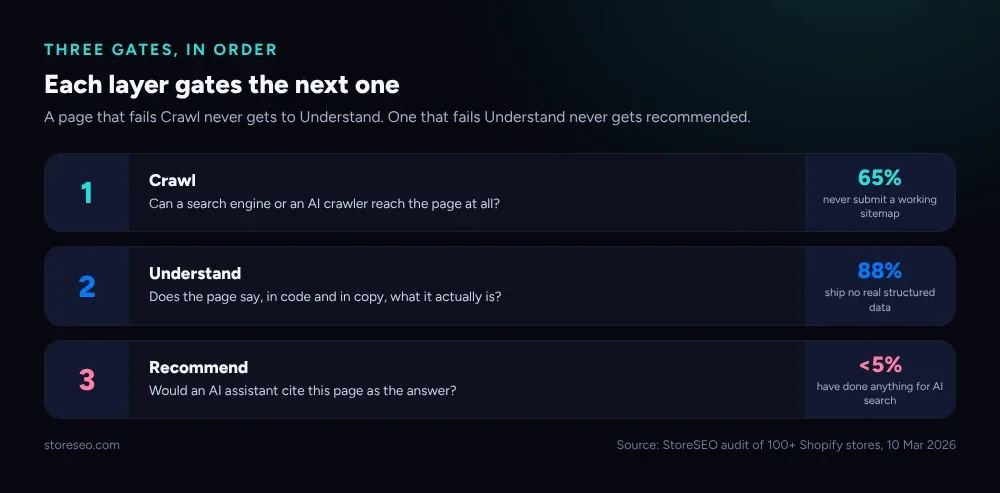 Each layer gates the next one. A page that fails Crawl never gets evaluated on Understand or Recommend at all.
Shopify generates a basic sitemap automatically at yourstore.myshopify.com/sitemap.xml, so the gap is almost never the sitemap’s existence. It is that nobody told Search Console it exists, or a theme change broke a redirect and nobody noticed for months. Google’s own Search Console documentation covers submission and the errors it flags, and it is worth the ten minutes it takes to check.
What Does the Understand Layer Check?
A page that passes Crawl is reachable. That says nothing about whether a search engine, or a language model summarizing a search engine’s index, actually understands what it is looking at.
Understand asks: does the page tell a machine, in a form a machine can parse, what it is. A unique and specific meta title. A meta description that is a real sentence, not Shopify’s auto-generated default. Structured data, Product and Organization schema in particular, that goes beyond the minimal JSON-LD Shopify ships out of the box. Product descriptions that are not copy-pasted from a manufacturer feed verbatim across every store that carries the same item.
The audit’s numbers here are the starkest in the whole study: 88% of stores had no structured data beyond Shopify’s own minimum, and 78% had critical on-page gaps, missing or duplicate meta titles and descriptions being the single most common issue. Put together, most Shopify stores that clear layer one are still functionally unreadable to anything smarter than a basic crawler.
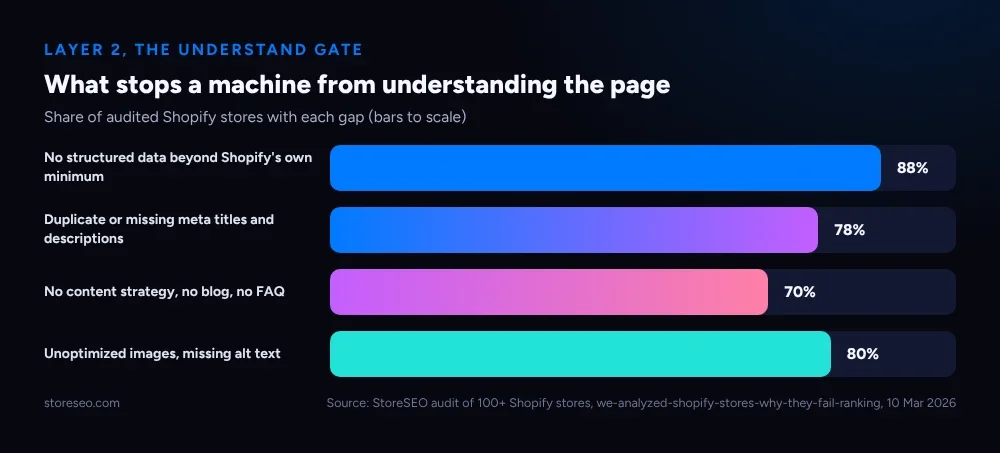 Share of audited Shopify stores with each gap. Structured data is the single biggest shortfall, by a wide margin.
This is where StoreSEO’s own SEO Analysis and score does most of its work. It reads a page the way a search engine does, checks titles, descriptions, headings and schema against what actually matters, and returns a score with the specific fix attached rather than a generic grade. The feature’s own page, view your SEO reports, is where that score and its fix list live for a connected store.
Schema specifically is a W3C-adjacent vocabulary maintained jointly by the major search engines, and the gap between “Shopify’s default output” and “a complete Product object with brand, offer and rating” is usually a few fields, not a rebuild.
Why Don’t AI Engines Recommend Most Shopify Stores?
This is the layer almost nobody is working on, and it is the one the model is named for last on purpose. A page can be fully crawlable and fully machine-readable and still never get picked when a shopper asks ChatGPT, Gemini or Perplexity for a recommendation, because being indexable and being citable are different things.
An AI engine assembling an answer favors pages that state the answer plainly near the top, that back a claim with a specific number or example rather than a generic promise, and that carry real FAQ content answering the exact follow-up questions a shopper would ask next. It also has to be allowed in: a crawler like GPTBot or ClaudeBot that is blocked in robots.txt, or a store with no llms.txt pointing to its real content, is invisible to that layer regardless of how good the page is.
In the same audit, fewer than 5% of stores had taken any visible step toward AI search visibility, and over 70% had zero content strategy at all: no blog, no FAQ, no long-form page answering a real question. Those two numbers together explain why “my product ranks on Google but ChatGPT never mentions it” is such a common complaint; most stores never gave an AI engine anything worth citing.
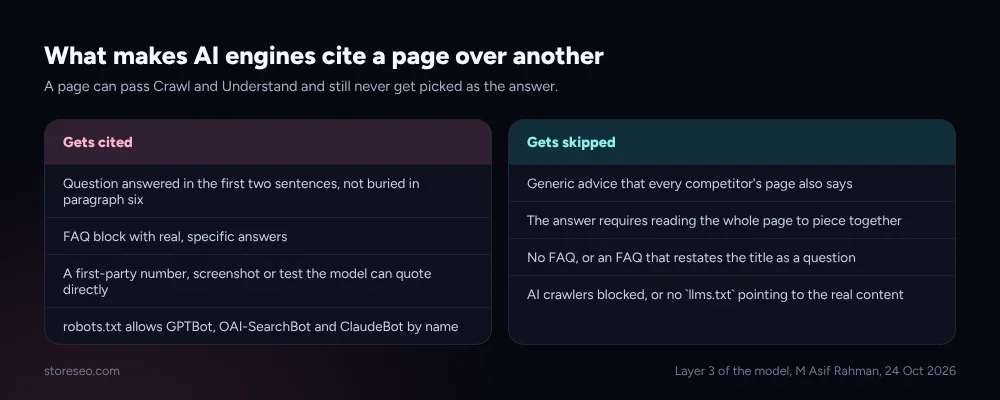 A page can pass Crawl and Understand and still never get picked as the answer, if it gives an AI engine nothing specific to quote.
StoreSEO’s Agentic Discovery Score is the deep dive on this specific layer, built around the same question this section asks: not “can this page be found,” but “would an AI assistant actually recommend it.” Checking whether your own crawlers even let AI bots in is the cheapest first step on this layer, and the free AIScan agent-readiness scanner will tell you that in under a minute without touching your Shopify admin.
How Do You Score Your Own Store Against This Model?
The honest way to use this model is not to grade your whole store at once. It is to pick one important page, a best-selling product or your homepage, and walk it through all three layers in order, because a failure in an earlier layer makes a later one meaningless to assess.
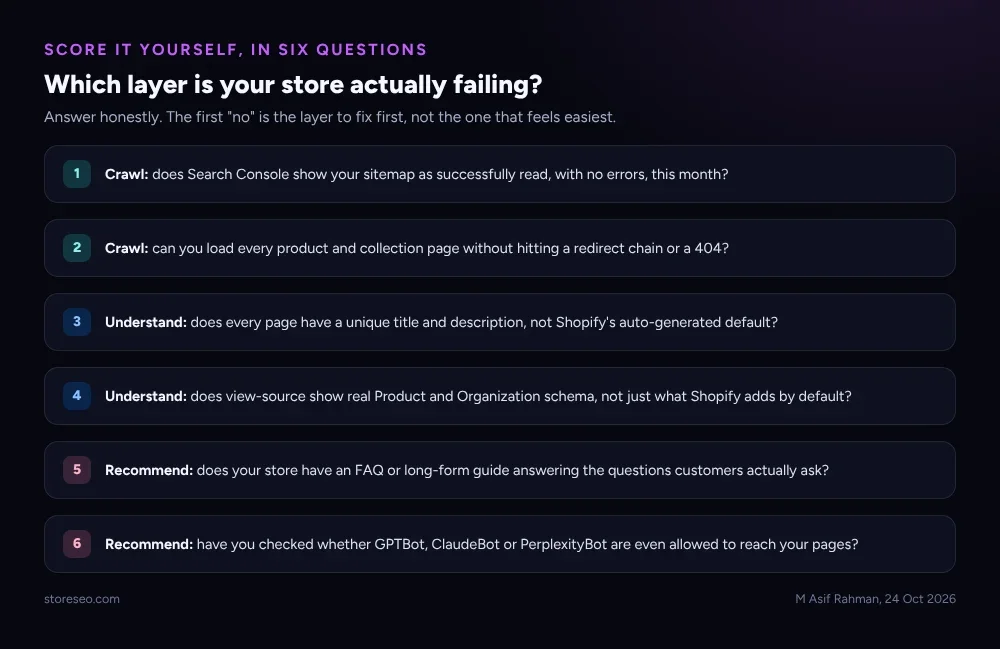 Answer honestly. The first “no” is the layer to fix, whichever layer it falls in.
Start at layer one and stop at your first honest “no”. If Search Console shows crawl errors, fix those before spending an afternoon rewriting meta descriptions; a page nobody can reach does not benefit from better copy. If crawl is clean but your product pages still use Shopify’s default title and no schema, that is layer two, and it is the layer StoreSEO’s SEO Analysis and score is built to shorten: it flags exactly which fields are missing per page rather than leaving you to guess. Only once layers one and two are solid does layer three, writing the FAQ content and checking AI-crawler access, actually move the needle.
Our broader Shopify SEO checklist and the complete Shopify SEO guide both cover the individual tasks inside each layer in more detail; this model is the order to do them in, not a replacement for either.
Where Does This Model Come From?
The three layers are not a marketing frame invented for this post. They come directly from StoreSEO’s own audit of 100+ Shopify stores across fashion, electronics, home goods, beauty, pet products, food and fitness, published in full as we analyzed 100+ Shopify stores and here’s exactly why they fail ranking. Every percentage in this post is pulled from that audit, dated 10 March 2026.
What the audit actually found was not one failure mode, it was a sequence: stores that had technically solved crawling but never touched schema, and stores that had decent on-page SEO but had done precisely nothing for how an AI assistant would summarize them. Grouping those findings into Crawl, Understand and Recommend was the clearest way to show that sequence, and to show why fixing layer three before layer one wastes the effort. If your own store’s scores look nothing like the industry averages here, our separate piece on normal Shopify SEO score benchmarks has the comparison data to check against.
Frequently Asked Questions (FAQs)
1. What is the Crawl, Understand, Recommend model?
It is a three-layer way to grade Shopify SEO: whether a page can be reached by a crawler, whether a machine can tell what it is about, and whether an AI assistant would recommend it as an answer. Each layer only matters once the one before it passes.
2. Is this the same thing as a normal SEO audit?
It covers similar ground but orders it differently. A typical audit lists every issue at once; this model groups those issues into three gates so you fix them in the sequence that actually matters, crawl before schema, schema before AI-answer content.
3. Where do Core Web Vitals fit into this model?
Mostly in the Crawl layer. A slow page or poor Core Web Vitals score eats into crawl budget and can keep large catalogs from being fully indexed, which is a crawl problem even though it is usually discussed as a speed problem.
4. How is this different from StoreSEO’s Agentic Discovery Score?
The Agentic Discovery Score is a deep, scored version of layer three specifically, how likely an AI assistant is to recommend a given page. This model is the wider frame it sits inside, covering the two layers that come before it.
5. Can a small or new Shopify store realistically reach layer three?
Yes, and often faster than a larger store, because layer three rewards specific, well-structured content over domain authority. A new store with a genuinely useful FAQ and a clean schema implementation can out-cite an established competitor that never got past layer one.
6. How often should a store re-check itself against this model?
Quarterly is reasonable for most stores, or right after any theme change, since a theme swap is the single most common way a store that passed Crawl suddenly fails it again, and StoreSEO’s own SEO Analysis and score can be re-run anytime a page changes instead of waiting for the quarter to end.
This model will not rank a page for you, but it tells you which of the three problems is actually yours before you spend a week fixing the wrong one, since most Shopify stores invisible to AI search are not failing at AI search specifically, they are still stuck on layer one or two, which is why the fix is almost always earlier than it looks, and the next step is to try StoreSEO on the Shopify App Store
Keep reading
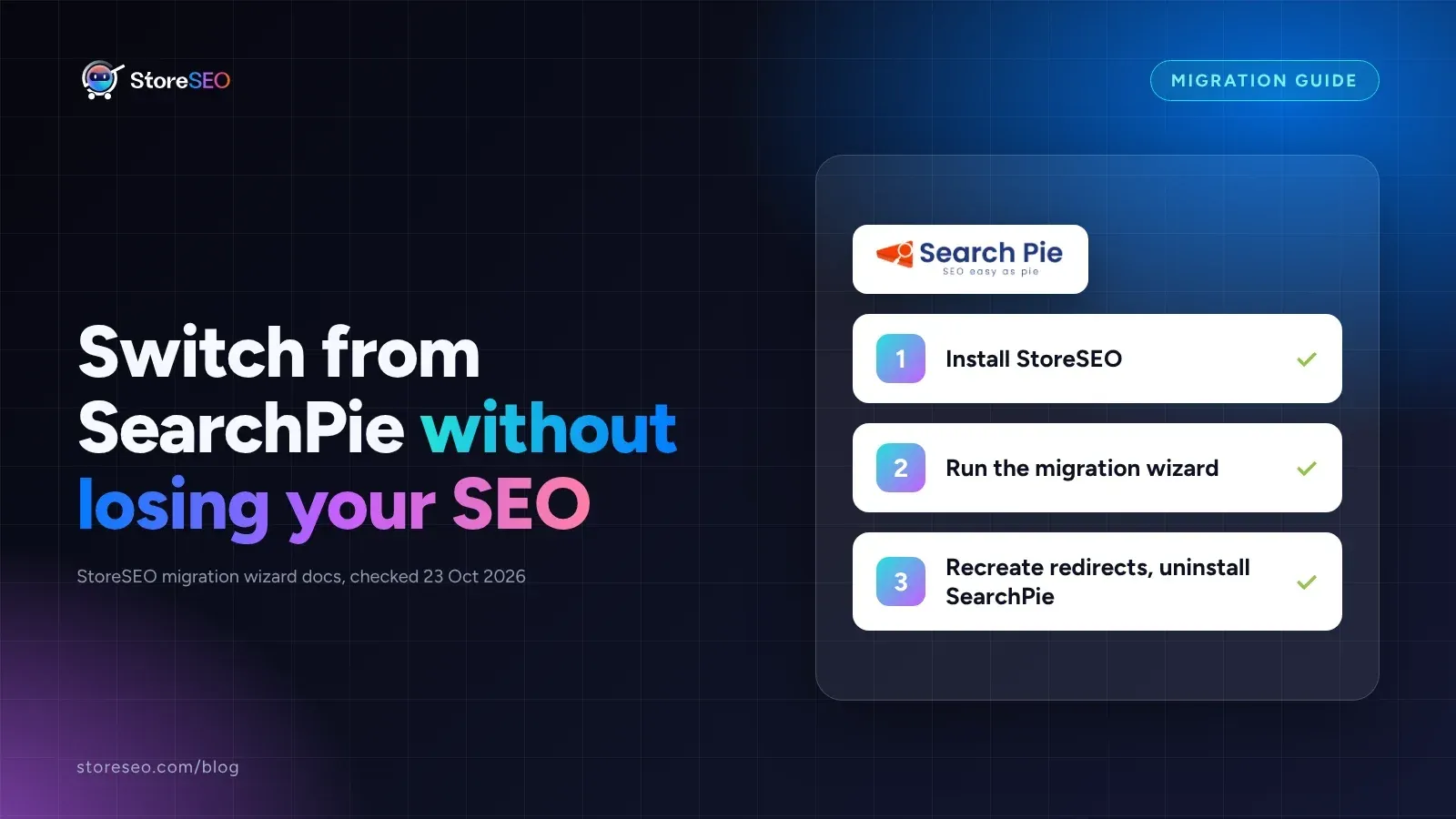
Migrate From SearchPie to StoreSEO (Step by Step)
Switching from SearchPie to StoreSEO takes about ten minutes with the built-in wizard, and your meta titles and schema carry over automatically.
Read article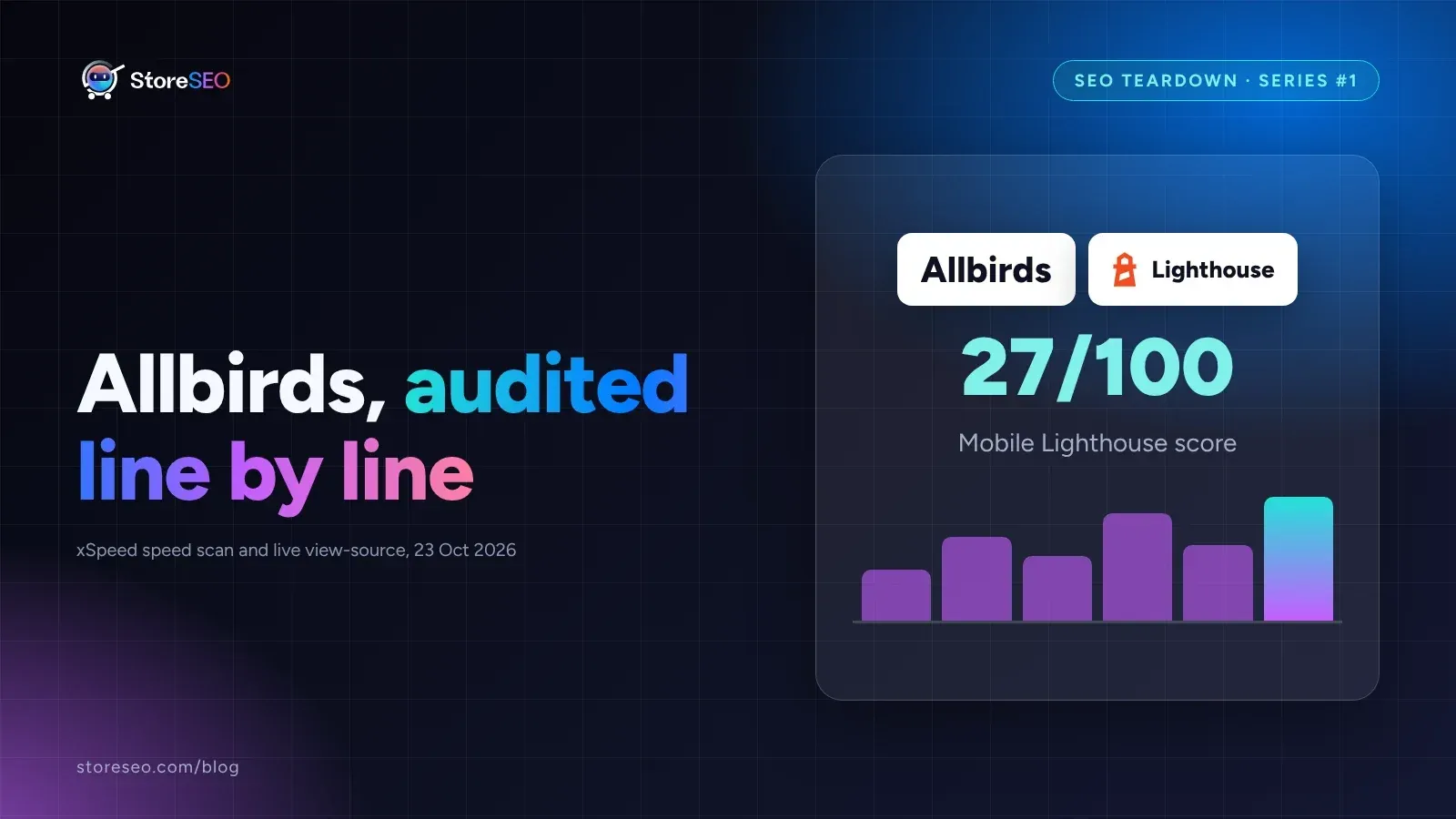
Shopify SEO Teardown #1: Allbirds
We audited Allbirds.com's live pages and found a 27 mobile Lighthouse score, zero homepage schema, three h1 tags, and a typo in the title tag.
Read article
Shopify Image Filenames Are Hurting Your SEO: The Fix
Shopify publishes your uploaded filename straight into the live image URL, so a camera default like IMG_4821.jpg stays that way until you rename it.
Read article