
Google's November Core Update: What to Check
 Written by M Asif Rahman
Google’s November 2026 core update started rolling out on 10 November and, as of this writing, is still open on Google’s own Search Status Dashboard. It changes rankings sitewide, not specific pages, and if your Shopify store’s traffic moved this month, the right first move is to wait, not to edit.
TL;DR
| What Changed | Rollout Window | What To Do |
|---|---|---|
| A broad core update to Google’s ranking systems | Started 10 Nov 2026, still open as of 22 Nov | Confirm the rollout has finished before you judge anything |
| No Shopify or ecommerce specific impact has been reported | Ongoing, 12+ days so far | Keep watching, do not assume your store is affected |
| Rankings can move up or down with no change on your end | Past updates ran 12 to 18 days | Compare a full week after it ends to a week before it started |
| Some pages drop while others on the same store gain | Typical pattern, per Google’s own guidance | Scan each affected page before touching any of them |
What Exactly Changed, and When?
Google confirmed the rollout began on 10 November 2026. Google’s Search Status Dashboard lists the incident with a start time of 10:06 US/Pacific that day and, checked again on 22 November, still shows no end time, which puts it past the two week mark with no formal close yet. Google’s own documentation describes a core update as a broad, periodic change to its ranking systems, not a change aimed at any one site or page, rolled out several times a year and logged publicly when it happens.
No Shopify specific or ecommerce specific impact data exists yet for this particular update. Independent SEO trade coverage has called the early chatter “more muted than most” compared to recent updates, but that is a read on general web chatter, not a measured number for Shopify stores, and this page will not pretend otherwise.
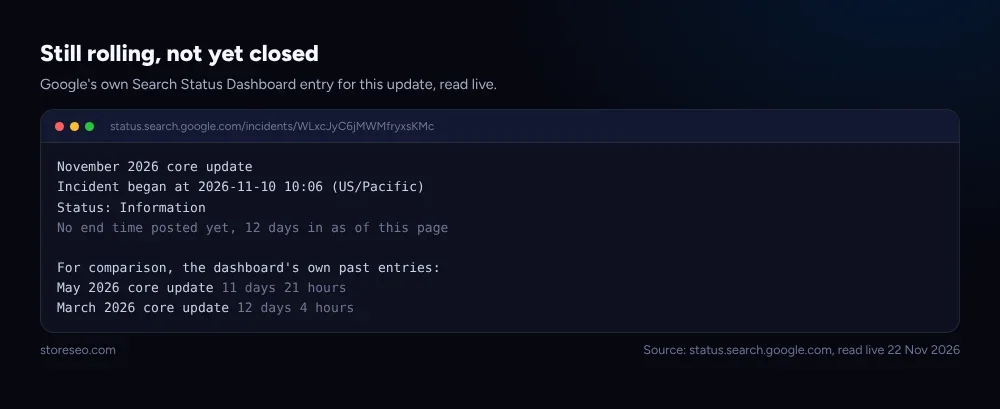 Google’s Search Status Dashboard, read live 22 November 2026.
Does a Ranking Drop Mean You Did Something Wrong?
Not on its own. Google is explicit that a core update reassesses the whole web at once, the way a food guide reshuffles its list as new restaurants open and old favorites change, and a page that moves down is not automatically “bad”: there are simply other pages Google now rates as a better answer for that search. A small move, say from position 2 to position 4, is not worth reacting to at all; Google’s own advice is to avoid changing content that is already performing well.
A large, sustained drop, say from position 4 to position 29, is the one worth a real look, and even then the first step is patience rather than panic.
| What You Are Seeing | What It Likely Means | Your Action |
|---|---|---|
| Small move, a few positions | Normal churn, not a problem | Leave the page alone |
| Large, sustained drop on one page | Worth a closer look once the update ends | Run it through a self assessment |
| Drop across many pages at once | Possible site wide quality signal | Review the whole site, not one page |
| Traffic flat, rankings unchanged | This update likely did not touch you | No action needed |
How Do You Check If the Update Hit Your Store?
Start in Search Console, not in a panic edit. First, confirm on the Search Status Dashboard whether the rollout has actually finished, since judging a site mid rollout mixes two signals together. Google’s own guidance recommends waiting at least a full week after a core update completes, then comparing that week against the week before the update started, which isolates the update’s effect from normal day to day noise. From there, check the Performance report’s top pages and queries for the period, and look at search types separately (Web, Images, Shopping) since a drop in one does not mean the others moved too.
StoreSEO’s own SEO Analysis and score tool is a faster way to see which of your Shopify pages are the weakest candidates if a broader check turns up a real drop: it flags missing structured data, thin content and metadata gaps in one pass rather than six separate manual checks, which matters here because Google’s own self assessment asks exactly those kinds of content and trust questions. If the picture looks more like a sudden traffic cliff than a gradual core update shuffle, our step by step organic traffic diagnosis is the faster next read, since not every drop in a given week is this update at all.
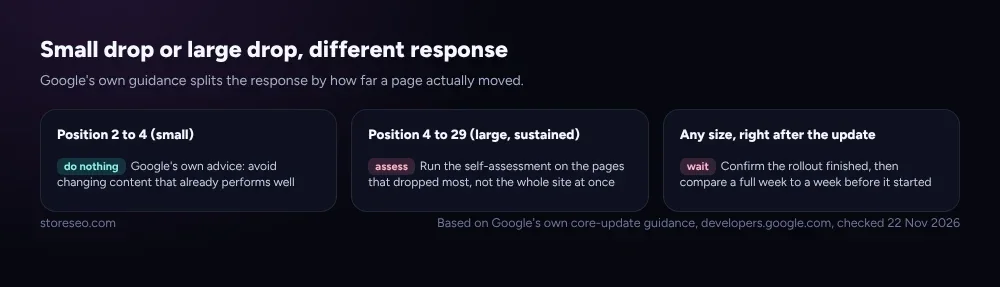 Based on Google’s own core update guidance, developers.google.com, checked 22 November 2026.
What Should You Fix, and What Should You Leave Alone?
Google’s own advice here is unusually direct: avoid “quick fix” changes made only because you heard they help with SEO, and treat deleting content as a last resort, used only when a page genuinely cannot be improved rather than as a reflex. The guidance that matters most is the same self assessment Google has published for years: is this page helpful, reliable and written for a person rather than for a search engine first. A Shopify store that already runs that check regularly, rather than only after a scary week, is the one least likely to need dramatic changes when an update like this lands.
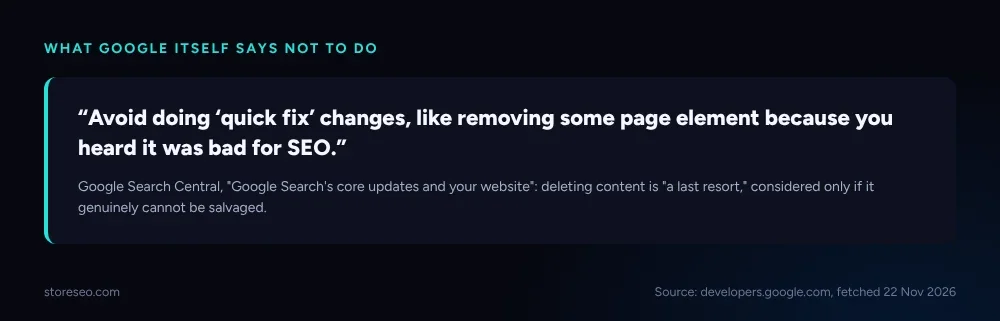 Source: developers.google.com, fetched 22 November 2026.
Two of our own myths and problems pages cover the content side of this in more depth. 11 Shopify SEO myths, checked against Google’s docs is a useful gut check before you assume a core update broke something a thin product description was already going to cost you anyway, and common Shopify SEO problems, ranked by impact ranks the fixes most stores actually need regardless of what any single update did this month.
How Do You Find Out When the Update Has Finished Rolling Out?
Google posts the status of every core update on its public Search Status Dashboard, and that page, not a blog post or a forum thread, is the one source worth checking before you act. Past core updates give a rough sense of scale: the March 2026 update ran about 12 days, May 2026 ran about 12 days as well, and December 2025 ran just over 18 days, so a rollout stretching past two weeks is well inside the normal range rather than a sign something unusual is happening. Once the dashboard shows an end date, wait the extra week Google recommends before drawing any conclusion from your own numbers.
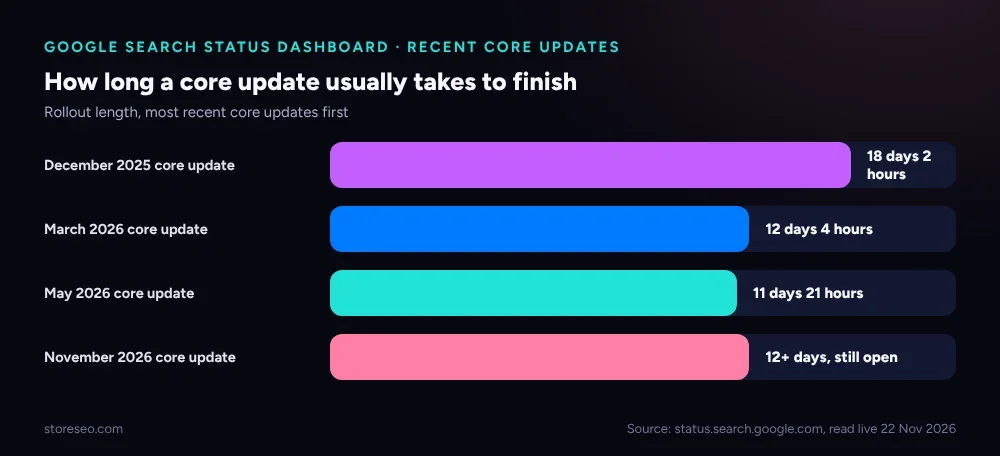 Source: status.search.google.com, read live 22 November 2026.
Frequently Asked Questions (FAQs)
1. When did Google’s November 2026 core update start?
It started rolling out on 10 November 2026, confirmed on Google’s own Search Status Dashboard with a start time of 10:06 US/Pacific. As of 22 November the dashboard still showed no end time for the rollout.
2. Has this update specifically hit Shopify stores?
No Shopify specific or ecommerce specific impact data existed as of this writing. General industry chatter about the update has been described as quieter than usual, but that is not a measured figure for any particular platform.
3. Should I change my store right now because of this update?
Not based on the update alone. Google’s own guidance says to avoid changing content that is already performing well and to treat a core update as a reason to review, not a reason to react immediately.
4. How long do Google core updates usually take to finish?
Recent core updates have run between about 12 and 18 days. The November 2026 update had already run more than 12 days as of this check with no end date posted yet, which is within that normal range.
5. My rankings dropped a little. Is that the core update?
A small move, a few positions either way, is normal churn and not worth acting on by itself, per Google’s own advice. A large, sustained drop across many pages is the pattern worth investigating once the rollout has finished.
6. What should I check first if I think my store was affected?
Confirm the rollout has finished on the Search Status Dashboard, then compare a full week after it ends to a week before it started in Search Console. A StoreSEO SEO Analysis and score scan is a fast way to see which pages have real, fixable gaps once you know where to look.
Most stores will not need to change anything because of this update at all; the stores that do are usually the ones a plain content review would have flagged anyway. If you would rather run one scan than wait and wonder, try StoreSEO on the Shopify App Store.
Keep reading
Google & AI Search Changes for Shopify, Tracked
This log tracks every confirmed Google and AI search change that affects Shopify SEO, newest first, each dated with its source and what to do.
Read article
Discover BFCM Tips: 10+ Essential Store Optimizations for Black Friday Traffic Boost
Black Friday and Cyber Monday 2025 are approaching fast! Last year, Shopify merchants made a record $11.5B in sales. Prepare your store with our step-by-step Shopify BFCM optimization guide. Learn how to analyze data, speed up your site, deploy winning apps, forecast inventory, engage loyal fans early, and run marketing campaigns to maximize revenue.
Read article
What Happens If You Block GPTBot on Shopify?
Blocking GPTBot in robots.txt opts your Shopify store out of AI training data, but it does not remove you from ChatGPT search or stop AI shoppers.
Read article