
12 Shopify Collection Pages, Annotated for SEO
 Written by M Asif Rahman
Twelve public Shopify collection pages, read directly from their live HTML on 10 October 2026, share three repeatable habits: a keyword-first title tag, a meta description that names the product instead of a slogan, and a URL slug built for one specific collection, not a catch-all. Copy any one of the three today.
TL;DR
| Pattern | What It Looks Like | Do This |
|---|---|---|
| Keyword-first title | The product and its modifier appear before the brand name | Lead your title with the term a shopper types, brand last |
| Descriptive meta, not a slogan | Names the product, material or benefit in one real sentence | Write what the collection holds, never a tagline |
| Specific URL slug | The slug names one filtered view, such as mens-shorts or the-point | Give every collection its own slug, not /collections/all |
Why Do Collection Pages Get Overlooked?
A product page gets a title, a description and often a review count. A collection page, the shelf that groups products together, is where Shopify puts the least thought by default: a theme auto-generates the title from the collection’s name and leaves the meta description blank unless someone fills it in. That gap shows up across stores of every size, from single-founder shops to brands with teams dedicated to SEO.
The twelve pages below are not a random sample. Each one is a live, public collection page on a working Shopify store, fetched directly rather than guessed at, so every pattern below is something you can check yourself by opening the same URL.
 Title tags read from each site, 10 Oct 2026
12 Shopify Collection Pages, Annotated
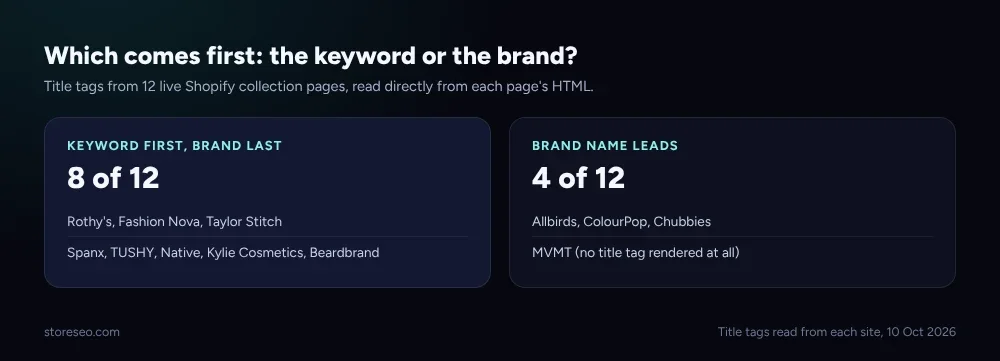
Here is what each one does with its title tag, read straight from the page source, and which of the two broad groups it falls into.
| Store | Title Leads With | Group |
|---|---|---|
| Allbirds | Brand name first, then “Sustainable Men’s Shoes” | Brand-first |
| ColourPop | Brand name first, then “Shop our Bold and Vibrant Eyeshadows” | Brand-first |
| Chubbies | Brand name alone, no category term | Brand-only |
| Beardbrand | “Beard Products Collection,” brand name last | Keyword-first |
| Rothy’s | “Women’s Pointed Toe Flats,” brand name last | Keyword-first |
| Fashion Nova | “Dresses For Women,” plus a benefit phrase, brand last | Keyword-first |
| Taylor Stitch | “Men’s Shirts and Button Downs,” brand name last | Keyword-first |
| Spanx | “Women’s Shapewear” plus product types, brand last | Keyword-first |
| TUSHY | “Bidet Attachments and Bidet Toilet Seats,” brand last | Keyword-first |
| Native | “Shop All Deodorant,” brand name last | Keyword-first |
| Kylie Cosmetics | “Shop Lip Kits,” brand name last | Keyword-first |
| MVMT | No title tag rendered; the meta description names “Men’s Watches” directly | Meta-only |
Eight of the twelve put the product term before the brand. Three lead with the brand alone, and one, MVMT, renders no visible title tag at all on this template, leaning entirely on its meta description to say what the page is. Mixed as the sample is, the keyword-first group is the majority, and it is the easier pattern for a new store to copy since it needs no brand recognition to make sense in a search result.
 Meta tags read from each site, 10 Oct 2026
Which Pattern Should You Copy First?
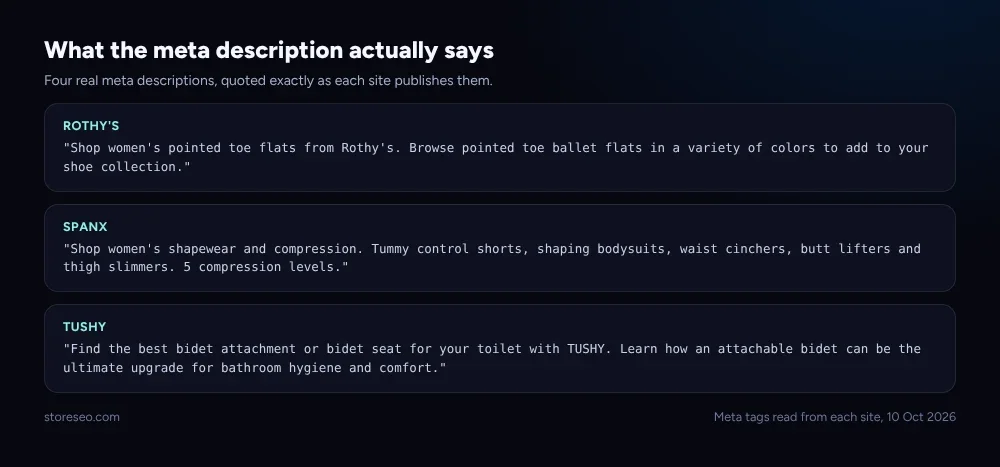
The meta description is the second pattern worth copying, and it is the one more stores get wrong, because Shopify leaves it blank by default. Every store above that wrote one did the same thing: it named the actual product, material or use case in one plain sentence, never a slogan. Rothy’s meta names “pointed toe flats” and “colors.” Spanx names “shapewear,” “tummy control shorts” and “compression levels.” TUSHY names “bidet attachment” and “bidet seat.” None of the three leans on a tagline a shopper could not act on.
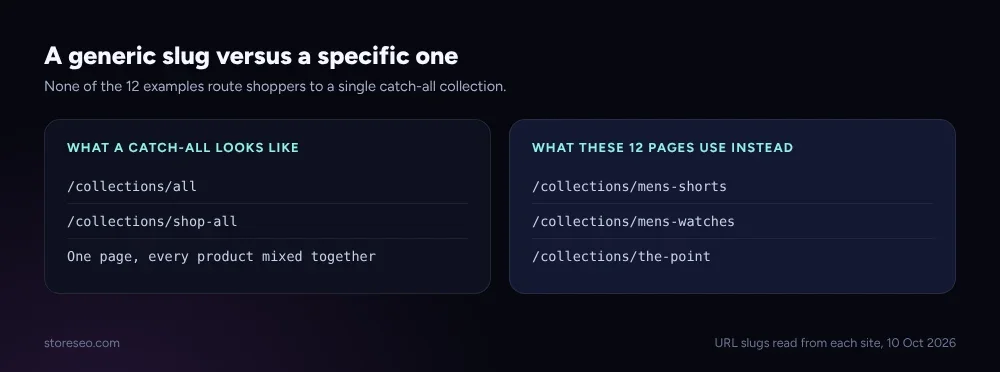
The third pattern sits in the URL itself. Not one of the twelve collection pages routes a shopper to a single mixed bag of every product; each slug names the specific filtered view it serves, such as mens-shorts, mens-watches or the-point. A generic slug like /collections/all or /collections/shop-all still works for Shopify, but it throws every product into one page with one title and one meta description to cover all of them, which is the opposite of what a search engine needs to match a specific query to a specific page.
 URL slugs read from each site, 10 Oct 2026
How Do You Apply These Patterns in Shopify?
All three patterns live in fields Shopify already gives you. Open a collection in your Shopify admin, scroll to Search engine listing preview, and edit the Page title and Meta description fields directly: lead the title with the product term, put the brand name last, and write the meta description as one real sentence naming what the collection holds. The slug is the URL and handle field in the same panel, and it is yours to rename to the specific term shoppers search for rather than leaving Shopify’s auto-generated version in place.
Doing this once for a handful of collections is a ten-minute job. Doing it across every collection a catalog-heavy store runs is where the work piles up, and that is what StoreSEO’s Bulk SEO optimization is built for: it applies the same title, meta description and keyword checks across many pages at once instead of one collection at a time, from the same screen where you already manage product and page SEO.
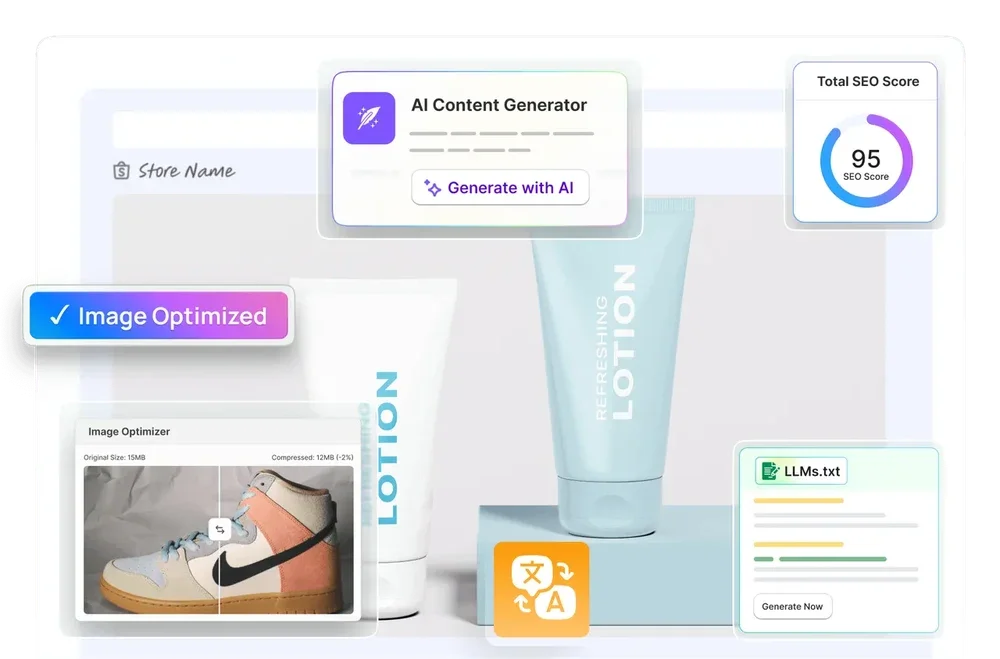 StoreSEO product screen, 10 Oct 2026
StoreSEO’s Bulk SEO optimization docs page covers the setting that turns this on, and the collection page optimization guide walks through the same three fields one by one, and how StoreSEO boosts Shopify collection page SEO ranking covers the wider ranking picture these twelve examples sit inside. If you want a working checklist rather than examples, Shopify collection page SEO: 5 working tips is the how-to version of this same page. A collection page’s place in your store’s structure matters too: how to create a site structure for your Shopify store covers where collections sit relative to products and the homepage, and a collection page that keeps changing its canonical target is its own separate problem, covered in “Google chose different canonical”: the Shopify fix.
Frequently Asked Questions (FAQs)
1. Should a Shopify collection title lead with the keyword or the brand?
Lead with the keyword when the page is meant to catch a new shopper searching for that product, which is the more common goal for a collection page. Eight of the twelve pages in this roundup do exactly that. Brand-first still works for an established name shoppers already search for directly, which is the smaller group here.
2. Does Shopify fill in a collection page’s meta description automatically?
No. Shopify leaves the meta description field blank unless a merchant or an app writes one, and an empty field means Google generates its own snippet from whatever text sits on the page. Several of the stores in this roundup clearly wrote theirs by hand, naming the exact product and material rather than a slogan.
3. Why does a collection page’s URL slug matter for SEO?
A specific slug, such as mens-shorts rather than all, tells both shoppers and search engines what one page is about before they even click it. None of the twelve examples here route traffic through a single catch-all collection, and a specific slug also makes it possible to write a title and meta description that match that one collection instead of trying to describe every product a store sells.
4. How many collection pages should a Shopify store actually have?
Enough to give every distinct way a shopper searches its own page, and no more than that. A store with one real product line needs very few; a store with dozens of categories, sizes or use cases benefits from a dedicated collection for each one a shopper is likely to search for by name.
5. Can editing a collection page’s title hurt its existing ranking?
A title or meta description change does not change the URL, so it carries no redirect risk the way renaming a slug does. Google re-crawls and re-indexes the new title on its own schedule, typically within days to a few weeks, and a title that better matches what shoppers search for tends to help click-through rather than hurt it.
6. Can StoreSEO apply these three patterns to many collections at once?
Yes. StoreSEO’s Bulk SEO optimization checks title, meta description and keyword patterns across a store’s collections from one screen, rather than requiring a merchant to open each collection individually in Shopify admin.
Twelve pages are a small sample next to the millions of Shopify stores online, but the three patterns they share cost nothing to copy and touch fields every store already has. try StoreSEO on the Shopify App Store
Keep reading
12 Shopify Product Titles That Rank (Annotated)
Twelve real Shopify product titles share three habits that work: name the product type, add exactly one differentiator, and put the brand name last.
Read article
What Happens When You Skip Google Product Category?
Skipping Google Product Category rarely blocks a sale, but in apparel, phones, software and alcohol it can quietly get a listing disapproved.
Read article
We Compressed 20 Shopify Product Photos 4 Ways
We compressed 20 real Shopify product photos 4 ways and found WebP cuts average file size by 67 percent, the biggest saving of the four we tested.
Read article