
Shopify Keyword Analytics: A Diagnostic Flowchart
 Written by M Asif Rahman
If one Shopify product keyword lost position or impressions, check four things in order: whether Google ran an update, whether the page or the targeted keyword changed, whether demand is seasonal, and whether only this query moved or the whole site did. Most single-keyword drops trace to one of these inside the Search Console Performance report.
| TL;DR | Check first | Likely verdict |
|---|---|---|
| Google ran an update | Compare the drop date to Google’s ranking-update list and your other queries | Usually settles in 1 to 3 weeks on its own |
| You changed the page or the keyword | Recent content edit, URL change, or a new focus keyword in Keyword Analytics | Fixable the same day: revert, redirect, or re-target |
| It is seasonal | Compare the same weeks last year, not last month | No action needed |
| Tracking broke | Search Console verification, a filter, or a reporting glitch | The keyword never actually moved |
This page is for one keyword, not the whole store. It assumes the fundamentals in the Ultimate SEO Checklist are already in place; if every query in Search Console dropped together on the same date, that is a site-wide traffic drop, and Shopify Organic Traffic Dropped? 15-Minute Diagnosis is the right page, not this one.
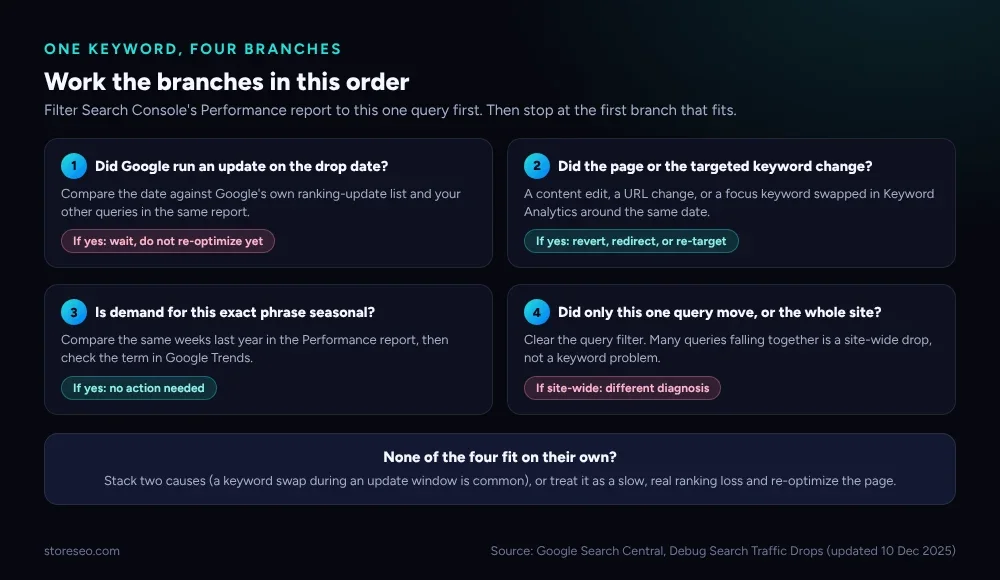 The four branches, worked in order. Stop at the first one that fits.
Before picking a branch, pull the raw shape of the drop. Open the Search Console Performance report, filter it to this one query, set the date range to the last 16 months, and read clicks, impressions and average position side by side. Google’s own guidance on debugging Search traffic drops (last updated 10 December 2025) is written for a whole site, but the same three numbers, read for a single filtered query, tell you which of the three shapes below you are looking at.
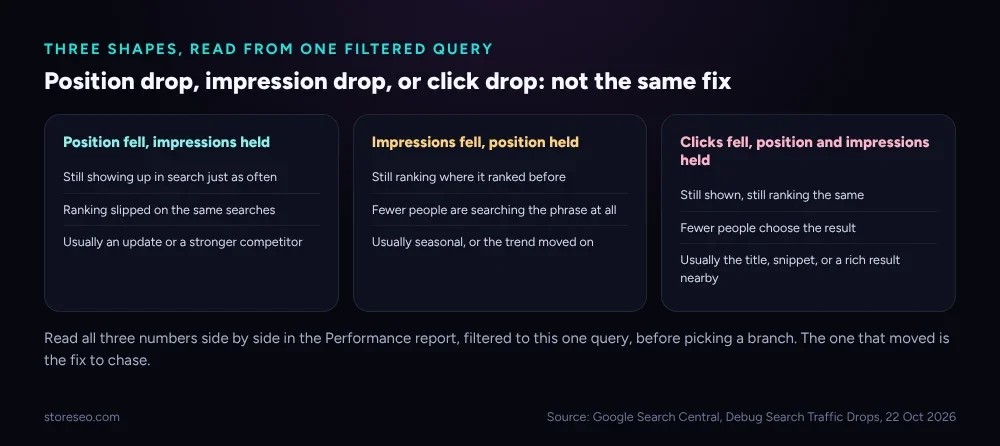 Read all three numbers before picking a branch. The one that moved is the fix to chase.
How Do You Filter Search Console to One Query?
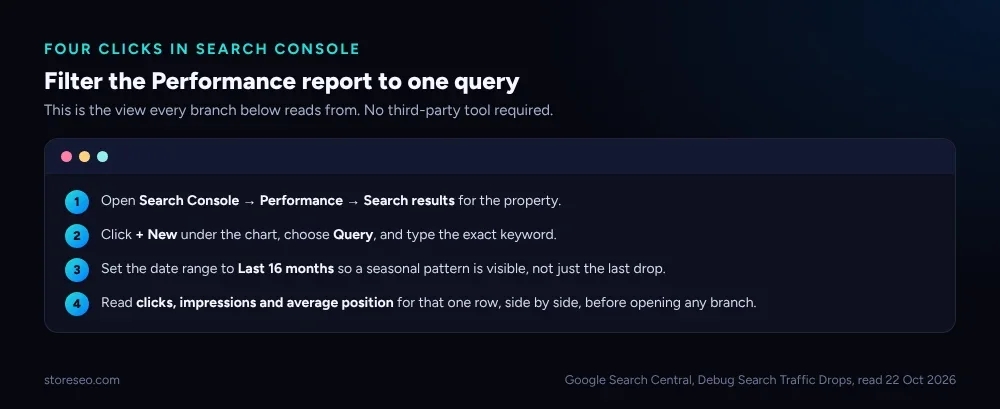 No third-party tool required. Every branch below reads from this one view.
Open Search Console → Performance → Search results, click + New under the chart, choose Query, and type the exact keyword. Set the date range to Last 16 months, because a seasonal pattern will not show up in 28 days. Then read the row: clicks, impressions, and average position, in that order. A drop in clicks with impressions and position both holding steady is a click-through problem, not a ranking problem, and none of the four branches below fix it on their own; that symptom points at the page’s title and meta description instead.
| Symptom | Likely cause | How to confirm | Fix |
|---|---|---|---|
| Position fell, impressions held | Update, or a stronger competitor | Compare the date to Google’s ranking-update list | Usually none; wait and keep the page healthy |
| Impressions fell, position held | Seasonal demand, or the trend moved on | Compare the same weeks last year in Trends | Usually none; demand returns on its own |
| Clicks fell, position and impressions held | Title or snippet, or a new rich result nearby | Check the live SERP for the query | Rewrite the title or meta description |
| Both position and impressions fell overnight | A page or keyword change, or a technical issue | Check recent edits, redirects, or a noindex tag | Revert the change, or fix the tag |
Did Google Run an Update on the Drop Date?
Check your drop date against Google’s own list of ranking updates, and look at a handful of your other queries in the same Performance report for the same window. A genuine update usually moves several of your queries over a few days, not one keyword overnight, and the position shift is often small (second to fourth place) rather than falling out of the results entirely. If that matches, the guidance in Google’s own documentation is not to make radical changes to a page that was already performing well; small position moves recover on their own more often than they are fixed by editing.
A large drop, out of the top ten entirely, is treated differently: Google’s guidance says to self-assess the whole page, not just chase the one keyword, and that changes can take weeks to months to show any effect once made.
Did the Page or the Targeted Keyword Change?
This is the branch worth checking first in practice, because it is the one you control. Did the product’s title, description, or URL change around the drop date? Was the product’s focus keyword swapped for a different one in StoreSEO’s Keyword Analytics, or in any other optimization step? A content edit, a URL rename without a redirect, a new robots.txt rule, or an accidental noindex tag all produce the same shape: a clean, overnight step down that lines up with a deploy or a settings change, not with Google’s own update calendar.
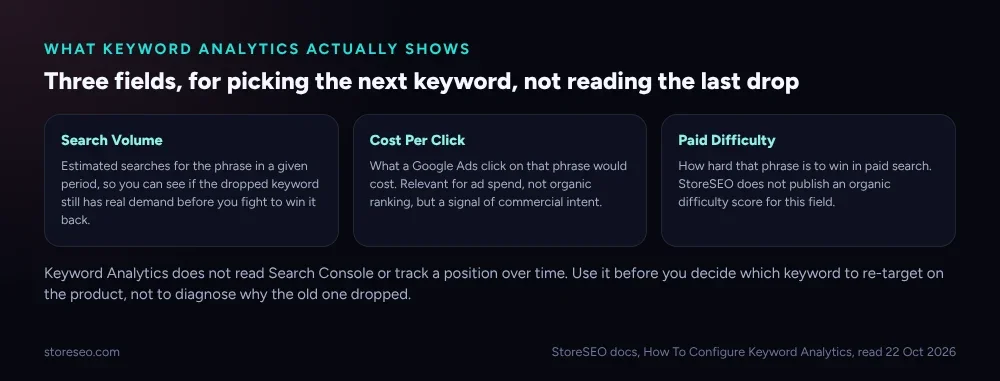 Keyword Analytics is a research tool for the next keyword, not a monitor for the one that dropped.
StoreSEO names this feature Keyword Analytics, and it is worth being precise about what it does and does not do. Opening a product’s General SEO tab and clicking Keyword Analytics shows Search Volume, Cost Per Click and Paid Difficulty for a phrase, plus related keyword suggestions you can insert as the new focus keyword with one click, per StoreSEO’s own setup guide. It does not read Search Console, and it does not track a position over time; use it to judge whether a keyword still has real demand before you spend effort re-targeting it, not as a replacement for the Performance report itself. If the drop traces back to a keyword swap, Keyword Analytics is where you check that the replacement actually has volume worth chasing, rather than guessing.
Is Demand for This Exact Phrase Seasonal?
Open the Performance report filtered to the same query, and compare the same calendar weeks a year ago, not the previous month. A gift-shaped query dropping in February after a December peak is not a ranking problem, it is the calendar. Cross-check the exact phrase in Google Trends: if the whole web’s interest in the term fell at the same time, nothing about your page caused it, and nothing about your page will fix it. StoreSEO’s Keyword Analytics can show whether a replacement keyword used for that product has steadier year-round volume, which is a legitimate reason to re-target even when the original drop was purely seasonal.
Did Only This One Query Move, or the Whole Site?
Clear the query filter in the Performance report and look at the chart for every query together. If one keyword fell while the rest of the store’s queries held steady or grew, the cause is specific to that keyword or that one product page, and the three branches above are the right ones to work through. If many queries fell together on the same date, this page is the wrong diagnosis: that shape is a site-wide drop, and Shopify Organic Traffic Dropped? 15-Minute Diagnosis walks the same four causes at the whole-store level instead of the single-query level this page covers.
What If None of the Four Fit?
Two causes can stack: a keyword swap that happened to land inside an update window is common enough to look at both before ruling either one out. If the numbers genuinely do not match an update, a change, seasonality, or a site-wide pattern, treat it as a slow, real ranking loss rather than a drop with one clean cause.
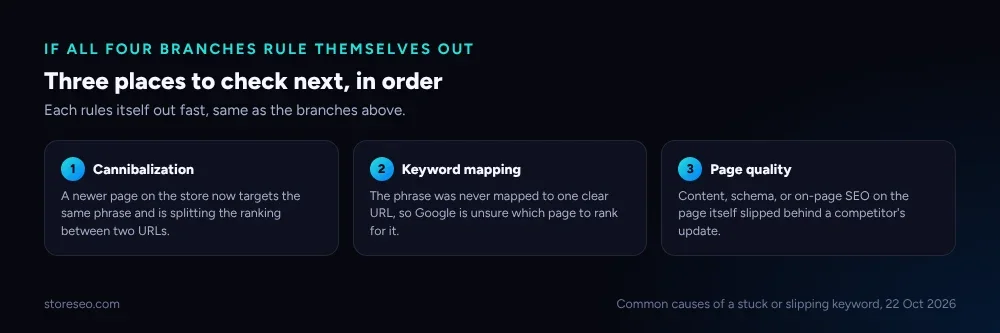 Each rules itself out fast, the same way the four branches above do.
Check for keyword cannibalization from a newer page targeting the same phrase, re-map the keyword with the Shopify Keyword Mapping Template if it was never assigned to one clear URL, and re-optimize the content and schema on the page itself rather than waiting on a cause that the data has already ruled out.
Frequently Asked Questions (FAQs)
1. How long should I wait before deciding a keyword drop is permanent?
Give it at least one to three weeks if the shape matches a Google update, since Google’s own guidance says small position fluctuations move in both directions without any change on your part. If the drop is a clean overnight step that lines up with an edit, there is no need to wait; fix the change directly.
2. Does StoreSEO’s Keyword Analytics track my keyword’s position over time?
No. Keyword Analytics shows Search Volume, Cost Per Click and Paid Difficulty for a phrase at the time you check it, and it is meant for choosing or validating a focus keyword, not for monitoring a ranking that already dropped. The Search Console Performance report, filtered to that one query, is the source for position history.
3. I changed the focus keyword and then the ranking dropped. Did I cause it?
Possibly. Check the drop date against when you made the change. If they line up closely, the swap is the most likely cause, and the fix is to confirm the new keyword actually has search volume worth chasing in Keyword Analytics before deciding whether to revert or stay with it.
4. What if impressions dropped but position and clicks stayed the same?
That shape points at demand, not ranking. Fewer people are searching the exact phrase, which is usually seasonal or a sign the trend has moved on, and it is not something an on-page change will fix.
5. Should I redirect the product URL if I think a URL change caused the drop?
Only if the URL actually changed without a redirect already in place; check first, since an unredirected URL change is a common, same-day-fixable cause. If a redirect was already set up correctly, the drop has a different cause and redirecting again will not help.
6. Can a single keyword drop because of a manual action or a security issue?
Rarely for just one keyword. Google’s own documentation on the Manual Actions report and Security Issues report describes these as the kind of problem that tends to affect a page or a site broadly, not one isolated query, so check those reports if several things look wrong at once, not for a single keyword in isolation.
Filter to the one query, read the three numbers, and work the branches in order before touching the page. try StoreSEO on the Shopify App Store
Keep reading
Shopify Image Filenames Are Hurting Your SEO: The Fix
Shopify publishes your uploaded filename straight into the live image URL, so a camera default like IMG_4821.jpg stays that way until you rename it.
Read article
Does Local Business Schema Help an Online Store?
Local Business schema needs a real street address and set opening hours, so a fully online Shopify store has little practical reason to add it.
Read article
Common Shopify SEO Problems, Ranked by Impact
Six Shopify SEO problems ranked by real cost, each scored for how common it is in our 100+ store audit, how severe, and how fast you can fix it.
Read article