
Shopify "Soft 404" Warning in Search Console: The Fix
 Written by M Asif Rahman
A soft 404 means Google thinks a page that returned a normal 200 status actually reads like an error or an empty result. On Shopify the usual cause is a collection page that still loads with no products on it, often because every item sold out or a filter combination matched nothing. Fix the page itself, not the status code.
TL;DR: the cause, how to confirm it, and the fix.
| Cause | How to confirm | Fix |
|---|---|---|
| A filter combination matches zero products | Request the flagged URL directly; the grid is empty but the page still answers 200 | Block the parameter pattern in robots.txt, or canonicalize to the unfiltered collection |
| Every product in the collection is sold out | Check inventory on the collection’s products in Shopify admin | Hide the collection, or add it to StoreSEO’s noindex list until stock returns |
| An old product or collection URL now redirects to the homepage | Follow the flagged URL; it lands on / with content that has nothing to do with the original page | Redirect it to the closest live replacement instead, never to the homepage |
| A thin page (empty blog category, placeholder page) is live and indexable | Open the URL and check whether it has any real content below the template | Noindex it, or unpublish it until it has content |
A soft 404 is one of the status labels Search Console’s own Page indexing report can show for a URL, and Google’s own definition is specific about what it means: the page “returns a user-friendly ‘not found’ message but not a 404 HTTP response code.” Google decided, from the page’s content rather than its status code, that the URL does not have anything worth indexing. Google’s crawling documentation adds the mechanics behind that: for a 200 response, “if the content of the page suggests an error for Google Search, an empty page or an error message, Search Console will show a soft 404 error.” Nothing about the request failed. The page loaded fine. Google simply read it and decided it was not a real page.
Why Does Shopify Trigger a Soft 404?
Shopify almost never ships a broken status code on its own. The platform’s native 404 handling for a URL that truly does not exist returns a real 404, not a soft one. The soft 404 pattern shows up when a URL is technically live, Shopify answers 200 for it, but the page it renders carries little or nothing a shopper would call content.
We confirmed the most common trigger live on Shopify’s own Dawn demo theme on 6 November 2026: requesting a collection URL with a filter combination that matches no products returns a full 200 page with the heading “No products found” and a prompt to use fewer filters. Nothing about that request failed. The server is behaving correctly. But a crawler reading that page sees an empty grid and an error-shaped message, which is exactly the pattern Google’s own definition describes.
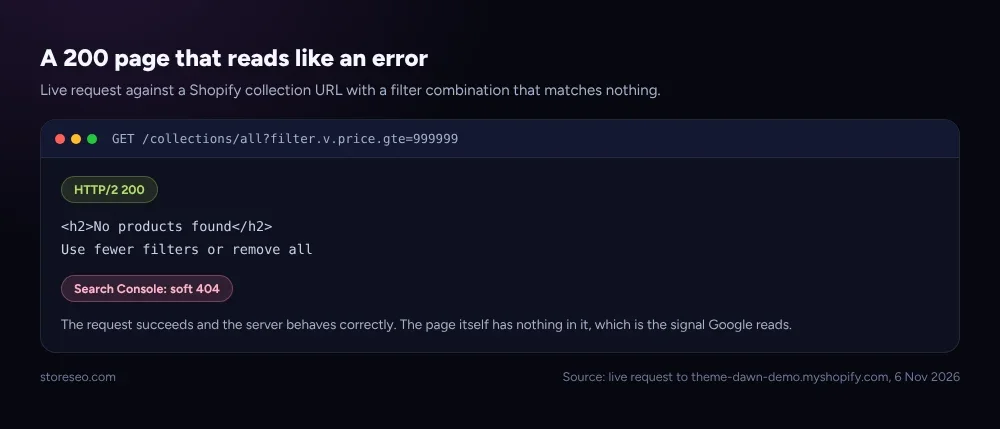 Source: live request to theme-dawn-demo.myshopify.com with a filter combination matching no products, checked 6 Nov 2026.
The same shape appears in three other places on a Shopify store: a collection where every product has sold out and the grid renders empty without the collection being hidden; an old product or collection URL that a theme or a bulk cleanup redirects straight to the homepage instead of to a specific replacement, which Google’s own support team names directly as something to avoid, since a redirect to a page with no real connection to the original query reads the same way an empty page does; and a thin page, like a blog category with no posts yet or a draft-style page nobody finished, that is still live and crawlable.
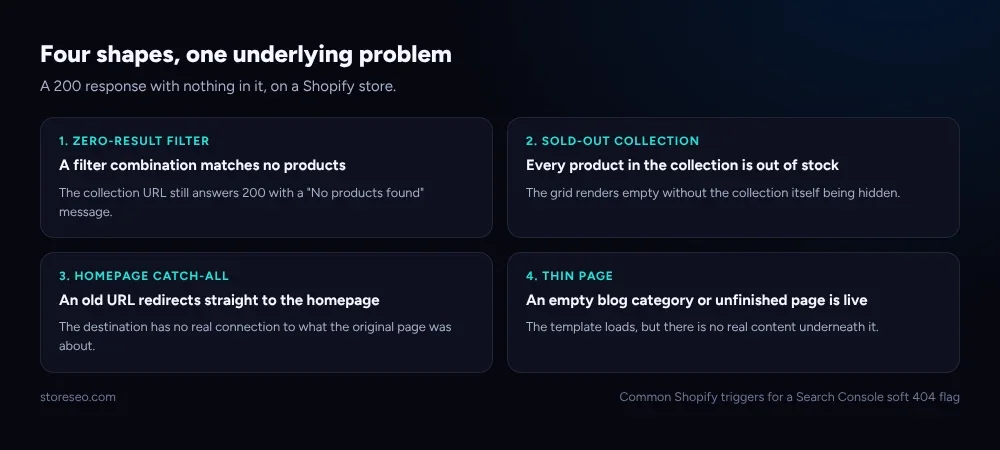 What a 200 response with nothing in it looks like on a Shopify store, in four common shapes.
How Do You Fix a Soft 404 Step By Step?
Confirm before you touch anything, since the four causes above need different fixes and treating all of them the same way can quietly remove a page that was never the real problem.
Step 1: open the flagged URL exactly as Search Console found it. The Page indexing report in Search Console names the exact URL. Request it directly, with the same query parameters if any are present, and read what actually loads rather than assuming it from the slug.
Step 2: decide whether the page should exist at all. If it is a filtered view, an out-of-stock collection, or a thin page with no real content, it probably should not be indexed in its current state. If it is a genuinely useful page that happens to render emptily right now, such as a collection between restocks, that is a temporary state worth protecting rather than removing.
Step 3: apply the matching fix, not a generic one. A zero-result filter URL is best handled by keeping the parameter pattern out of the index entirely, either with a robots.txt rule (our Shopify robots.txt guide covers that pattern) or a canonical pointing at the clean collection URL, which our canonical vs redirect vs noindex guide walks through choosing between. A sold-out collection is usually better noindexed temporarily than deleted, since the products are coming back. An old URL deserves a real redirect target, never a blanket drop onto the homepage. StoreSEO’s Google Search Console integration resubmits the sitemap and requests indexing for the corrected URL once the fix is live, instead of waiting for Google’s next unscheduled crawl.
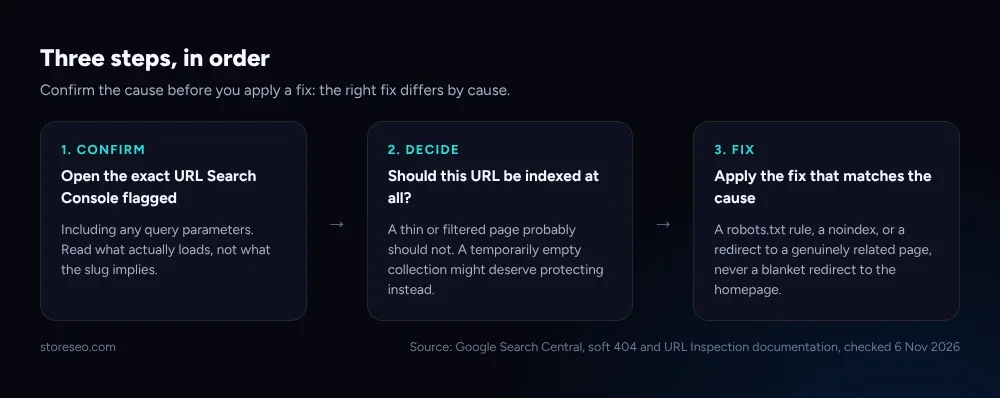 Three steps, in order: confirm what actually loads, decide whether the page belongs in the index, then fix the specific cause rather than the symptom.
If several of your flagged URLs share the same pattern, for instance a whole run of sold-out collections, it is faster to fix the pattern once (a noindex rule tied to inventory, or a robots.txt block on the filter parameters) than to resolve each URL by hand as Search Console reports it.
When Is It Fine To Leave a Soft 404 Alone?
Not every soft 404 needs urgent action. If the page is a filtered view nobody actually links to or searches for, one that only exists because the storefront generates a URL for every possible filter combination, it costs nothing to leave it exactly as it is; Google is already doing the sensible thing by not indexing it. The same applies to a seasonal collection that goes empty for a few weeks between stock drops, provided it comes back with real products before you reach for a permanent fix like deletion.
Where it is worth acting fast is the homepage-redirect case, because that pattern can repeat across dozens of old URLs at once if a bulk cleanup or theme migration set it up, and it actively confuses which page Google should be crawling instead of just quietly ignoring one.
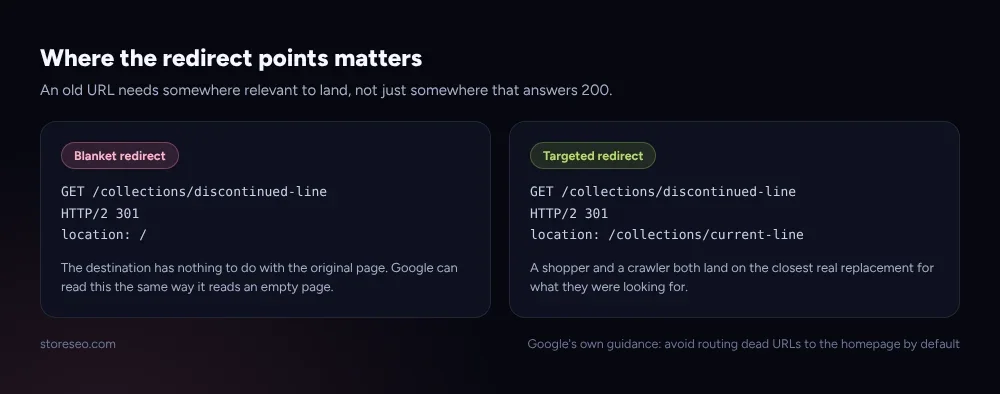 Routing every dead URL to the homepage reads the same way an empty page does; a redirect to a genuinely related page does not.
This is exactly the gap StoreSEO’s sitemap and search console tools are built to close: once a fix is live, StoreSEO’s sitemap submission and instant indexing tells Google to recrawl the corrected URL rather than leaving it to Google’s own schedule, and the same report surfaces new soft 404 flags going forward so they get caught before they pile up. For the broader indexing picture beyond this one status, our Shopify Search Console indexing statuses guide and the ultimate Shopify SEO checklist cover the rest of what Search Console can flag.
Frequently Asked Questions (FAQs)
1. Is a soft 404 the same thing as a broken page?
No. The page loaded correctly and returned a normal 200 status. Google is telling you the content of that page did not look like a real result worth indexing, not that something technically failed.
2. Will a soft 404 hurt my Shopify store’s rankings?
Not directly, and not for the page itself, since Google was never going to rank an empty or error-shaped page anyway. The real cost is indirect: if the pattern repeats across many URLs, like dozens of old pages all redirected to the homepage, it can waste crawl attention that would otherwise go to pages that do matter.
3. Does StoreSEO fix soft 404s automatically?
StoreSEO does not change what your theme renders on a given URL, since the fix depends on which of the causes above applies. Its Google Search Console integration resubmits the sitemap and requests indexing for a URL once you have applied the matching fix yourself, which is the step that otherwise waits on Google’s own crawl schedule.
4. Is “Duplicate, Google chose different canonical” the same issue as a soft 404?
No, they are different Search Console statuses. A soft 404 is about a page’s content reading like an error; the different-canonical status is about two live URLs competing for the same content. Our different canonical fix guide covers that one separately.
5. Should I just redirect every flagged URL to my homepage?
No. Google’s own guidance is to avoid routing every dead or empty URL to the homepage, since a destination with no real connection to the original page can itself read as an error-shaped result. Redirect to the closest genuinely relevant page, or apply a noindex, instead.
6. How long does a soft 404 flag take to clear after I fix the page?
There is no fixed timeline; it depends on Google’s next crawl of that URL. Requesting indexing for the corrected URL in Search Console after the fix is live, which StoreSEO’s integration can trigger, is faster than waiting for Google to recrawl it unprompted.
If this status keeps showing up across more than a handful of URLs at once, it is usually one underlying pattern, like a faceted navigation setup or a bulk redirect rule, rather than six separate problems, so fix the pattern first and let Search Console confirm the rest clear on their own. try StoreSEO on the Shopify App Store
Keep reading
Shopify SEO Checklist for Launch Day: The Last 48 Hours
A Shopify store's SEO gets set in the 48 hours before launch: titles, sitemap submission, and the password screen all need fixing before the first crawl.
Read article
Do Shopify Stores Need Breadcrumbs for SEO?
Shopify's Dawn theme ships no breadcrumb trail or schema, so you need StoreSEO's one click Breadcrumb Schema to help Google read your site structure.
Read article
Shopify FAQ Answer Template: 6 Fill-In Formats
Six copy-paste FAQ answer templates for shipping, returns, sizing, warranty, subscriptions, and general support, ready to fill in and publish today.
Read article