
Shopify SEO Brief Template for Your Theme Developer

A theme developer rarely breaks your rankings on purpose; they break them because nobody wrote down what SEO work was already in place. This copyable brief fixes that: hand it over before any theme change, replatform or agency hand-off, naming the scope, the fields that must not move, and the checks that sign off before anything ships.
TL;DR
| Section | What it covers | Who owns it | Action |
|---|---|---|---|
| Scope | Which pages and templates the project actually touches | You, before the brief goes out | Write it before the project starts |
| SEO requirements | URLs, metadata, canonical tags, schema, robots.txt | Written into the brief, enforced by sign-off | Never skip |
| Never touch without checking | Five fields that quietly carry your rankings | The developer, flagged in the brief | Never skip |
| Sign-off checks | Four checks run on staging before merge | Whoever approves the build | Required before merge |
| QA after launch | What a staging check cannot catch | You, for the first month | Watch for a month |
The Copyable Brief: Scope, SEO Requirements, Acceptance Checks
Three sections cover almost every hand-off, from a small theme tweak to a full replatform. Scope states which pages or templates the project touches, in plain language (“product and collection templates only; checkout and account pages are out of scope”), because a developer who does not know the boundary will happily “improve” a page nobody asked them to change. SEO requirements lists the specific things that must survive: the exact URL for every page that is not being deliberately renamed, the data source each meta title and description field reads from, the canonical and hreflang behavior already live, and the structured data types the site already outputs. Acceptance checks is the list in the next two sections below, copied in as-is, so sign-off is never a verbal “looks good to me.”
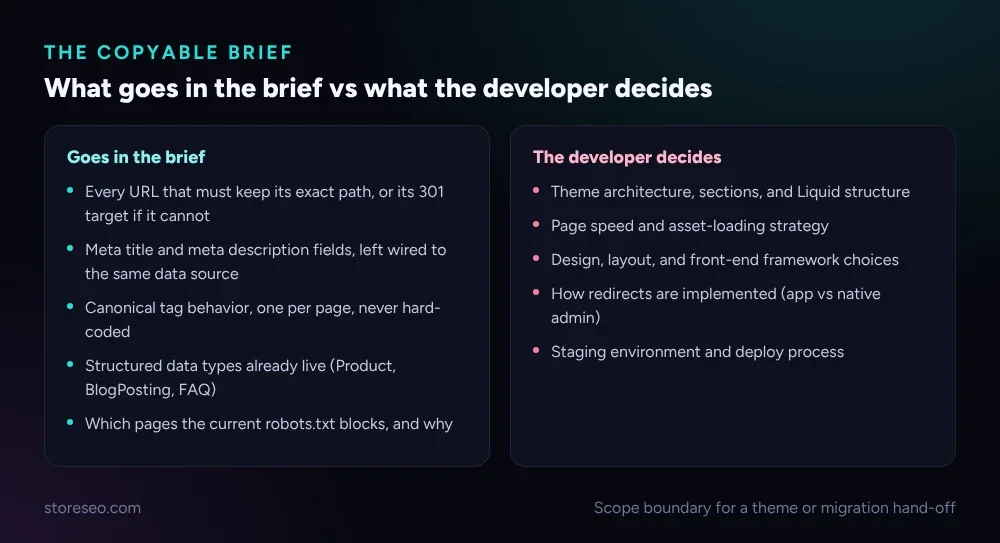 Everything on the left is non-negotiable in the brief; everything on the right is the developer’s call to make.
Keep the brief to one page. A 20-page requirements document gets skimmed once and ignored; a one-page checklist gets pinned to the pull request and actually used.
What Should Your Developer Never Change Without Checking?
Five things carry most of a store’s SEO equity, and all five are easy to break by accident during a theme rebuild, not on purpose. Shopify’s own theme SEO documentation calls out three of them directly: the theme’s SEO metadata, its robots.txt.liquid file, and the hreflang tags a multi-market theme renders. The other two, canonical tags and URL structure, break just as often: a template copied from one page type to another frequently drags a hard-coded canonical with it, and a “cleaner” URL handle is exactly the kind of change a developer makes without realizing it needs a redirect planned first.
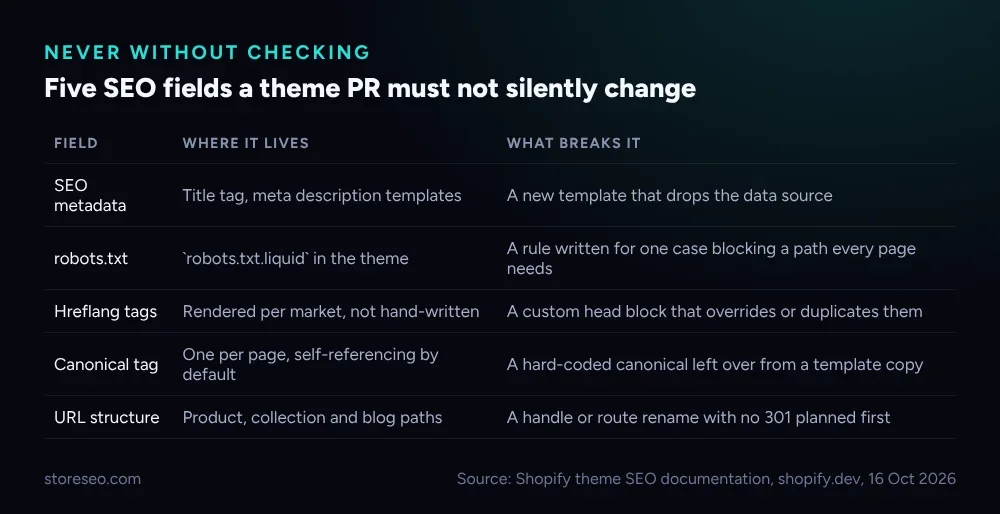 None of these need to be off-limits forever, only flagged: a developer who knows a field matters will ask before changing it instead of after.
None of this requires the developer to understand SEO deeply. It requires them to know which five things to flag for a second look, which is a very different, much smaller ask.
Which SEO Checks Should Sign Off a Theme Change?
Run these four checks against the staging URL, never against production, before the change merges. Do titles and meta descriptions still render on a sample of real pages, pulled from the page source rather than a CMS preview that can hide a broken template. Does every page carry exactly one canonical tag and one H1, since a duplicated section or a copied template is the single most common way a page quietly ends up with two of either. Do the planned redirects resolve, tested with a direct request against every mapped old URL, because a redirect loop or a 404 here is a launch blocker, not a post-launch fix. Is structured data still valid, re-checked after the template change rather than assumed from before it, since Product, BlogPosting and FAQ JSON-LD both move location and change shape more often than developers expect; StoreSEO’s own schema analysis is a fast way to re-run that check without a separate validator tool.
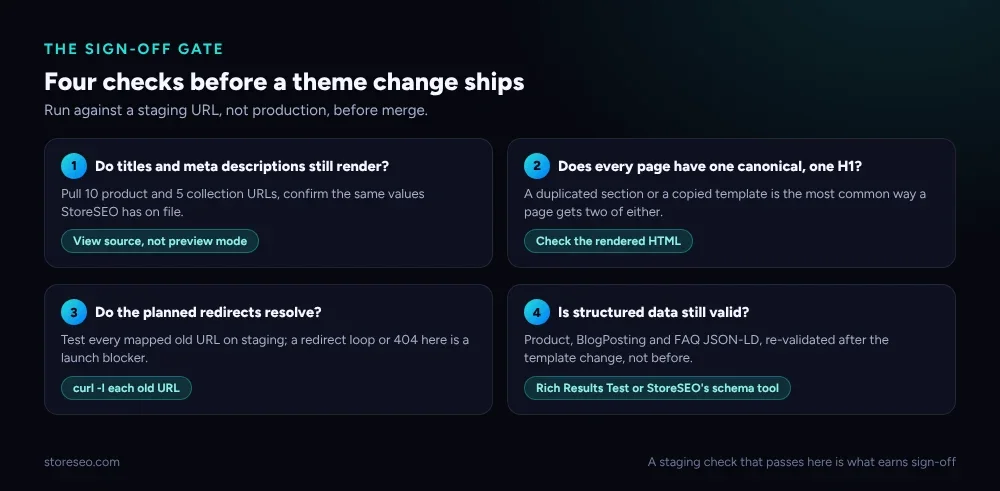 A build that passes all four on staging is the bar for sign-off; a build that passes three is not ready yet.
StoreSEO’s own Bulk SEO optimization tooling helps here after launch, not during the build: once new or changed product pages land, Auto AI Optimization can regenerate meta titles, descriptions, tags and image alt text in bulk against your live catalog, rather than leaving a developer to hand-write them one page at a time.
How Do You QA After Launch?
A staging check proves the theme works in isolation; it cannot prove how real crawl and index behavior responds once the change is live, and that takes a few more weeks to watch. On launch day, pull the staging site out of search indexing if it was ever indexable, resubmit the sitemap if any URL structure changed, and spot-check redirects on the real domain rather than trusting the staging results to carry over. Through the first week, watch Search Console’s Coverage report for a spike in 404s or pages marked “not indexed,” and compare the indexed page count against what it was before launch. By the first month, track ranking and traffic specifically on the pages whose URLs changed, and close out any redirect that is still returning a 404 under real traffic rather than the handful of test requests staging saw.
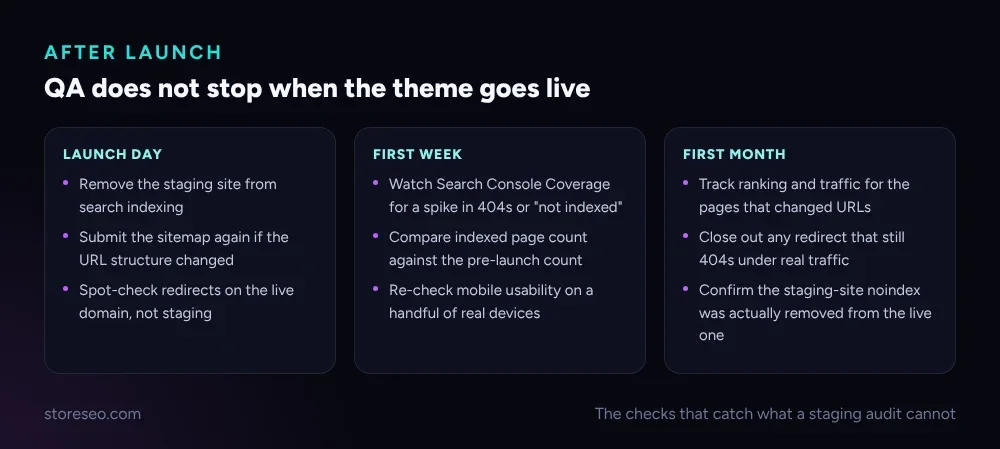 The staging checks catch what is broken; these catch what only shows up once real crawlers and real visitors hit the site.
This same discipline, back up first, crawl the current URLs, map every change, and plan redirects before the first page moves, is what our own Shopify SEO migration guide walks through for a full platform move. The brief here is the same checklist, scaled down to a single theme project and handed to someone who did not write the original site. For the most common things that go wrong even with a careful hand-off, our ranked list of common Shopify SEO problems and the 300-product schema audit are both worth keeping open during the sign-off checks above; the schema audit in particular shows how often structured data breaks in ways that look fine on screen. If the theme change also touches crawler access, our Shopify robots.txt guide covers the rules worth setting deliberately rather than inheriting from a template default. Start from the fundamentals checklist if this is the first brief you have written for a project like this.
Frequently Asked Questions (FAQs)
1. Do I need this brief for a small theme tweak, or only a full rebuild?
Write a short version for any change that touches a template, not only full rebuilds. A single section edit on the product template can still drop a meta field or duplicate a canonical tag; the brief just gets shorter, not skipped, scaled to what the project actually touches.
2. Who should actually run the sign-off checks?
Whoever approves the pull request, not the developer who wrote the code. A second set of eyes catches what the person closest to the change is most likely to miss, the same reason code review exists for anything else.
3. What if the developer needs to rename a URL for a good reason?
That is allowed, it just needs a 301 redirect planned and tested before the rename ships, never after. Add the old and new URL to the brief’s scope section so the redirect check in sign-off has something concrete to test against.
4. Does this replace a full SEO audit before a replatform?
No. This is the scope-and-checks layer for the build itself, not a replacement for planning an entire move. A full replatform still needs the broader steps our migration guide covers, including content migration, site architecture and launch preparation, well beyond what one theme project touches. Use this brief inside that bigger plan, for the specific hand-off to whoever is doing the build work.
5. Can an agency use this brief with any theme, or only a Shopify default theme?
Any theme, including third-party and page-builder themes, not only Shopify’s own defaults. The five fields in the never-touch table, metadata, robots.txt, hreflang, canonical tags and URL structure, work the same way regardless of which theme renders them, since they are concepts the Shopify platform defines, not features specific to one theme’s code. Only where those fields live in the theme’s files changes from one build to another, which is exactly why the brief describes the fields and not a file path.
6. What happens if a check fails after the change already shipped?
Fix it the same way you would have caught it in sign-off: confirm the exact field that broke, correct it, and re-run that one check on the live URL rather than the whole list again. A failed launch-day check is a fast fix, not a reason to redo the project.
Hand this brief to the next developer or agency before the work starts, not after you notice something changed. A dropped meta field or a missing redirect is far cheaper to catch the same day than three months later in a traffic report, which is exactly what a tool watching every page in the background is for: try StoreSEO on the Shopify App Store.