
Stop Year-Stamping Blog Titles You Didn't Update
 Written by M Asif Rahman
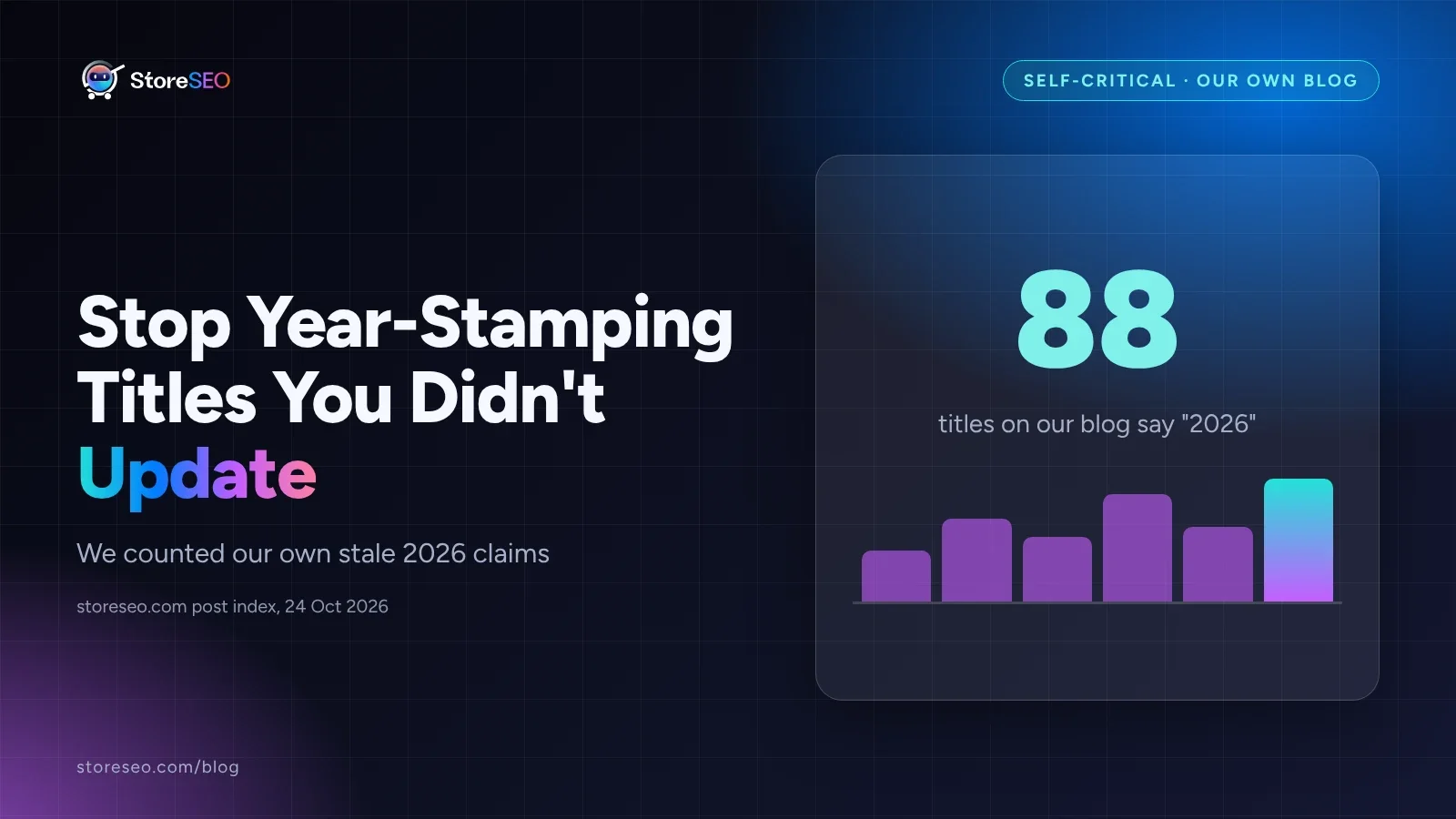
StoreSEO is our product, and this post is about our own mistake: 88 titles on storeseo.com’s blog say “2026,” and 69 of those posts actually published between 2021 and 2025 and were never substantially updated since. We counted them, and we are fixing them.
TL;DR: what we did, what it cost us, and what we do now.
| Area | What we did | What it cost us | The fix going forward |
|---|---|---|---|
| Titles | Stamped a year into the title (”…In 2026”) on posts never rewritten since | Readers and crawlers can treat the date as a false freshness signal | Only stamp a year when the body changed enough to earn it |
| Content | Left the body and examples from 2021 through 2025 untouched under the new year | A reader clicking a “2026” title can land on years-old screenshots | Rewrite the body first; the title’s year follows the content, not the other way around |
| Process | Had no recurring check for titles drifting out of date with their own content | 69 posts accumulated before anyone counted them | A quarterly pass with StoreSEO’s own AI Content Optimizer flags and rewrites the stale ones |
Why Does “Fake-Fresh” Content Backfire?
A title that says “2026” is a promise: this is current. When the body under it is from 2021, that promise is broken the moment a reader checks the examples, the pricing, or a screenshot against what Shopify or Google actually look like today. We found the clearest case in our own archive: a post titled “Top 10 Best Shopify Apps For eCommerce Stores Of 2026” that was actually published on 29 December 2021, four years and ten months before this post, with no visible update since.
Google is direct about why this backfires. Its own guidance on creating helpful content asks site owners to self-assess against a specific warning sign: “Are you changing the date of pages to make them seem fresh when the content has not substantially changed?” The same page adds that adding or removing content “primarily because you believe it will help your search rankings overall by somehow making your site seem fresh” does not work. A year in a title is the same signal in a smaller package, and we had sent it 88 times.
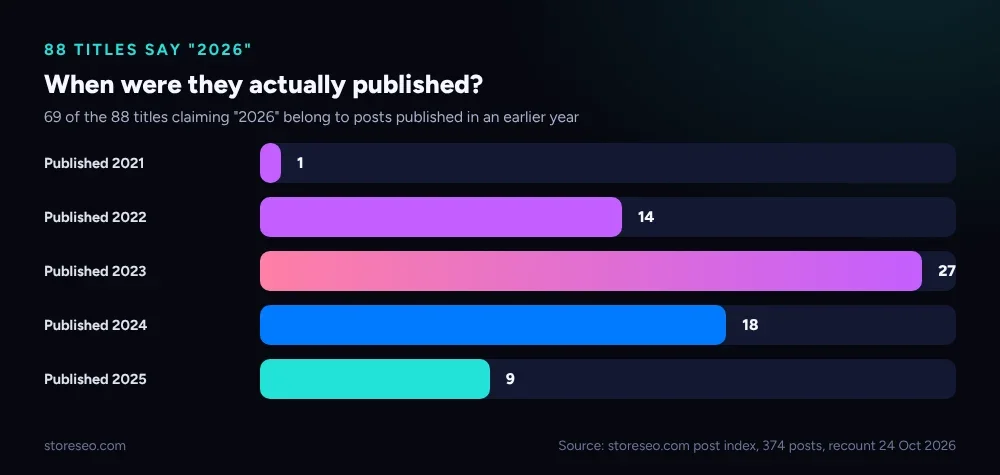 Recount of storeseo.com’s own post index, 374 published posts, 24 Oct 2026.
How Do Google and AI Engines Detect It?
A search engine or an AI answer engine does not need to read the whole post to catch this. The signals are structural, not just editorial.
- The gap between the claimed year and the publish date. Our own
BlogPostingschema carries a realdatePublished, so a title claiming “2026” on a pagedatePublishedin 2021 is a contradiction a crawler can check in one field comparison, the same wayschema.org’s owndateModifiedproperty exists specifically so a page can declare, machine-readably, when it actually last changed. - Content that does not match the claimed year. A screenshot of an old admin screen, a pricing table with numbers that no longer match the live page, or an app list missing the last two years of launches, all of these are evidence a reader (and increasingly an AI summarizer quoting the page) can catch even when the schema fields look fine.
- A pattern across many pages, not one. One stale year-stamped title looks like an oversight. Eighty-eight of them on one domain looks like a habit, and ranking systems are built to notice patterns across a whole site, not just one page in isolation.
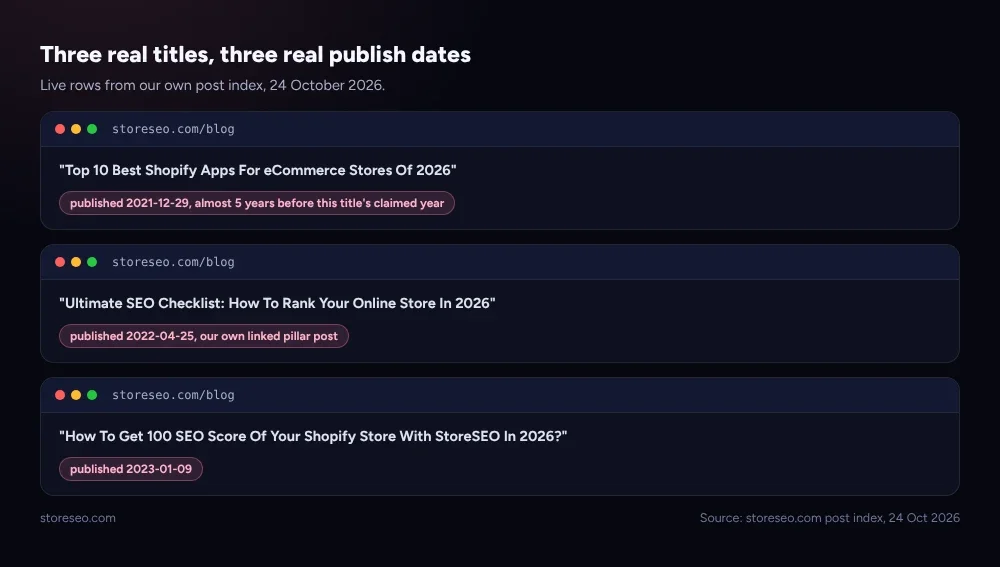 Three real examples from our own blog, storeseo.com post index, 24 Oct 2026.
None of this means a dated title is always wrong. A post we rewrite this quarter, with new numbers, new screenshots and a changed body, has earned the year in its title. The problem is only ever the gap between the claim and the content.
What Should You Do With Old Posts Instead?
The fix is not to strip every year from every title. It is to make the year match the work.
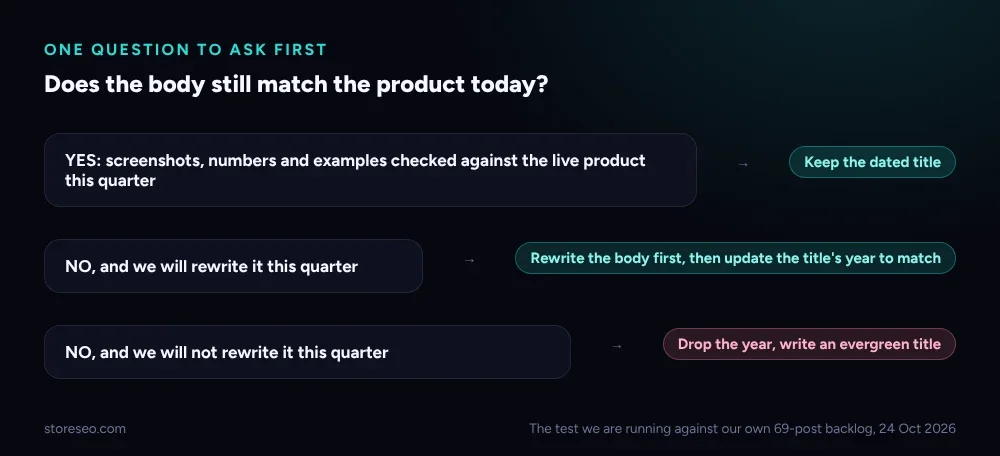 The question to ask before touching any dated title.
For a post you are not ready to rewrite this quarter, drop the year and write an evergreen title instead: “Top 10 Best Shopify Apps For eCommerce Stores” tells a reader just as much as the dated version did, without a claim the body cannot back up. For a post worth the investment, rewrite the body first (new screenshots, current numbers, a working example checked against the live product), and only then let the title’s year catch up to match. We are running our own backlog of 69 posts through exactly this test over the next two quarters, oldest and highest-traffic first.
This is also where we are changing our own workflow rather than just our own titles. StoreSEO’s AI Content Optimizer already rewrites a page’s title, meta description and tags from a focus keyword in one pass; we now run it as a quarterly audit step across our own archive, not just on new posts, specifically to flag a title whose claimed freshness has drifted away from its actual content. The same pass works for any Shopify store sitting on old blog or collection copy, not only for an app like ours, and it is one piece of the broader plan in Shopify SEO: The Complete Guide.
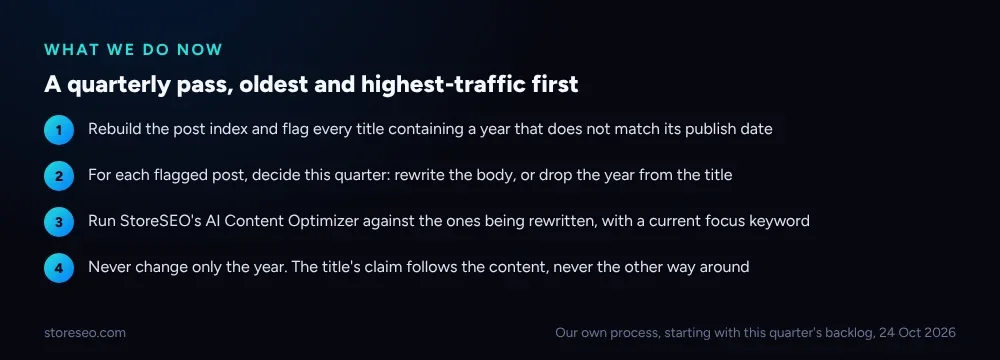 Our own process, starting with this quarter’s backlog.
We covered the pattern behind this kind of self-inflicted content debt from a different angle in 11 Shopify SEO Myths, Checked Against Google’s Docs, and we ran the same honest-audit exercise across our whole blog, not just its titles, in We Audited Our Own 345-Post Shopify SEO Blog. This post is the narrower, title-specific follow-up to both. It belongs in the same technical checklist that starts most stores’ SEO work, our Ultimate SEO Checklist, which is itself one of the 88: titled ”…In 2026,” published 25 April 2022, and next up for the rewrite this backlog needs.
Frequently Asked Questions (FAQs)
1. Is it ever okay to put a year in a blog title?
Yes, when the body genuinely matches that year: new screenshots, current pricing, examples checked against the live product. The problem is only a title claiming a year the content has not earned.
2. Does Google penalize a page for an outdated year in the title?
Google has not described this as a direct ranking penalty. Its own guidance lists “changing the date of pages to make them seem fresh when the content has not substantially changed” as a warning sign of search-engine-first content, which is a quality signal, not a named penalty.
3. How did you find 88 titles with a mismatched year?
We rebuilt our full post index from the live blog, 374 published posts, and checked every title for a four-digit year against that post’s actual publish date. Eighty-eight titles contained a year; 69 of those were published before 2026.
4. Should we just delete old posts with a mismatched year instead of fixing them?
Usually not. Most of these posts still answer a real question and carry existing links and rankings. Rewriting the title, and the body where it is worth the time, keeps that equity. Deleting is a last resort for a post with no remaining demand at all.
5. Can StoreSEO’s AI Content Optimizer find these automatically?
It rewrites a title, meta description and tags from a focus keyword once you run it on a page. It does not currently scan an entire archive for title-year mismatches on its own, so that audit step is still something we run by hand against our own post index, the same way this post’s 88-title count was produced.
6. What should a new post’s title do instead of a year?
Lead with the keyword and the specific outcome a reader wants, and let the body’s freshness speak for itself through real dates on real facts, rather than a year baked into the headline that someone has to remember to update later.
If you are carrying the same kind of dated-title backlog on your own Shopify blog, try StoreSEO on the Shopify App Store.
Keep reading
What Happens When You Skip Google Product Category?
Skipping Google Product Category rarely blocks a sale, but in apparel, phones, software and alcohol it can quietly get a listing disapproved.
Read article
Shopify Product Schema JSON-LD: Copy-Paste Code Blocks
Shopify's Dawn theme outputs Product and Offer JSON-LD automatically but ships no AggregateRating block at all, so here are the exact ones to add.
Read article
We Tested 3 Ways to Write Shopify Meta Descriptions
We tested three ways to write Shopify meta descriptions on five products, and only one method stayed inside Google's length window every time.
Read article