
What Is Content Gap Analysis in StoreSEO?
 Written by M Asif Rahman
Content Gap Analysis is a report inside StoreSEO that compares the topics your Shopify blog and product pages already cover against what merchants in your space search for, then lists what is missing. It arrives in your inbox through StoreSEO’s scheduled SEO report email, not a page you check by hand.
TL;DR
| What merchants ask | Recommendation |
|---|---|
| What is it? | A list of topics your store has not covered, inside StoreSEO’s scheduled SEO report |
| Is it a rank tracker? | No, Keyword Rank Tracker already does positions; this is about missing topics |
| Where does it come from? | StoreSEO’s own SEO Reports and Email Notification settings |
| What do you do with it? | Pick one real gap, brief or write a page for it, then wait for the next report |
What Does Content Gap Analysis Actually Show You?
StoreSEO’s features page describes it plainly: scheduled report emails bring your detailed SEO stats, your AI search performance, and a read on the topics you are not covering yet, so the work worth doing next arrives in your inbox instead of waiting for you to go looking for it. That third part, the topics you are not covering, is Content Gap Analysis. It does not grade a page you already have; it names the subjects close to your catalog that no live post or page on your store currently addresses.
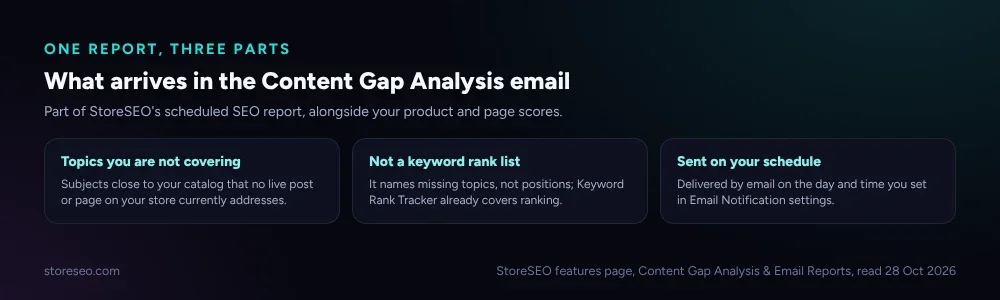 Content Gap Analysis is one part of StoreSEO’s scheduled SEO report, alongside your product and page scores.
A gap in this sense is not a ranking problem. Google’s own guidance on helpful content asks whether a page provides a substantial, complete or comprehensive description of its topic, and a missing topic is the extreme case of that question: there is no page to judge at all. Content Gap Analysis exists to catch that before a shopper or an AI assistant notices it first.
How Do You Find It Inside StoreSEO?
Content Gap Analysis travels with the rest of your scheduled report, so there is nothing separate to install. Head to your StoreSEO dashboard’s Report tab for the on-demand view, or turn on the Overall Product Optimization Report under Settings, Email Notification, to have it land in your inbox on the day and time you choose. StoreSEO’s own SEO reports documentation covers the Overall Score and Total Issues side of the same report in detail.
If your store has never enabled email notifications, the on-demand Report tab shows the same gap list; the email just saves you from opening the dashboard to check it.
What Should You Do With the List?
Treat each entry as a candidate, not an order. A topic can appear because genuine demand exists and you have not written about it yet, or because it is adjacent to your catalog without actually fitting a page a customer would search for.
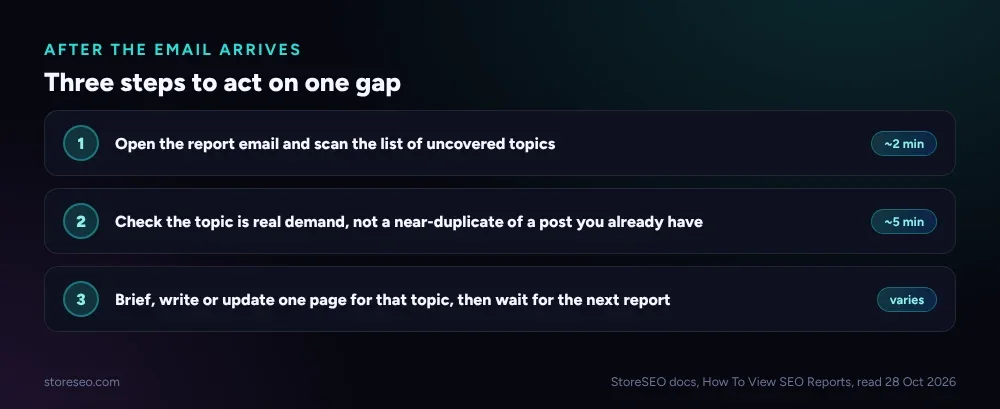 Act on one gap at a time: confirm real demand before you brief or write anything.
Pick the gap that is closest to a product or category you already sell, check it against your own weekly SEO routine or your store’s own content audit so you are not duplicating a page that already half-covers it, then brief, write or update one page. Our own complete Shopify SEO guide is a reasonable place to start if you are not sure which topic to prioritise first, and the ultimate SEO checklist covers everywhere else content gaps tend to hide.
Frequently Asked Questions (FAQs)
1. Does Content Gap Analysis write the missing content for me?
No. It names the topics your store has not covered; writing or briefing the page is still a separate step. StoreSEO’s AI Blog Writer and AI Content Optimizer can speed up that step once you have picked a topic, but the gap list itself is a diagnostic, not a draft.
2. Is this the same as the Keyword Rank Tracker?
No. Keyword Rank Tracker follows how keywords you already target are ranking over time. Content Gap Analysis is about topics you have not addressed at all, so there is no ranking to track yet.
3. Do I need the email turned on to use it?
No. The Report tab inside your StoreSEO dashboard shows the same information on demand. Email Notification just delivers it to your inbox on a schedule, so you do not have to remember to check.
4. Will every topic in the list be worth writing about?
Not automatically. Some entries will be adjacent subjects with no real search demand for your store. Check each one against your own catalog and existing content before committing time to it, the same way you would any other content idea.
Content Gap Analysis will not write a single word for you, but it saves you from guessing what is missing. Check it on the schedule you set, confirm real demand before you act, and try StoreSEO on the Shopify App Store.
Keep reading
Bulk SEO Optimization: One by One or All at Once?
Auto AI Optimization handles new Shopify products automatically, but an existing backlog still needs the one by one Fix button to clear it first.
Read article
We Tested 3 Ways to Write Shopify Meta Descriptions
We tested three ways to write Shopify meta descriptions on five products, and only one method stayed inside Google's length window every time.
Read article
Does Local Business Schema Help an Online Store?
Local Business schema needs a real street address and set opening hours, so a fully online Shopify store has little practical reason to add it.
Read article