
Black Friday SEO Brief for Your Shopify Developer
 Written by M Asif Rahman
A Black Friday SEO brief hands your theme developer the freeze window dates, the five SEO fields that must not move before 27 November, the checks that sign off any pre-freeze change, and who approves it before launch day arrives.
TL;DR
| Section | What it covers | Deadline | Action |
|---|---|---|---|
| Scope | Which templates and pages the pre-BFCM project touches | Before the freeze starts | Write it before work begins |
| Freeze window | No theme, template or app-config change except a critical fix | 13 Nov to 1 Dec 2026 | Lock it in writing with your developer |
| SEO requirements | URLs, metadata, canonical tags, schema and robots.txt that must survive | Before the freeze starts | Never skip |
| Sign-off checks | Four checks run on staging before the last pre-freeze merge | Before 13 Nov | Required before merge |
| Sold-out redirects | A tested plan for products that may sell out mid-sale | Before 13 Nov | Never skip |
The BFCM Hand-Off Brief: Scope, Freeze Window and Sign-Off
Three things make this brief different from a normal hand-off. Scope states which templates the project actually touches this close to Black Friday (“product and collection templates only, checkout stays untouched”), so a developer tidying up something nobody asked about does not become the reason a page changes during peak traffic. The freeze window is the part a year-round brief does not need: a dated start and end, with only critical fixes allowed to ship inside it. SEO requirements lists exactly what must survive untouched: the URL for every page not being deliberately redirected, the data source each meta field reads from, and the structured data types already live.
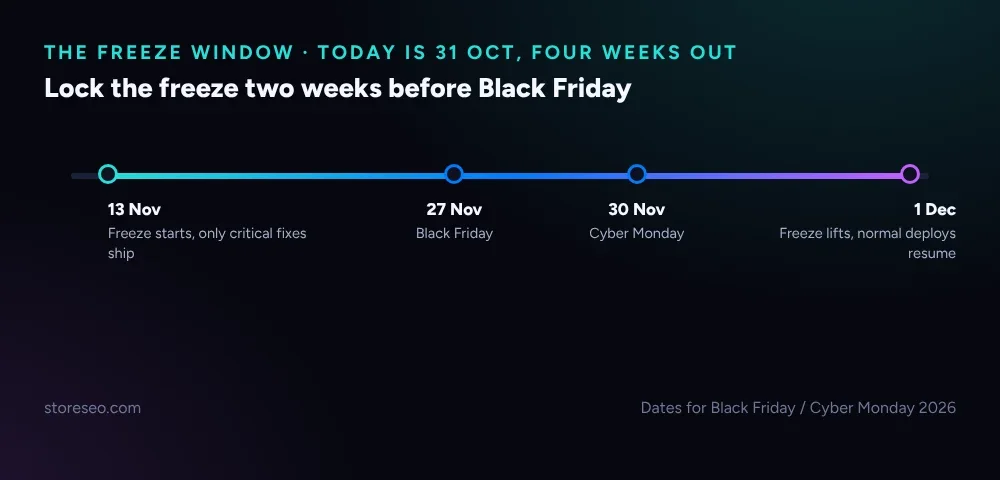 Freeze starting 13 November gives a two-week buffer before Black Friday 27 November and Cyber Monday 30 November 2026.
Shopify’s own engineering team has described running a similar discipline at platform scale: before its biggest sale weekend it locks in a feature freeze, then a code freeze, so that “there aren’t any surprises” once traffic peaks (Shopify Engineering, 21 Jan 2019). A single store needs the same idea at a much smaller scale: pick the date, write it down, and give your developer a short, explicit list of what is still allowed to ship once the freeze starts.
If you have not written a hand-off brief before, our general SEO brief for your theme developer covers the year-round scope, requirements and sign-off sections in full; this page is the BFCM-dated version, timed against this year’s own Black Friday SEO checklist.
What Should Your Developer Never Change During the Freeze?
Five fields carry most of a store’s SEO equity, and Shopify’s own theme SEO documentation names three of them directly: a theme’s SEO metadata, its robots.txt.liquid file and its canonical tag behaviour. The other two break just as often during a rushed pre-sale change: a template copied to add a promo banner section frequently drags a hard-coded canonical with it, and a quick fix to a product handle is exactly the kind of edit that needs a redirect planned first, not after.
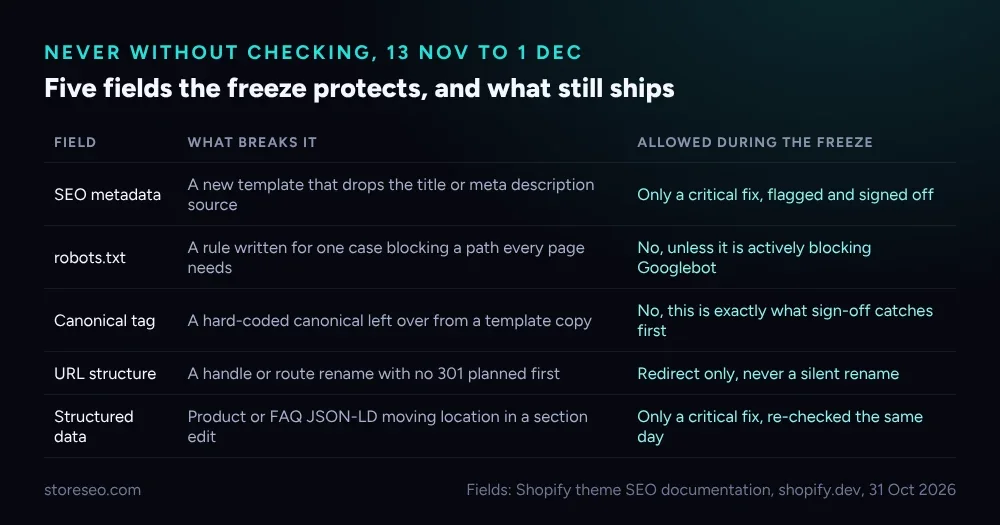 None of these need to be permanently off-limits, only flagged for a second look while the freeze is on.
This is where the Black Friday brief diverges from the year-round one: a critical fix is still allowed, but it is logged, flagged to whoever owns sign-off, and re-checked the same day, never folded quietly into an unrelated deploy. A field that is not actually broken waits until 1 December. StoreSEO’s own Bulk URL Redirect Manager is one of the two sanctioned tools for the one change that does need to happen mid-freeze: a product selling out and needing a redirect instead of a 404, alongside Shopify’s native CSV import under Content, Menus, URL redirects, which our own bulk Shopify redirects guide walks through step by step.
Which SEO Checks Sign Off a Theme Change Before Black Friday?
Run these four checks against staging, never production, before the last merge that lands ahead of 13 November. Do titles and meta descriptions still render on a sample of real pages, pulled from the page source rather than a CMS preview that can mask a broken template. Does every page carry one canonical tag and one H1, since a copied template is the single most common way a page quietly ends up with two of either. Does the sold-out redirect map actually resolve, tested with a direct request against every URL on the list, because a 404 here during Black Friday hands a competitor the ranking a 301 would have kept. Is structured data still valid, re-checked after the last pre-freeze template change rather than assumed from before it.
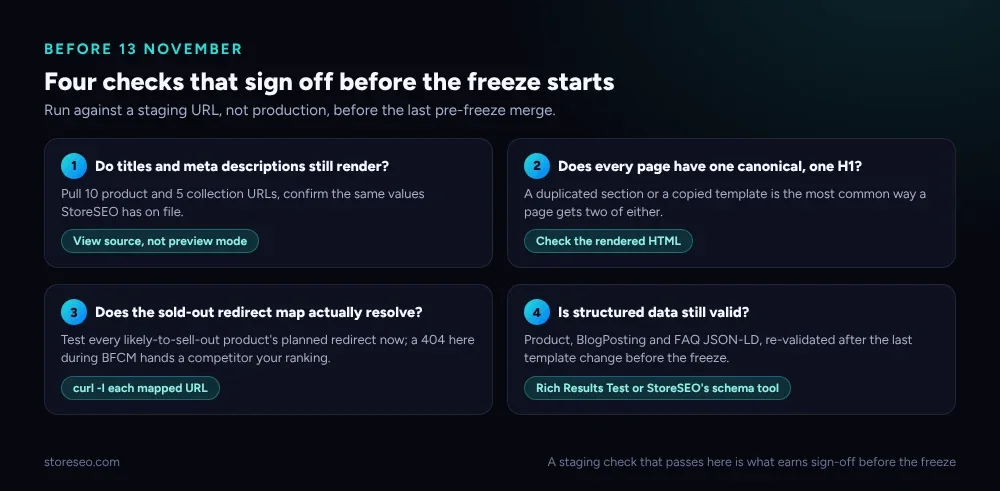 A build that passes all four on staging is the bar for sign-off before the freeze locks in.
This hand-off brief also leans on our Q4 SEO calendar for the weeks around it: the freeze is one entry in a longer run of dated tasks stretching from early October through January, and having both documents open at once keeps the developer-facing checks and the marketing-facing deadlines from drifting apart.
How Do You QA Through BFCM Week Itself?
A sign-off check proves the theme works in isolation on 12 November; it cannot prove how real crawl and traffic behaviour responds once the freeze is actually tested by Black Friday’s own load. Our own Black Friday SEO checklist already sets the cadence: watch Search Console daily from 23 to 30 November for a crawl-error spike or an index drop, redirect rather than delete any product that sells out, and log every critical fix that shipped under the freeze exception so nothing is forgotten once the freeze lifts.
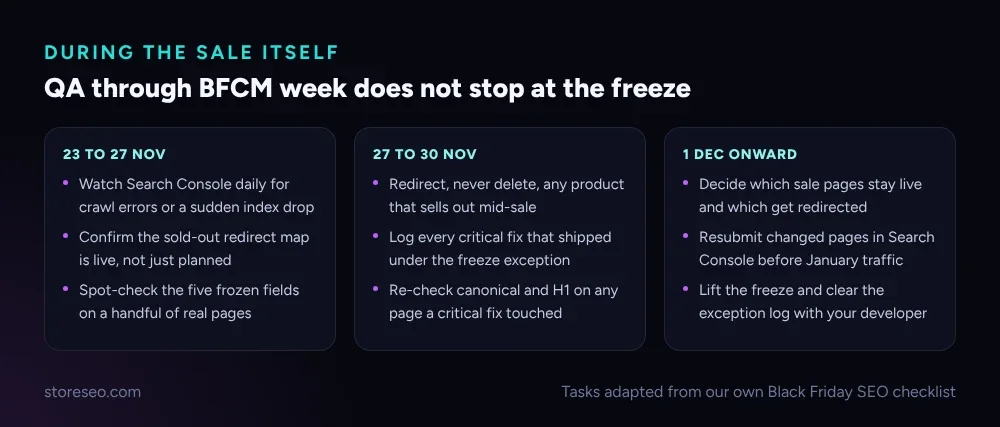 The freeze catches what would otherwise break; this is what catches what only shows up once real traffic hits the live site.
By 1 December, decide which sale landing pages stay live for the terms they keep ranking on and which get redirected, resubmit anything that changed in Search Console, and sit down with your developer to clear the exception log before January traffic arrives. The brief’s job ends there, with a short list of exactly what shipped during the freeze and why, not a guess at what might have changed.
Frequently Asked Questions (FAQs)
1. When should our Black Friday code freeze actually start?
Two weeks before Black Friday is a reasonable default, which lands on 13 November for the 27 November 2026 date. A smaller store with a simple theme can run a shorter freeze; a store planning any kind of theme change should not start it later than that, since the point is to leave time to catch a problem before traffic peaks, not after.
2. Do I need this if I already use the year-round developer brief?
Yes, if BFCM dates matter to the project. Reuse the scope, SEO requirements and sign-off sections from the general brief as written, and add the freeze window dates, the sold-out redirect plan, and who has the authority to approve an exception, since none of that exists in a brief with no deadline attached.
3. What happens if a product sells out during the freeze itself?
Redirect it, never delete the page. A deleted product page loses the ranking signal it built up; a 301 to the nearest live alternative or the parent collection keeps that signal working while the listing is gone. StoreSEO’s Bulk URL Redirect Manager or Shopify’s native CSV import both work for this; the choice matters less than having the mapping ready before the freeze starts.
4. Who actually runs the sign-off checks before the freeze?
Whoever approves the pull request, not the developer who wrote the change. A second set of eyes catches what the person closest to the code is most likely to miss, the same reason code review exists for anything else, and it matters more here because there is no second chance to fix a bad merge once the freeze is locked in.
5. Can a genuine critical bug fix still ship during the freeze?
Yes. A freeze blocks cosmetic and “nice to have” changes, not a fix for something actively broken, such as checkout failing or a page returning a server error. Log the fix, flag it to whoever owns sign-off, and re-check the five protected SEO fields the same day rather than assuming the fix left them untouched.
6. Does the freeze cover app updates too, or only the theme?
Both. An app update unrelated to SEO can still touch injected scripts, meta tags or page structure through a theme app extension, so treat any app update the same as a theme change for the purposes of the freeze: flag it, check it against the five protected fields, and hold it until 1 December unless it is fixing something broken right now.
Hand this brief to your developer before the freeze needs to start, not after a theme change already shipped during BFCM week. A missed redirect is far cheaper to catch on 12 November than on 28 November in a traffic report, which is exactly what a tool watching every page in the background is for: try StoreSEO on the Shopify App Store.
Keep reading
Canonical vs Redirect vs Noindex on Shopify
Use canonical to point Google at the preferred URL, redirect when the old URL should disappear, and noindex to keep a page live but out of search results.
Read article
Crawl, Understand, Recommend: A Shopify SEO Model
Most Shopify stores pass the crawl layer, fail the understand layer, and never reach the recommend layer where AI engines cite pages by name.
Read article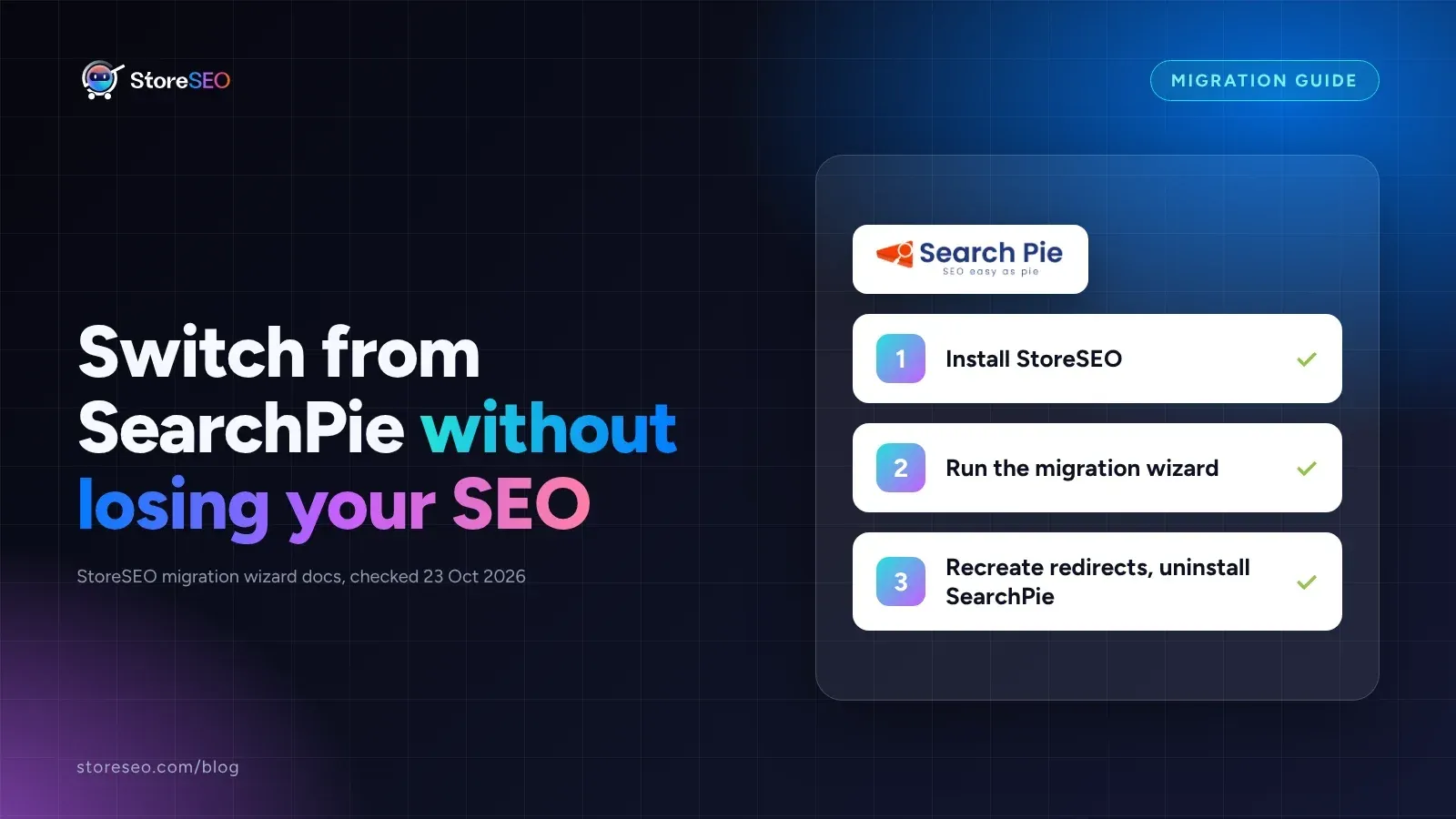
Migrate From SearchPie to StoreSEO (Step by Step)
Switching from SearchPie to StoreSEO takes about ten minutes with the built-in wizard, and your meta titles and schema carry over automatically.
Read article